<p align="center">
  <img src="https://raw.githubusercontent.com/rolecraft-sh/rolecraft/main/assets/rolecraft_logo.png" alt="RoleCraft" width="200" height="200">
</p>

<h1 align="center">RoleCraft</h1>

<p align="center">
  <b>The Security-First Skill Manager for AI Agents</b><br>
   Every install runs a security scan · Skills & MCP Servers across 87 Agents (27 Verified)<br>
  Zero-dependency CLI · No signup · Offline-first

</p>

<p align="center">
  <a href="https://awesome.re"><img src="https://awesome.re/badge.svg" alt="Awesome"></a>
  <a href="https://www.npmjs.com/package/rolecraft"><img src="https://img.shields.io/npm/v/rolecraft?logo=npm&label=&color=cb3837" alt="npm"></a>
  <a href="https://www.npmjs.com/package/rolecraft"><img src="https://img.shields.io/npm/dm/rolecraft?logo=npm&label=&color=cb3837" alt="npm downloads"></a>
   <a href="https://github.com/rolecraft-sh/rolecraft/actions/workflows/test.yml"><img src="https://img.shields.io/github/actions/workflow/status/rolecraft-sh/rolecraft/test.yml?logo=githubactions&label=tests" alt="Tests"></a>
   <a href="https://github.com/rolecraft-sh/rolecraft/actions/workflows/codeql.yml"><img src="https://img.shields.io/github/actions/workflow/status/rolecraft-sh/rolecraft/codeql.yml?logo=github&label=CodeQL" alt="CodeQL"></a>
   <a href="https://github.com/rolecraft-sh/rolecraft/blob/main/.github/dependabot.yml"><img src="https://img.shields.io/badge/dependabot-enabled-025e8c?logo=Dependabot" alt="Dependabot"></a>
   <a href="https://github.com/marketplace/actions/rolecraft-action"><img src="https://img.shields.io/badge/GitHub%20Action-rolecraft--action-blue?logo=github" alt="GitHub Action"></a>
   <a href="https://github.com/rolecraft-sh/rolecraft"><img src="https://img.shields.io/github/stars/rolecraft-sh/rolecraft?style=social" alt="Stars"></a>
  <a href="CHANGELOG.md"><img src="https://img.shields.io/badge/📜-Changelog-blue" alt="Changelog"></a>
  <a href="CONTRIBUTING.md"><img src="https://img.shields.io/badge/🤝-Contributing-green" alt="Contributing"></a>
  <a href="LICENSE"><img src="https://img.shields.io/badge/license-MIT-green?logo=opensourceinitiative&logoColor=white" alt="MIT"></a>
   <a href="https://rolecraft-sh.github.io/rolecraft/"><img src="https://img.shields.io/badge/📖-Docs%20site-blue" alt="Docs"></a>
  <a href="package.json"><img src="https://img.shields.io/node/v/rolecraft?logo=nodedotjs&label=&logoColor=white&color=339933" alt="Node"></a>
   <a href="docs/api.md"><img src="https://img.shields.io/badge/API-blue?logo=nodedotjs&label=&logoColor=white" alt="Node.js API"></a>
   <a href="docs/security.md"><img src="https://img.shields.io/badge/🔒-security%20scoring-brightgreen" alt="Security scoring"></a>
  <a href="CODE_OF_CONDUCT.md"><img src="https://img.shields.io/badge/📖-Code%20of%20Conduct-orange" alt="Code of Conduct"></a>
  <a href="SUPPORT.md"><img src="https://img.shields.io/badge/💬-Support-blue" alt="Support"></a>
</p>

<p align="center">
  Works with <b>87 AI agents</b>. See the <a href="docs/agents.md">full agent table →</a>
</p>

<p align="center">
  <a href="#quick-start">Quick Start</a> ·
  <a href="#features">Features</a> ·
  <a href="#commands-overview">Commands</a> ·
  <a href="#comparison">Comparison</a> ·
  <a href="#faq">FAQ</a> ·
   <a href="docs/security.md">Security</a> ·
   <a href="CONTRIBUTING.md">Contribute</a>
</p>

<p align="center">
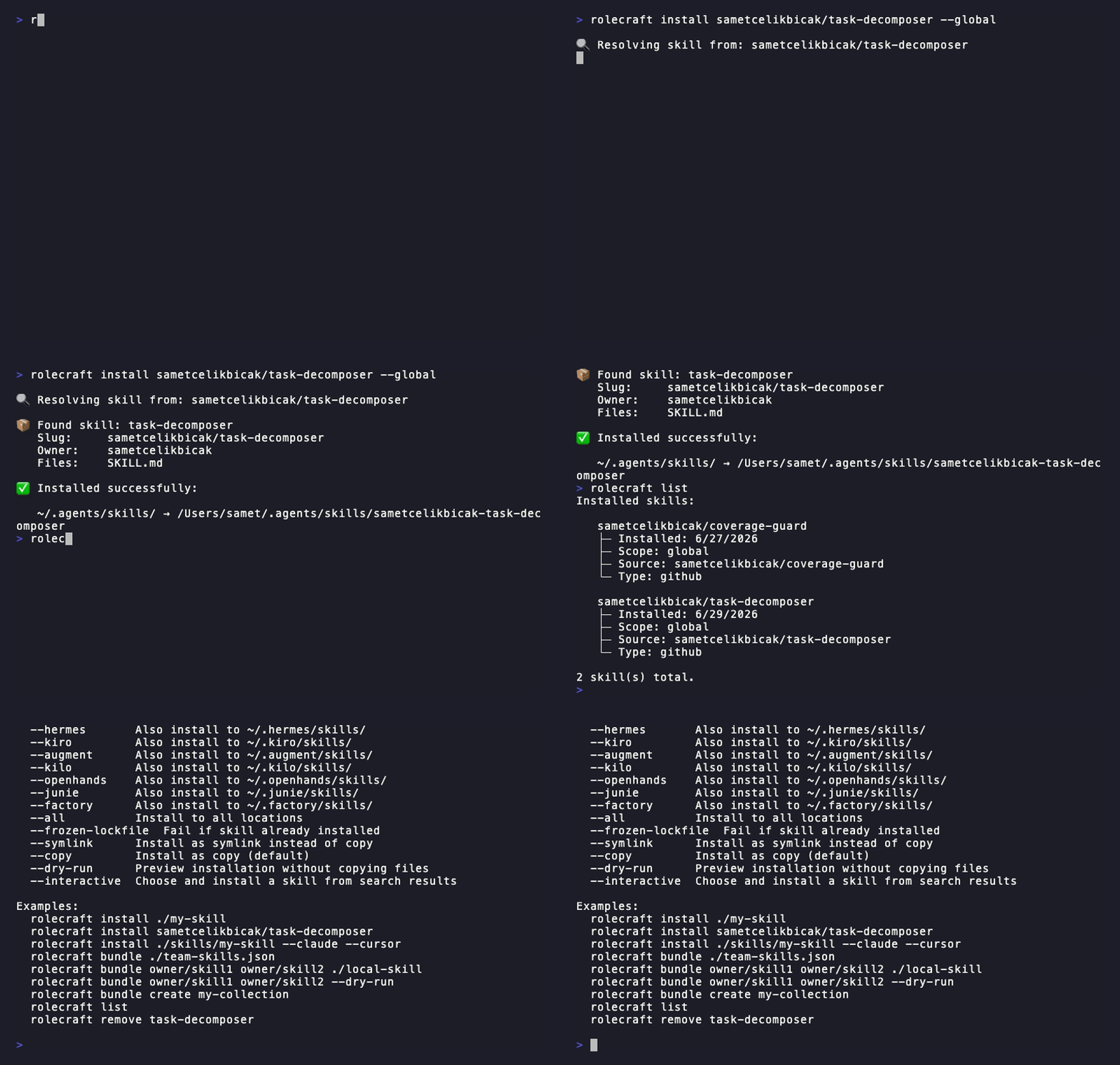
  <img src="https://raw.githubusercontent.com/rolecraft-sh/rolecraft/main/assets/rolecraft-demo.gif" alt="RoleCraft demo" width="720">
</p>

---

<p align="center">
  <b>⚡ Zero dependencies</b> · <b>📦 432.8 kB</b> · <b>🤖 26 verified agents</b> · <b>🔌 Skills + MCP</b> · <b>🔒 Security scoring</b> · <b>📝 Skill testing</b> · <b>🔧 Init templates</b> · <b>🌐 Offline-first</b>
</p>

<p align="center">
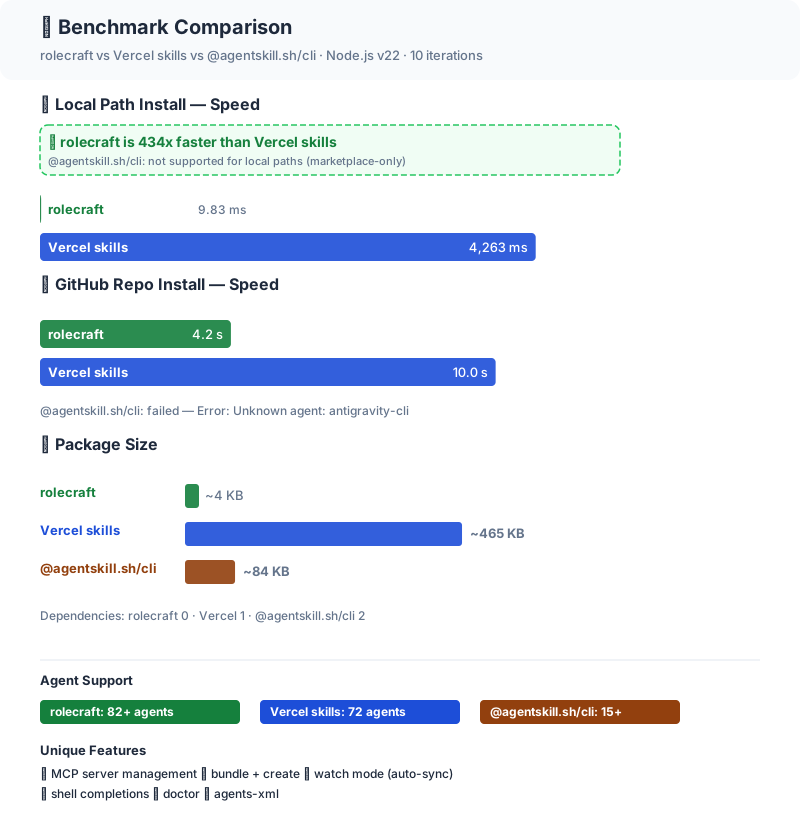
  <a href="benchmark/RESULTS.md"><img src="https://raw.githubusercontent.com/rolecraft-sh/rolecraft/main/benchmark/comparison.svg" alt="Benchmark: significantly faster than Vercel" width="600"></a>
  <br>
  <a href="benchmark/RESULTS.md"><b>Full benchmark results →</b></a>
    
  <a href="docs/comparison.md"><b>Full feature comparison →</b></a>
    
  <a href="docs/migration-from-skills.md"><b>Migrate from Vercel skills →</b></a>
</p>

---

## Quick start

```bash
# try without installing
npx rolecraft --help

# or install globally (works with npm, pnpm, yarn, bun)
npm install -g rolecraft

# detect all agents + install a skill to every agent
rolecraft setup user/repo

# install a skill (local, GitHub, GitLab, SSH, npm)
rolecraft install ./my-skill --cursor

# install a skill WITH its MCP servers (declared in SKILL.md)
rolecraft install ./postgres-rules --cursor

# manage MCP servers standalone
rolecraft mcp install npm:@modelcontextprotocol/github --cursor

# manage installed skills
rolecraft list
rolecraft search code-review
rolecraft check
rolecraft remove my-skill

# convert between SKILL.md and .mdc formats
rolecraft convert ./my-skill
rolecraft convert --help
```

**Requirements:** Node.js >= 20 · 432.8 kB · zero dependencies · 87 agents · [Getting Started →](docs/guides/getting-started.md) · [Full install guide →](docs/install.md)

> **Why zero dependencies?** Every dependency is a supply-chain risk. rolecraft uses only Node.js built-ins (`fs`, `path`, `crypto`, `https`) — no `node_modules` surprises.

---

## Registry (optional community marketplace)

Discover and install skills by short names from the [rolecraft Registry](https://github.com/rolecraft-sh/registry) ([source](https://github.com/rolecraft-sh/registry)) — a GitHub-powered, zero-backend index of published skills:

```bash
# Search the registry
rolecraft search react --registry

# Install by short slug (auto-resolves to underlying repo)
rolecraft install react-rules

# Publish your skill
rolecraft publish ./my-skill/ --repo user/my-skill
```

PRs to the registry are auto-validated, then merged by a maintainer. The registry is **completely optional**; every other feature works without it.

All registry operations are also available via the [Node.js API](docs/api.md#searchregistryquery) — `searchRegistry`, `registryResolve`, `registryPublish`, `registryCheckUpdates`, `registryInfo`, `registryList`, `registryClearCache`.

---

## Skills + MCP in one command

rolecraft installs both agent skills and MCP servers in a single command.

A single SKILL.md can declare both a skill and its required MCP servers:

```yaml
---
name: postgres-rules
mcp_servers:
  - name: postgres
    source: npm:@modelcontextprotocol/postgres
---
```

```bash
# one command installs the skill AND the MCP server
rolecraft install ./postgres-rules --cursor
```

No other CLI combines both. npx skills has no MCP support. ags has a separate MCP server for search only. [→ Full MCP docs](docs/mcp.md)

---

## Features

- **Zero dependencies** — 432.8 kB, only Node.js built-ins
- **MCP + Skills in one command** — install skills and their MCP servers together
- **Any source** — local folder, GitHub/GitLab/SSH URL, npm package
- **87 agents** — opencode, claude-code, cursor, copilot, aider, oh-my-pi (omp), and more
- **No registry required** — works fully without a marketplace; community-driven [registry](https://github.com/rolecraft-sh/registry) optional
- **Security scoring** — static analysis on every install: detects prompt injection, command injection, obfuscated code, credential harvesting. Scores 0–100. Blocks dangerous skills (use `--yes` to override). 341 malicious skills were found on community hubs in Feb 2026 — rolecraft scans every skill before it touches your machine
- **CI-ready** — lockfile-based re-install (`rolecraft ci`), `--yes` flag, `--dry-run`
- **Shell completions** — bash, zsh, fish auto-completion
- **TUI search** — interactive arrow-key skill browser with preview
- **System health check** — `rolecraft doctor` diagnoses agent directories, lockfiles, and skill integrity
- **AGENTS.md XML generation** — `rolecraft agents-xml` generates Claude Code-compatible XML
- **Profile system** — save, apply, and share multi-agent configurations

---

## CI/CD Integration

Use the [rolecraft GitHub Action](https://github.com/marketplace/actions/rolecraft-action) ([source](https://github.com/rolecraft-sh/rolecraft-action)) to verify and install skills in your CI pipeline:
<br><br>
<a href="https://github.com/marketplace/actions/rolecraft-action"><img src="https://img.shields.io/badge/Get%20it%20on%20GitHub%20Marketplace-rolecraft--action-blue?logo=github&style=for-the-badge" alt="Get it on Marketplace"></a>

```yaml
# .github/workflows/skills.yml
- uses: rolecraft-sh/rolecraft-action@v1
  with:
    command: ci --yes
```

See the [CI guide](docs/guides/ci.md) for more examples.

---

## Node.js API

rolecraft exposes a programmatic API for use in your own Node.js scripts and tools:

```js
import {
  install,
  list,
  search,
  check,
  doctor,
  verify,
  ci,
  mcpInstall,
  profileSave,
} from "rolecraft";

// install a skill
const result = await install("./my-skill", { global: true });
console.log(result);

// search GitHub for skills
const results = await search("code-review");
console.log(results.results);

// system health check
const health = await doctor();
console.log(health.summary);

// full API reference → [docs/reference.md](docs/reference.md)
```

All API functions return plain objects (no side-effects). Available exports:

| Function        | Description                          |
| --------------- | ------------------------------------ |
| `install`       | Install a skill with security scan   |
| `list`          | List installed skills                |
| `search`        | Search GitHub or skills.sh           |
| `resolve`       | Resolve a source string              |
| `remove`        | Uninstall a skill                    |
| `update`        | Re-install a skill                   |
| `check`         | Check for updates                    |
| `verify`        | Verify skill integrity               |
| `ci`            | Re-install from lockfile             |
| `doctor`        | System health check                  |
| `use`           | Preview a skill                      |
| `mcpInstall`    | Install an MCP server                |
| `mcpList`       | List MCP servers                     |
| `mcpUpdate`     | Update an MCP server                 |
| `mcpRemove`     | Remove an MCP server                 |
| `mcpCheck`      | Check MCP server status              |
| `mcpSearch`     | Search MCP servers                   |
| `profileSave`   | Save current config                  |
| `profileApply`  | Apply a saved profile                |
| `profileDiff`   | Diff current vs saved                |
| `profileList`   | List profiles                        |
| `profileShow`   | Show profile details                 |
| `profileDelete` | Delete a profile                     |
| `profileImport` | Import a profile                     |
| `test`          | Test a skill quality with assertions |

---

## Commands overview

| Command                                    | Description                                                                 | Details                              |
| ------------------------------------------ | --------------------------------------------------------------------------- | ------------------------------------ |
| `rolecraft init [<name>]`                  | Scaffold a new `SKILL.md` (`--template`, `--list`)                          | [docs](docs/commands/init.md)        |
| `rolecraft install <source>`               | Install a skill with security scan (local path, GitHub/GitLab/SSH URL, npm) | [docs](docs/commands/install.md)     |
| `rolecraft publish <source>`               | Publish a skill to the rolecraft Registry                                   | [docs](docs/commands/publish.md)     |
| `rolecraft bundle <sources>`               | Install multiple skills from inline sources or file                         | [docs](docs/commands/bundle.md)      |
| `rolecraft bundle create`                  | Create a new bundle file                                                    | [docs](docs/commands/bundle.md)      |
| `rolecraft search <query>`                 | Search for skills on GitHub (TUI with `--interactive`)                      | [docs](docs/commands/search.md)      |
| `rolecraft check`                          | Check installed skills for available updates                                | [docs](docs/commands/check.md)       |
| `rolecraft use <source>`                   | Preview a skill's files without installing                                  | [docs](docs/commands/use.md)         |
| `rolecraft completions bash\|zsh\|fish`    | Generate shell completion scripts                                           | [docs](docs/commands/completions.md) |
| `rolecraft setup [<source>]`               | Detect agents, optionally install a skill to all                            | [docs](docs/commands/setup.md)       |
| `rolecraft list`                           | Show all installed skills (filter with `--agent`)                           | [docs](docs/commands/list.md)        |
| `rolecraft doctor`                         | Run system health check                                                     | [docs](docs/commands/doctor.md)      |
| `rolecraft agents`                         | Show agent capability manifest                                              | [docs](docs/commands/agents.md)      |
| `rolecraft agents-xml [--write]`           | Generate skills XML for AGENTS.md                                           | [docs](docs/commands/agents-xml.md)  |
| `rolecraft mcp install/remove/list/search` | Install, remove, list, or search MCP servers for AI agents                  | [docs](docs/commands/mcp.md)         |
| `rolecraft mcp check/update`               | Check for MCP server updates or update a server                             | [docs](docs/commands/mcp.md)         |
| `rolecraft profile save/apply/list`        | Save, apply, and share multi-agent configuration profiles                   | [docs](docs/commands/profile.md)     |
| `rolecraft verify`                         | Check installed skill integrity via content hash                            | [docs](docs/commands/verify.md)      |
| `rolecraft watch [<slug>]`                 | Watch skills for changes and auto-sync                                      | [docs](docs/commands/watch.md)       |
| `rolecraft ci`                             | Re-install all skills from lockfile (CI mode)                               | [docs](docs/commands/ci.md)          |
| `rolecraft convert <source>`               | Convert between SKILL.md and .mdc formats                                   | [docs](docs/commands/convert.md)     |
| `rolecraft diff <a> <b>`                   | Compare two skills section-by-section                                       | [docs](docs/commands/diff.md)        |
| `rolecraft compose <a> <b> [...]`          | Compose multiple skills into one                                            | [docs](docs/commands/compose.md)     |
| `rolecraft upgrade`                        | Upgrade rolecraft to the latest version                                     | [docs](docs/commands/upgrade.md)     |
| `rolecraft test <skill-path>`              | Test a skill quality with built-in assertions                               | [docs](docs/commands/test.md)        |
| `rolecraft remove <slug>`                  | Uninstall a skill                                                           | [docs](docs/commands/remove.md)      |
| `rolecraft update <slug>`                  | Re-install a skill to latest                                                | [docs](docs/commands/update.md)      |
| `rolecraft rollback <slug>`                | Restore a skill to previous version from backup history                     | [docs](docs/commands/rollback.md)    |
| `rolecraft --version`                      | Show version                                                                |                                      |
| `rolecraft --help`                         | Show full command reference                                                 | [CLI Reference](docs/reference.md)   |

---

## Comparison

| Feature                              | rolecraft        | skills (Vercel) | @agentskill.sh/cli  |
| ------------------------------------ | ---------------- | --------------- | ------------------- |
| Zero dependencies                    | ✅ **0**         | ✅ (1 dep)      | ❌ (2)              |
| Local path install                   | ✅ **1st class** | ✅              | ❌ marketplace only |
| GitHub repo install                  | ✅               | ✅              | ❌                  |
| GitLab / SSH git URL                 | ✅               | ✅              | ❌                  |
| npm package source                   | ✅               | ✅              | ❌                  |
| **MCP server management**            | ✅               | ❌              | ❌                  |
| Agent targets                        | **87**           | 72              | 15+                 |
| **Registry / marketplace**           | ✅               | ✅ (skills.sh)  | ⚠️ (registry only)  |
| Bundle install + create              | ✅               | ❌              | ✅ (skillset only)  |
| Interactive TUI search + install     | ✅               | ✅              | ❌                  |
| Security scoring (0–100)             | ✅               | ✅ (Snyk)       | ✅ (server + local) |
| Non-interactive flag (`--yes`/`-y`)  | ✅               | ✅              | ❌                  |
| Skill update check (`check`)         | ✅               | ❌              | ❌                  |
| Shell completions (bash/zsh/fish)    | ✅               | ❌              | ❌                  |
| Dry-run preview (`--dry-run`)        | ✅               | ❌              | ❌                  |
| Interactive scope prompt             | ✅               | ✅              | ❌                  |
| Content hash verification (`verify`) | ✅               | ✅              | ❌                  |
| CI-mode re-install (`ci`)            | ✅               | ✅              | ❌                  |
| System health check (`doctor`)       | ✅               | ❌              | ❌                  |
| Watch mode (auto-sync)               | ✅               | ❌              | ❌                  |
| AGENTS.md XML generation             | ✅               | ❌              | ❌                  |
| Self-upgrade command                 | ✅               | ❌              | ❌                  |
| **Publish to registry**              | ✅               | ❌              | ❌                  |
| File size                            | 432.8 kB         | ~465 KB         | ~84 KB              |

[See full table →](docs/comparison.md)

---

## Security

Every install is automatically scanned with **static analysis** that detects:

| Severity      | What it catches                                                                                      |
| ------------- | ---------------------------------------------------------------------------------------------------- |
| 🔴 Critical   | Prompt injection, obfuscated code (base64 blobs, `eval()`), command injection (download-and-execute) |
| 🟡 High       | Credential harvesting patterns, sensitive file access (`~/.ssh`, `.env`)                             |
| 🟢 Medium/Low | Missing metadata, unusual source patterns                                                            |

Scores range **0–100**:

- **90+** → SAFE, install proceeds
- **70–89** → REVIEW, prompts for confirmation
- **<70** → DANGER, blocked unless `--yes`
- **Any critical issue** → DANGER regardless of score (a single critical finding can never be silently skipped)

```bash
rolecraft install ./my-skill              # auto-scanned
rolecraft install ./my-skill --yes        # force install even if DANGER
```

[→ Full security documentation](docs/security.md)

---

## How agents discover skills

rolecraft knows where each AI agent looks for skills. Use flags like `--claude`, `--cursor`, `--devin` to target specific agents, or `--all` for every supported agent.

[→ Full agent path table](docs/agents.md)

```bash
# Install to multiple agents at once
rolecraft install ./my-skill --cursor --devin --copilot --gemini --cody
```

---

## Architecture

1. Parses `SKILL.md` from source (local, GitHub, GitLab, SSH, npm)
2. Runs **static security scan** on all files (prompt injection, command injection, obfuscation, credential harvesting) — scores 0–100
3. Copies/symlinks files to target agent's skill directory
4. Records SHA256 content hash in `~/.agents/.skill-lock.json`
5. Compatible with skills from `npx skills`, `@agentskill.sh/cli`, or manual installs

[→ Full architecture](docs/architecture.md)

---

## FAQ

**Q: Do I need to sign up or log in?**
A: No. No account, no API key, no marketplace. Point rolecraft at any folder or repo and it works.

**Q: Can I use rolecraft with multiple AI agents?**
A: Yes. 87 agents supported. Use `--cursor`, `--claude`, `--devin` flags or `--all` for every agent.

**Q: Does rolecraft send telemetry?**
A: No. Zero data leaves your machine. The security scan runs locally. No phone home.

**Q: How is this different from `npx skills` (Vercel)?**
A: rolecraft has zero dependencies, MCP server management, 87 agents (vs 72), `doctor`, `watch`, `bundle`, `agents-xml`, and shell completions. [Full comparison →](docs/comparison.md)

**Q: Can I use it in CI/CD?**
A: Yes. `rolecraft ci --yes` re-installs all skills from lockfile, non-interactive. Perfect for pipelines.

**Q: My skill is blocked as DANGER. What do I do?**
A: Review the security report, fix the flagged patterns, or use `--yes` to force install (not recommended for untrusted skills).

## Development

```bash
git clone https://github.com/rolecraft-sh/rolecraft.git
cd rolecraft
npm install                # sets up the pre-commit hook automatically
npm link                   # rolecraft CLI runs from local checkout
npm run lint               # syntax + Biome (format & unused-variable checks)
npm run lint:fix           # auto-fix formatting and unused imports
npm run docs:dev           # local docs preview (VitePress)
npm test                   # 828+ tests, 0 fails expected
```

A `pre-commit` hook runs lint automatically on every commit and rejects commits that don't pass. Zero-runtime-dependency policy is preserved — Biome and VitePress are devDependencies only.

[→ Contributing guide](CONTRIBUTING.md)

## Support

- **[Docs site](https://rolecraft-sh.github.io/rolecraft/)** — full command reference and guides
- **[GitHub Issues](https://github.com/rolecraft-sh/rolecraft/issues)** — bug reports, feature requests
- **[SUPPORT.md](SUPPORT.md)** — how to get help
- **[SECURITY.md](SECURITY.md)** — responsible disclosure

## Contributing

Contributions are welcome! See [CONTRIBUTING.md](CONTRIBUTING.md) for guidelines on how to get started. Before opening an issue, check our [templates](.github/ISSUE_TEMPLATE/) for bug reports and feature requests.

### Contributors

Thanks to everyone who has contributed to RoleCraft:

All contributions are tracked automatically by GitHub — the list below stays in sync without any manual edits.

<a href="https://github.com/rolecraft-sh/rolecraft/graphs/contributors">
  <img src="https://contrib.rocks/image?repo=rolecraft-sh/rolecraft" alt="Contributors" />
</a>

### What contributors say

> _We're asking our contributors what they think. If you've contributed to RoleCraft and want to share your experience, we'd love to hear from you._

<table style="width:100%; border-collapse:collapse; margin-top:1rem;">
  <tr>
    <td style="width:80px; vertical-align:top; padding-right:1rem;">
      <a href="https://github.com/yukidev630">
        <img src="https://github.com/yukidev630.png?size=60" alt="yukidev630" height="60" width="60" style="border-radius: 50%; border: 2px solid #31d583;">
      </a>
    </td>
    <td style="vertical-align:top;">
      <span style="font-weight:bold">yukidev630</span>: <span style="font-style:italic">Contributing was straightforward, and it was easy to understand where to make the change. I had a great experience contributing to RoleCraft.</span>
    </td>
  </tr>
  <tr>
    <td style="width:80px; vertical-align:top; padding-right:1rem;">
      <a href="https://github.com/BenjaminAyivoh1">
        <img src="https://github.com/BenjaminAyivoh1.png?size=60" alt="BenjaminAyivoh1" height="60" width="60" style="border-radius: 50%; border: 2px solid #31d583;">
      </a>
    </td>
    <td style="vertical-align:top;">
      <span style="font-weight:bold">BenjaminAyivoh1</span>: <span style="font-style:italic">Contributing to RoleCraft was a great experience, especially as one of my first open-source contributions. The issue was clearly defined, and the maintainers were responsive throughout the process, which made it easy to understand the project and contribute confidently</span>
    </td>
  </tr>
</table>

---

⭐ **If rolecraft makes your AI agent workflow easier, consider [starring the repo](https://github.com/rolecraft-sh/rolecraft).**  
It helps others discover the project and shows that the community finds it useful.

---

## License

MIT