---
title: Card
description: Card component doc
wrapperClass: card-demo-wrapper
tags:
  - 'components'
  - 'data'
---

# Card 卡片

将信息聚合在卡片容器中展示。

## 基础用法

组件包括`header`和`body`部分，`header`部分需要有显式具名 slot 分发，同时也是可选的。

```vue demo
<template>
  <rol-card class="box-card">
    <template #header>
      <div class="box-header">
        <span>卡片名称</span>
        <rol-button type="link">操作按钮</rol-button>
      </div>
    </template>
    <div v-for="o in 4" :key="o" class="text item">
      {{ '列表内容 ' + o }}
    </div>
  </rol-card>
</template>
```

## 简单卡片

卡片可以只有内容区域。

```vue demo
<template>
  <rol-card class="box-card">
    <div v-for="o in 4" :key="o" class="text item">
      {{ '列表内容 ' + o }}
    </div>
  </rol-card>
</template>
```

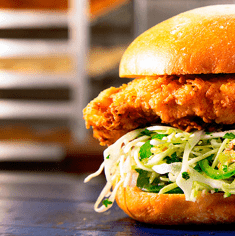
## 带图片

配置`body-style`属性来自定义`body`部分的`style`。

```vue demo
<template>
  <rol-row>
    <rol-col :span="8" v-for="(o, index) in 2" :key="o" :offset="index > 0 ? 2 : 0">
      <rol-card :body-style="{ padding: '0px' }">
        <img
          src="https://shadow.elemecdn.com/app/element/hamburger.9cf7b091-55e9-11e9-a976-7f4d0b07eef6.png"
          class="image"
        />
        <div style="padding: 14px;">
          <span>好吃的汉堡</span>
          <div class="bottom clearfix">
            <time class="time">{{ currentDate }}</time>
            <rol-button type="info" class="button">操作按钮</rol-button>
          </div>
        </div>
      </rol-card>
    </rol-col>
  </rol-row>
</template>

<script>
import dayjs from 'dayjs/esm'

export default {
  data() {
    return {
      currentDate: dayjs().format('YYYY-MM-DD HH:mm:ss'),
    }
  },
}
</script>
```

## 卡片阴影

可对阴影的显示进行配置。

通过`shadow`属性设置卡片阴影出现的时机：`always`、`hover`或`never`。

```vue demo
<template>
  <rol-row :gutter="12">
    <rol-col :span="8">
      <rol-card shadow="always">
        总是显示
      </rol-card>
    </rol-col>
    <rol-col :span="8">
      <rol-card shadow="hover">
        鼠标悬浮时显示
      </rol-card>
    </rol-col>
    <rol-col :span="8">
      <rol-card shadow="never">
        从不显示
      </rol-card>
    </rol-col>
  </rol-row>
</template>
```

### Attributes

| 参数       | 说明                                           | 类型   | 可选值                 | 默认值              |
| ---------- | ---------------------------------------------- | ------ | ---------------------- | ------------------- |
| header     | 设置 header，也可以通过 `slot#header` 传入 DOM | string | —                      | —                   |
| body-style | 设置 body 的样式                               | object | —                      | { padding: '20px' } |
| shadow     | 设置阴影显示时机                               | string | always / hover / never | always              |
