## React Native Swipe Button Component Rectangular

<hr>
<div style="color:darkcyan; font-size: 15px;">
    <p>yarn add rn-swipe-button-rectangular</p>
    <p>import SwipeButton from 'rn-swipe-button-rectangular';</p>
    const renderSwipeButton = () => (&lt;SwipeButton /&gt;) 
</div>
<hr>
<div>
  <h2 style="color:darkgreen;">Screenshots</h2>
  <table border>
	<tr">
	  <td style="padding: 5px;"><span>iOS</span></td>
	  <td style="padding: 5px;"><span>Android</span></td>
  	<td style="padding: 5px;"><span>iOS GIF</span></td>
	</tr>
	<tr>
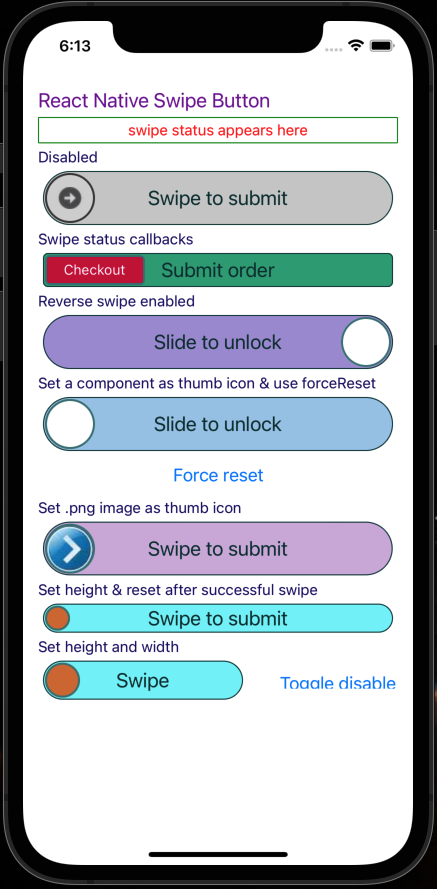
     	  <td><img src="https://udaysravank.github.io/RNSwipeButton/rn-swipe-button-ios.png" width="200" style="margin-right: 30px;"/></td>
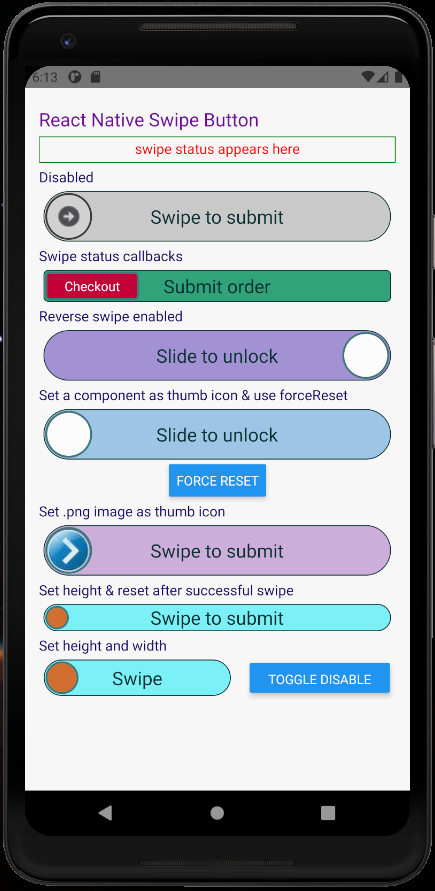
     	  <td><img src="https://udaysravank.github.io/RNSwipeButton/rn-swipe-button.png" style="margin-right: 30px;" width="200"/></td>
        <td><img src="https://github.com/UdaySravanK/RNSwipeButton/blob/master/docs/rn-swipe-button.gif" style="margin-right: 30px;" width="200"/></td>
	</tr>
  </table>
  <p>These screenshots are from demo app under examples folder in the repo, however instead of circular corners you will be able to view round rect corners</p>
</div>
<hr>

<h2 style="color:darkgreen;">Component properties</h2>
<pre style="font-size: 15px; color: brown;">
    <b>containerStyles</b>: PropTypes.object,
    <b>disabled</b>: PropTypes.bool,
    <b>disabledRailBackgroundColor</b>: PropTypes.string,
    <b>disabledThumbIconBackgroundColor</b>: PropTypes.string,
    <b>disabledThumbIconBorderColor</b>: PropTypes.string,
    <b>enableRightToLeftSwipe</b>: PropTypes.bool,
    <b>forceReset</b>: PropTypes.func, <span style="color: blueviolet"> // RNSwipeButton will call this function by passing a "reset" function as argument. Calling "reset" will reset the swipe thumb.</span>
    <b>height</b>: PropTypes.oneOfType([
       PropTypes.string,
       PropTypes.number,
    ]),
    <b>onSwipeFail</b>: PropTypes.func,
    <b>onSwipeStart</b>: PropTypes.func,
    <b>onSwipeSuccess</b>: PropTypes.func,
    <b>railBackgroundColor</b>: PropTypes.string,
    <b>railBorderColor</b>: PropTypes.string,
    <b>railFillBackgroundColor</b>: PropTypes.string,
    <b>railFillBorderColor</b>: PropTypes.string,
    <b>railStyles</b>: PropTypes.object,
    <b>resetAfterSuccessAnimDelay</b>: PropTypes.number, <span style="color: blueviolet">// This is delay before resetting the button after successful swipe When shouldResetAfterSuccess = true </span>
    <b>resetAfterSuccessAnimDuration</b>: PropTypes.number,
    <b>screenReaderEnabled</b>: PropTypes.bool,
    <b>shouldResetAfterSuccess</b>: PropTypes.bool, <span style="color: blueviolet">// If set to true, buttun resets automatically after swipe success with default delay of 1000ms</span>
    <b>swipeSuccessThreshold</b>: PropTypes.number, <span style="color: blueviolet">// Ex: 70. Swipping 70% will be considered as successful swipe</span>
    <b>thumbIconBackgroundColor</b>: PropTypes.string,
    <b>thumbIconBorderColor</b>: PropTypes.string,
    <b>thumbIconComponent</b>: PropTypes.node, <span style="color: blueviolet">Pass any react component to replace swipable thumb icon</span>
    <b>thumbIconImageSource</b>: PropTypes.oneOfType([
      PropTypes.string,
      PropTypes.number,
    ]),
    <b>thumbIconStyles</b>: PropTypes.object
    <b>title</b>: PropTypes.string,
    <b>titleColor</b>: PropTypes.string,
    <b>titleFontSize</b>: PropTypes.number,
    <b>titleStyles</b>: PropTypes.object,
    <b>width</b>: PropTypes.oneOfType([
      PropTypes.string,
      PropTypes.number,
    ]),
</pre>
<hr>
<h2 style="color:darkgreen;">Code for above screenshots</h2>

```
import React, {useState} from 'react';
import {SafeAreaView, View, Text, StatusBar, Button} from 'react-native';

import Icon from 'react-native-vector-icons/FontAwesome';

import thumbIcon from './assets/thumbIcon.png';
import arrowRight from './assets/arrow-right.png';
import styles from './styles';

import SwipeButton from 'rn-swipe-button';


const App: () => React$Node = () => {
  const defaultStatusMessage = 'swipe status appears here';
  const [swipeStatusMessage, setSwipeStatusMessage] = useState(
    defaultStatusMessage,
  );

  const TwitterIcon = () => <Icon name="twitter" color="#3b5998" size={30} />;
  const FacebookIcon = () => <Icon name="facebook" color="#3b5998" size={30} />;

  setInterval(() => setSwipeStatusMessage(defaultStatusMessage), 5000);
  const updateSwipeStatusMessage = (message) => setSwipeStatusMessage(message);
  const renderSubHeading = (heading) => (
    <Text style={styles.subHeading}>{heading}</Text>
  );
  let forceResetLastButton = null;

  return (
    <>
      <StatusBar barStyle="dark-content" />
      <SafeAreaView>
        <View style={styles.container}>
          <Text style={styles.title}>React Native Swipe Button</Text>
          <Text style={styles.swipeStatus}>{swipeStatusMessage}</Text>
          {renderSubHeading('Disabled')}
          <SwipeButton thumbIconImageSource={arrowRight} disabled />
          {renderSubHeading('Swipe status callbacks')}
          <SwipeButton
            thumbIconImageSource={arrowRight}
            onSwipeStart={() => updateSwipeStatusMessage('Swipe started!')}
            onSwipeFail={() => updateSwipeStatusMessage('Incomplete swipe!')}
            onSwipeSuccess={() =>
              updateSwipeStatusMessage('Submitted successfully!')
            }
          />
          {renderSubHeading('Right to left swipe enabled')}
          <SwipeButton
            enableRightToLeftSwipe
            thumbIconBackgroundColor="#FFFFFF"
            thumbIconComponent={FacebookIcon}
            title="Slide to unlock"
            onSwipeSuccess={() => updateSwipeStatusMessage('Slide success!')}
          />
          {renderSubHeading('Set a component as thumb icon & use forceReset')}
          <SwipeButton
            thumbIconBackgroundColor="#FFFFFF"
            thumbIconComponent={TwitterIcon}
            title="Slide to unlock"
            railStyles={{
              backgroundColor: '#44000088',
              borderColor: '#880000FF',
            }}
            forceReset={ reset => {
              forceResetLastButton = reset
            }}
          />
          <View style={{ alignItems: 'center', marginBottom: 5 }}>
            <Button onPress={() => forceResetLastButton && forceResetLastButton()} title="Force reset" />
          </View>
          {renderSubHeading('Set .png image as thumb icon')}
          <SwipeButton thumbIconImageSource={thumbIcon} />
          {renderSubHeading('Set height & reset after successful swipe')}
          <SwipeButton height={25} shouldResetAfterSuccess={true} resetAfterSuccessAnimDelay={1000} />
          {renderSubHeading('Set height and width')}
          <SwipeButton height={35} width={150} title="Swipe" />
        </View>
      </SafeAreaView>
    </>
  );
};
```

<hr/>

### Note

In accessibility mode this component works like a regular button (double tap to activate)

<h2 style="color:darkgreen;">Tech Stack</h2>
<ul>
<li>Node</li>
<li>Yarn</li>
<li>JavaScript</li>
<li>TypeScript</li>
<li>ReactNative</li>
</ul>

<div>
    <h2 style="color:darkgreen;">Running example app</h2>
    <ol>
      <li><code>git clone https://github.com/UdaySravanK/RNSwipeButton.git</code></li>
      <li><code>cd RNSwipeButton/examples/RNSwipeButtonDemo</code></li>
      <li><code>yarn</code></li>
      <li><p>To run on an android emulator</p>
        <code>yarn android</code> 
        <details>
          <summary>Make sure of</summary>
          <ul>
            <li>Android Studio is configured</li>
            <li>Global paths set correctly for Android SDK i.e ANDROID_HOME, tools, platform-tools</li>
            <li>Java8 is installed</li>
            <li>At least one emulator is ready</li>
          </ul>
        </details>
      </li>
      <li><p>To run on an ios simulator</p>
        <code>yarn ios</code> 
        <details>
          <summary>Make sure of</summary>
          <ul>
            <li>xcode is configured</li>
            <li>cocoapods installed</li>
            <li>If seeing issues then run <code>pod deintegrate & pod install</code></li>
            <li>If seeing issues with fonts
               <ol>
                 <li>Open ios workspace project in xcode</li>
                 <li>Select RNSwipeButtonDemo</li>
                 <li>Go to Build phases</li>
                 <li>Open 'Copy Bundle Resources' and delete all .ttf files</li>
               </ol>
            </li>
          </ul>
        </details>
      </li>
    </ol>
   </div>