# React Native Rich Text Editor
[](https://www.npmjs.com/package/rn-rich-text-editor)
[](https://www.npmjs.com/package/rn-rich-text-editor)
[](https://www.npmjs.com/package/rn-rich-text-editor)
**A powerful and customizable rich text editor built natively for React Native. Everything included, nothing missing.**
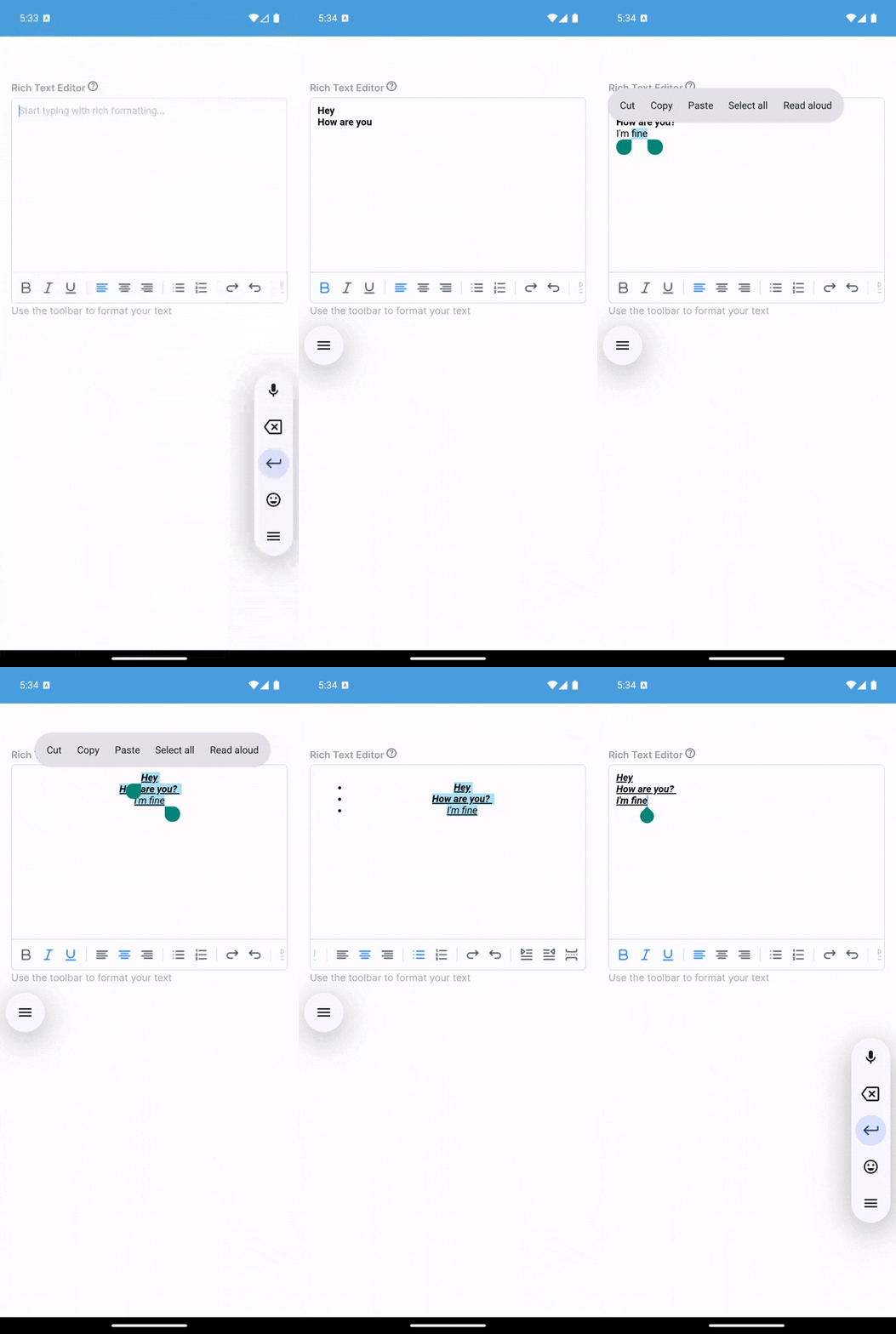
## ✨ Features
- **Rich Formatting**: Bold, italic, underline, strikethrough, subscript, superscript
- **Text Styling**: Font size, family, colors, highlights, line height
- **Lists & Structure**: Bullet lists, numbered lists, checkbox lists, headings (H1-H6)
- **Media**: Insert images and videos with custom styling
- **Alignment**: Left, center, right, justify with cycle button
- **Code & Blocks**: Code blocks, blockquotes, horizontal rules
- **Smart Paste**: Automatically preserves HTML formatting from web pages, Word docs, and more
- **Read-Only Mode**: Display formatted content without editing
- **Keyboard Management**: Built-in iOS/Android keyboard handling
- **Fully Customizable**: Toolbar, icons, styles, and behavior
- **Pre-init Styling Control**: Replace default content CSS and run JS before editor init (no flash)
## 📦 Installation
```bash
npm install rn-rich-text-editor
```
**Peer dependencies:**
```bash
npm install react react-native react-native-webview
```
> **Note**: If you use `react-native-svg-transformer`, SVG icons work automatically. Install `react-native-svg` for runtime.
## 🚀 Quick Start
```tsx
import React, { useRef, useState } from 'react';
import { View } from 'react-native';
import { Editor, Toolbar, ColorPicker } from 'rn-rich-text-editor';
function App() {
const editorRef = useRef(null);
return (
console.log('Content:', html)}
/>
);
}
```
## 📚 API Reference
### Editor Props
| Prop | Type | Default | Description |
|------|------|---------|-------------|
| `ref` | `RefObject` | - | Editor reference for methods |
| `placeholder` | `string` | `''` | Placeholder text |
| `initialContentHTML` | `string` | `''` | Initial HTML content |
| `readOnly` | `boolean` | `false` | Display-only mode |
| `disabled` | `boolean` | `false` | Disable editing |
| `pasteAsPlainText` | `boolean` | `false` | Disable HTML paste |
| `initialFocus` | `boolean` | `false` | Auto-focus on mount |
| `editorStyle` | `object` | - | Style configuration (see below) |
| `onChange` | `(html: string) => void` | - | Content change callback |
| `onFocus` / `onBlur` | `() => void` | - | Focus callbacks |
| `onPaste` | `(data: unknown) => void` | - | Paste event callback |
| `onLink` | `(data: unknown) => void` | - | Link click callback |
| `onHeightChange` | `(height: number) => void` | - | Height change callback |
| `errorMessage` | `string` | - | Error message (shows red border) |
| `disableDefaultCSS` | `boolean` | `false` | Disable built-in `getContentCSS()` rules |
| `customContentCSS` | `string` | `''` | CSS injected at initial HTML render (replaces built-in content CSS) |
| `initialJS` | `string` | `''` | JS injected before editor initialization script |
**EditorStyle:**
```typescript
{
backgroundColor?: string; // Editor background
color?: string; // Text color
placeholderColor?: string; // Placeholder color
caretColor?: string; // Cursor color
contentCSSText?: string; // Content CSS
cssText?: string; // Additional CSS
initialCSSText?: string; // Initial CSS
}
```
### Editor Methods
Access via `editorRef.current`:
| Method | Description |
|--------|-------------|
| `setContentHTML(html)` | Set editor content |
| `getContentHtml()` | Get content (Promise, deprecated - use `onChange`) |
| `insertText(text)` | Insert plain text |
| `insertHTML(html)` | Insert HTML |
| `insertImage(attrs, style?)` | Insert image |
| `insertVideo(attrs, style?)` | Insert video |
| `insertLink(title, url)` | Insert link |
| `setFontSize(size)` | Set font size |
| `setFontName(name)` | Set font family |
| `setForeColor(color)` | Set text color |
| `setHiliteColor(color)` | Set highlight color |
| `setLineHeight(value)` | Set line height |
| `focusContentEditor()` | Focus editor |
| `blurContentEditor()` | Blur editor |
| `dismissKeyboard()` | Dismiss keyboard |
| `injectJavascript(script)` | Inject custom JS |
### Toolbar Props
| Prop | Type | Default | Description |
|------|------|---------|-------------|
| `editor` | `{ current: EditorRef \| null }` | - | Editor ref |
| `actions` | `string[]` | `defaultActions` | Action array (see Actions) |
| `disabled` | `boolean` | `false` | Disable toolbar |
| `readOnly` | `boolean` | `false` | Hide when read-only |
| `iconTint` | `string` | `'#71787F'` | Icon color |
| `selectedIconTint` | `string` | - | Selected icon color |
| `iconSize` | `number` | `20` | Icon size |
| `iconGap` | `number` | `12` | Icon spacing |
| `iconMap` | `Record` | - | Custom icons |
| `renderAction` | `(action, selected) => ReactNode` | - | Custom renderer |
| `onPressAddImage` | `() => void` | - | Image button handler |
| `onInsertLink` | `() => void` | - | Link button handler |
| `insertVideo` | `() => void` | - | Video button handler |
### ColorPicker Props
| Prop | Type | Default | Description |
|------|------|---------|-------------|
| `visible` | `boolean` | `false` | Controls modal visibility |
| `onClose` | `() => void` | - | Called when modal closes |
| `onSelectColor` | `(color: string) => void` | - | Called when a color is selected (hex format) |
| `title` | `string` | `'Text color'` | Modal title text |
| `initialColor` | `string` | `'#000000'` | Initial selected color (hex format) |
### Actions
Import actions: `import { actions } from 'rn-rich-text-editor'`
**Text Formatting:** `setBold`, `setItalic`, `setUnderline`, `setStrikethrough`, `setSubscript`, `setSuperscript`, `removeFormat`
**Headings:** `heading1` through `heading6`, `setParagraph`
**Alignment:** `alignLeft`, `alignCenter`, `alignRight`, `alignFull`, `align` (cycle)
**Lists:** `insertBulletsList`, `insertOrderedList`, `checkboxList`, `indent`, `outdent`
**Media:** `insertImage`, `insertVideo`, `insertLink`
**Styling:** `fontSize`, `fontName`, `foreColor`, `hiliteColor`, `lineHeight`
**Other:** `code`, `blockquote`, `setHR`, `line`, `undo`, `redo`, `table`, `keyboard`, `separator`
**Default actions:** `keyboard`, `setBold`, `setItalic`, `setUnderline`, `removeFormat`, `insertBulletsList`, `indent`, `outdent`, `insertLink`
## 💡 Examples
### Custom Toolbar
```tsx
import { Editor, Toolbar, actions } from 'rn-rich-text-editor';
const customActions = [
actions.keyboard,
actions.setBold,
actions.setItalic,
actions.heading1,
actions.insertBulletsList,
actions.insertLink,
];
```
### Programmatic Content
```tsx
// Insert content
editorRef.current?.insertText('Hello');
editorRef.current?.insertHTML('Bold');
editorRef.current?.insertLink('Click', 'https://example.com');
editorRef.current?.insertImage({ src: 'image.jpg' }, { width: '100%' });
// Style text
editorRef.current?.setFontSize(18);
editorRef.current?.setForeColor('#FF0000');
editorRef.current?.setLineHeight(1.5);
```
### Styling
```tsx
```
### Full CSS/JS Control (No Flash)
```tsx
```
Notes:
- `customContentCSS` is applied during initial HTML creation, so styles are present before the editor becomes interactive.
- `initialJS` runs before the editor bootstraps and before `editorInitializedCallback`.
- If you do not pass these props, existing behavior remains unchanged.
### Image Handling
```tsx
import { ImagePicker } from 'react-native-image-picker';
const handleAddImage = () => {
ImagePicker.launchImageLibrary({}, (response) => {
if (response.assets?.[0]) {
editorRef.current?.insertImage(
{ src: response.assets[0].uri },
{ width: '100%', height: 'auto' }
);
}
});
};
```
### Read-Only Display
```tsx
```
### ColorPicker
The `ColorPicker` component provides a modal interface for selecting colors with preset options and custom hex input. Perfect for text color (`foreColor`) and highlight color (`hiliteColor`) selection.
```tsx
import { Editor, Toolbar, ColorPicker, actions } from 'rn-rich-text-editor';
function MyEditor() {
const editorRef = useRef(null);
const [showColorPicker, setShowColorPicker] = useState(false);
const [colorPickerType, setColorPickerType] = useState('foreColor');
const [selectedColor, setSelectedColor] = useState('#000000');
const handleColorSelect = (color) => {
if (colorPickerType === 'foreColor') {
editorRef.current?.setForeColor(color);
} else {
editorRef.current?.setHiliteColor(color);
}
setSelectedColor(color);
};
return (
{
setColorPickerType('foreColor');
setShowColorPicker(true);
}}
hiliteColor={() => {
setColorPickerType('hiliteColor');
setShowColorPicker(true);
}}
/>
setShowColorPicker(false)}
onSelectColor={handleColorSelect}
title={colorPickerType === 'foreColor' ? 'Text Color' : 'Highlight Color'}
initialColor={selectedColor}
/>
);
}
```
**ColorPicker Props:**
| Prop | Type | Default | Description |
|------|------|---------|-------------|
| `visible` | `boolean` | `false` | Controls modal visibility |
| `onClose` | `() => void` | - | Called when modal closes |
| `onSelectColor` | `(color: string) => void` | - | Called when a color is selected |
| `title` | `string` | `'Text color'` | Modal title |
| `initialColor` | `string` | `'#000000'` | Initial selected color |
### Custom Action Handlers
```tsx
editorRef.current?.setFontSize(18)}
foreColor={() => editorRef.current?.setForeColor('#FF0000')}
lineHeight={() => editorRef.current?.setLineHeight(1.5)}
/>
```
### Custom Icons & Renderers
```tsx
// Custom icons
const iconMap = {
[actions.setBold]: require('./assets/bold.png'),
[actions.setItalic]: require('./assets/italic.png'),
};
// Custom renderer
const renderAction = (action, selected) => {
if (action === actions.setBold) {
return ;
}
return null; // Use default for others
};
```
## 🎯 Smart Paste
The editor automatically preserves HTML formatting when pasting. It detects HTML in the clipboard and maintains:
- Text formatting (bold, italic, colors, etc.)
- Inline styles
- Links and HTML elements
To paste as plain text only:
```tsx
```
## 🔧 Advanced
### Custom JavaScript
```tsx
editorRef.current?.injectJavascript(`
document.querySelector('#content').style.border = '2px solid red';
`);
```
### TypeScript
```typescript
import { Editor, Toolbar, ColorPicker, EditorRef, EditorProps, ColorPickerProps, actions } from 'rn-rich-text-editor';
const editorRef = useRef(null);
const props: EditorProps = { placeholder: 'Type...', onChange: (html) => {} };
const colorPickerProps: ColorPickerProps = {
visible: true,
onClose: () => {},
onSelectColor: (color) => {},
title: 'Text Color',
initialColor: '#000000',
};
```
## 🐛 Troubleshooting
**Editor not focusing?**
- Set `initialFocus={true}` or call `focusContentEditor()`
- On Android, use `showAndroidKeyboard()` first
**Content not updating?**
- Use `onChange` callback instead of polling `getContentHtml()`
- Set `initialContentHTML` correctly on mount
**Paste not preserving format?**
- Ensure `pasteAsPlainText` is `false`
- HTML paste works when clipboard contains HTML data
**Toolbar not working?**
- Verify `editor` prop uses ref object: `editor={editorRef}`
- Ensure editor initializes before toolbar interactions
## 📱 Platform Notes
- **iOS**: WebKit WebView, automatic keyboard handling
- **Android**: Android WebView, may need `showAndroidKeyboard()` for focus
## 📄 License
MIT
## 🤝 Contributing
Contributions welcome! See the [GitHub repository](https://github.com/vishaal2002/rn-rich-editor) for issues and PRs.