
Reuse different React components to create new ones
Play on CodeSandbox




## Installation
```sh
npm i reuse
```
> Thanks to [@eldargab](https://github.com/eldargab) for the package name on npm.
## Why
This enables **(sub)[atomic design](http://bradfrost.com/blog/post/atomic-web-design/)** approach.
When using classic CSS, we have a powerful way to compose "stylesheet components" by applying multiple class names to our HTML elements (`.btn`, `.large`, `.rounded` etc.). But, by doing that in React, which has its own component structure, we'll have conflicting component structures.
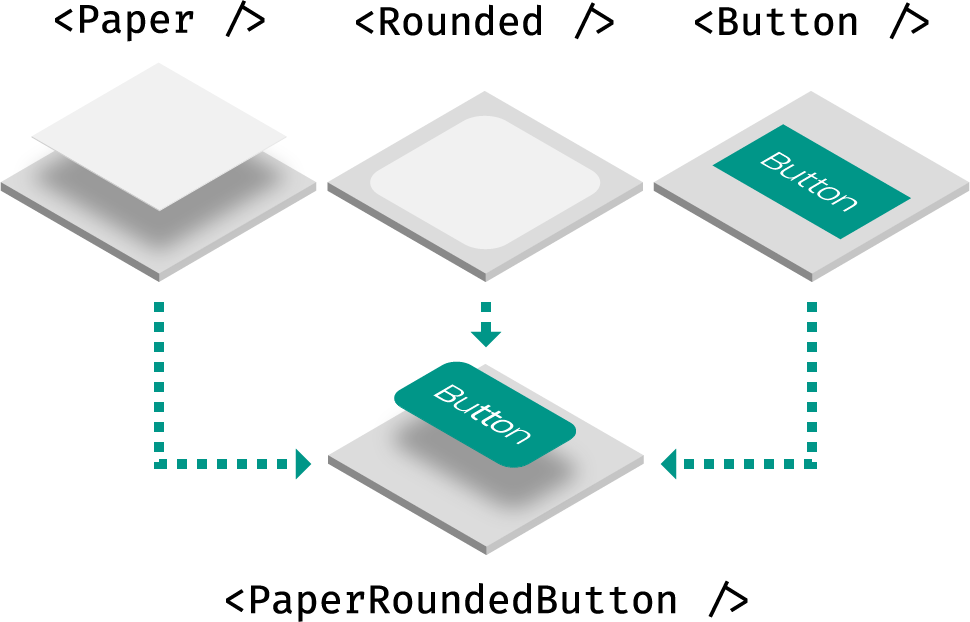
**Reuse** solves it by combining React components together as if they were CSS classes. This also means that not only style will be composed, but also JavaScript behavior, like React lifecycle methods and event handlers.
## Usage
Reuse simply exports a factory method that returns a React component. You can leverage that method in two ways: [augmentation](#augmentation) and [combination](#combination).
### Examples
- [Simple](https://codesandbox.io/s/github/diegohaz/reuse/tree/master/examples/simple)
- [PaperRoundedButton](https://codesandbox.io/s/github/diegohaz/reuse/tree/master/examples/paper-rounded-button)
- [Styled Components](https://codesandbox.io/s/github/diegohaz/reuse/tree/master/examples/styled-components)
### Augmentation
The component returned by the `use` factory will expect a `use` prop:
```jsx
import use from "reuse";
const Box = use();
; // null
; //
; //
```
You can create the component with a default element:
```jsx
const Box = use("div");
; //
; //
```
You can create the component with another component. **Just make sure to render the `use` prop as the underlying element and pass the other props down** (at least, when `use` isn't a string – HTML element):
```jsx
import React from "react";
import use from "reuse";
// grab the `use` prop and pass down other props
const Base = ({ use: T = "div", ...props }) => ;
const Box = use(Base);
; //
; //
const BoxSpan = use(Box, "span");
; //
```
> You can use `Base` to filter custom props when `use` is a string using [@emotion/is-prop-valid](https://github.com/emotion-js/emotion/tree/master/next-packages/is-prop-valid), for example.
### Combination
Let's create some components:
```jsx
// Using styled-components
const Paper = styled(use("div"))`
box-shadow: 0 2px 4px rgba(0, 0, 0, 0.30);
`;
// Using class names
const Rounded = use(({ use: T, ...props }) => (
), "div");
// Using inline styles
const Button = use(({ use: T, ...props }) => (
), "button");
```
Once you have a few of those components, you can combine them using the same `use` methods:
```jsx
import use from "reuse";
import { Rounded, Paper, Button } from "../components";
// with factory
const RoundedPaperButton = use(Rounded, Paper, Button);
; //
; //
// with prop
//
//
```
Note that the underlying HTML element will always be based on the last component you pass to `use`.
## FAQ
How does this compare to render props and HOCs?
These are equivalent implementations:
**Render props**
```jsx
{paperProps => (
{roundedProps => (
)}
)}
```
**High-order components**
```jsx
withPaper(withRounded(withButton(props => )));
```
**Reuse**
```jsx
use(Paper, Rounded, Button);
// or
```
When using render props or HOCs, you have to stick with their static (HOC) or dynamic implementation (render prop). With Reuse, besides simplicity, you can use both depending on your needs.
## License
MIT © [Haz](https://github.com/diegohaz)