# ansi-colors [](https://www.npmjs.com/package/ansi-colors) [](https://npmjs.org/package/ansi-colors) [](https://npmjs.org/package/ansi-colors) [](https://travis-ci.org/doowb/ansi-colors) [](https://ci.appveyor.com/project/doowb/ansi-colors)
> Easily add ANSI colors to your text and symbols in the terminal. A faster drop-in replacement for chalk, kleur and turbocolor (without the dependencies and rendering bugs).
Please consider following this project's author, [Brian Woodward](https://github.com/doowb), and consider starring the project to show your :heart: and support.
## Install
Install with [npm](https://www.npmjs.com/):
```sh
$ npm install --save ansi-colors
```

## Why use this?
ansi-colors is _the fastest Node.js library for terminal styling_. A more performant drop-in replacement for chalk, with no dependencies.
* _Blazing fast_ - fastest terminal styling library in node.js, 10-20x faster than chalk! (See [Beware of false claims!](#beware-of-false-claims))!
* _Drop-in replacement_ for [chalk](https://github.com/chalk/chalk).
* _No dependencies_ (Chalk has 7 dependencies in its tree!)
* _Safe_ - Does not modify the `String.prototype` like [colors](https://github.com/Marak/colors.js).
* Supports [nested colors](#nested-colors).
* Supports [chained colors](#chained-colors).
* [Toggle color support](#toggle-color-support) on or off.
## Usage
```js
const c = require('ansi-colors');
console.log(c.red('This is a red string!'));
console.log(c.green('This is a red string!'));
console.log(c.cyan('This is a cyan string!'));
console.log(c.yellow('This is a yellow string!'));
```

### Chained colors
```js
console.log(c.bold.red('this is a bold red message'));
console.log(c.bold.yellow.italic('this is a bold yellow italicized message'));
console.log(c.green.bold.underline('this is a bold green underlined message'));
```

### Nested colors
```js
console.log(c.yellow(`foo ${c.red.bold('red')} bar ${c.cyan('cyan')} baz`));
```

### Toggle color support
Easily enable/disable colors.
```js
const c = require('ansi-colors');
// disable colors manually
c.enabled = false;
// or use a library to automatically detect support
c.enabled = require('color-support').stdout;
console.log(c.red('I will only be colored red if the terminal supports colors'));
```
## Strip ANSI codes
Use the `.unstyle` method to strip ANSI codes from a string.
```js
console.log(c.unstyle(c.blue.bold('foo bar baz')));
//=> 'foo bar baz'
```
## Available styles
**Note** that bright and bright-background colors are not always supported.
| Colors | Background Colors | Bright Colors | Bright Background Colors |
| --- | --- | --- | --- |
| black | bgBlack | blackBright | bgBlackBright |
| red | bgRed | redBright | bgRedBright |
| green | bgGreen | greenBright | bgGreenBright |
| yellow | bgYellow | yellowBright | bgYellowBright |
| blue | bgBlue | blueBright | bgBlueBright |
| magenta | bgMagenta | magentaBright | bgMagentaBright |
| cyan | bgCyan | cyanBright | bgCyanBright |
| white | bgWhite | whiteBright | bgWhiteBright |
| gray | | | |
| grey | | | |
_(`gray` is the U.S. spelling, `grey` is more commonly used in the Canada and U.K.)_
### Style modifiers
* dim
* **bold**
* hidden
* _italic_
* underline
* inverse
* ~~strikethrough~~
* reset
## Performance
**Libraries tested**
* ansi-colors v3.0.4
* chalk v2.4.1
Beware of false claims!
### Kleur and turbocolor are buggy and incomplete
tldr; kleur and turbocolor do not have parity with chalk or ansi-colors, and they fail too many of the unit tests to be included in our benchmarks.
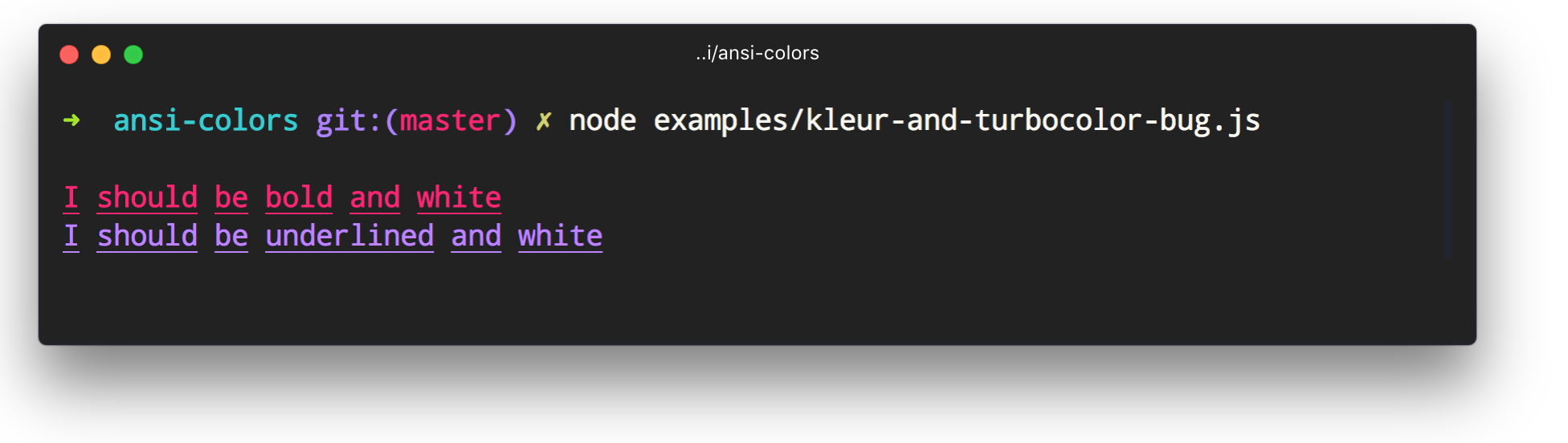
You might have seen claims from [kleur](https://github.com/lukeed/kleur) or [turbocolor](https://github.com/jorgebucaran/turbocolor) that they are "faster than ansi-colors". Both libraries are unofficial forks of ansi-colors, and in an attempt to appear faster and differentiate from ansi-colors, _both libraries removed crucial code that was necessary for resetting chained colors_.
To illustrate the bug, simply do the following with `kleur` (as of v2.0.1):
```js
const kleur = require('kleur');
const red = kleur.bold.underline.red;
console.log(kleur.bold('I should be bold and white'));
const blue = kleur.underline.blue;
console.log(kleur.underline('I should be underlined and white'));
```
Same with `turbocolor` (as of v2.4.5):
```js
const turbocolor = require('turbocolor');
const red = turbocolor.bold.underline.red;
console.log(turbocolor.bold('I should be bold and white'));
const blue = turbocolor.underline.blue;
console.log(turbocolor.underline('I should be underlined and white'));
```
Both libraries render the following:
**Other pitfalls**
Beyond the aforementioned rendering bug, neither kleur nor turbocolor can be used as a drop-in replacement for chalk:
* both libraries omit code that prevents background bleed around newlines (try doing `console.log(kleur.bgRed('foo\nbar') + 'baz qux')` and `console.log(turbocolor.bgRed('foo\nbar') + 'baz qux')`).
* both libraries fail half of the ansi-colors unit tests (chalk passes them all)
* neither library supports bright colors (chalk and ansi-colors do)
* neither library supports bright-background colors (chalk and ansi-colors do)
* turbocolor swaps bright-background colors for background colors. (surprise! turbocolor gives you unexpected colors in the terminal!)
### Mac
> MacBook Pro, Intel Core i7, 2.3 GHz, 16 GB.
**Load time**
Time it takes to load the first time `require()` is called:
* ansi-colors - `1.915ms`
* chalk - `12.437ms`
**Benchmarks**
```
# All Colors
ansi-colors x 173,851 ops/sec ±0.42% (91 runs sampled)
chalk x 9,944 ops/sec ±2.53% (81 runs sampled)))
# Chained colors
ansi-colors x 20,791 ops/sec ±0.60% (88 runs sampled)
chalk x 2,111 ops/sec ±2.34% (83 runs sampled)
# Nested colors
ansi-colors x 59,304 ops/sec ±0.98% (92 runs sampled)
chalk x 4,590 ops/sec ±2.08% (82 runs sampled)
```
### Windows
> Windows 10, Intel Core i7-7700k CPU @ 4.2 GHz, 32 GB
**Load time**
Time it takes to load the first time `require()` is called:
* ansi-colors - `1.494ms`
* chalk - `11.523ms`
**Benchmarks**
```
# All Colors
ansi-colors x 193,088 ops/sec ±0.51% (95 runs sampled))
chalk x 9,612 ops/sec ±3.31% (77 runs sampled)))
# Chained colors
ansi-colors x 26,093 ops/sec ±1.13% (94 runs sampled)
chalk x 2,267 ops/sec ±2.88% (80 runs sampled))
# Nested colors
ansi-colors x 67,747 ops/sec ±0.49% (93 runs sampled)
chalk x 4,446 ops/sec ±3.01% (82 runs sampled))
```
## About
Contributing
Pull requests and stars are always welcome. For bugs and feature requests, [please create an issue](../../issues/new).
Running Tests
Running and reviewing unit tests is a great way to get familiarized with a library and its API. You can install dependencies and run tests with the following command:
```sh
$ npm install && npm test
```
Building docs
_(This project's readme.md is generated by [verb](https://github.com/verbose/verb-generate-readme), please don't edit the readme directly. Any changes to the readme must be made in the [.verb.md](.verb.md) readme template.)_
To generate the readme, run the following command:
```sh
$ npm install -g verbose/verb#dev verb-generate-readme && verb
```
### Related projects
You might also be interested in these projects:
* [ansi-wrap](https://www.npmjs.com/package/ansi-wrap): Create ansi colors by passing the open and close codes. | [homepage](https://github.com/jonschlinkert/ansi-wrap "Create ansi colors by passing the open and close codes.")
* [strip-color](https://www.npmjs.com/package/strip-color): Strip ANSI color codes from a string. No dependencies. | [homepage](https://github.com/jonschlinkert/strip-color "Strip ANSI color codes from a string. No dependencies.")
### Contributors
| **Commits** | **Contributor** |
| --- | --- |
| 35 | [doowb](https://github.com/doowb) |
| 26 | [jonschlinkert](https://github.com/jonschlinkert) |
| 6 | [lukeed](https://github.com/lukeed) |
| 2 | [Silic0nS0ldier](https://github.com/Silic0nS0ldier) |
| 1 | [jorgebucaran](https://github.com/jorgebucaran) |
| 1 | [madhavarshney](https://github.com/madhavarshney) |
| 1 | [chapterjason](https://github.com/chapterjason) |
### Author
**Brian Woodward**
* [GitHub Profile](https://github.com/doowb)
* [Twitter Profile](https://twitter.com/doowb)
* [LinkedIn Profile](https://linkedin.com/in/woodwardbrian)
### License
Copyright © 2018, [Brian Woodward](https://github.com/doowb).
Released under the [MIT License](LICENSE).
***
_This file was generated by [verb-generate-readme](https://github.com/verbose/verb-generate-readme), v0.6.0, on September 20, 2018._