# `remark-lint-frontmatter-schema` 📑
[](https://code.visualstudio.com)
[](https://unifiedjs.com)
[](https://www.npmjs.com/package/remark-lint-frontmatter-schema)

[](./LICENSE)
[](https://github.com/JulianCataldo/remark-lint-frontmatter-schema)
[](https://makeapullrequest.com)
[](http://www.typescriptlang.org/)
[](https://prettier.io)
[](https://editorconfig.org)
[](https://eslint.org)
Validate **Markdown** frontmatter **YAML** against an associated **JSON schema** with this **remark-lint** rule plugin.
Supports:
- **Types validation**, pattern, enumerations,… and all you can get with JSON Schema
- **Code location** problems indicator (for IDE to underline)
- **Auto-fixes** with suggestions
- **C**ommand **L**ine **I**nterface reports
- **VS Code** integration (see below)
- **Global patterns** or **in-file** schemas associations
- In JS framework **MD / MDX pipelines**
# Demo
[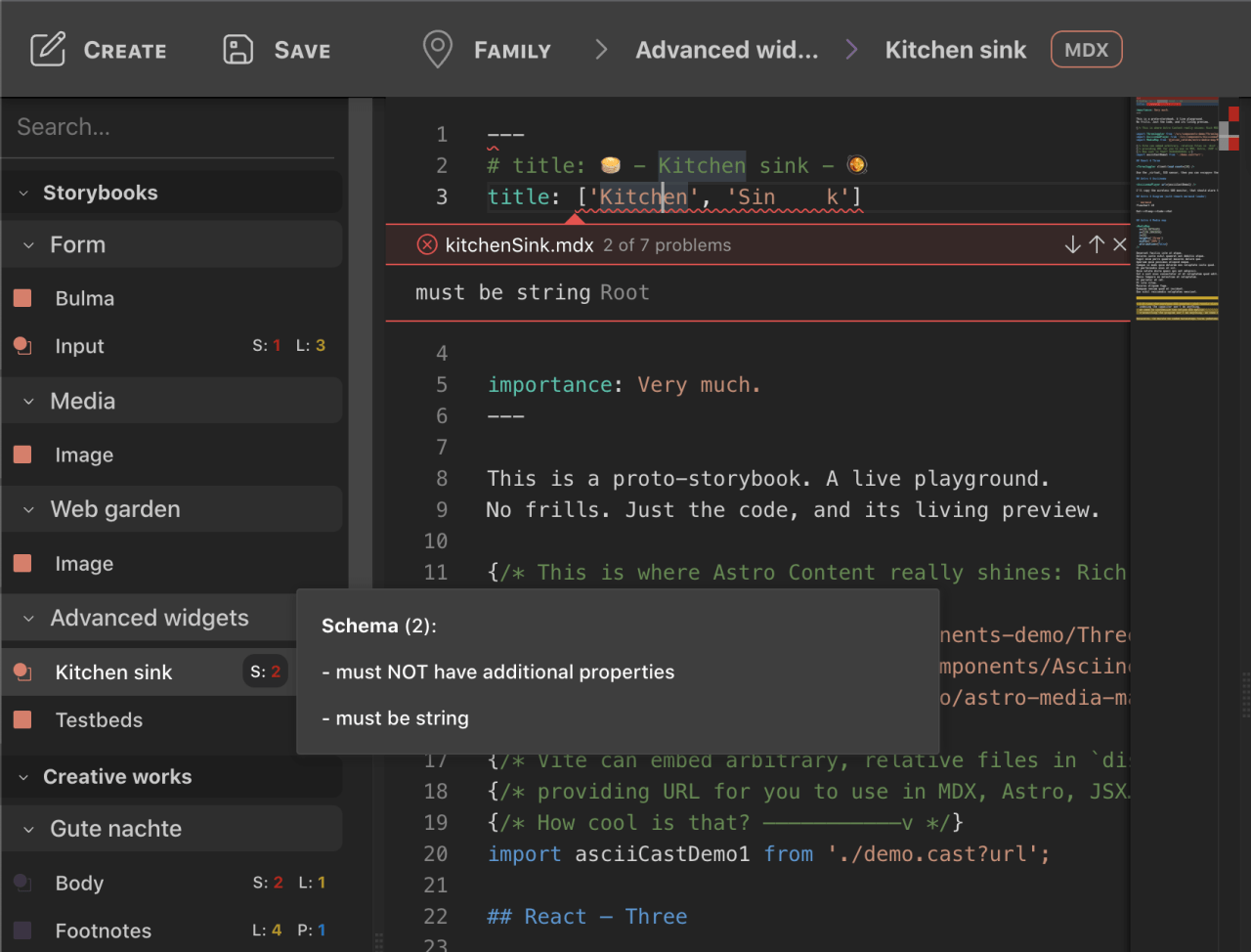
**🕹 Preview it online!**](https://astro-content.dev/__content)
(w. Astro Content — Editor)
---
**Jump to**:
- [👉 **Play with pre-configured ./demo**](#play-with-pre-configured-demo)
- [Base](#base)
- [VS Code (optional)](#vs-code-optional)
- [CLI / IDE (VS Code) — **Static** linting](#cli--ide-vs-code--static-linting)
- [Workspace](#workspace)
- [Schema example](#schema-example)
- [🆕 Add references to external definitions (advanced)](#add-references-to-external-definitions-advanced)
- [Schemas associations](#schemas-associations)
- [Inside frontmatter](#inside-frontmatter)
- [Globally, with patterns](#globally-with-patterns)
- [CLI usage](#cli-usage)
- [Bonus](#bonus)
- [Validate your schema with _JSON meta schema_](#validate-your-schema-with-json-meta-schema)
- [ESLint MDX plugin setup](#eslint-mdx-plugin-setup)
- [Known issues](#known-issues)
- [MD / MDX pipeline — **Runtime** validation](#md--mdx-pipeline--runtime-validation)
- [Custom pipeline](#custom-pipeline)
- [Implementation living example](#implementation-living-example)
- [Important foot-notes for custom pipeline](#important-foot-notes-for-custom-pipeline)
- [Framework](#framework)
- [Astro](#astro)
- [Gatsby](#gatsby)
---
[](https://raw.githubusercontent.com/JulianCataldo/remark-lint-frontmatter-schema/master/docs/screenshot.png)
---
[](https://raw.githubusercontent.com/JulianCataldo/remark-lint-frontmatter-schema/master/docs/screenshot-2.png)
---
[](https://raw.githubusercontent.com/JulianCataldo/remark-lint-frontmatter-schema/master/docs/screenshot-3.png)
---
## 👉 **Play with pre-configured [./demo](./demo/)**
Quick shallow **clone** with:
```sh
pnpx degit JulianCataldo/remark-lint-frontmatter-schema/demo ./demo
```
---
# Installation
### Base
```sh
pnpm install -D \
remark remark-cli \
remark-frontmatter \
remark-lint-frontmatter-schema
```
> **Remove** `-D` flag for runtime **`unified`** MD / MDX **pipeline** (custom, Astro, Gatsby, etc.), for production.
> **Keep it** if you just want to lint with **CLI** or your **IDE** locally, without any production / CI needs.
### VS Code (optional)
```sh
code --install-extension unifiedjs.vscode-remark
```
# Configuration
### CLI / IDE (VS Code) — **Static** linting
👉 **See [./demo](./demo/)** folder to get a working, pre-configured, bare project workspace.
You also get example Markdown files and associated schema to play with.
Supports `remark-cli` and/or `unifiedjs.vscode-remark` extension.
📌 Check out the **[demo/README.md](./demo) for bootstrapping** it.
#### Workspace
Create the root config. file for `remark` to source from:
`touch ./.remarkrc.mjs`
Paste this base configuration:
```mjs
import remarkFrontmatter from 'remark-frontmatter';
import remarkLintFrontmatterSchema from 'remark-lint-frontmatter-schema';
const remarkConfig = {
plugins: [remarkFrontmatter, remarkLintFrontmatterSchema],
};
export default remarkConfig;
```
You can use YAML / JSON / …, too (uses [cosmiconfig](https://github.com/davidtheclark/cosmiconfig)).
#### Schema example
`./content/creative-work.schema.yaml`
```yaml
type: object
properties:
title:
type: string
# …
```
##### 🆕 Add references to external definitions (advanced)
Referencing schema definitions
allows re-using bit and piece instead of duplicate them,
accross your content schemas.
You can reference an external schema relatively, using `$ref`.
For example we can -_kind of_- merge an host object with a reference properties:
The host schema, `content/articles/index.schema.yaml`
```yaml
allOf:
- $ref: ../page.schema.yaml
- properties:
layout:
const: src/layouts/Article.astro
category:
type: string
enum:
- Book
- Movie
foo:
type: string
required:
- layout
- category
```
A referenced schema, `content/page.schema.yaml`
```yaml
properties:
title:
type: string
maxLength: 80
# ...
# ...
required:
- title
```
The result will be _(virtually)_ the same as this:
```yaml
properties:
title:
type: string
maxLength: 80
# ...
# ...
layout:
const: src/layouts/Article.astro
category:
type: string
enum:
- Book
- Movie
foo:
type: string
# ...
required:
- title
- layout
- category
```
#### Schemas associations
Inspired by [VS Code JSON Schema](https://code.visualstudio.com/docs/languages/json#_json-schemas-and-settings)
and [`redhat.vscode-yaml`](https://marketplace.visualstudio.com/items?itemName=redhat.vscode-yaml) conventions.
##### Inside frontmatter
See **[./demo/content](./demo/content)** files for examples.
Schema association can be done directly **inside** the **frontmatter** of the **Markdown** file,
relative to project root, thanks to the `'$schema'` key:
```markdown
---
# From workspace root (`foo/…`, `/foo/…` or `./foo/…` is the same)
'$schema': content/creative-work.schema.yaml
# —Or— relatively, from this current file directory (`./foo/…` or `../foo/…`)
# '$schema': ../creative-work.schema.yaml
layout: src/layouts/Article.astro
title: Hello there
category: Book
# …
---
# You're welcome!
🌝 My **Markdown** content… 🌚
…
```
##### Globally, with patterns
> **Note**:
> Locally defined **`'$schema'` takes precedence** over global settings below.
```js
const remarkConfig = {
plugins: [
remarkFrontmatter,
[
remarkLintFrontmatterSchema,
{
schemas: {
/* One schema for many files */
'./content/creative-work.schema.yaml': [
/* Per-file association */
'./content/creative-work/the-shipwreck__global-broken.md',
/* Support glob patterns ———v */
// './content/creative-work/*.md',
// …
// `./` prefix is optional
// 'content/creative-work/foobiz.md',
],
// './content/ghost.schema.yaml': [
// './content/casper.md',
// './content/ether.md',
// ],
},
},
],
],
};
```
`'./foo'`, `'/foo'`, `'foo'`, all will work.
It's always relative to your `./.remarkrc.mjs` file, in your workspace root.
#### CLI usage
Linting whole workspace files (as `./**/*.md`) with `remark-cli`:
```sh
pnpm remark .
```
Yields:

#### Bonus
##### Validate your schema with _JSON meta schema_
First, install the [YAML for Visual Studio Code](https://marketplace.visualstudio.com/items?itemName=redhat.vscode-yaml) extension:
```sh
code --install-extension redhat.vscode-yaml
```
Then, add this to your `.vscode/settings.json`:
```jsonc
{
"yaml.schemas": {
"http://json-schema.org/draft-07/schema#": ["content/**/*.schema.yaml"]
}
/* ... */
}
```
##### ESLint MDX plugin setup
Will work with the ESLint VS Code extension and the CLI command.
Install the [ESLint MDX plugin](https://github.com/mdx-js/eslint-mdx),
the [MDX VS Code extension](https://marketplace.visualstudio.com/items?itemName=unifiedjs.vscode-mdx) and the [ESLint VS Code extension](https://marketplace.visualstudio.com/items?itemName=dbaeumer.vscode-eslint).
Add this dependencies to your project:
```sh
pnpm i -D eslint eslint-plugin-mdx \
eslint-plugin-prettier eslint-config-prettier
```
Add a `.eslintrc.cjs`:
```js
/** @type {import("@types/eslint").Linter.Config} */
module.exports = {
overrides: [
{
files: ['*.md', '*.mdx'],
extends: ['plugin:mdx/recommended'],
},
],
};
```
Add a `.remarkrc.yaml` (or JSON, etc.), e.g.:
```yaml
plugins:
- remark-frontmatter
- - remark-lint-frontmatter-schema
- schemas:
src/schemas/blog-post.schema.yaml:
- content/blog-posts/*.{md,mdx}
# - remark-preset-lint-consistent
# - remark-preset-lint-markdown-style-guide
# - remark-preset-lint-recommended
```
---
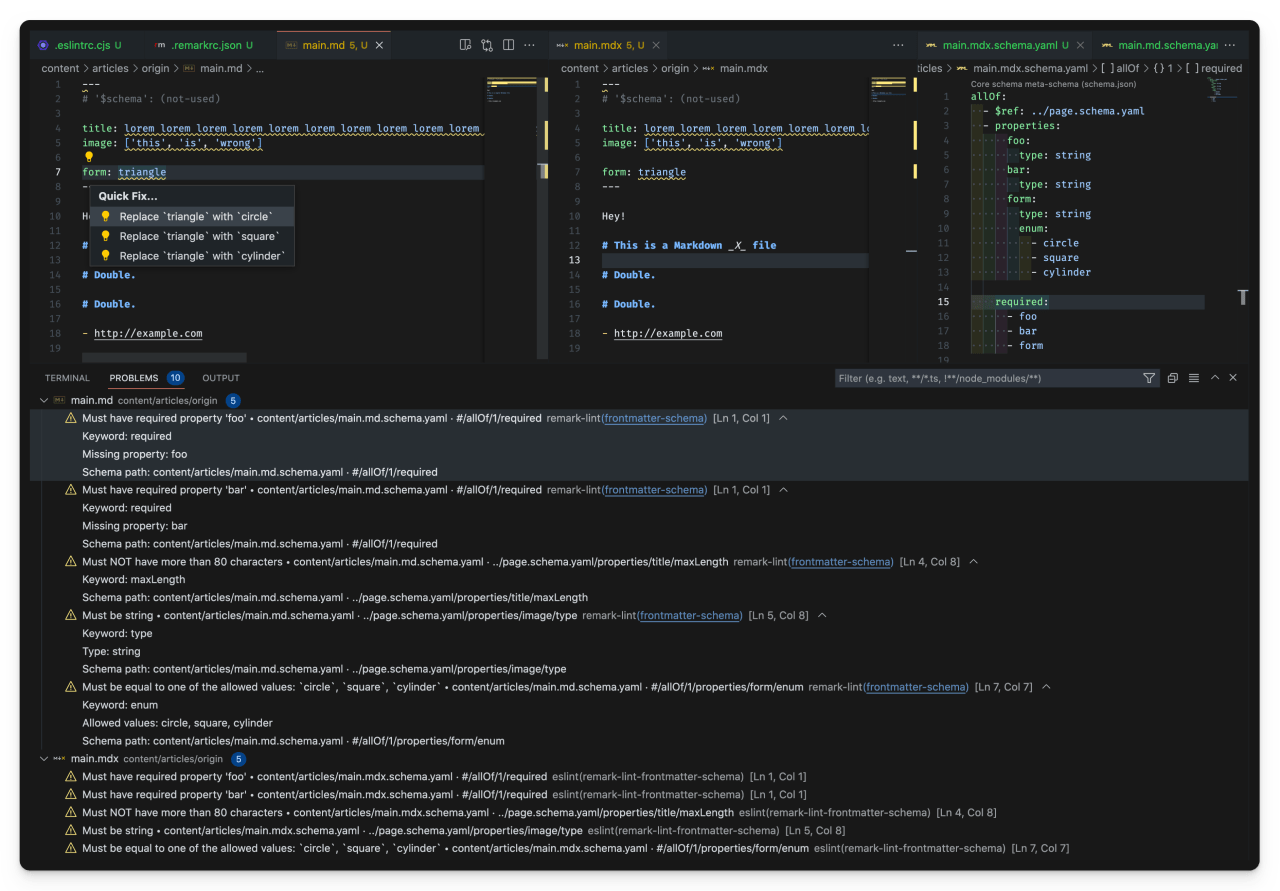
Result:
[
](https://res.cloudinary.com/dzfylx93l/image/upload/eslint-plugin-mdx-1.png)
---
Lint with CLI:
```sh
pnpm eslint --ext .mdx .
```
> Efforts has been made to have the best output for both remark and ESLint,
> for IDE extensions and CLIs.
###### Known issues
- Expected `enum` values suggestions are working with the remark extension, not with the ESLint one.
- Similarly, ESLint output will give less details (see screenshot above), and a bit different layout for CLI output, too.
- remark extension seems to load faster, and is more reactive to schema changes.
- As of `eslint-plugin-mdx@2`, `.remarkrc.mjs` (ES Module) is not loaded, JSON and YAML configs are fine.
### MD / MDX pipeline — **Runtime** validation
Use it as usual like any remark plugin inside your framework or your custom `unified` pipeline.
#### Custom pipeline
When processing Markdown as single files inside your JS/TS app.
An minimal example is provided in [`./demo/pipeline.ts`](./demo/pipeline.ts), you can launch it with `pnpm pipeline` from `./demo`.
---
Schema should be provided programmatically like this:
```ts
// …
import remarkFrontmatter from 'remark-frontmatter';
import remarkLintFrontmatterSchema from 'remark-lint-frontmatter-schema';
import type { JSONSchema7 } from 'json-schema';
import { reporter } from 'vfile-reporter';
const mySchema: JSONSchema7 = {
/* … */
};
const output = await unified()
// Your pipeline (basic example)
.use(remarkParse)
// …
.use(remarkFrontmatter)
.use(remarkLintFrontmatterSchema, {
/* Bring your own schema */
embed: mySchema,
})
// …
.use(remarkRehype)
.use(rehypeStringify)
.use(rehypeFormat)
.process(theRawMarkdownLiteral);
/* `path` is for debugging purpose here, as MD literal comes from your app. */
output.path = './the-current-processed-md-file.md';
console.error(reporter([output]));
```
Yields:
```
./the-current-processed-md-file.md
1:1 warning Must have required property 'tag' frontmatter-schema remark-lint
⚠ 1 warning
```
##### Implementation living example
Checkout [**Astro Content**](https://github.com/JulianCataldo/astro-content) repository.
Astro Content relies on this library, among others, for providing linting reports.
##### Important foot-notes for custom pipeline
This is **different from static linting**, with VS Code extension or CLI.
It **will not source `.remarkrc`** (but you can source it by your own means, if you want).
In fact, it's not aware of your file structure,
nor it will associate or import any schema / Markdown files.
That way, it will integrate easier with your own business logic and existing pipelines.
I found that **static linting** (during editing) / and **runtime validation** are two different
uses cases enough to separate them in their setups, but I might converge them partially.
#### Framework
> **Warning**
> WIP. **NOT tested yet**! It is not a common use case for `remark-lint`.
> Linting data inside frameworks are generally ignored.
> AFAIK, `messages` data isn't forwarded to CLI output.
> Feel free to open a PR if you have some uses cases in this area that need special care.
> Maybe Astro or Astro Content could leverage these linter warnings in the future.
See [global patterns `schemas` associations](#globally-with-patterns) for settings reference.
##### Astro
In `astro.config.mjs`
```ts
// …
export default defineConfig({
// …
remarkPlugins: [
// …
'remark-frontmatter',
['remark-lint-frontmatter-schema', { schemas }],
// …
];
// …
});
```
##### Gatsby
In `gatsby-config.js`
```ts
{
// …
plugins: [
// …
{
resolve: 'gatsby-transformer-remark',
options: {
plugins: [
// …
'remark-frontmatter',
['remark-lint-frontmatter-schema', { schemas }],
// …
],
},
},
// …
];
}
```
# Interfaces
```ts
export interface Settings {
/**
* Global workspace file associations mapping (for linter extension).
*
* **Example**: `'schemas/thing.schema.yaml': ['content/things/*.md']`
*/
schemas?: Record;
/**
* Direct schema embedding (for using inside an `unified` transform pipeline).
*
* Format: JSON Schema - draft-2019-09
*
* **Documentation**: https://ajv.js.org/json-schema.html#draft-07
*/
embed?: JSONSchema7;
/**
* **Documentation**: https://ajv.js.org/options.html
*/
ajvOptions?: AjvOptions;
}
export interface FrontmatterSchemaMessage extends VFileMessage {
schema: AjvErrorObject & { url: JSONSchemaReference };
}
```
Example of a `VFileMessage` content you could collect from this lint rule:
```jsonc
[
// …
{
// JS native `Error`
"name": "Markdown YAML frontmatter error (JSON Schema)",
"message": "Keyword: type\nType: string\nSchema path: #/properties/title/type",
// `VFileMessage` (Linter / VS Code…)
"reason": "/clientType: Must be equal to one of the allowed values",
"line": 16,
"column": 13,
"url": "https://github.com/JulianCataldo/remark-lint-frontmatter-schema",
"source": "remark-lint",
"ruleId": "frontmatter-schema",
"position": {
"start": {
"line": 16,
"column": 13
},
"end": {
"line": 16,
"column": 24
}
},
"fatal": false,
"actual": "Individuaaaaaaaal",
"expected": ["Corporate", "Non-profit", "Individual"],
// Condensed string, human readable version of AJV error object
"note": "Keyword: enum\nAllowed values: Corporate, Non-profit, Individual\nSchema path: #/properties/clientType/enum",
// AJV's `ErrorObject`
"schema": {
"url": "https://ajv.js.org/json-schema.html",
"instancePath": "/clientType",
"schemaPath": "#/properties/clientType/enum",
"keyword": "enum",
"params": {
"allowedValues": ["Corporate", "Non-profit", "Individual"]
},
"message": "must be equal to one of the allowed values"
}
}
]
```
---
# Footnotes
**100% ESM**, including dependencies.
Environments:
- **CLI Tool**
> Remark lint | https://github.com/remarkjs/remark-lint
- **IDE Extension** (optional)
> VS Code `unifiedjs.vscode-remark`
> https://github.com/remarkjs/vscode-remark
Major dependencies:
`ajv`, `yaml`, `remark`, `remark-frontmatter`, `unified`, `remark-cli`
---
See [CHANGELOG.md](./CHANGELOG.md) for release history.
---
**Other projects 👀**…
- [retext-case-police](https://github.com/JulianCataldo/retext-case-police): Check popular names casing. Example: ⚠️ `github` → ✅ `GitHub`.
- [remark-embed](https://github.com/JulianCataldo/remark-embed): A `remark` plugin for embedding remote / local Markdown or code snippets.
- [astro-content](https://github.com/JulianCataldo/astro-content): A text based, structured content manager, for edition and consumption.
- [Web garden](https://github.com/JulianCataldo/web-garden): Building blocks for making progressive and future-proof websites.
---
**Find this project useful?**
[](https://github.com/JulianCataldo/remark-lint-frontmatter-schema)
---
🔗 [JulianCataldo.com](https://www.juliancataldo.com)