# Popup
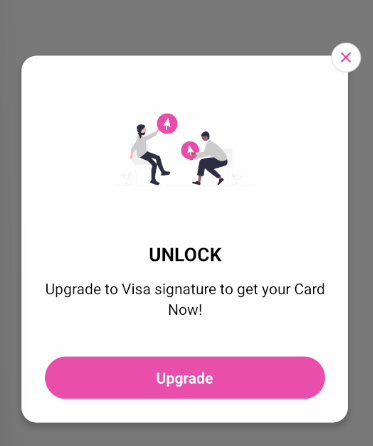
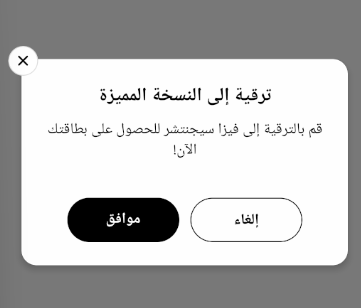

## Popup Documentation
The `Popup` is a versatile modal component designed for displaying important information, confirmations, or actions to users. It provides a customizable interface with support for background images, illustrations, titles, content text, and action buttons. The component is fully RTL-compatible and offers different variants for close button positioning.
### Usage
```tsx
import Popup from "@/components/Popup";
import { useTheme } from "../../theme";
const MyComponent = () => {
const [isVisible, setIsVisible] = useState(false);
const theme = useTheme();
const handleClose = () => setIsVisible(false);
const handlePrimaryAction = () => {
// Do something
handleClose();
};
return (
}
/>
);
};
```
### Illustration Example
```tsx
}
/>
```
### RTL
```tsx
```
### Props
| Prop | Type | Default | Description |
|------|------|---------|-------------|
| `visible` | `boolean` | Required | Controls the visibility of the popup |
| `onClose` | `() => void` | Required | Function to call when popup should be closed |
| `backgroundImage` | `ImageSourcePropType` | `undefined` | Optional background image for the popup |
| `title` | `string` | `undefined` | Main title text |
| `subtitle` | `string` | `undefined` | Subtitle text displayed below title |
| `content` | `string` | `undefined` | Main content text |
| `children` | `ReactNode` | `undefined` | Custom content to render inside the popup |
| `primaryButtonText` | `string` | `undefined` | Text for the primary action button |
| `onPrimaryButtonPress` | `() => void` | `undefined` | Function to execute when primary button is pressed |
| `secondaryButtonText` | `string` | `undefined` | Text for the secondary action button |
| `onSecondaryButtonPress` | `() => void` | `undefined` | Function to execute when secondary button is pressed |
| `closeOnBackdropPress` | `boolean` | `true` | Whether tapping outside the popup should close it |
| `showCloseIcon` | `boolean` | `false` | Whether to show the close icon button |
| `closeIconVariant` | `"floating" \| "nested"` | `"floating"` | Style variant for the close icon position |
| `customCloseIcon` | `ReactNode` | `undefined` | Custom component to use as close icon |
| `illustrationImage` | `ImageSourcePropType` | `undefined` | Image to display at the top of the content area |
| `isRTL` | `boolean` | `false` | Whether to render in right-to-left mode |
| `containerStyle` | `StyleProp` | `undefined` | Additional styles for the container |
| `contentContainerStyle` | `StyleProp` | `undefined` | Additional styles for the content container |
| `titleStyle` | `StyleProp` | `undefined` | Additional styles for the title text |
| `subtitleStyle` | `StyleProp` | `undefined` | Additional styles for the subtitle text |
| `contentStyle` | `StyleProp` | `undefined` | Additional styles for the content text |
| `primaryButtonStyle` | `StyleProp` | `undefined` | Additional styles for the primary button |
| `primaryButtonTextStyle` | `StyleProp` | `undefined` | Additional styles for the primary button text |
| `secondaryButtonStyle` | `StyleProp` | `undefined` | Additional styles for the secondary button |
| `secondaryButtonTextStyle` | `StyleProp` | `undefined` | Additional styles for the secondary button text |
| `closeIconContainerStyle` | `StyleProp` | `undefined` | Additional styles for the close icon container |
| `closeIconStyle` | `StyleProp` | `undefined` | Additional styles for the close icon |
| `illustrationStyle` | `StyleProp` | `undefined` | Additional styles for the illustration image |
### Close Icon Variants
- **Floating**: The close icon appears outside the popup's main border, creating a floating effect
- **Nested**: The close icon appears inside the popup's border in the top-right (or top-left in RTL mode)
### Related Components
- `Modal`: The native React Native component used as the foundation
- `ImageBackground`: Used when a background image is provided
- `TouchableOpacity`: Used for the buttons and close icon
- `Text`: Used for rendering text content