# Filters Component
A flexible, customizable bottom sheet filter component for React Native applications with support for sorting options, points range selection, brand filtering, and extensive styling options.
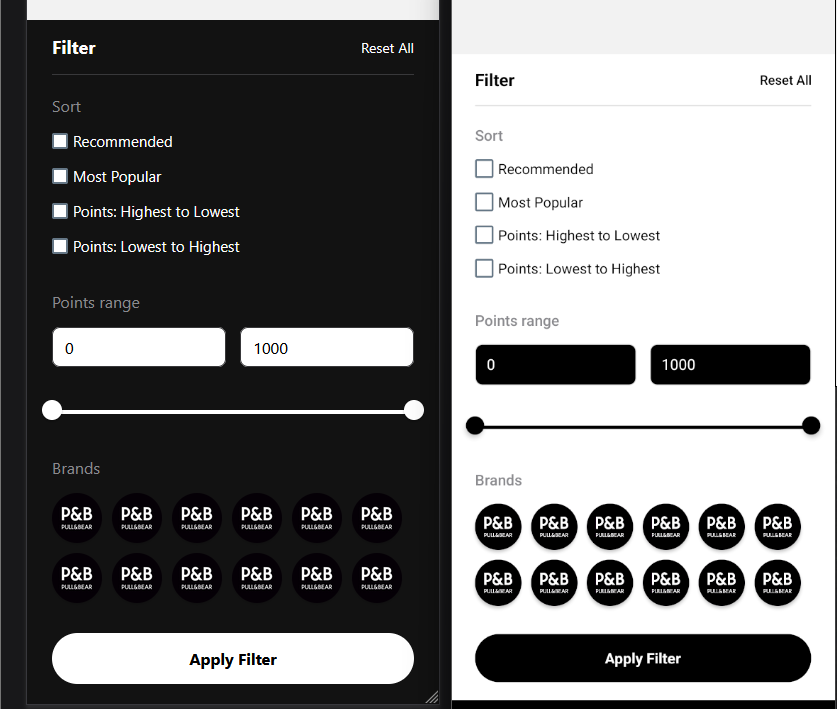
## Basic Usage
```jsx
import React from 'react';
import { View } from 'react-native';
import { Filters } from '@your-org/component-library';
const ExampleScreen = () => {
const sortOptions = [
{ id: 1, name: 'Price: Low to High', value: 'price_asc' },
{ id: 2, name: 'Price: High to Low', value: 'price_desc' },
];
const brands = [
{ id: '1', name: 'Brand A', logo: require('../assets/brandA.png') },
{ id: '2', name: 'Brand B', logo: require('../assets/brandB.png') },
];
const handleFilterApply = (result) => {
console.log('Applied filters:', result);
};
return (
);
};
export default ExampleScreen;
```
## Props
The `Filters` component provides extensive customization options through its props.
### Core Properties
| Prop | Type | Required | Default | Description |
|------|------|----------|---------|-------------|
| `onActionButtonPress` | `(result: FilterResult) => void` | ❌ | - | Function called when Apply Filter button is pressed |
| `sortOptions` | `SortOption[]` | ❌ | `[]` | Array of sorting options to display |
| `brands` | `Brand[]` | ❌ | `[]` | Array of brand options to display |
| `isRTL` | `boolean` | ❌ | `I18nManager.isRTL` | Whether to display in right-to-left mode |
### Layout & Sections Properties
| Prop | Type | Required | Default | Description |
|------|------|----------|---------|-------------|
| `sortSectionTitle` | `string` | ❌ | `"Sort"` | Title for the sorting section |
| `pointsRangeSectionTitle` | `string` | ❌ | `"Points range"` | Title for the points range section |
| `brandSectionTitle` | `string` | ❌ | `"Brands"` | Title for the brands section |
| `showPointsRange` | `boolean` | ❌ | `true` | Whether to display the points range section |
| `headerTitleText` | `string` | ❌ | `"Filter"` | Text for the header title |
| `headerResetText` | `string` | ❌ | `"Reset All"` | Text for the reset button |
| `applyButtonText` | `string` | ❌ | `"Apply Filter"` | Text for the apply button |
### Points Range Properties
| Prop | Type | Required | Default | Description |
|------|------|----------|---------|-------------|
| `rangeMinLimit` | `number` | ❌ | `0` | Minimum possible value for the range selector |
| `rangeMaxLimit` | `number` | ❌ | `1000` | Maximum possible value for the range selector |
| `rangeInitialMin` | `number` | ❌ | `0` | Initial minimum selected value |
| `rangeInitialMax` | `number` | ❌ | `1000` | Initial maximum selected value |
### Points Range Styling Properties
| Prop | Type | Required | Default | Description |
|------|------|----------|---------|-------------|
| `pointsRangeContainerStyle` | `ViewStyle` | ❌ | - | Style for the main points range container |
| `pointsRangeInputsContainerStyle` | `ViewStyle` | ❌ | - | Style for the inputs container in points range selector |
| `pointsRangeCustomInputContainerStyle` | `ViewStyle` | ❌ | - | Style for the custom input containers |
| `pointsRangeCustomInputFieldStyle` | `ViewStyle` | ❌ | - | Style for the input fields |
| `pointsRangeSliderContainerStyle` | `ViewStyle` | ❌ | - | Style for the slider container |
| `pointsRangeMultiSliderContainerStyle` | `ViewStyle` | ❌ | - | Style for the multi-slider container |
| `pointsRangeTrackStyle` | `ViewStyle` | ❌ | - | Style for the slider track |
| `pointsRangeSelectedTrackStyle` | `ViewStyle` | ❌ | - | Style for the selected portion of the track |
| `pointsRangeUnselectedTrackStyle` | `ViewStyle` | ❌ | - | Style for the unselected portions of the track |
| `pointsRangeMarkerStyle` | `ViewStyle` | ❌ | - | Style for slider markers |
| `pointsRangeMarkerEnabledStyle` | `ViewStyle` | ❌ | - | Style for enabled slider markers |
| `pointsRangeMarkerDisabledStyle` | `ViewStyle` | ❌ | - | Style for disabled slider markers |
| `pointsRangeMarkerDotStyle` | `ViewStyle` | ❌ | - | Style for the marker dots |
| `pointsRangeInputProps` | `Object` | ❌ | - | Additional props to pass to the range input fields |
| `pointsRangeMultiSliderProps` | `Object` | ❌ | - | Additional props to pass to the MultiSlider component |
### Brand Configuration Properties
| Prop | Type | Required | Default | Description |
|------|------|----------|---------|-------------|
| `brandActiveIcon` | `React.ReactNode` | ❌ | `` | Icon to show for selected brands |
| `brandActiveIconStyle` | `ViewStyle` | ❌ | - | Style for the active brand icon |
### Bottom Sheet Properties
| Prop | Type | Required | Default | Description |
|------|------|----------|---------|-------------|
| `bottomSheetIndex` | `number` | ❌ | `0` | Initial index for the bottom sheet |
| `snapPoints` | `string[]` | ❌ | `["50%", "90%"]` | Snap points for the bottom sheet |
| `handleIndicatorStyle` | `ViewStyle` | ❌ | - | Style for the bottom sheet handle indicator |
### Style Customization Properties
| Prop | Type | Required | Default | Description |
|------|------|----------|---------|-------------|
| `containerStyle` | `ViewStyle` | ❌ | - | Style for the main container |
| `headerStyle` | `ViewStyle` | ❌ | - | Style for the header |
| `titleStyle` | `TextStyle` | ❌ | - | Style for the header title |
| `resetTextStyle` | `TextStyle` | ❌ | - | Style for the reset text |
| `sectionStyle` | `ViewStyle` | ❌ | - | Style for all filter sections |
| `sortSectionStyle` | `ViewStyle` | ❌ | - | Style specifically for the sort section |
| `sectionTitleStyle` | `TextStyle` | ❌ | - | Style for section titles |
| `optionRowStyle` | `ViewStyle` | ❌ | - | Style for option rows in the sort section |
| `optionTextStyle` | `TextStyle` | ❌ | - | Style for option text in the sort section |
| `checkboxColor` | `string` | ❌ | `theme.secondary` | Color for checkboxes |
| `brandContainerStyle` | `ViewStyle` | ❌ | - | Style for the brands grid container |
| `applyButtonStyle` | `ViewStyle` | ❌ | - | Style for the apply button |
| `applyButtonTextStyle` | `TextStyle` | ❌ | - | Style for the apply button text |
| `bottomSheetStyle` | `ViewStyle` | ❌ | - | Style for the bottom sheet |
## Types
```typescript
type SortOption = {
name: string;
value: string;
id: number;
};
type Brand = {
id: string;
name: string;
logo: ImageSourcePropType;
};
type FilterResult = {
sort: SortOption[];
pointsRange: { min: number; max: number };
selectedBrands: Brand[];
};
```
## Examples
### Basic Filter with Sort Options Only
```jsx
handleSort(result.sort)}
/>
```
### Points Range Filter with Custom Limits
```jsx
handlePriceRange(result.pointsRange)}
/>
```
### Brand Selection with Custom Styling
```jsx
handleBrandFilter(result.selectedBrands)}
/>
```
### RTL Support with Custom Headers
```jsx
```