# Card Template Components
List of pre-defined template common based on app designs, the templates use the internal Card related components
## 1. Simple Trending Card
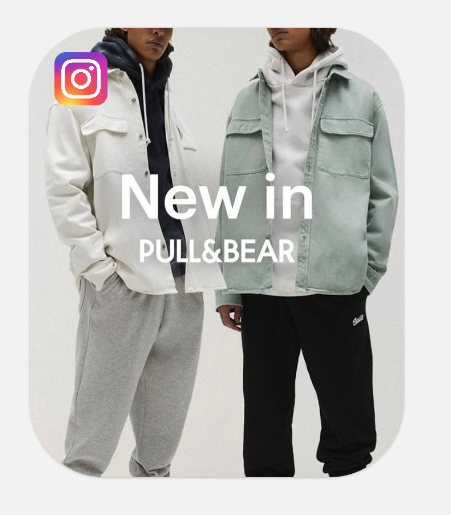
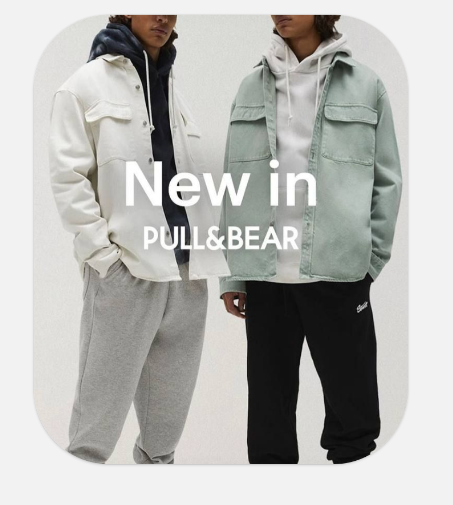
## SimpleTrendingCard Documentation
The `SimpleTrendingCard` is a customizable card component designed for displaying trending content with an optional icon. It leverages the base `Card` component and provides a sleek interface with background image support.
### Usage
```tsx
import SimpleTrendingCard from "@/components/Card/templates/SimpleTrendingCard";
import { Image } from "react-native";
const MyComponent = () => {
return (
}
onPress={()=>Alert.alert("Pressed")}
iconPosition="left"
/>
);
};
```
### Props
| Prop | Type | Default | Description |
|------|------|---------|-------------|
| `backgroundImage` | `ImageSourcePropType` | Required | The background image to display in the card |
| `icon` | `React.ReactNode` | `undefined` | Optional icon to display in the card header |
| `iconPosition` | `"left" \| "right"` | `"left"` | Position of the icon in the header |
| `shadowEffect` | `true \| false` | `true` | Shadow Effect displayed or not |
| `shadowOpacity` | `number` | `0.5` | Shadow Effect Opacity |
| `onPress` | `() => void` | `undefined` | Function to execute when the card is pressed |
| `style` | `StyleProp` | `undefined` | Additional styles to apply to the card |
### Features
- **Background Image**: The card displays a full-size background image with "cover" resize mode
- **Customizable Icon**: Optional icon that can be positioned on either the left or right side of the card header
- **Responsive Sizing**: Default dimensions of 250×300, which can be overridden with custom styles
- **Interactive**: Built-in touch handling through the `onPress` prop
### Related Components
- `Card`: The base component for all card layouts
- `CardHeader`: Handles the positioning of elements in the card header
# DealCardWithBackgroundImage
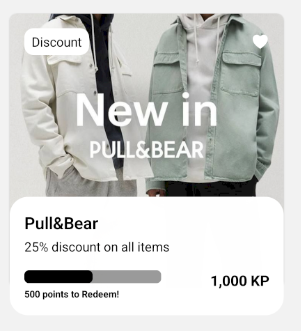
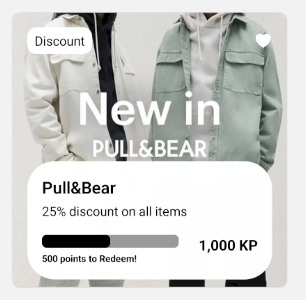
# DealCardWithBackgroundImage Documentation
The `DealCardWithBackgroundImage` is a versatile card component designed for displaying deals, offers, or promotions with rich customization options. It features a background image, customizable labels, action icons, inner card content, and optional progress bar. As well as choosing between a floating or nested inner card.
## Usage
```tsx
import DealCardWithBackgroundImage from "@/components/Card/templates/DealCardWithBackgroundImage";
import { Image } from "react-native";
import { HeartIcon, HeartFilledIcon } from "@/components/Icons";
const MyComponent = () => {
return (
}
actionIconActive={
}
innerCardVariant="floating"
onActionPress={(active) => console.log(active)}
dealProviderName="Pull&Bear"
dealDescription="25% discount on all items"
progressBar={true}
progressBarText="500 points to Redeem!"
progressBarTextPosition="below"
remainingProgressColor="rgba(0, 0, 0, 0.4)"
dealPrice="1,000 KP"
/>
);
};
```
## Props
| Prop | Type | Default | Description |
|------|------|---------|-------------|
| `backgroundImage` | `ImageSourcePropType` | Required | The background image to display in the card |
| `label` | `string` | `undefined` | Optional label text to display in the upper left corner |
| `labelStyle` | `StyleProp` | `undefined` | Custom styles for the label text |
| `labelContainerStyle` | `StyleProp` | `undefined` | Custom styles for the label container |
| `actionIconDefault` | `React.ReactNode` | `undefined` | Icon to display when action is inactive (e.g., unfavorited) |
| `actionIconActive` | `React.ReactNode` | `undefined` | Icon to display when action is active (e.g., favorited) |
| `onActionPress` | `(active: boolean) => void` | `undefined` | Function to execute when the action icon is pressed |
| `innerCardStyle` | `StyleProp` | `undefined` | Additional styles for the inner card |
| `innerCardVariant` | `"floating" \| "nested"` | `"nested"` | The style variant for the inner card |
| `dealDescription` | `string` | `undefined` | Description text for the deal |
| `dealDescriptionStyle` | `StyleProp` | `undefined` | Custom styles for the deal description |
| `dealProviderName` | `string` | `undefined` | Name of the deal provider |
| `dealProviderNameStyle` | `StyleProp` | `undefined` | Custom styles for the provider name |
| `dealPrice` | `string` | `undefined` | Price text for the deal |
| `dealPriceStyle` | `StyleProp` | `undefined` | Custom styles for the price text |
| `progressBar` | `boolean` | `undefined` | Whether to show a progress bar |
| `progressBarText` | `string` | `undefined` | Text to display with the progress bar |
| `progressBarTextPosition` | `ProgressBarTextPosition` | `undefined` | Position of the progress bar text |
| `progressBarTextAlign` | `ProgressBarTextAlign` | `undefined` | Alignment of the progress bar text |
| `progressColor` | `string` | `undefined` | Color of the progress indicator |
| `progressWidth` | `number` | `undefined` | Width of the progress bar |
| `progressHeight` | `number` | `undefined` | Height of the progress bar |
| `remainingProgressColor` | `string` | `undefined` | Color of the unfilled portion of the progress bar |
| `progressValue` | `number` | `undefined` | Value between 0 and 1 representing progress |
| `onPress` | `() => void` | `undefined` | Function to execute when the card is pressed |
| `style` | `StyleProp` | `undefined` | Additional styles to apply to the card |
| `width` | `number` | `300` | Width of the card in pixels |
| `isRTL` | `boolean` | `false` | Whether to render the component in right-to-left mode for RTL languages |
| `overlayVisible` | `boolean` | `false` | Whether to show a lock overlay on the card |
| `overlayCover` | `"all" \| "background"` | `"background"` | Controls which part of the card the overlay covers |
## Inner Card Variants
- **Nested**: The inner card sits within the main card's boundaries
- **Floating**: The inner card extends beyond the bottom edge of the main card, creating a floating effect
## Related Components
- `Card`: The base component for all card layouts
- `CardHeader`: Handles the positioning of elements in the card header
- `CardContent`: Contains the main content of the card
- `CardFooter`: Displays the progress bar and price at the bottom of the inner card
- `ProgressBar`: Shows completion or availability status visually
- `LockOverlay`: Displays a lock overlay when the `overlayVisible` prop is true
# DealCard
# DealCard Documentation
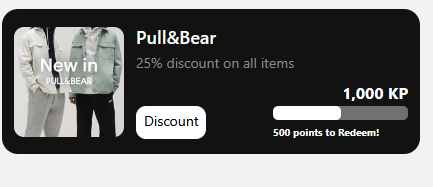
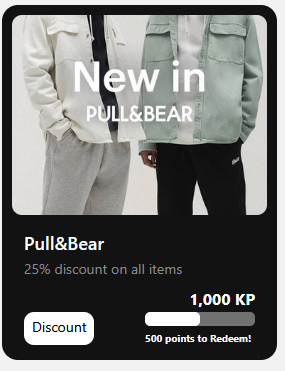
The `DealCard` is a versatile card component designed for displaying deals or offers in either horizontal or vertical orientation. It features an image, customizable labels, descriptive text, pricing information, and an optional progress bar.
## Usage
```tsx
import DealCard from "@/components/Card/templates/DealCard";
import { Alert } from "react-native";
const MyComponent = () => {
return (
);
};
```
## Props
| Prop | Type | Default | Description |
|------|------|---------|-------------|
| `imageSource` | `ImageSourcePropType` | Required | The image to display in the card |
| `variant` | `"vertical" \| "horizontal"` | `"horizontal"` | Layout orientation of the card |
| `label` | `string` | `undefined` | Optional label text to display |
| `labelStyle` | `StyleProp` | `undefined` | Custom styles for the label text |
| `labelContainerStyle` | `StyleProp` | `undefined` | Custom styles for the label container |
| `dealDescription` | `string` | `undefined` | Description text for the deal |
| `dealDescriptionStyle` | `StyleProp` | `undefined` | Custom styles for the deal description |
| `dealProviderName` | `string` | `undefined` | Name of the deal provider |
| `dealProviderNameStyle` | `StyleProp` | `undefined` | Custom styles for the provider name |
| `dealPrice` | `string` | `undefined` | Price text for the deal |
| `dealPriceStyle` | `StyleProp` | `undefined` | Custom styles for the price text |
| `progressBar` | `boolean` | `undefined` | Whether to show a progress bar |
| `progressBarText` | `string` | `undefined` | Text to display with the progress bar |
| `progressBarTextPosition` | `ProgressBarTextPosition` | `undefined` | Position of the progress bar text |
| `progressBarTextAlign` | `ProgressBarTextAlign` | `undefined` | Alignment of the progress bar text |
| `progressColor` | `string` | `undefined` | Color of the progress indicator |
| `progressWidth` | `number` | `undefined` | Width of the progress bar |
| `progressHeight` | `number` | `undefined` | Height of the progress bar |
| `remainingProgressColor` | `string` | `undefined` | Color of the unfilled portion of the progress bar |
| `progressValue` | `number` | `undefined` | Value between 0 and 1 representing progress |
| `onPress` | `() => void` | `undefined` | Function to execute when the card is pressed |
| `style` | `StyleProp` | `undefined` | Additional styles to apply to the card |
| `width` | `number \| string` | `undefined` | Width of the card in pixels or as a percentage |
| `isRTL` | `boolean` | `false` | Whether to render the component in right-to-left mode for RTL languages |
| `overlayVisible` | `boolean` | `false` | Whether to show a lock overlay on top of the image |
## Layout Variants
- **Horizontal**: Image appears on the left side with content to the right
- **Vertical**: Image appears on top with content below
## Related Components
- `Card`: The base component used for the overall container
- `CardHeader`: Displays the provider name and deal description
- `CardFooter`: Contains the label and progress bar
- `ProgressBar`: Shows completion or availability status visually
- `LockOverlay`: Displays a lock overlay when the `overlayVisible` prop is true