 At its core, `redux-entity` is just a [reducer](https://redux.js.org/basics/reducers) that utilizes a specialized [thunk](https://github.com/reduxjs/redux-thunk#whats-a-thunk), which is designed to handle asynchronous actions in the form of a [Promise](https://developer.mozilla.org/en-US/docs/Web/JavaScript/Reference/Global_Objects/Promise).
Most web applications need to handle a variety of domain entities such as orders, products, users, etc. This library was designed to manage these objects within Redux in a predictable and scalable way.
At its core, `redux-entity` is just a [reducer](https://redux.js.org/basics/reducers) that utilizes a specialized [thunk](https://github.com/reduxjs/redux-thunk#whats-a-thunk), which is designed to handle asynchronous actions in the form of a [Promise](https://developer.mozilla.org/en-US/docs/Web/JavaScript/Reference/Global_Objects/Promise).
Most web applications need to handle a variety of domain entities such as orders, products, users, etc. This library was designed to manage these objects within Redux in a predictable and scalable way.
- [Demos](#demo)
- [Installation](#installation)
- [Getting Started](#getting-started)
- [Integrate into Redux](#integrate-into-redux)
- [GetEntity(key, promise, options)](#GetEntity-promise-options)
- [Redux Store](#redux-store)
- [Detailed Usage](#detailed-usage)
- [Configuration Options](#configuration-options)
- [Additional Thunks](#additional-thunks)
## Demos
- [CodeSandbox](https://codesandbox.io/s/redux-entity-reset-delete-h94yo)
- [Live Demo via `react-boilerplate`](http://mikechabot.github.io/react-boilerplate)
> Check out the demo repository at https://github.com/mikechabot/react-boilerplate
## Install
`$ npm install redux-entity`
`$ yarn add redux-entity`
## Getting Started
The API is very simplistic; a thunk called [`GetEntity`](#GetEntity-promise-options) is exposed, which does all the heavy lifting.
> Every entity you fetch is automatically associated with the following properties to ensure predictability. No need to track these yourself.
```typescript
interface EntityState {
/** Data returned from the resolved promise */
data?: any;
/** Error returned from the rejected promise */
error?: Error;
/** Whether the entity promise is pending */
isFetching: boolean;
/** Timestamp of the promise's last resolution or rejection */
lastUpdated?: Date;
}
```
#### Integrate into Redux
To get started, import the `reducer` from `redux-entity`, and combine with your existing reducers.
> By default, we're carving out a space in the Redux tree with the key of `entities`, but you can rename it to whatever you'd like.
```javascript
// root-reducer.ts
import { reducer as entities } from 'redux-entity';
import { combineReducers } from 'redux';
export default combineReducers({
...,
entities
});
```
Now we're ready to use [`GetEntity`](#GetEntity-promise-options).
#### `GetEntity(key, promise, options)`
When using `GetEntity`, you only need to provide two elements: a key to uniquely identify the entity, and a promise to fetch the data.
```javascript
import { GetEntity } from 'redux-entity';
import OrderService from './services/order-service';
const key = 'orders';
const promise = OrderService.getOrders();
export const loadOrders = () => GetEntity(key, promise);
```
#### Redux Store
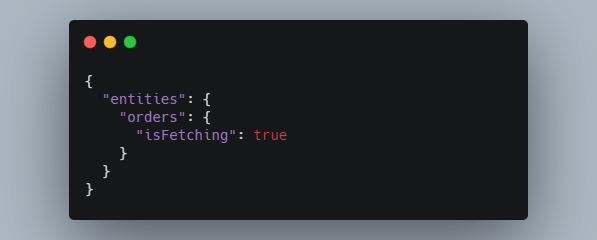
Let's take a look at what the Redux store looks like when `loadOrders` is invoked.
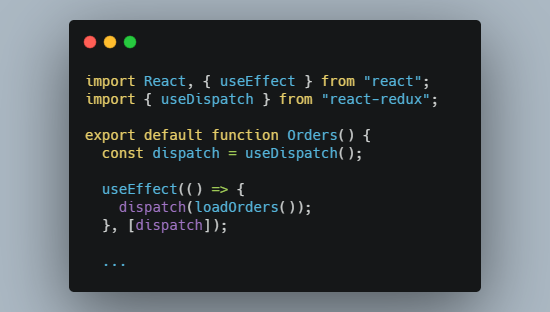
> In the context of React, let's say we have an `` component; when the component mounts, we'll want to fetch our data.
> See [Detailed Usage](#detailed-usage) for the full React component.
 While `loadOrders` is pending, `isFetching` is set to true:
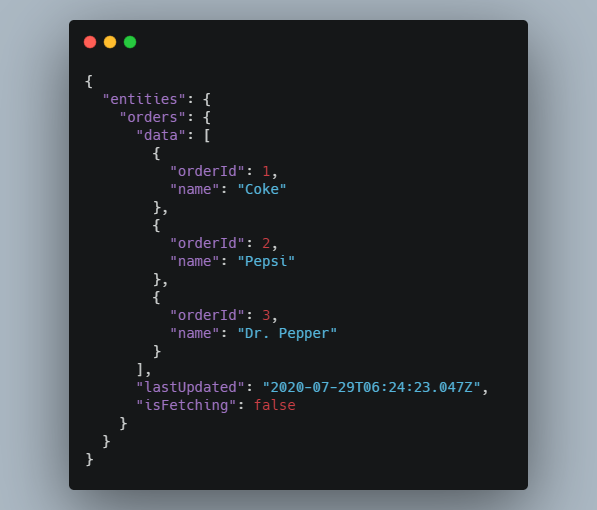
 If `loadOrders` **succeeds**, the results are stamped on the store at `entities.orders.data`, and `lastUpdated` is set:
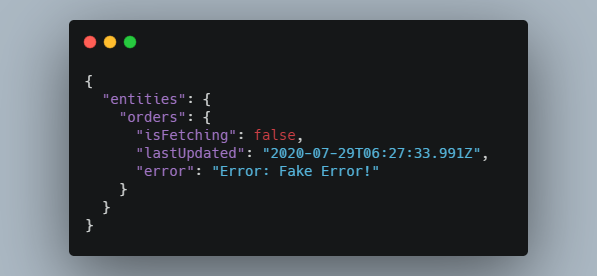
 If `loadOrders` **fails**, the results are stamped on the store at `entities.orders.error`, and `lastUpdated` is set:
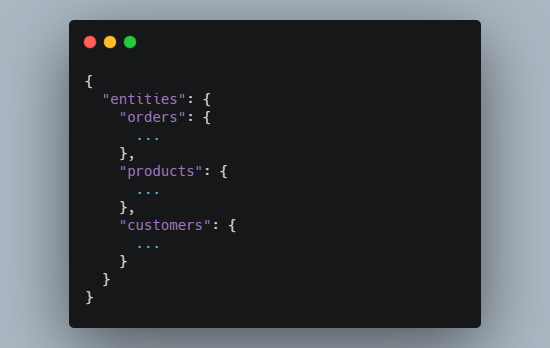
 If we need to load more entities, we just create additional thunks with [`GetEntity`](#GetEntity-promise-options), and invoke them as described above.
> Every entity we fetch will be stamped on the `entities` tree.
If we need to load more entities, we just create additional thunks with [`GetEntity`](#GetEntity-promise-options), and invoke them as described above.
> Every entity we fetch will be stamped on the `entities` tree.
 ---
## Detailed Usage
The guide below assumes you've already injected the Redux store into your React application.
#### 1. Configure the root reducer
Follow along with [Integrate into Redux](#integrate-into-redux) to integrate the reducer into your existing Redux store.
#### 2. Create a custom thunk
Create a thunk using `GetEntity`. You only need to provide a key that uniquely identifies the entity, and a data promise.
> You can optionally pass a configuration to `GetEntity`. See [Configuration](#configuration-options):
```javascript
import { GetEntity } from 'redux-entity';
import OrderService from './services/order-service';
const entityKey = 'orders';
const promise = OrderService.getOrders();
export const loadOrders = () => GetEntity(key, promise);
```
#### 3. Create a React component
Here's a full React component that utilizes our `loadOrders` example. At this point, `loadOrders` is no different than any other Redux thunk.
> Check out the [CodeSandbox](https://codesandbox.io/s/redux-entity-mrk5u)
```javascript
import React, { useEffect } from 'react';
import { useSelector, useDispatch } from 'react-redux';
import { loadOrders } from './utils';
import Buttons from './Buttons';
import State from './State';
export default function Orders() {
const dispatch = useDispatch();
useEffect(() => {
dispatch(loadOrders());
}, [dispatch]);
const { orders } = useSelector((state) => state.entities);
let body, isFetching;
if (orders) {
isFetching = orders.isFetching;
const { data, error } = orders;
if (isFetching) {
body = 'Fetching Orders...';
} else if (error) {
body = error.message;
} else if (data) {
body = `Found ${orders.data.length} Orders!`;
}
}
return (
---
## Detailed Usage
The guide below assumes you've already injected the Redux store into your React application.
#### 1. Configure the root reducer
Follow along with [Integrate into Redux](#integrate-into-redux) to integrate the reducer into your existing Redux store.
#### 2. Create a custom thunk
Create a thunk using `GetEntity`. You only need to provide a key that uniquely identifies the entity, and a data promise.
> You can optionally pass a configuration to `GetEntity`. See [Configuration](#configuration-options):
```javascript
import { GetEntity } from 'redux-entity';
import OrderService from './services/order-service';
const entityKey = 'orders';
const promise = OrderService.getOrders();
export const loadOrders = () => GetEntity(key, promise);
```
#### 3. Create a React component
Here's a full React component that utilizes our `loadOrders` example. At this point, `loadOrders` is no different than any other Redux thunk.
> Check out the [CodeSandbox](https://codesandbox.io/s/redux-entity-mrk5u)
```javascript
import React, { useEffect } from 'react';
import { useSelector, useDispatch } from 'react-redux';
import { loadOrders } from './utils';
import Buttons from './Buttons';
import State from './State';
export default function Orders() {
const dispatch = useDispatch();
useEffect(() => {
dispatch(loadOrders());
}, [dispatch]);
const { orders } = useSelector((state) => state.entities);
let body, isFetching;
if (orders) {
isFetching = orders.isFetching;
const { data, error } = orders;
if (isFetching) {
body = 'Fetching Orders...';
} else if (error) {
body = error.message;
} else if (data) {
body = `Found ${orders.data.length} Orders!`;
}
}
return (
{body}
);
}
```
---
## Configuration Options
Optionally pass a configuration with any of the following properties:
| Argument | Default | Description |
| ------------ | ----------- | ----------------------------------------------------------------------------------------------------------------------------------------------------------------------------------------------- |
| `silent` | `false` | If `true`, don't toggle `isFetching` when the thunk is invoked |
| `append` | `false` | If `true`, append the results of each invocation to the existing `data` property instead of overwriting it |
| `processors` | `undefined` | Hook into the `GetEntity` lifecycle. Each processor has access to Redux's `dispatch` and `getState` along with either the `data` or `error` object of the entity. See [Processors](#processors) |
The options configuration must adhere to the following interface:
```typescript
interface ReduxEntityOptions {
[OptionKey.Silent]?: boolean;
[OptionKey.Append]?: boolean;
[OptionKey.Processors]?: Processors;
}
enum OptionKey {
Silent = 'silent',
Append = 'append',
Processors = 'processors',
}
```
#### Example Configurations
Simple configuration:
```javascript
const key = 'orders';
const promise = OrderService.getOrders();
const options = { silent: true, append: true };
export const loadOrders = () => GetEntity(key, promise, options);
```
Dynamically pass a configuration:
```javascript
const key = 'orders';
const promise = OrderService.getOrders();
export const loadOrders = (options) => GetEntity(key, promise, options);
```
---
#### Processors
Processors are optional and in most cases won't be needed, however you can take additional action when an entity's promise either resolves or rejects by hooking into the processors below.
| Processor | When is this executed? |
| --------------- | ----------------------------------------------------------------------------------------------------- |
| `beforeSuccess` | After promise resolution, but _before_ `data` is dispatched to the store. **Must** return `any` |
| `afterSuccess` | After promise resolution, and _after_ the store has been updated |
| `beforeFailure` | After promise rejection, but _before_ the `error` is dispatched to the store. **Must** return `error` |
| `afterFailure` | After promise rejection, and _after_ the store has been updated |
The processor object must adhere to the following interface:
```typescript
type Processors = {
[key in ProcessorType]?: (
data: any,
dispatch: ThunkDispatch,
getState: GetState
) => any | void;
};
enum ProcessorType {
BeforeSuccess = 'beforeSuccess',
AfterSuccess = 'afterSuccess',
BeforeFailure = 'beforeFailure',
AfterFailure = 'afterFailure',
}
```
Configuration with processors:
```javascript
const key = 'orders';
const promise = OrderService.getOrders();
const options = {
silent: true,
processors: {
beforeSuccess: (data, dispatch, getState) => {
// Do synchronous stuff
// *Must* return data to be dispatched to the store
return Object.keys(data);
},
beforeFailure: (error, dispatch, getState) => {
// Do synchronous stuff
// *Must* return an error to the dispatched to the store
return new Error('Intercepted error!');
},
},
};
export const loadOrders = () => GetEntity(key, promise, options);
```
---
## Additional Thunks
The following actions can be use to reset or delete your entity.
> Check out the [Demos](#demo) to see these in action.
| Action creator | Description |
| -------------: | :-------------------------------------------------------------------- |
| `ResetEntity` | Reset the entity to the original `EntityState`, and set `lastUpdated` |
| `DeleteEntity` | Delete the entity from `state` |
#### Example usage
> Check out the [CodeSandbox](https://codesandbox.io/s/redux-entity-reset-delete-h94yo)
```javascript
import React, { useEffect } from 'react';
import { useSelector, useDispatch } from 'react-redux';
import Buttons from './Buttons';
import State from './State';
import { loadOrders } from './utils';
export default function App() {
const { orders } = useSelector((state) => state.entities);
const dispatch = useDispatch();
useEffect(() => {
dispatch(loadOrders());
}, [dispatch]);
let body, isFetching;
if (orders) {
isFetching = orders.isFetching;
const { data, error } = orders;
if (isFetching) {
body = Fetching Orders...;
} else if (error) {
body = {error.message};
} else if (data) {
body = `Found ${orders.data.length} Orders!`;
} else {
body = 'No Data!';
}
} else {
body = 'No Entity!';
}
return (
);
}
```


