# react stepzilla [](https://badge.fury.io/js/react-stepzilla)
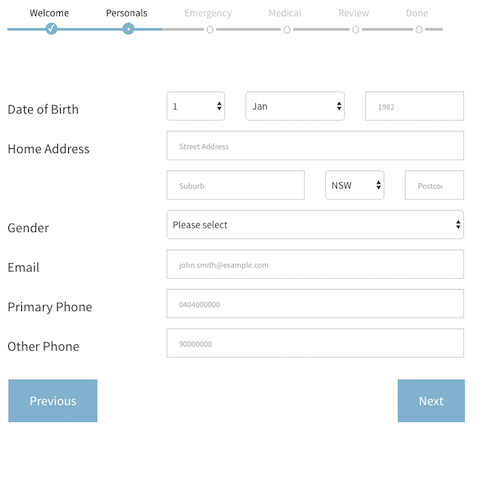
is a multi-step, wizard component for sequential data collection. It basically lets you throw a bunch of react components at it (data forms, text / html components etc) and it will take the user through those components in steps. If it's a data-entry form it can trigger validation and only proceed if the data is valid.
#### :tada: whats new:
```
v4.7.2: optimised react, react-dom dependency loading (peerDependencies)
v4.5.0: ported to react and react-dom 15.5.4
v4.3.0: now supporting higer order component based validation via react-validation-mixin!
v4.2.0: now supporting pure, dumb components!
```
### what does it do?
something like this of course:
### better yet, have a look at a live example
:metal::metal::metal::metal::metal::metal::metal:
Full example usage code is available in the `src/examples` directory. Have a look at a [live working version here](https://newbreedofgeek.github.io/react-stepzilla/)
### get started
- run
```
npm install --save react-stepzilla
```
- require into your project via
```
var StepZilla = require('react-stepzilla')
```
- define the list of all the components* you want to step through. The `name` indicates the title of the UI step and component is what loads.
```
const steps =
[
{name: 'Step 1', component: },
{name: 'Step 2', component: },
{name: 'Step 3', component: },
{name: 'Step 4', component: },
{name: 'Step 5', component: }
]
```
*as of v4.2.0 you can also use Pure Components but they wont support validation, see Step2.js in the examples directory for more info.*
- and now render it out somewhere in your app
```
```
- pass in following options as well if you want to customise it further
```
// hide or show Next and Previous Buttons at the bottom
showNavigation: true | false
// disable or enable the steps UI navigation on top
showSteps: true | false
// disable or enable onClick step jumping from the UI navigation on top
stepsNavigation: true | false
// show or hide the previous button in the last step (maybe the last step is a thank you message and you don't want them to go back)
prevBtnOnLastStep: true | false
// dev control to disable validation rules called in step components **
dontValidate: true | false
// by default if you hit the Enter key on any element it validates the form and moves to next step if validation passes. Use this to prevent this behaviour
preventEnterSubmission: true | false
// specify what step to start from in the case you need to skip steps (send in a 0 based index for the item in the steps array. e.g. 2 will load initially)
startAtStep: [stepIndex]
// specify the next button text (if not given it defaults to "Next")
nextButtonText: "Siguiente"
// specify the back button text (if not given it default to "Previous")
backButtonText: "Espalda"
// specify the next button class (if not given it defaults to "btn btn-prev btn-primary btn-lg" which depends on bootstrap)
nextButtonCls: "btn btn-prev btn-primary btn-lg pull-right"
// specify the back button text (if not given it default to "btn btn-next btn-primary btn-lg")
backButtonCls: "btn btn-next btn-primary btn-lg pull-left"
// specify what the next button text should be in the step before the last (This is usually the last "Actionable" step. You can use this option to change the Next button to say Save - if you save the form data collected in previous steps)
nextTextOnFinalActionStep: "Save"
// its recommended that you use basic javascript validation (i.e simple validation implemented inside your step component. But stepzilla steps can also use 'react-validation-mixin' which wraps your steps as higher order components. If you use this then you need to specify those steps indexes that use 'react-validation-mixin' below in this array)
hocValidationAppliedTo: [1, 2]
// function, which is called every time the index of the current step changes (it uses a zero based index)
onStepChange: (step) => console.log(step)
```
example options usage:
```
```
- *if one of your components is a form that requires validation before moving to the next component, then that component needs to implement a `isValidated()` public method which validates the form and returns true/false if the data is valid. For an e.g. on this have a look at the `src/examples/Step3` component.*
- *validation can also be Async and therefore Promise based. This is useful if you do server side validation or you want to save data to a server and only proceed if it was a success. For an e.g. on this have a look at the `src/examples/Step5` component.*
- *also if you want some default style, copy the source from `src/css/main.css` code into your project (the above look in the picture also requires bootstrap)*
- *check out `src/examples/` for how `onStepChange` can be used to persist last known step state across browser reloads (using `startAtStep` pulled from session storage)*
#### jumpToStep() utility
- stepzilla injects an utility method called `jumpToStep` as a prop into all your react step components
- this utility methods lets you jump between steps from inside your react component
e.g.
`this.props.jumpToStep(2)` will jump to your 3rd step (it uses a zero based index)
- check out `src/examples/Step2` for an actual usage example
- important!! this jumpToStep() utility method will not validate data! so use with caution. its only meant to be a utility to break from the standard flow of steps
#### step validation
- your individual react steps can implement some checks to prevent moving onto the next step, this is called "validation" in stepzilla.
- to use this feature, you need to implement a public `isValidated()` method in your react step component.
- this `isValidated()` method can return a static `true/false` (true to proceed and false to prevent). It can also return a `Promise` which in turn should `resolve` or `reject` (which maps to the static `true/false` behaviour)
- stepzilla also supports advanced form validation via `react-validation-mixin`
- check out sample code in the `src/examples` directory. (Step3.js and Step4.js show you all this in action)
### dev
- all node source is in src/main.js
- you need to install dependencies first `npm install`
- make any changes and run `npm run build` to transpile the jsx into `dist`
- the transpilation is run as an auto pre-publish task so it should usually be up to date when consumed via npm
- `npm run build-example` builds and packs the example app into the 'docs' folder so it can be accessed via ghpages
### run and view example in browser
A full example is found in the `src/examples` directory.
- run `npm install`
- then run `npm run example`
- then go to `http://localhost:8080/webpack-dev-server/src/examples/index.html` in your browser
- hot reload will work as you dev
### tests
- tests are written in the mocha, chai, sinon, enzyme stack
- located in the 'tests' folder and supports es6
- run the `npm run test` command run tests
- run the `npm run test:watch` command run test in watch mode
### code test coverage
- test coverage is done via istanbul
- run the `npm run test:coverage` command to generate full coverage report (shown in terminal and as lcov report in coverage directory)
- all code is run against coverage, not just the unit tested modules
- test coverage improvement is currently a work in progress
Current coverage sitting at v4.7.2:
```
Statements : 87.43% ( 160/183 ), 11 ignored
Branches : 76.07% ( 124/163 ), 23 ignored
Functions : 84.78% ( 39/46 ), 3 ignored
Lines : 83.33% ( 105/126 )
```
### dev todo
- ~~write the tests~~
- improve code coverage
### community dev tips
our brilliant community sometimes solves implementation issues themselves, head over to the [Useful Dev Tips](https://github.com/newbreedofgeek/react-stepzilla/wiki/Useful-Dev-Tips) page for a curated list of the most useful tips. For e.g. ***How to persist Step State on "Previous/Back" button click*** or ***How to hide navigation buttons in some steps***
### help us improve stepzilla?
do you have any ideas for new features or improvements to stepzilla? we would love to hear from you. head over to the [issues section here](https://github.com/newbreedofgeek/react-stepzilla/issues) and raise a new thread about what you would like. make sure you include some use cases for your request, or ***upvote*** [existing community requests here](https://github.com/newbreedofgeek/react-stepzilla/issues?q=is%3Aissue+is%3Aopen+label%3A%22UpVotes+Needed%22)
### known issues
- open bugs [are here](https://github.com/newbreedofgeek/react-stepzilla/issues?utf8=%E2%9C%93&q=is%3Aissue%20is%3Aopen%20label%3Abug)
#### change log
- change log [is here](https://github.com/newbreedofgeek/react-stepzilla/wiki/Change-Log)