# react-schema-viewer
---
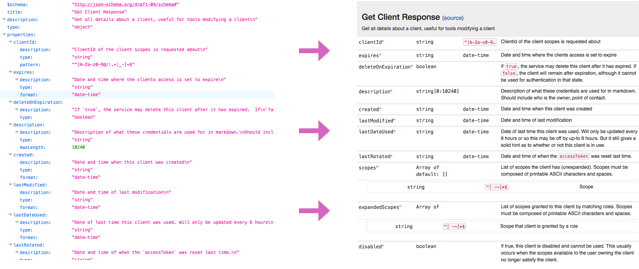
React Schema Viewer takes a schema as input and uses it to generate comprehensible views.
It has full support for Joi and JSON schema (version 3 and 4).
## SchemaTable
### Props
| Property | Type | Required? | Description |
|-------------------------|----------------------------|-----------|---------------------------------------------------------------------------------------------------|
| `schema` | Object | ✓ | A JSON schema object. |
| `headerBackgroundColor` | string | - | The header background color given that a schema title is provided. Default: 'rgb(245, 245, 245)'. |
| `maxHeight` | string | - | Max height of the panel. Default: '100%'. |
## JoiSchemaTable
### Props
| Property | Type | Required? | Description |
|-------------------------|----------------------------|-----------|---------------------------------------------------------------------------------------------------|
| `schema` | Object | ✓ | A Joi schema object. |
| `headerBackgroundColor` | string | - | The header background color given that a schema title is provided. Default: 'rgb(245, 245, 245)'. |
| `maxHeight` | string | - | Max height of the panel. Default: '100%'. |
### Usage
react-schema-viewer is an ES-compatible module, so it can be imported as expected. If you want to use it with CJS require, you'll need to use the .default property to access the default exports:
_Example: Importing SchemaTable_
```js
// CJS require
const SchemaTable = require('react-schema-viewer/lib/SchemaTable').default;
// ES module
import SchemaTable from 'react-schema-viewer/lib/SchemaTable';
```
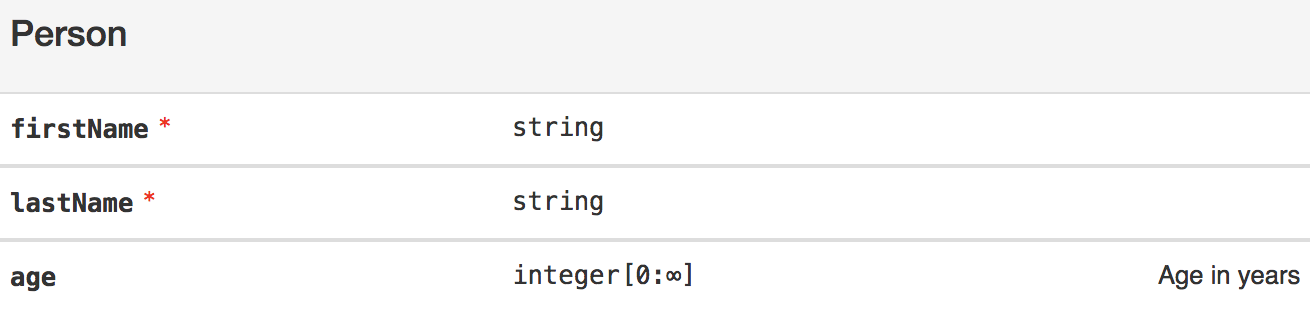
_Example: Rendering a JSON schema:_
```js
import React from 'react';
import { render } from 'react-dom';
import SchemaTable from 'react-schema-viewer/lib/SchemaTable';
const jsonSchema = {
'title': 'Person',
'type': 'object',
'properties': {
'firstName': {
'type': 'string'
},
'lastName': {
'type': 'string'
},
'age': {
'description': 'Age in years',
'type': 'integer',
'minimum': 0
}
},
'required': ['firstName', 'lastName']
};
render((
), document.getElementById('root'));
````
_Example: Rendering a Joi object schema:_
```js
import React from 'react';
import { render } from 'react-dom';
import JoiSchemaTable from 'react-schema-viewer/lib/JoiSchemaTable';
joi.object({
firstName: joi.string().required(),
lastName: joi.string().required(),
age: joi.number().integer().min(0).description('Age in years'),
}).label('Person');
render((
), document.getElementById('root'));
````
## Development and Contributing
This repository uses [Neutrino](https://neutrino.js.org) and [neutrino-preset-react-components](https://github.com/eliperelman/neutrino-preset-react-components/) for developing, previewing, and building React components. To get started:
- Fork and clone this repo.
- Install the dependencies with `yarn`.
- Start the development servers with `yarn start`.
- Use CTRL-C to exit the development server.
- Use `yarn build` to generate the compiled component for publishing to npm.
Feel free to open an issue, submit a pull request, or contribute however you would like. Understand that this
documentation is still a work in progress, so file an issue or submit a PR to ask questions or make improvements.
Thanks!
## License
react-schema-viewer is released as [MPL 2.0](http://mozilla.org/MPL/2.0/).