# react-open-weather-map
Yet another **React Weather** component based on [OpenWeatherMap's API](http://openweathermap.org/current)
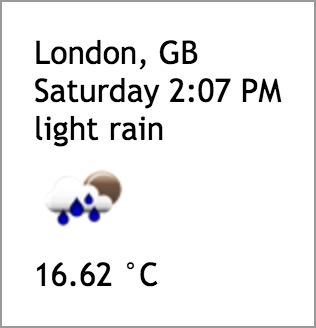 ## Usage
Npm install using the following command:
```
npm i react-open-weather-map
```
And use it inside your **React** app:
```javascript
import OpenWeatherMap from 'react-open-weather-map';
const props = { data: sample }; // info: sample is the response object from the OpenWeatherMap's API
```
Data sample:
```json
{
"weather": {
"coord": {
"lon": -0.13,
"lat": 51.51
},
"weather": [
{
"id": 500,
"main": "Rain",
"description": "light rain",
"icon": "10n"
}
],
"base": "cmc stations",
"main": {
"temp": 16.62,
"pressure": 1013,
"humidity": 88,
"temp_min": 15,
"temp_max": 18.5
},
"wind": {
"speed": 3.6,
"deg": 250
},
"rain": {
"3h": 0.215
},
"clouds": {
"all": 32
},
"dt": 1473541622,
"sys": {
"type": 1,
"id": 5091,
"message": 0.0107,
"country": "GB",
"sunrise": 1473485363,
"sunset": 1473531820
},
"id": 2643743,
"name": "London",
"cod": 200
}
}
```
## Config
The component accepts a config object that can be used in order to specify:
name | type | default | description
--- | --- | --- | ---
containerClassName | string | 'react-open-weather-map' | the container class name
```javascript
import OpenWeatherMap from 'react-open-weather-map';
const config = { containerClassName: 'open-weather-map-container-class-name' };
```
## Example
Clone or download this GitHub repository then run the example app using the following npm commands:
```
npm i
npm run example
```
## Usage
Npm install using the following command:
```
npm i react-open-weather-map
```
And use it inside your **React** app:
```javascript
import OpenWeatherMap from 'react-open-weather-map';
const props = { data: sample }; // info: sample is the response object from the OpenWeatherMap's API
```
Data sample:
```json
{
"weather": {
"coord": {
"lon": -0.13,
"lat": 51.51
},
"weather": [
{
"id": 500,
"main": "Rain",
"description": "light rain",
"icon": "10n"
}
],
"base": "cmc stations",
"main": {
"temp": 16.62,
"pressure": 1013,
"humidity": 88,
"temp_min": 15,
"temp_max": 18.5
},
"wind": {
"speed": 3.6,
"deg": 250
},
"rain": {
"3h": 0.215
},
"clouds": {
"all": 32
},
"dt": 1473541622,
"sys": {
"type": 1,
"id": 5091,
"message": 0.0107,
"country": "GB",
"sunrise": 1473485363,
"sunset": 1473531820
},
"id": 2643743,
"name": "London",
"cod": 200
}
}
```
## Config
The component accepts a config object that can be used in order to specify:
name | type | default | description
--- | --- | --- | ---
containerClassName | string | 'react-open-weather-map' | the container class name
```javascript
import OpenWeatherMap from 'react-open-weather-map';
const config = { containerClassName: 'open-weather-map-container-class-name' };
```
## Example
Clone or download this GitHub repository then run the example app using the following npm commands:
```
npm i
npm run example
```