## Please take a look at this [issue](https://github.com/alinz/react-native-webview-bridge/issues/109) first
# React Native WebView Javascript Bridge
I have been testing and reading a lot of way to safely create a bridge between react-native and webview. I'm happy to announced that the wait is over and from **React-Native 0.20 and above**, the bridge is fully functional.
## Installation
In order to use this extension, you have to do the following steps:
in your react-native project, run `npm install react-native-webview-bridge --save`
### iOS
1. go to xcode's `Project Navigator` tab
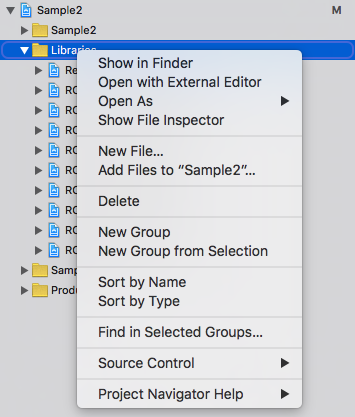
2. right click on `Libraries`
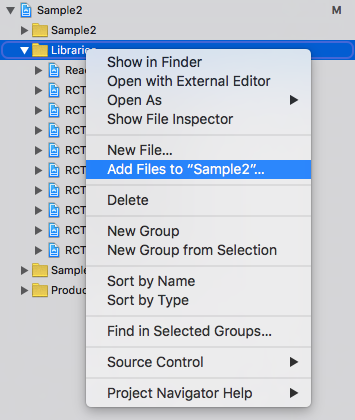
3. select `Add Files to ...` option
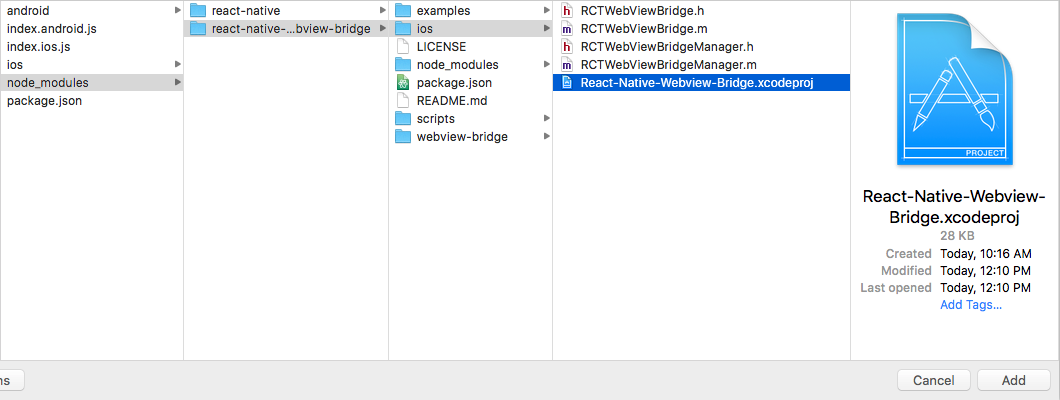
4. navigate to `node_modules/react-native-webview-bridge/ios` and add `React-Native-Webview-Bridge.xcodeproj` folder
5. on project `Project Navigator` tab, click on your project's name and select Target's name and from there click on `Build Phases`
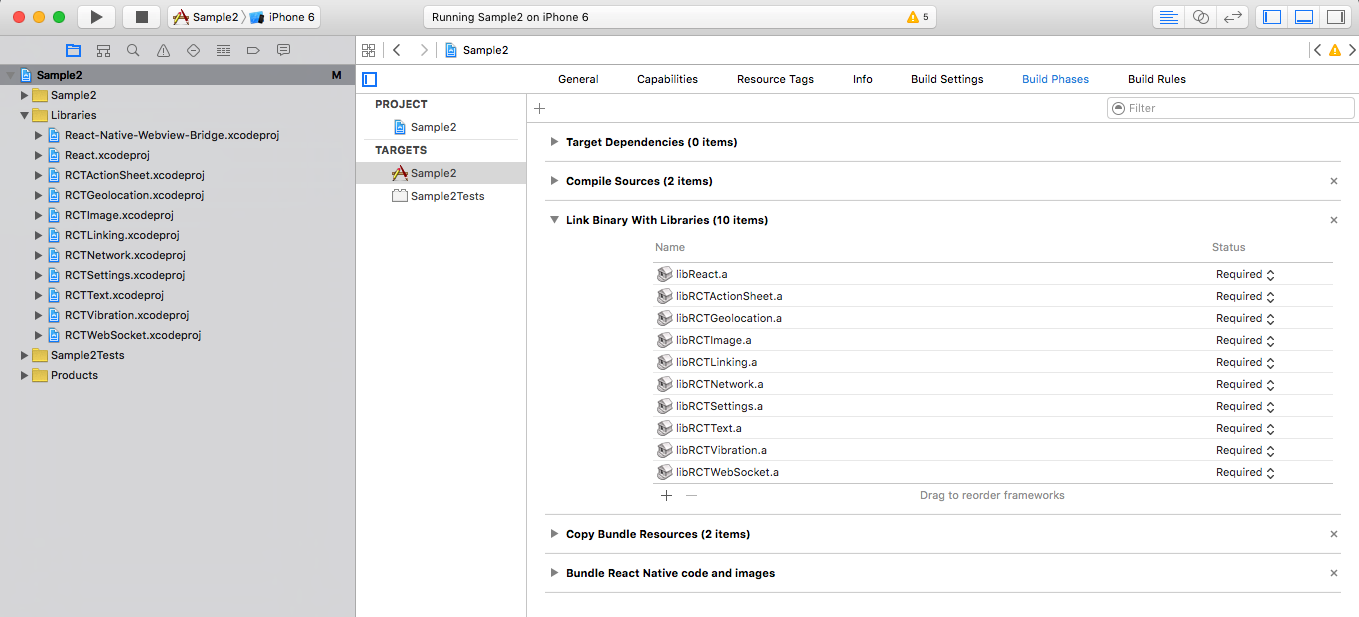
6. expand `Link Binary With Libraries` and click `+` sign to add a new one.
7. select `libReact-Native-Webviwe-Bridge.a` and click `Add` button.
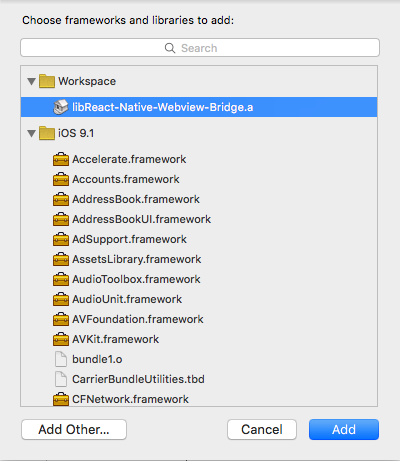
8. clean compile to make sure your project can compile and build.
### Android
1. add the following import to `MainApplication.java` (`MainActivity.java` if RN < 0.29) of your application
```java
import com.github.alinz.reactnativewebviewbridge.WebViewBridgePackage;
```
2. add the following code to add the package to `MainApplication.java`` (`MainActivity.java` if RN < 0.29)
```java
protected List getPackages() {
return Arrays.asList(
new MainReactPackage(),
new WebViewBridgePackage() //<- this
);
}
```
3. add the following codes to your `android/setting.gradle`
> you might have multiple 3rd party libraries, make sure that you don't create multiple include.
```
include ':app', ':react-native-webview-bridge'
project(':react-native-webview-bridge').projectDir = new File(rootProject.projectDir, '../node_modules/react-native-webview-bridge/android')
```
4. edit `android/app/build.gradle` and add the following line inside `dependencies`
```
compile project(':react-native-webview-bridge')
```
5. run `react-native run-android` to see if everything is compilable.
## Usage
just import the module with one of your choices way:
** CommonJS style **
```js
var WebViewBridge = require('react-native-webview-bridge');
```
** ES6/ES2015 style **
```js
import WebViewBridge from 'react-native-webview-bridge';
```
`WebViewBridge` is an extension of `WebView`. It injects special script into any pages once it loads. Also it extends the functionality of `WebView` by adding 1 new method and 1 new props.
#### sendToBridge(message)
the message must be in string. because this is the only way to send data back and forth between native and webview.
#### onBridgeMessage
this is a prop that needs to be a function. it will be called once a message is received from webview. The type of received message is also in string.
#### allowFileAccessFromFileURLs (Android only)
this is a prop that allows locally loaded pages via file:// to access other file:// resources. Pass-thru to corresponding [setting](https://developer.android.com/reference/android/webkit/WebSettings.html#setAllowFileAccessFromFileURLs(boolean)) in WebView. Default is `false` for Android 4.1 and above.
#### allowUniversalAccessFromFileURLs (Android only)
this is a prop that allows locally loaded pages via file:// to access resources in any origin. Pass-thru to corresponding [setting](https://developer.android.com/reference/android/webkit/WebSettings.html#setAllowUniversalAccessFromFileURLs(boolean)) in WebView. Default is `false` for Android 4.1 and above.
## Bridge Script
bridge script is a special script which injects into all the webview. It automatically register a global variable called `WebViewBridge`. It has 2 optional methods to implement and one method to send message to native side.
#### send(message)
this method sends a message to native side. the message must be in string type or `onError` method will be called.
#### onMessage
this method needs to be implemented. it will be called once a message arrives from native side. The type of message is in string.
#### onError (iOS only)
this is an error reporting method. It will be called if there is an error happens during sending a message. It receives a error message in string type.
## Notes
> a special bridge script will be injected once the page is going to different URL. So you don't have to manage when it needs to be injected.
> You can still pass your own javascript to be injected into webview. However, Bridge script will be injected first and then your custom script.
## Simple Example
This example can be found in `examples` folder.
```js
const injectScript = `
(function () {
if (WebViewBridge) {
WebViewBridge.onMessage = function (message) {
if (message === "hello from react-native") {
WebViewBridge.send("got the message inside webview");
}
};
WebViewBridge.send("hello from webview");
}
}());
`;
var Sample2 = React.createClass({
onBridgeMessage(message){
const { webviewbridge } = this.refs;
switch (message) {
case "hello from webview":
webviewbridge.sendToBridge("hello from react-native");
break;
case "got the message inside webview":
console.log("we have got a message from webview! yeah");
break;
}
},
render() {
return (
);
}
});
```