 # react-native-wallet-manager
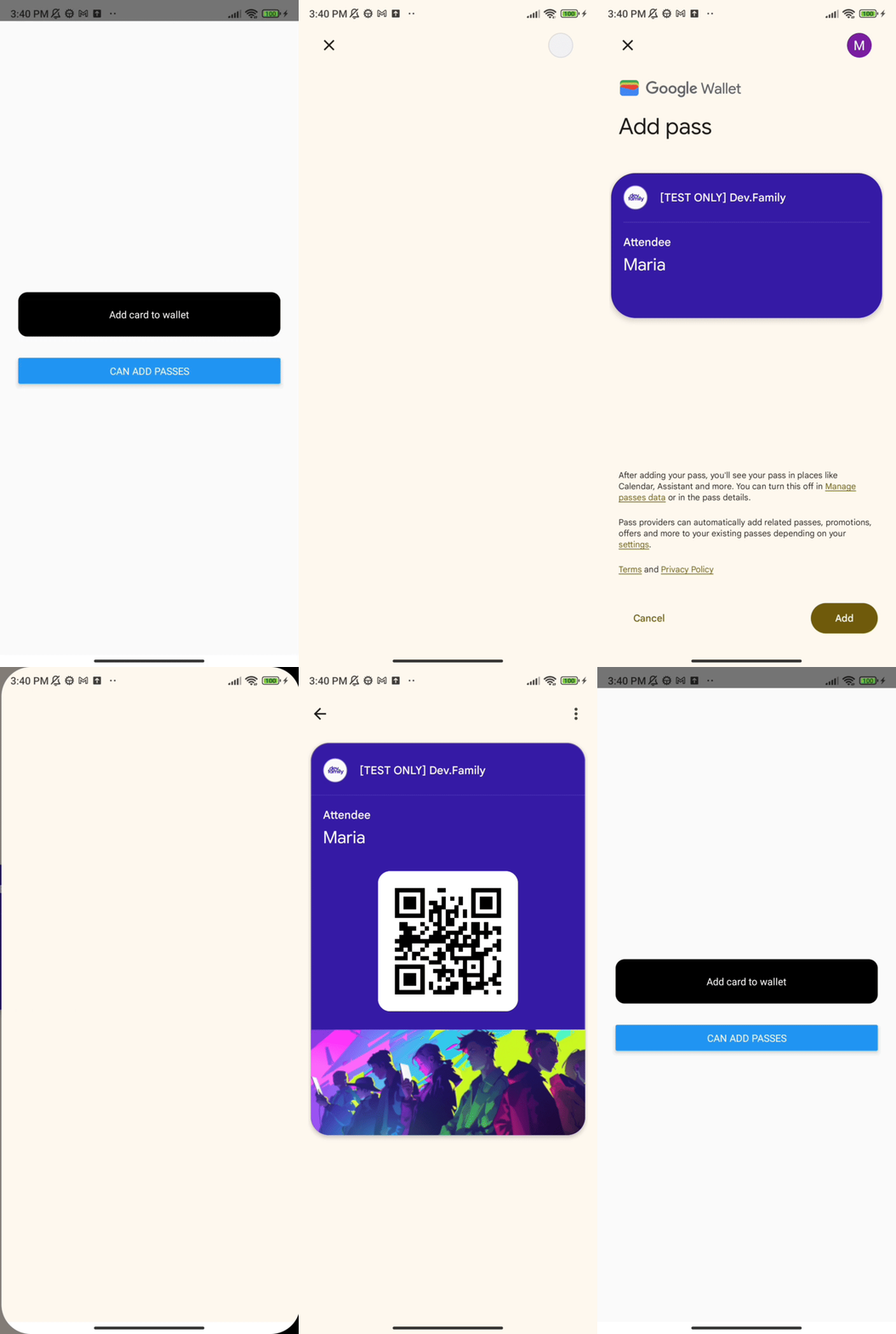
This library provides integration with both Apple Wallet on iOS and Google Wallet on Android. It allows you to add, remove, and check for existing passes on iOS, and add passes to Google Wallet on Android.
[](https://www.npmjs.org/package/react-native-wallet-manager)
[](https://www.npmjs.org/package/react-native-wallet-manager)
[](https://opensource.org/licenses/MIT)
# react-native-wallet-manager
This library provides integration with both Apple Wallet on iOS and Google Wallet on Android. It allows you to add, remove, and check for existing passes on iOS, and add passes to Google Wallet on Android.
[](https://www.npmjs.org/package/react-native-wallet-manager)
[](https://www.npmjs.org/package/react-native-wallet-manager)
[](https://opensource.org/licenses/MIT)
[](https://www.android.com)
[](https://developer.apple.com/ios)
 |
|  |
|  |
| :-------------------------------------------------------------------------------------------------------------------------------: | :--------------------------------------------------------------------------------------------------------------------------------------------------------: |
| iOS | Android |
## Installation
- react-native-wallet-manager V2 requires the new architecture/TurboModules to be enabled
- iOS 13.0 or later
- for old architecture please use react-native-wallet-manager V1.1.3
If a method rejects with `native module NativeWalletManager not found`, the New Architecture is disabled in the app (the default before React Native 0.76). Enable it and rebuild the app:
- Android: set `newArchEnabled=true` in `android/gradle.properties`
- iOS: run `RCT_NEW_ARCH_ENABLED=1 bundle exec pod install` in the `ios` folder
Or stay on V1.1.3.
```sh
yarn add react-native-wallet-manager
```
or
```sh
npm install react-native-wallet-manager
```
## Setup
### iOS
To enable the Wallet functionality on iOS, you need to add the Wallet capability in Xcode. Follow these steps:
1. Open your project in Xcode (`xcworkspace` file).
2. Select your project **Target**.
3. Go to the **Signing & Capabilities** tab.
4. Click on **+ Capability** to add a new capability.
5. In the search bar, type **Wallet** and add it to your project.
After that, navigate to the `ios` folder in your project directory and run the following command to install necessary dependencies:
```bash
cd ios && pod install
```
### Android
No extra setup is needed. The library already depends on `com.google.android.gms:play-services-pay`. The device needs Google Play services and a Google account to save passes.
## Usage
For platform-specific instructions on how to create passes:
- **iOS**: For a detailed guide on creating Apple Wallet pkpasses visit [this Medium article](https://medium.com/@dev.family/how-to-integrate-apple-wallet-into-the-mobile-app-54700346beb1).
- **Android**: You can find a detailed guide on creating passes for Google Wallet at [this Google Codelab](https://codelabs.developers.google.com/add-to-wallet-web).
To use this library, start by importing it into your React Native component:
```javascript
import WalletManager from 'react-native-wallet-manager';
```
## API
| Method | Parameters | iOS | Android |
| ---------------------------------------------------------------------------------------------------------------------------------- | -------------------------------------------------- | --- | ------- |
| [`canAddPasses()`](#canaddpasses) | None | ✅ | ✅ |
| [`addPassToGoogleWallet(jwt: string)`](#addpasstogooglewalletjwt-string) | `jwt: string` | ❌ | ✅ |
| [`addPassFromUrl(url: string, headers?: Record)`](#addpassfromurlurl-string-headers-recordstring-string) | `url: string, headers?: Record` | ✅ | ✅ |
| [`addPassesFromUrls(urls: string[], headers?: Record)`](#addpassesfromurlsurls-string-headers-recordstring-string) | `urls: string[], headers?: Record` | ✅ | ❌ |
| [`hasPass(cardIdentifier: string, serialNumber?: string)`](#haspasscardidentifier-string-serialnumber-string) | `cardIdentifier: string, serialNumber?: string` | ✅ | ❌ |
| [`removePass(cardIdentifier: string, serialNumber?: string)`](#removepasscardidentifier-string-serialnumber-string) | `cardIdentifier: string, serialNumber?: string` | ✅ | ❌ |
| [`viewInWallet(cardIdentifier: string, serialNumber?: string)`](#viewinwalletcardidentifier-string-serialnumber-string) | `cardIdentifier: string, serialNumber?: string` | ✅ | ❌ |
| [`showAddPassControllerFromFile(filePath: string)`](#showaddpasscontrollerfromfilefilepath-string) | `filePath: string` | ✅ | ❌ |
### Notes
All methods return a `Promise` that resolves with the result of the operation or rejects if an error occurs.
On a platform where a method is not supported (❌ in the table), the promise rejects with an `Error` that has no `code`.
Only one request can add passes at a time. While `addPassFromUrl`, `addPassesFromUrls`, `addPassToGoogleWallet` or `showAddPassControllerFromFile` is downloading passes or showing the Wallet sheet, another call to `addPassFromUrl`, `addPassesFromUrls` or `addPassToGoogleWallet` rejects with `ADD_PASS_IN_PROGRESS`, and `showAddPassControllerFromFile` resolves with `false`.
The `headers` of `addPassFromUrl` and `addPassesFromUrls` are sent with every request, to every URL in the list. Pass an `Authorization` header only for URLs that should receive it. Header values should be strings. A number or boolean value is sent as text, other values such as `null` are skipped. On iOS, a pass is always downloaded again, the local cache is not used.
### Access to passes (iOS)
`hasPass`, `removePass` and `viewInWallet` only see passes whose pass type identifier is allowed by the app's Wallet capability. By default the capability allows all pass types of your team. Passes of other teams are not visible to the app. Adding a pass does not depend on this.
## Error codes
Rejected promises carry an error with a `code`. The `WalletErrorCode` type covers every code below except the Android-only `RESULT_CANCELED`, `UNKNOWN_ERROR` and `ERROR`.
| Code | Platform | Meaning |
| ---------------------- | ------------ | ------------------------------------------------------------------------- |
| `INVALID_URL` | iOS, Android | The URL cannot be parsed or has no scheme, or the list of URLs is empty. |
| `NETWORK_ERROR` | iOS, Android | The request failed. |
| `HTTP_ERROR` | iOS, Android | The server responded with a status outside 200–299. |
| `ADD_PASS_IN_PROGRESS` | iOS, Android | Another pass is being added. |
| `USER_CANCELLED` | iOS | The Apple Wallet sheet was closed without adding the passes. |
| `PASS_ALREADY_EXISTS` | iOS | The pass, or every pass of a bundle or URL list, is already in Wallet. |
| `INVALID_PASS` | iOS | The data is not a valid `.pkpass` or contains no valid pass in a bundle. |
| `INVALID_DATA` | iOS | The response has no body. |
| `NO_VIEW_CONTROLLER` | iOS | No view controller is available to show the sheet. |
| `CONTROLLER_ERROR` | iOS | The Apple Wallet sheet could not be created or shown. |
| `RESULT_CANCELED` | Android | Google Wallet was closed without saving the pass. |
| `NO_ACTIVITY` | Android | There is no current activity. |
| `API_ERROR` | Android | Google Pay API returned an error. |
| `GENERAL_ERROR` | Android | Saving to Google Wallet failed for another reason. |
| `UNKNOWN_ERROR` | Android | Google Wallet returned an unexpected result. |
| `ERROR` | Android | `canAddPasses` could not check the availability of the Google Wallet API. |
## canAddPasses()
Checks if the device can add passes to the wallet. This method is supported on both iOS and Android.
### Example
```javascript
const canAddPasses = async () => {
try {
const result = await WalletManager.canAddPasses();
console.log(result);
} catch (e) {
console.log(e);
}
};
```
## addPassToGoogleWallet(jwt: string)
Adds a pass to Google Wallet. This method is only supported on Android.
### Parameters
- `jwt` (string): The JWT token containing the pass information to be added to Google Wallet.
The promise resolves with a message when Google Wallet reports success, also when the pass was already saved. It rejects with `RESULT_CANCELED` when Google Wallet is closed without saving.
_Note:_ In the example below, you'll see a placeholder for the JWT. You need to generate a valid Google Wallet JWT for testing purposes.
### Example
```javascript
const addPassToGoogleWallet = async () => {
try {
await WalletManager.addPassToGoogleWallet(
'eyJhbGciOiJSUzI1NiIsInR5cCI6IkpXVCJ9...'
);
} catch (e) {
console.log(e);
}
};
```
## addPassFromUrl(url: string, headers?: Record)
Adds a pass from a specified URL. This method is supported on both iOS and Android.
- On iOS, it downloads the pass and shows the Apple Wallet sheet to add it. The promise resolves with `true` once the pass is added. It rejects with `USER_CANCELLED` if the sheet is closed and with `PASS_ALREADY_EXISTS` if the pass is already in Wallet.
- On Android, the response body must be a Google Wallet JWT. It is passed to Google Wallet, and the promise resolves and rejects the same way as in `addPassToGoogleWallet`. It resolves with the message string, although the TypeScript type is `Promise`.
### Parameters
- `url` (string): The URL of the pass. On iOS it is a `.pkpass` file or a `.pkpasses` bundle, on Android it returns a JWT.
- `headers` (object, optional): HTTP headers sent with the request, for example for authentication.
### Pass bundles (iOS)
A `.pkpasses` bundle with several passes is shown in a single Apple Wallet sheet, which adds all of them at once. For several `.pkpass` URLs see [`addPassesFromUrls`](#addpassesfromurlsurls-string-headers-recordstring-string). Passes that are already in Wallet are left out of the sheet. The promise resolves with `true` after the passes are added and rejects with `USER_CANCELLED` if the sheet is closed. It rejects with `PASS_ALREADY_EXISTS` only when every pass of the bundle is already in Wallet, and with `INVALID_PASS` when no pass in the bundle can be read.
A bundle is a ZIP archive of `.pkpass` files, stored or deflated, ZIP64 included. Other files, entries that cannot be read and duplicate passes are skipped. Encrypted archives are not supported.
### URLs
`INVALID_URL` means the URL cannot be parsed or has no scheme. On iOS, characters that are not allowed in a URL, such as spaces, are percent-encoded.
### Examples
```javascript
const addPass = async () => {
try {
const result = await WalletManager.addPassFromUrl(
'https://github.com/dev-family/react-native-wallet-manager/blob/main/example/resources/pass.pkpass?raw=true'
);
console.log(result);
} catch (e) {
console.log(e);
}
};
const addPassWithAuth = async () => {
try {
const result = await WalletManager.addPassFromUrl(
'https://example.com/passes/ticket.pkpass',
{ Authorization: 'Bearer ' }
);
console.log(result);
} catch (e) {
console.log(e.code, e.message);
}
};
```
## addPassesFromUrls(urls: string[], headers?: Record)
Downloads several passes and shows them in a single Apple Wallet sheet, which adds all of them at once. Use it when the passes come as separate `.pkpass` files, for example one per ticket. This method is supported on iOS only. On Android, several passes are added with one JWT through `addPassToGoogleWallet` or `addPassFromUrl`.
Every URL is downloaded in parallel with the same headers and can return a `.pkpass` file or a `.pkpasses` bundle. A repeated URL is downloaded once. Duplicate passes and passes that are already in Wallet are left out of the sheet. The promise resolves with `true` after the passes are added and rejects with `USER_CANCELLED` if the sheet is closed, with `PASS_ALREADY_EXISTS` if every pass is already in Wallet and with `INVALID_URL` if the array is empty or one of the URLs is invalid. If a download fails (`NETWORK_ERROR`, `HTTP_ERROR` or `INVALID_DATA`), the other downloads are cancelled, the promise rejects with the error of the download that failed first and the sheet is not shown. If every download succeeds but one of them contains no valid pass, the promise rejects with `INVALID_PASS`. An error of a single URL names it by its position in the array, for example `URL 2: HTTP 404`.
### Parameters
- `urls` (string[]): The URLs of the passes.
- `headers` (object, optional): HTTP headers sent with every request, for example for authentication.
### Example
```javascript
const addTickets = async (urls) => {
try {
const result = await WalletManager.addPassesFromUrls(urls, {
Authorization: 'Bearer ',
});
console.log(result);
} catch (e) {
if (e.code === 'USER_CANCELLED') {
return;
}
console.log(e.code, e.message);
}
};
```
## hasPass(cardIdentifier: string, serialNumber?: string)
Checks if a pass with a specific identifier exists in the Apple Wallet. This method is only supported on iOS.
The promise resolves with `true` if a matching pass is found and `false` otherwise. See [Access to passes](#access-to-passes-ios).
### Parameters
- `cardIdentifier` (string): The pass type identifier, `passTypeIdentifier` in `pass.json`.
- `serialNumber` (string, optional): The serial number of the pass. This parameter is optional and can be used to further specify the pass.
### Example
```javascript
const hasPass = async () => {
try {
const result = await WalletManager.hasPass('pass.family.dev.walletManager');
console.log(`has pass: ${result}`);
} catch (e) {
console.log(e, 'hasPass');
}
};
```
## removePass(cardIdentifier: string, serialNumber?: string)
Removes a pass with a specific identifier from the Apple Wallet. This method is only supported on iOS.
The promise resolves with `true` if a matching pass was removed and `false` if none was found. Only the first matching pass is removed, so pass `serialNumber` when several passes share the pass type identifier. See [Access to passes](#access-to-passes-ios).
### Parameters
- `cardIdentifier` (string): The pass type identifier, `passTypeIdentifier` in `pass.json`.
- `serialNumber` (string, optional): The serial number of the pass. This parameter is optional and can be used to further specify the pass.
### Example
```javascript
const removePass = async () => {
try {
const result = await WalletManager.removePass(
'pass.family.dev.walletManager'
);
console.log(`remove pass: ${result}`);
} catch (e) {
console.log(e, 'removePass');
}
};
```
## viewInWallet(cardIdentifier: string, serialNumber?: string)
Opens a pass with a specific identifier in Apple Wallet. This method is only supported on iOS.
The promise resolves with `true` if a matching pass is found and `false` otherwise. See [Access to passes](#access-to-passes-ios).
### Parameters
- `cardIdentifier` (string): The pass type identifier, `passTypeIdentifier` in `pass.json`.
- `serialNumber` (string, optional): The serial number of the pass. This parameter is optional and can be used to further specify the pass.
### Example
```javascript
const viewPass = async () => {
try {
const result = await WalletManager.viewInWallet(
'pass.family.dev.walletManager'
);
console.log(result);
} catch (e) {
console.log(e, 'error Viewing Pass');
}
};
```
## showAddPassControllerFromFile(filePath: string)
Displays a view controller to add a pass using the data from the specified file path. This method is only supported on iOS.
The promise resolves with `true` as soon as the file is read, before the pass is parsed. It resolves with `false` when the file cannot be read or another pass is being added. It does not report whether the pass was added.
### Parameters
- `filePath` (string): The path to a `.pkpass` file or a `.pkpasses` bundle. All passes of a bundle are shown in a single Apple Wallet sheet.
### Example
```javascript
const showAddPassControllerFromFile = async (filePath) => {
try {
const result = await WalletManager.showAddPassControllerFromFile(filePath);
console.log(`File was read: ${result}`);
} catch (e) {
console.error('Error displaying pass view controller:', e);
}
};
```
Project inspired by [react-native-wallet](https://www.npmjs.com/package/react-native-wallet)
## Contributing
See the [contributing guide](CONTRIBUTING.md) to learn how to contribute to the repository and the development workflow.
## License
MIT
|
| :-------------------------------------------------------------------------------------------------------------------------------: | :--------------------------------------------------------------------------------------------------------------------------------------------------------: |
| iOS | Android |
## Installation
- react-native-wallet-manager V2 requires the new architecture/TurboModules to be enabled
- iOS 13.0 or later
- for old architecture please use react-native-wallet-manager V1.1.3
If a method rejects with `native module NativeWalletManager not found`, the New Architecture is disabled in the app (the default before React Native 0.76). Enable it and rebuild the app:
- Android: set `newArchEnabled=true` in `android/gradle.properties`
- iOS: run `RCT_NEW_ARCH_ENABLED=1 bundle exec pod install` in the `ios` folder
Or stay on V1.1.3.
```sh
yarn add react-native-wallet-manager
```
or
```sh
npm install react-native-wallet-manager
```
## Setup
### iOS
To enable the Wallet functionality on iOS, you need to add the Wallet capability in Xcode. Follow these steps:
1. Open your project in Xcode (`xcworkspace` file).
2. Select your project **Target**.
3. Go to the **Signing & Capabilities** tab.
4. Click on **+ Capability** to add a new capability.
5. In the search bar, type **Wallet** and add it to your project.
After that, navigate to the `ios` folder in your project directory and run the following command to install necessary dependencies:
```bash
cd ios && pod install
```
### Android
No extra setup is needed. The library already depends on `com.google.android.gms:play-services-pay`. The device needs Google Play services and a Google account to save passes.
## Usage
For platform-specific instructions on how to create passes:
- **iOS**: For a detailed guide on creating Apple Wallet pkpasses visit [this Medium article](https://medium.com/@dev.family/how-to-integrate-apple-wallet-into-the-mobile-app-54700346beb1).
- **Android**: You can find a detailed guide on creating passes for Google Wallet at [this Google Codelab](https://codelabs.developers.google.com/add-to-wallet-web).
To use this library, start by importing it into your React Native component:
```javascript
import WalletManager from 'react-native-wallet-manager';
```
## API
| Method | Parameters | iOS | Android |
| ---------------------------------------------------------------------------------------------------------------------------------- | -------------------------------------------------- | --- | ------- |
| [`canAddPasses()`](#canaddpasses) | None | ✅ | ✅ |
| [`addPassToGoogleWallet(jwt: string)`](#addpasstogooglewalletjwt-string) | `jwt: string` | ❌ | ✅ |
| [`addPassFromUrl(url: string, headers?: Record)`](#addpassfromurlurl-string-headers-recordstring-string) | `url: string, headers?: Record` | ✅ | ✅ |
| [`addPassesFromUrls(urls: string[], headers?: Record)`](#addpassesfromurlsurls-string-headers-recordstring-string) | `urls: string[], headers?: Record` | ✅ | ❌ |
| [`hasPass(cardIdentifier: string, serialNumber?: string)`](#haspasscardidentifier-string-serialnumber-string) | `cardIdentifier: string, serialNumber?: string` | ✅ | ❌ |
| [`removePass(cardIdentifier: string, serialNumber?: string)`](#removepasscardidentifier-string-serialnumber-string) | `cardIdentifier: string, serialNumber?: string` | ✅ | ❌ |
| [`viewInWallet(cardIdentifier: string, serialNumber?: string)`](#viewinwalletcardidentifier-string-serialnumber-string) | `cardIdentifier: string, serialNumber?: string` | ✅ | ❌ |
| [`showAddPassControllerFromFile(filePath: string)`](#showaddpasscontrollerfromfilefilepath-string) | `filePath: string` | ✅ | ❌ |
### Notes
All methods return a `Promise` that resolves with the result of the operation or rejects if an error occurs.
On a platform where a method is not supported (❌ in the table), the promise rejects with an `Error` that has no `code`.
Only one request can add passes at a time. While `addPassFromUrl`, `addPassesFromUrls`, `addPassToGoogleWallet` or `showAddPassControllerFromFile` is downloading passes or showing the Wallet sheet, another call to `addPassFromUrl`, `addPassesFromUrls` or `addPassToGoogleWallet` rejects with `ADD_PASS_IN_PROGRESS`, and `showAddPassControllerFromFile` resolves with `false`.
The `headers` of `addPassFromUrl` and `addPassesFromUrls` are sent with every request, to every URL in the list. Pass an `Authorization` header only for URLs that should receive it. Header values should be strings. A number or boolean value is sent as text, other values such as `null` are skipped. On iOS, a pass is always downloaded again, the local cache is not used.
### Access to passes (iOS)
`hasPass`, `removePass` and `viewInWallet` only see passes whose pass type identifier is allowed by the app's Wallet capability. By default the capability allows all pass types of your team. Passes of other teams are not visible to the app. Adding a pass does not depend on this.
## Error codes
Rejected promises carry an error with a `code`. The `WalletErrorCode` type covers every code below except the Android-only `RESULT_CANCELED`, `UNKNOWN_ERROR` and `ERROR`.
| Code | Platform | Meaning |
| ---------------------- | ------------ | ------------------------------------------------------------------------- |
| `INVALID_URL` | iOS, Android | The URL cannot be parsed or has no scheme, or the list of URLs is empty. |
| `NETWORK_ERROR` | iOS, Android | The request failed. |
| `HTTP_ERROR` | iOS, Android | The server responded with a status outside 200–299. |
| `ADD_PASS_IN_PROGRESS` | iOS, Android | Another pass is being added. |
| `USER_CANCELLED` | iOS | The Apple Wallet sheet was closed without adding the passes. |
| `PASS_ALREADY_EXISTS` | iOS | The pass, or every pass of a bundle or URL list, is already in Wallet. |
| `INVALID_PASS` | iOS | The data is not a valid `.pkpass` or contains no valid pass in a bundle. |
| `INVALID_DATA` | iOS | The response has no body. |
| `NO_VIEW_CONTROLLER` | iOS | No view controller is available to show the sheet. |
| `CONTROLLER_ERROR` | iOS | The Apple Wallet sheet could not be created or shown. |
| `RESULT_CANCELED` | Android | Google Wallet was closed without saving the pass. |
| `NO_ACTIVITY` | Android | There is no current activity. |
| `API_ERROR` | Android | Google Pay API returned an error. |
| `GENERAL_ERROR` | Android | Saving to Google Wallet failed for another reason. |
| `UNKNOWN_ERROR` | Android | Google Wallet returned an unexpected result. |
| `ERROR` | Android | `canAddPasses` could not check the availability of the Google Wallet API. |
## canAddPasses()
Checks if the device can add passes to the wallet. This method is supported on both iOS and Android.
### Example
```javascript
const canAddPasses = async () => {
try {
const result = await WalletManager.canAddPasses();
console.log(result);
} catch (e) {
console.log(e);
}
};
```
## addPassToGoogleWallet(jwt: string)
Adds a pass to Google Wallet. This method is only supported on Android.
### Parameters
- `jwt` (string): The JWT token containing the pass information to be added to Google Wallet.
The promise resolves with a message when Google Wallet reports success, also when the pass was already saved. It rejects with `RESULT_CANCELED` when Google Wallet is closed without saving.
_Note:_ In the example below, you'll see a placeholder for the JWT. You need to generate a valid Google Wallet JWT for testing purposes.
### Example
```javascript
const addPassToGoogleWallet = async () => {
try {
await WalletManager.addPassToGoogleWallet(
'eyJhbGciOiJSUzI1NiIsInR5cCI6IkpXVCJ9...'
);
} catch (e) {
console.log(e);
}
};
```
## addPassFromUrl(url: string, headers?: Record)
Adds a pass from a specified URL. This method is supported on both iOS and Android.
- On iOS, it downloads the pass and shows the Apple Wallet sheet to add it. The promise resolves with `true` once the pass is added. It rejects with `USER_CANCELLED` if the sheet is closed and with `PASS_ALREADY_EXISTS` if the pass is already in Wallet.
- On Android, the response body must be a Google Wallet JWT. It is passed to Google Wallet, and the promise resolves and rejects the same way as in `addPassToGoogleWallet`. It resolves with the message string, although the TypeScript type is `Promise`.
### Parameters
- `url` (string): The URL of the pass. On iOS it is a `.pkpass` file or a `.pkpasses` bundle, on Android it returns a JWT.
- `headers` (object, optional): HTTP headers sent with the request, for example for authentication.
### Pass bundles (iOS)
A `.pkpasses` bundle with several passes is shown in a single Apple Wallet sheet, which adds all of them at once. For several `.pkpass` URLs see [`addPassesFromUrls`](#addpassesfromurlsurls-string-headers-recordstring-string). Passes that are already in Wallet are left out of the sheet. The promise resolves with `true` after the passes are added and rejects with `USER_CANCELLED` if the sheet is closed. It rejects with `PASS_ALREADY_EXISTS` only when every pass of the bundle is already in Wallet, and with `INVALID_PASS` when no pass in the bundle can be read.
A bundle is a ZIP archive of `.pkpass` files, stored or deflated, ZIP64 included. Other files, entries that cannot be read and duplicate passes are skipped. Encrypted archives are not supported.
### URLs
`INVALID_URL` means the URL cannot be parsed or has no scheme. On iOS, characters that are not allowed in a URL, such as spaces, are percent-encoded.
### Examples
```javascript
const addPass = async () => {
try {
const result = await WalletManager.addPassFromUrl(
'https://github.com/dev-family/react-native-wallet-manager/blob/main/example/resources/pass.pkpass?raw=true'
);
console.log(result);
} catch (e) {
console.log(e);
}
};
const addPassWithAuth = async () => {
try {
const result = await WalletManager.addPassFromUrl(
'https://example.com/passes/ticket.pkpass',
{ Authorization: 'Bearer ' }
);
console.log(result);
} catch (e) {
console.log(e.code, e.message);
}
};
```
## addPassesFromUrls(urls: string[], headers?: Record)
Downloads several passes and shows them in a single Apple Wallet sheet, which adds all of them at once. Use it when the passes come as separate `.pkpass` files, for example one per ticket. This method is supported on iOS only. On Android, several passes are added with one JWT through `addPassToGoogleWallet` or `addPassFromUrl`.
Every URL is downloaded in parallel with the same headers and can return a `.pkpass` file or a `.pkpasses` bundle. A repeated URL is downloaded once. Duplicate passes and passes that are already in Wallet are left out of the sheet. The promise resolves with `true` after the passes are added and rejects with `USER_CANCELLED` if the sheet is closed, with `PASS_ALREADY_EXISTS` if every pass is already in Wallet and with `INVALID_URL` if the array is empty or one of the URLs is invalid. If a download fails (`NETWORK_ERROR`, `HTTP_ERROR` or `INVALID_DATA`), the other downloads are cancelled, the promise rejects with the error of the download that failed first and the sheet is not shown. If every download succeeds but one of them contains no valid pass, the promise rejects with `INVALID_PASS`. An error of a single URL names it by its position in the array, for example `URL 2: HTTP 404`.
### Parameters
- `urls` (string[]): The URLs of the passes.
- `headers` (object, optional): HTTP headers sent with every request, for example for authentication.
### Example
```javascript
const addTickets = async (urls) => {
try {
const result = await WalletManager.addPassesFromUrls(urls, {
Authorization: 'Bearer ',
});
console.log(result);
} catch (e) {
if (e.code === 'USER_CANCELLED') {
return;
}
console.log(e.code, e.message);
}
};
```
## hasPass(cardIdentifier: string, serialNumber?: string)
Checks if a pass with a specific identifier exists in the Apple Wallet. This method is only supported on iOS.
The promise resolves with `true` if a matching pass is found and `false` otherwise. See [Access to passes](#access-to-passes-ios).
### Parameters
- `cardIdentifier` (string): The pass type identifier, `passTypeIdentifier` in `pass.json`.
- `serialNumber` (string, optional): The serial number of the pass. This parameter is optional and can be used to further specify the pass.
### Example
```javascript
const hasPass = async () => {
try {
const result = await WalletManager.hasPass('pass.family.dev.walletManager');
console.log(`has pass: ${result}`);
} catch (e) {
console.log(e, 'hasPass');
}
};
```
## removePass(cardIdentifier: string, serialNumber?: string)
Removes a pass with a specific identifier from the Apple Wallet. This method is only supported on iOS.
The promise resolves with `true` if a matching pass was removed and `false` if none was found. Only the first matching pass is removed, so pass `serialNumber` when several passes share the pass type identifier. See [Access to passes](#access-to-passes-ios).
### Parameters
- `cardIdentifier` (string): The pass type identifier, `passTypeIdentifier` in `pass.json`.
- `serialNumber` (string, optional): The serial number of the pass. This parameter is optional and can be used to further specify the pass.
### Example
```javascript
const removePass = async () => {
try {
const result = await WalletManager.removePass(
'pass.family.dev.walletManager'
);
console.log(`remove pass: ${result}`);
} catch (e) {
console.log(e, 'removePass');
}
};
```
## viewInWallet(cardIdentifier: string, serialNumber?: string)
Opens a pass with a specific identifier in Apple Wallet. This method is only supported on iOS.
The promise resolves with `true` if a matching pass is found and `false` otherwise. See [Access to passes](#access-to-passes-ios).
### Parameters
- `cardIdentifier` (string): The pass type identifier, `passTypeIdentifier` in `pass.json`.
- `serialNumber` (string, optional): The serial number of the pass. This parameter is optional and can be used to further specify the pass.
### Example
```javascript
const viewPass = async () => {
try {
const result = await WalletManager.viewInWallet(
'pass.family.dev.walletManager'
);
console.log(result);
} catch (e) {
console.log(e, 'error Viewing Pass');
}
};
```
## showAddPassControllerFromFile(filePath: string)
Displays a view controller to add a pass using the data from the specified file path. This method is only supported on iOS.
The promise resolves with `true` as soon as the file is read, before the pass is parsed. It resolves with `false` when the file cannot be read or another pass is being added. It does not report whether the pass was added.
### Parameters
- `filePath` (string): The path to a `.pkpass` file or a `.pkpasses` bundle. All passes of a bundle are shown in a single Apple Wallet sheet.
### Example
```javascript
const showAddPassControllerFromFile = async (filePath) => {
try {
const result = await WalletManager.showAddPassControllerFromFile(filePath);
console.log(`File was read: ${result}`);
} catch (e) {
console.error('Error displaying pass view controller:', e);
}
};
```
Project inspired by [react-native-wallet](https://www.npmjs.com/package/react-native-wallet)
## Contributing
See the [contributing guide](CONTRIBUTING.md) to learn how to contribute to the repository and the development workflow.
## License
MIT