# react-native-voip-call
Base on https://github.com/ajith-ab/react-native-voip-call/ but i add typescript and fixed some bug! Please see https://github.com/ajith-ab/react-native-voip-call/
## Getting started
### Npm
```bash
$ npm install react-native-voip-call-2 --save
```
### Yarn
```bash
$ yarn add react-native-voip-call-2
```
### Mostly automatic installation RN < 0.60.x
`$ react-native link react-native-voip-call-2`
### ios Installation
```bash
$ cd ios && pod install
```
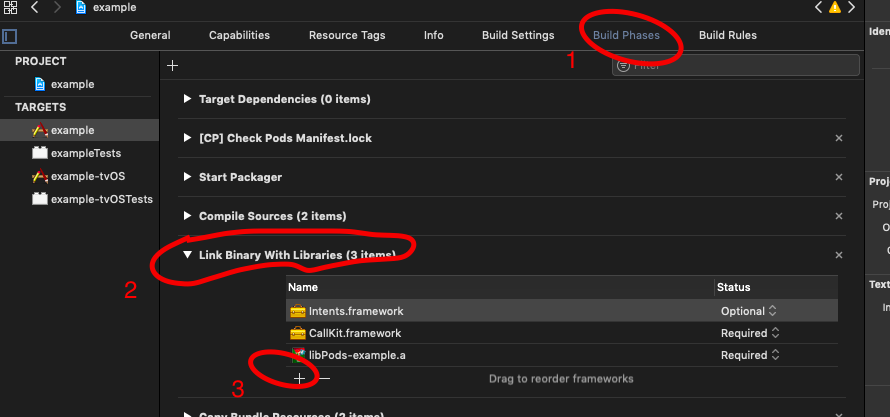
Link required libraries
Click on `Build Phases` tab, then open `Link Binary With Libraries`.
Add `CallKit.framework` and `Intents.framework` (and mark it Optional).
## Usage of RNVoip Call
#### `import this package as your needed places`
```javascript
import RNVoipCall from 'react-native-voip-call-2';
```
### 1. initialize Call (IOS Required)
```javasript
let options = {
appName:'RNVoip App', // Required
imageName: 'logo', //string (optional) in ios Resource Folder
ringtoneSound : '', //string (optional) If provided, it will be played when incoming calls received
includesCallsInRecents: false, // boolean (optional) If provided, calls will be shown in the recent calls
supportsVideo : true //boolean (optional) If provided, whether or not the application supports video calling (Default: true)
}
// Initlize Call Kit IOS is Required
RNVoipCall.initializeCall(options).then(()=>{
//Success Call Back
}).catch(e=>console.log(e));
```
### 2. display Incomming Call
```javascript
let callOptions = {
callerId:'825f4094-a674-4765-96a7-1ac512c02a71', // Important uuid must in this format
ios:{
phoneNumber:'12344', // Caller Mobile Number
name:'RNVoip', // caller Name
hasVideo:true
},
android:{
ringtuneSound: true, // defualt true
ringtune: 'ringtune', // add file inside Project_folder/android/app/res/raw
duration: 20000, // defualt 30000
vibration: true, // defualt is true
channel_name: 'call1asd', //
notificationId: 1121,
notificationTitle: 'Incomming Call',
notificationBody: 'Some One is Calling...',
answerActionTitle: 'Answer',
declineActionTitle: 'Decline',
}
}
RNVoipCall.displayIncomingCall(callOptions).then((data)=>{
console.log(data)
}).catch(e=>console.log(e))
```
### 3. call End
```javascript
RNVoipCall.endCall(uuid); // End specific Call
RNVoipCall.endAllCalls(); // End All Calls
```
### 4. Call Answer Event
```javascript
RNVoipCall.onCallAnswer(data => {
console.log(data);
});
```
### 5. Call End Event
```javascript
RNVoipCall.onEndCall(data => {
console.log(data);
});
```
### 6.Check Call Active (Ios Only)
```javascript
RNVoipCall.isCallActive(uuid);
```
### 7. Event Listener (Ios only)
```javascript
RNVoipCall.addEventListener('didDisplayIncomingCall', ({ error, callUUID, handle, localizedCallerName, hasVideo, fromPushKit, payload }) => {
});
RNVoipCall.addEventListener('didActivateAudioSession', () => {
// you might want to do following things when receiving this event:
// - Start playing ringback if it is an outgoing call
});
RNVoipCall.addEventListener('didPerformSetMutedCallAction', ({ muted, callUUID }) => {
});
```
### 8. call back on android app in background state (Android only)
```javascript
RNVoipCall.getInitialNotificationActions().then(data=>console.log(data))
.catch(e=>console.log(e));
```
### 9. Event Listener (Android only)
```javascript
//app open Automatically when Call recived
RNVoipCall.onCallOpenAppEvent(event => {
});
// on click call Notification
RNVoipCall.onCallNotificationOpen(event => {
});
missed call notification taped
RNVoipCall.onMissedCallOpen(event => {
});
```
### 10. Play and stop ringtune (Android only)
```javascript
RNVoipCall.playRingtune("ringtune",true); // param1 -> name of the ringtune in inside Project_folder/android/app/res/raw , param2 -> play ringtune as loop
RNVoipCall.stopRingtune();
```
## Usage (Background Integration)
### 1. IOS
##### 1.1 Configure Voip Service to App
1. please Refer and Configure [Apple Voice Over IP](https://developer.apple.com/library/archive/documentation/Performance/Conceptual/EnergyGuide-iOS/OptimizeVoIP.html)
2. Make sure you enabled the folowing in `Xcode -> Signing & Capabilities:`
2.1) `Background Modes` -> `Voice over IP enabled`
2.2 )`Capability` -> `Push Notifications`
2.3) Add `PushKit.framework`

3. Add Following Code to `Xcode -> project_folder -> AppDelegate.m`
```objective-c
...
#import "RNVoipCall.h" /* <------ add this line */
#import /* <------ add this line */
#import "RNVoipPushKit.h" /* <------ add this line */
@implementation AppDelegate
....
- (BOOL)application:(UIApplication *)application didFinishLaunchingWithOptions:(NSDictionary *)launchOptions
{
....
}
// --- Handle updated push credentials
- (void)pushRegistry:(PKPushRegistry *)registry didUpdatePushCredentials:(PKPushCredentials *)credentials forType:(PKPushType)type {
// Register VoIP push token (a property of PKPushCredentials) with server
[RNVoipPushKit didUpdatePushCredentials:credentials forType:(NSString *)type];
}
- (void)pushRegistry:(PKPushRegistry *)registry didInvalidatePushTokenForType:(PKPushType)type
{
// --- The system calls this method when a previously provided push token is no longer valid for use. No action is necessary on your part to reregister the push type. Instead, use this method to notify your server not to send push notifications using the matching push token.
}
// --- Handle incoming pushes (for ios <= 10)
- (void)pushRegistry:(PKPushRegistry *)registry didReceiveIncomingPushWithPayload:(PKPushPayload *)payload forType:(PKPushType)type {
NSLog(@"Ajith");
[RNVoipPushKit didReceiveIncomingPushWithPayload:payload forType:(NSString *)type];
}
// --- Handle incoming pushes (for ios >= 11)
- (void)pushRegistry:(PKPushRegistry *)registry didReceiveIncomingPushWithPayload:(PKPushPayload *)payload forType:(PKPushType)type withCompletionHandler:(void (^)(void))completion {
NSString *callerName = @"RNVoip is Calling";
NSString *callerId = [[[NSUUID UUID] UUIDString] lowercaseString];
NSString *handle = @"1234567890";
NSString *handleType = @"generic";
BOOL hasVideo = false;
@try {
if([payload.dictionaryPayload[@"data"] isKindOfClass:[NSDictionary class]]){
NSDictionary *dataPayload = payload.dictionaryPayload[@"data"];
callerName = [dataPayload[@"name"] isKindOfClass:[NSString class]] ? [NSString stringWithFormat: @"%@ is Calling", dataPayload[@"name"]] : @"RNVoip is Calling";
callerId = [dataPayload[@"uuid"] isKindOfClass:[NSString class]] ? dataPayload[@"uuid"] : [[[NSUUID UUID] UUIDString] lowercaseString];
handle = [dataPayload[@"handle"] isKindOfClass:[NSString class]] ? dataPayload[@"handle"] : @"1234567890";
handleType = [dataPayload[@"handleType"] isKindOfClass:[NSString class]] ? dataPayload[@"handleType"] : @"generic";
hasVideo = dataPayload[@"hasVideo"] ? true : false;
}
} @catch (NSException *exception) {
NSLog(@"Error PushKit payload %@", exception);
} @finally {
NSLog(@"RNVoip caller id ===> %@ callerNAme ==> %@ handle ==> %@",callerId, callerName, hasVideo ? @"true": @"false");
NSDictionary *extra = [payload.dictionaryPayload valueForKeyPath:@"data"];
[RNVoipCall reportNewIncomingCall:callerId handle:handle handleType:handleType hasVideo:hasVideo localizedCallerName:callerName fromPushKit: YES payload:extra withCompletionHandler:completion];
[RNVoipPushKit didReceiveIncomingPushWithPayload:payload forType:(NSString *)type];
}
}
@end
```
4. Add Following Code to `Xcode -> project_folder -> info.plist`
```xml
UIBackgroundModes
audio
voip
fetch
remote-notification
```
5. `IosPushKitHandler.js`
```javascript
import React, {useEffect, useState } from 'react';
import {
View,
Text,
Platform,
Button
} from 'react-native';
import { RNVoipCallNativeModule, RNVoipPushKitNativeModule: RNVoipPushKit } from 'react-native-voip-call-2';
const IsIos = Platform.OS === 'ios';
const log = (data) => console.log('RNVoipCall===> ',data);
const IosPushKitHandler = () => {
const [pushkitToken, setPushkitToken] = useState('');
useEffect(()=>{
iosPushKit();
},[])
const iosPushKit = () => {
if(IsIos){
//For Push Kit
RNVoipPushKit.requestPermissions(); // --- optional, you can use another library to request permissions
//Ios PushKit device token Listner
RNVoipPushKit.getPushKitDeviceToken((res) => {
if(res.platform === 'ios'){
setPushkitToken(res.deviceToken)
}
});
//On Remote Push notification Recived in Forground
RNVoipPushKit.RemotePushKitNotificationReceived((notification)=>{
log(notification);
});
}
}
return (
{"push kit token:" + pushkitToken}
);
};
}
export default IosPushKitHandler;
```
6. Create pem file for push please Refer [generate Cretificate](https://support.qiscus.com/hc/en-us/articles/360023340734-How-to-Create-Certificate-pem-for-Pushkit-) , [convert p12 to pem](https://stackoverflow.com/questions/40720524/how-to-send-push-notifications-to-test-ios-pushkit-integration-online)
7. send push [sendPush.php](https://github.com/ajith-ab/react-native-voip-call/blob/master/server/sendPush.php)
### 2. Android
#### Configure and install below 2 packages
```bash
# Install & setup the app module
yarn add @react-native-firebase/app
# Install the messaging module
yarn add @react-native-firebase/messaging
# If you're developing your app using iOS, run this command
cd ios/ && pod install
```
Installation
1. [@react-native-firebase/app](https://rnfirebase.io/)
2. [@react-native-firebase/messaging](https://rnfirebase.io/messaging/usage)
Add the below code to `index.js` in Root folder
```javascript
import messaging from '@react-native-firebase/messaging';
import {RNVoipCallNativeModule: RNVoipCall} from 'react-native-voip-call-2';
messaging().setBackgroundMessageHandler(async remoteMessage => {
console.log('Message handled in the background!', remoteMessage);
if(Platform.OS === 'android'){
let data;
if(remoteMessage.data){
data = remoteMessage.data;
}
if(data && data.type === 'call' && data.uuid){
let callOptions = {
callerId:data.uuid, // Important uuid must in this format
ios:{
phoneNumber:'12344', // Caller Mobile Number
name: data.name, // caller Name
hasVideo:true
},
android:{
ringtuneSound: true, // defualt true
ringtune: 'ringtune', // add file inside Project_folder/android/app/res/raw --Formats--> mp3,wav
duration: 30000, // defualt 30000
vibration: true, // defualt is true
channel_name: 'call', //
notificationId: 1123,
notificationTitle: 'Incomming Call',
notificationBody: data.name + ' is Calling...',
answerActionTitle: 'Answer',
declineActionTitle: 'Decline',
}
}
RNVoipCall.displayIncomingCall(callOptions).then((data)=>{
console.log(data)
}).catch(e=>console.log(e))
}
}
});
```
`push payload`
```Json
{
"to":"asgvdsdjhsfdsfd....", //device token
"data":{
"priority":"high", // Android required for background Notification
"uuid":"uuid of user",
"name":"RNVoip",
"type":"call" // to identify reciving call Notification
}
}
```
### Demo
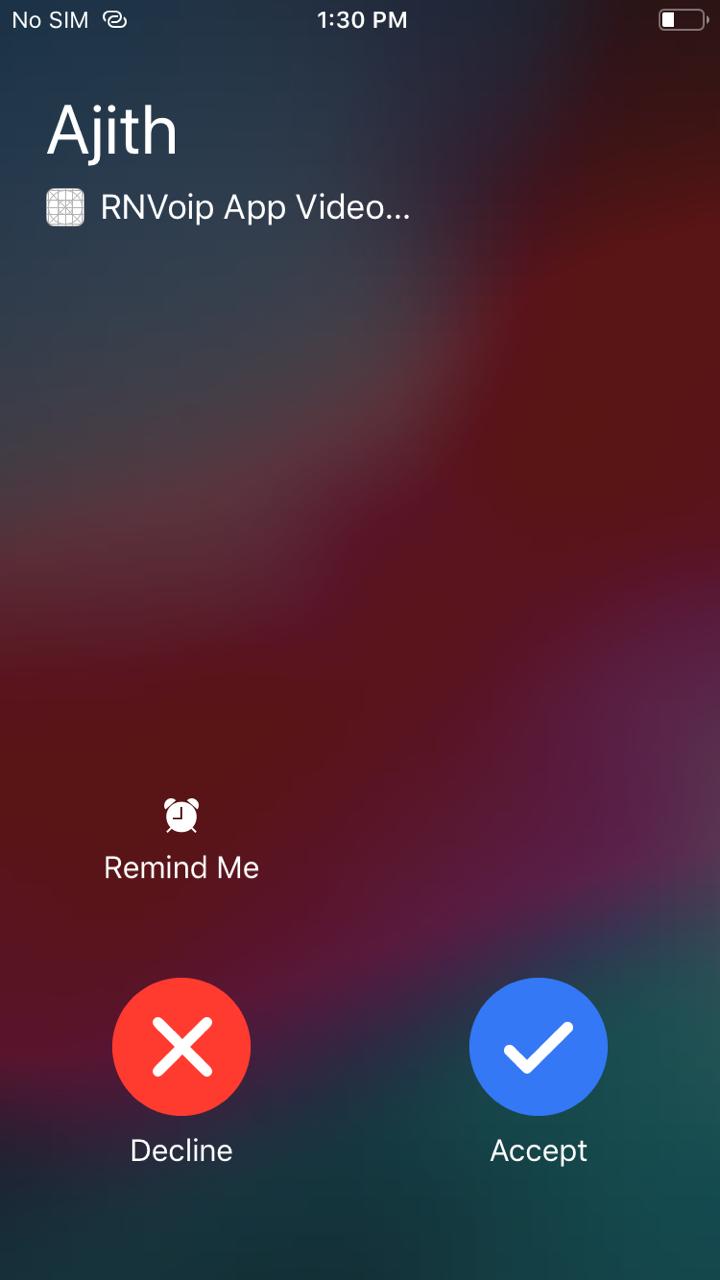
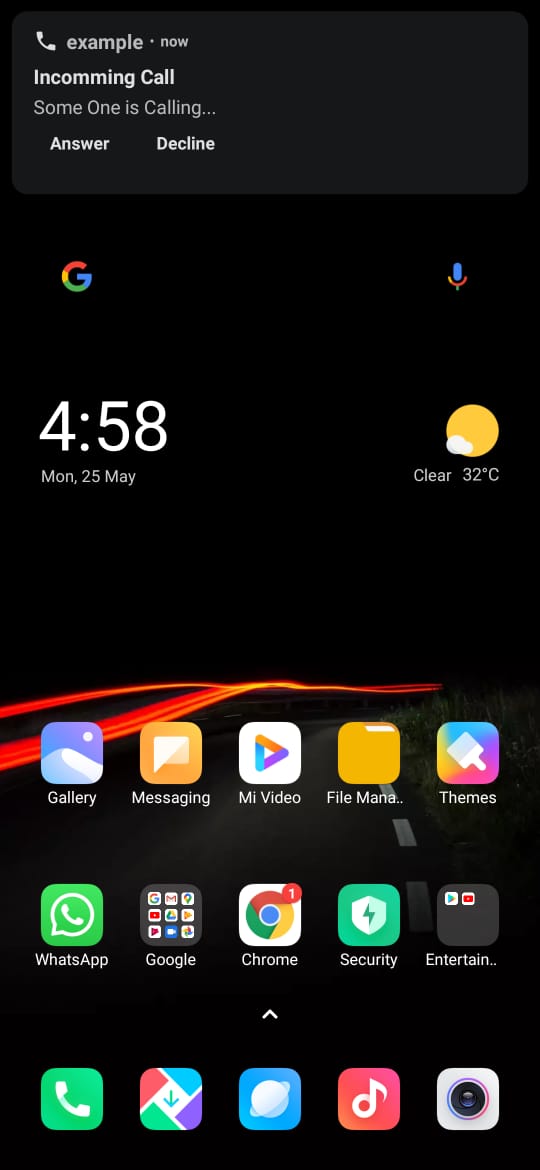
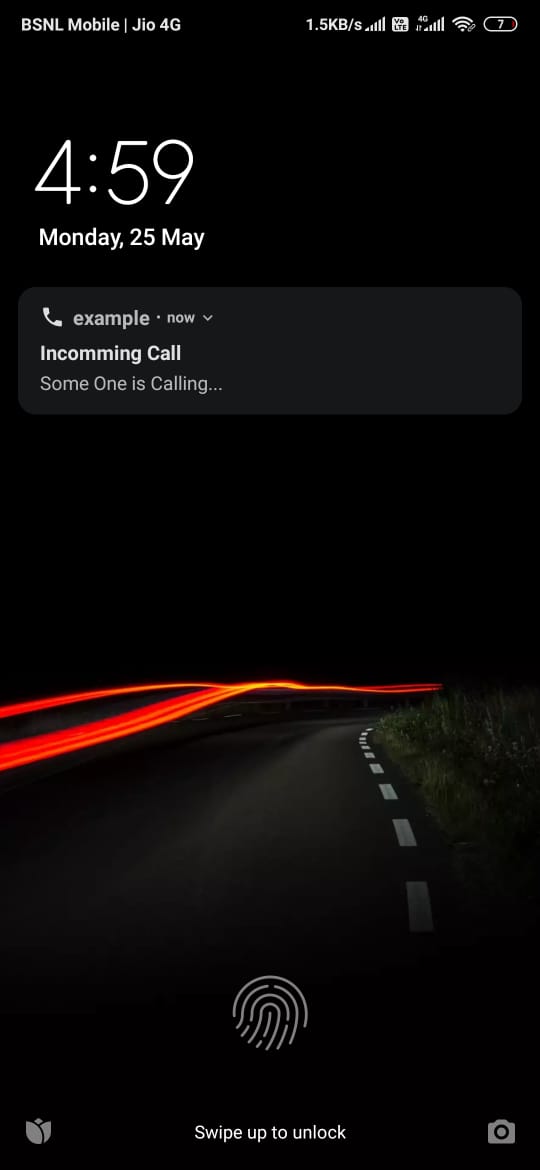
ios | Android | android( Lockscreen)
--- | --- | ---
 |
 |
 ### Author
[Ajith A B](https://www.linkedin.com/in/ajith-a-b-a61303197)
### licenses
MIT