## react-native-video-processing
[](https://travis-ci.org/shahen94/react-native-video-processing) [](https://github.com/semantic-release/semantic-release) [](https://badge.fury.io/js/react-native-video-processing) 
### Getting Started
```sh
npm install react-native-video-processing --save
```
```sh
yarn add react-native-video-processing
```
### You can check test by running
`$ npm test` or `$ yarn test`
### Installation
**Note: For RN 0.4x use 1.0 version, for RN 0.3x use 0.16**
#### [Android]
- Open up `android/app/src/main/java/[...]/MainApplication.java`
- Add `import com.shahenlibrary.RNVideoProcessingPackage;` to the imports at the top of the file
- Add new `new RNVideoProcessingPackage()` to the list returned by the getPackages() method
- Append the following lines to `android/settings.gradle`:
```
include ':react-native-video-processing'
project(':react-native-video-processing').projectDir = new File(rootProject.projectDir, '../node_modules/react-native-video-processing/android')
```
- Insert the following lines inside the dependencies block in `android/app/build.gradle`:
```
compile project(':react-native-video-processing')
```
- Add the following lines to `AndroidManifest.xml`:
```
```
#### [iOS]
1. In Xcode, right click your Xcode project and create `New Group` called `RNVideoProcessing`.
2. Go to `node_modules/react-native-video-processing/ios/RNVideoProcessing` and drag the `.swift` files under the group you just created. Press `Create folder references` option if not pressed.
3. Repeat steps 1 & 2 for the subdirectories `RNVideoTrimmer`, `RNTrimmerView`, and `ICGVideoTrimmer` and all the files underneath them. Make sure you keep the folders hierarchy the same.
4. Go to `node_modules/react-native-video-processing/ios/GPUImage/framework` and drag `GPUImage.xcodeproj` to your project's root directory in Xcode.
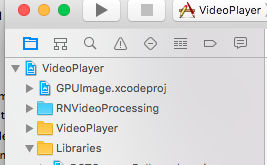
5. Under your project's `Build Phases`, make sure the `.swift` files you added appear under `Compile Sources`.
6. Under your project's `General` tab, add the following frameworks to `Linked Frameworks and Libraries` :
- CoreMedia
- CoreVideo
- OpenGLES
- AVFoundation
- QuartzCore
- MobileCoreServices
- GPUImage
7. Add `GPUImage.frameworkiOS` to `Embedded Binaries`.
8. Navigate to your project's bridging header file ** and add `#import "RNVideoProcessing.h"`.
9. Clean and run your project.
*Check the following video for more setup reference.*
[](https://youtu.be/HRjgeT6NQJM)
## Update ffmpeg binaries
1. Clone [mobile-ffmpeg](https://github.com/tanersener/mobile-ffmpeg)
2. Setup project, see [Prerequisites](https://github.com/tanersener/mobile-ffmpeg#51-prerequisites) in README.
3. Modify `build/android-ffmpeg.sh` so it generates binaries ([more info](https://github.com/tanersener/mobile-ffmpeg/issues/30#issuecomment-425964213))
1. Delete --disable-programs line
2. Change --disable-static line to --enable-static
3. Delete --enable-shared line
4. Compile binaries: `./android.sh --lts --disable-arm-v7a-neon --enable-x264 --enable-gpl --speed`. The command might finish with `failed`. That's okay because we modified the build script. Make sure every build outputs: `ffmpeg: ok`.
5. Find `ffmpeg` binaries in `prebuilt/[android-arm|android-arm64|android-x86|android-x86_64]/ffmpeg/bin/ffmpeg`
6. Copy and rename binaries to `android/src/main/jniLibs/[armeabi-v7a|arm64-v8a|x86|x86_64]/libffmpeg.so`. Make sure you rename the binaries from `ffmpeg` to `libffmpeg.so`!
## Example Usage
```javascript
import React, { Component } from 'react';
import { View } from 'react-native';
import { VideoPlayer, Trimmer } from 'react-native-video-processing';
class App extends Component {
trimVideo() {
const options = {
startTime: 0,
endTime: 15,
quality: VideoPlayer.Constants.quality.QUALITY_1280x720, // iOS only
saveToCameraRoll: true, // default is false // iOS only
saveWithCurrentDate: true, // default is false // iOS only
};
this.videoPlayerRef.trim(options)
.then((newSource) => console.log(newSource))
.catch(console.warn);
}
compressVideo() {
const options = {
width: 720,
height: 1280,
bitrateMultiplier: 3,
saveToCameraRoll: true, // default is false, iOS only
saveWithCurrentDate: true, // default is false, iOS only
minimumBitrate: 300000,
removeAudio: true, // default is false
};
this.videoPlayerRef.compress(options)
.then((newSource) => console.log(newSource))
.catch(console.warn);
}
getPreviewImageForSecond(second) {
const maximumSize = { width: 640, height: 1024 }; // default is { width: 1080, height: 1080 } iOS only
this.videoPlayerRef.getPreviewForSecond(second, maximumSize) // maximumSize is iOS only
.then((base64String) => console.log('This is BASE64 of image', base64String))
.catch(console.warn);
}
getVideoInfo() {
this.videoPlayerRef.getVideoInfo()
.then((info) => console.log(info))
.catch(console.warn);
}
render() {
return (
this.videoPlayerRef = ref}
startTime={30} // seconds
endTime={120} // seconds
play={true} // default false
replay={true} // should player play video again if it's ended
rotate={true} // use this prop to rotate video if it captured in landscape mode iOS only
source={'file:///sdcard/DCIM/....'}
playerWidth={300} // iOS only
playerHeight={500} // iOS only
style={{ backgroundColor: 'black' }}
resizeMode={VideoPlayer.Constants.resizeMode.CONTAIN}
onChange={({ nativeEvent }) => console.log({ nativeEvent })} // get Current time on every second
/>
console.log(e.currentTime)} // iOS only
currentTime={this.video.currentTime} // use this prop to set tracker position iOS only
themeColor={'white'} // iOS only
thumbWidth={30} // iOS only
trackerColor={'green'} // iOS only
onChange={(e) => console.log(e.startTime, e.endTime)}
/>
);
}
}
```
Or you can use `ProcessingManager` without mounting `VideoPlayer` component:
```javascript
import React, { Component } from 'react';
import { View } from 'react-native';
import { ProcessingManager } from 'react-native-video-processing';
export class App extends Component {
componentWillMount() {
const { source } = this.props;
ProcessingManager.getVideoInfo(source)
.then(({ duration, size, frameRate, bitrate }) => console.log(duration, size, frameRate, bitrate));
// on iOS it's possible to trim remote files by using remote file as source
ProcessingManager.trim(source, options) // like VideoPlayer trim options
.then((data) => console.log(data));
ProcessingManager.compress(source, options) // like VideoPlayer compress options
.then((data) => console.log(data));
ProcessingManager.reverse(source) // reverses the source video
.then((data) => console.log(data)); // returns the new file source
ProcessingManager.boomerang(source) // creates a "boomerang" of the surce video (plays forward then plays backwards)
.then((data) => console.log(data)); // returns the new file source
const maximumSize = { width: 100, height: 200 };
ProcessingManager.getPreviewForSecond(source, forSecond, maximumSize)
.then((data) => console.log(data))
}
render() {
return ;
}
}
```
##
If this project was helpful to you, please
 ## Contributing
1. Please follow the eslint style guide.
2. Please commit with `$ npm run commit`
## Roadmap
1. [ ] Use FFMpeg instead of MP4Parser
2. [ ] Add ability to add GLSL filters
3. [x] Android should be able to compress video
4. [x] More processing options
5. [ ] Create native trimmer component for Android
6. [x] Provide Standalone API
7. [ ] Describe API methods with parameters in README
## Contributing
1. Please follow the eslint style guide.
2. Please commit with `$ npm run commit`
## Roadmap
1. [ ] Use FFMpeg instead of MP4Parser
2. [ ] Add ability to add GLSL filters
3. [x] Android should be able to compress video
4. [x] More processing options
5. [ ] Create native trimmer component for Android
6. [x] Provide Standalone API
7. [ ] Describe API methods with parameters in README