
[](https://www.npmjs.com/package/react-native-ui-datepicker)
[](https://www.npmjs.com/package/react-native-ui-datepicker)
[](https://github.com/farhoudshapouran/react-native-ui-datepicker)
[](https://www.npmjs.com/package/react-native-ui-datepicker)
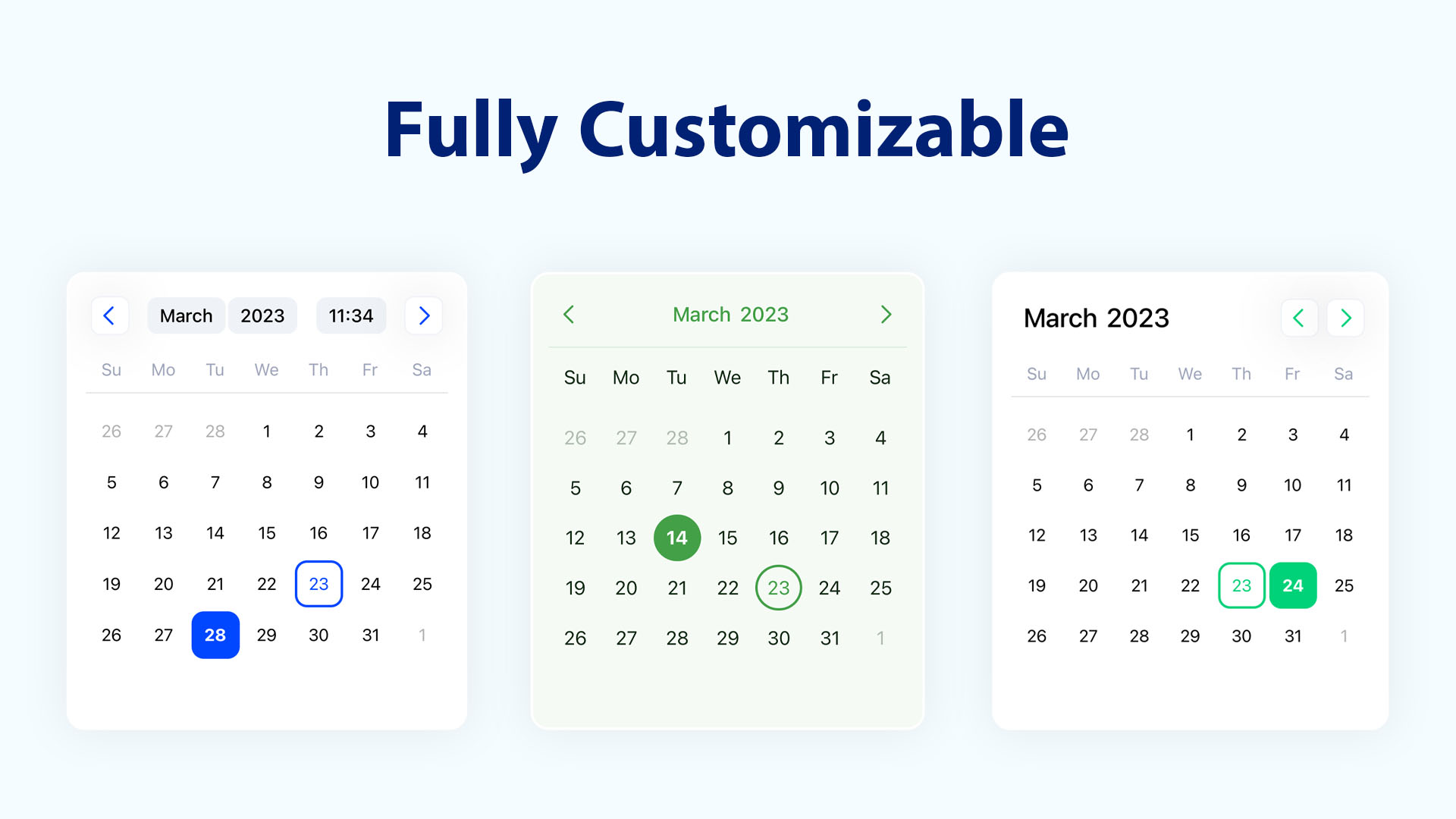
DateTimePicker component for React Native that allows you to create a customizable datetime picker. The component uses extensive set of props that allows you to customizing the calendar based on your own UI design. Please visit [demo](https://farhoudshapouran.github.io/react-native-ui-datepicker/).
## Features
- 📅 Supports different selection modes: single, range, and multiple days.
- 🌿 Unstyled by default, every component is minimally styled and fully customizable.
- 🛠️ Extensive set of props for fine-tuned calendar customization.
- 🎨 Fully compatible with [NativeWind](https://www.nativewind.dev/).
- 🌎 Easily localizable into any language.
- 🕗 Handles different time zones seamlessly.
- ⚙️ Customizable components allow extending rendered elements.
- ⚡ Fast & lightweight, only re-renders the elements that actually change.
## Installation
```sh
npm install react-native-ui-datepicker
```
Or
```sh
yarn add react-native-ui-datepicker
```
## Basic Usage
1. Import the component and default styles or classNames from `react-native-ui-datepicker`.
2. Choose a selection mode using the `mode` prop. The available modes are: `single`, `range`, and `multiple`.
```jsx
import { useState } from 'react';
import DateTimePicker, { DateType, useDefaultStyles } from 'react-native-ui-datepicker';
export function Calendar() {
const defaultStyles = useDefaultStyles();
const [selected, setSelected] = useState();
return (
setSelected(date)}
styles={defaultStyles}
/>
);
}
```
## Calendar Base Props
| Name | Type | Description |
| ------------------ | --------------------------------- | -------------------------------------------------- |
| `mode` | `"single"` \| `"range"` \| `"multiple"` | Defines the DatePicker mode. |
| `calendar` | `"gregory"` \| `"jalali"` | Defines the calendar type of DatePicker. |
| `minDate` | `DateType` | Defines the minimum selectable date in the DatePicker. |
| `maxDate` | `DateType` | Defines the maximum selectable date in the DatePicker. |
| `enabledDates` | `DateType[]` \| `(date: DateType) => boolean` | Defines an array of enabled dates or a function that returns `true` for enabled dates. It takes precedence over disabledDates. |
| `disabledDates` | `DateType[]` \| `(date: DateType) => boolean` | Defines an array of disabled dates or a function that returns `true` for disabled dates. |
| `firstDayOfWeek` | `number` | Defines the first day of the week: 0-6 (0 = Sunday, 6 = Saturday). |
| `initialView` | `"day"` \| `"month"` \| `"year"` \| `"time"` | Defines the initial view of the DatePicker |
| `month` | `number` | Defines the currently selected month. |
| `year` | `number` | Defines the currently selected year. |
| `onMonthChange` | `(month: number) => void` | Callback function triggered when the current month changes. |
| `onYearChange` | `(year: number) => void` | Callback function triggered when the current year changes. |
## Example
```jsx
export function Calendar() {
let today = new Date();
const [selected, setSelected] = useState();
return (
setSelected(date)}
minDate={today} // Set the minimum selectable date to today
enabledDates={(date) => dayjs(date).day() === 1} // Enable only Mondays (takes precedence over disabledDates)
disabledDates={(date) => [0, 6].includes(dayjs(date).day())} // Disable weekends
/>
);
}
```

## Single Mode props
| Name | Type | Description |
| ------------ | ------------------ | ------------------------------------------------------------- |
| `date` | `DateType` | Specifies the currently selected date. |
| `onChange` | `({date}) => void` | Callback function triggered when the date change. |
| `timePicker` | `boolean` | Whether to enable the time picker. |
| `use12Hours` | `boolean` | Whether to use a 12-hour format (AM/PM) in the time picker. |
## Range Mode props
| Name | Type | Description |
| ----------- | -------------------------------- | -----------------------------------------------------------|
| `startDate` | `DateType` | Defines the start date for a range selection. |
| `endDate` | `DateType` | Defines the end date for a range selection. |
| `onChange` | `({startDate, endDate}) => void` | Callback function triggered when the start and end change. |
| `min` | `number` | Defines the minimum allowed nights. |
| `max` | `number` | Defines the maximum allowed nights. |
## Multiple Mode props
| Name | Type | Description |
| ----------------- | ------------------- | ----------------------------------------------------------- |
| `dates` | `DateType[]` | Defines the selected dates for multiple date selection. |
| `onChange` | `({dates}) => void` | Callback function triggered when the dates change. |
| `max` | `number` | Defines the maximum allowed days to select. |
| `multiRangeMode` | `boolean` | Whether to display selecting multiple dates in a range row. |
## Customization
| Name | Type | Description |
| -------------------- | ----------------------------------- | --------------------------------------------------------- |
| `showOutsideDays` | `boolean` | Whether to show the days of the previous and next months. |
| `navigationPosition` | `"around"` \| `"right"` \| `"left"` | Defines the position of the navigation. |
| `containerHeight` | `number` | Defines the height of the calendar days container. |
| `weekdaysHeight` | `number` | Defines the height of the weekdays row. |
| `weekdaysFormat` | `"short"` \| `"full"` \| `"min"` | Defines the format for displaying weekdays. |
| `monthsFormat` | `"short"` \| `"full"` | Defines the format for displaying months. |
| `monthCaptionFormat` | `"short"` \| `"full"` | Defines the format for displaying the month caption. |
| `hideHeader` | `boolean` | Whether to hide the calendar header. |
| `hideWeekdays` | `boolean` | Whether to hide the weekdays row. |
| `disableMonthPicker` | `boolean` | Whether to disable the month picker. |
| `disableYearPicker` | `boolean` | Whether to disable the year picker. |
## Styling
DateTimePicker comes with a minimal style, making it easy to extend and customize according to your needs.
| Name | Type | Description |
| ----------------- | --------------- | --------------------------------------------------------------- |
| `style` | `ViewStyle` | style for the calendar container. |
| `className` | `string` | className for the calendar container. |
| `styles` | `Styles` | Custom styles for specific components inside the calendar. |
| `classNames` | `ClassNames` | Custom classNames for specific components inside the calendar. |
## Custom Styles
Use the `styles` prop to apply custom styles instead of the default ones.
These styles are mapped to the values of the [UI Theme](https://github.com/farhoudshapouran/react-native-ui-datepicker/blob/main/src/ui.ts) enums.
```jsx
import DateTimePicker, { useDefaultStyles } from 'react-native-ui-datepicker';
export function Calendar() {
const defaultStyles = useDefaultStyles();
return (
);
}
```
## NativeWind (Tailwind CSS)
If you're using [NativeWind](https://www.nativewind.dev/) in your project, apply Tailwind CSS class names to style the calendar.
Use the `classNames` prop to apply custom class names instead of the default ones.
These class names are mapped to the values of the [UI Theme](https://github.com/farhoudshapouran/react-native-ui-datepicker/blob/main/src/ui.ts) enums.
```jsx
import DateTimePicker, { useDefaultClassNames } from 'react-native-ui-datepicker';
export function Calendar() {
const defaultClassNames = useDefaultClassNames();
return (
);
}
```
## Time Zones
Use the `timeZone` prop to set the time zone for the calendar.
| Name | Type | Description |
| -------------- | ------------------ | ------------------------------------------ |
| `timeZone` | `string` | Defines the timezone for the DatePicker. |
The time zone can be set using either an [IANA time zone](https://en.wikipedia.org/wiki/List_of_tz_database_time_zones) identifier or a UTC offset.
```jsx
// Use Coordinated Universal Time
// Use Japan Standard Time (JST)
```
## Localization
DateTimePicker offers multiple options to customize the calendar for different languages.
| Name | Type | Description |
| ------------ | ------------------------------------ | ------------------------------------------------------------ |
| `locale` | `string` | Defines the locale of the DateTimePicker. Default is `en` |
| `numerals` | [Numerals](#list-of-numeral-systems) | Specifies the numeral system to use (e.g., Arabic, Persian). |
## Custom Components
Use the `components` prop to replace the default rendered elements with your own custom components.
| Name | Type | Description |
| --------------- | ------------------------- | -------------------------------------------------------- |
| `components` | `CalendarComponents` | Custom components to replace default calendar elements. |
## Implementing a Custom Component
Pass the custom components to the `components` prop. Refer to the list below for available [custom components](#list-of-custom-components).
```jsx
import DateTimePicker, {
CalendarDay,
CalendarMonth,
CalendarComponents,
} from 'react-native-ui-datepicker';
const components: CalendarComponents = {
Day: (day: CalendarDay) => ,
Month: (month: CalendarMonth) =>
// etc
};
export function Calendar() {
return (
);
}
```
## List of Custom Components
| Name | Type | Description |
| ---------- | -------------------------------------- | ------------------------------------------------------ |
| `Day` | `(day: CalendarDay) => ReactNode` | The component containing the day in the days grid. |
| `Month` | `(month: CalendarMonth) => ReactNode` | The component containing the month in the months grid. |
| `Year` | `(year: CalendarYear) => ReactNode` | The component containing the year in the years grid. |
| `Weekday` | `(weekday: CalendarWeek) => ReactNode` | The component containing the weekday in the header. |
| `IconPrev` | `ReactNode` | The previous month/year button icon in the header. |
| `IconNext` | `ReactNode` | The next month button/year icon in the header. |
## Type Definitions
```typescript
type DateType = string | number | Dayjs | Date | null | undefined;
type CalendarMode = 'single' | 'range' | 'multiple';
type NavigationPosition = 'around' | 'right' | 'left';
type WeekdayFormat = 'min' | 'short' | 'full';
type MonthFormat = 'short' | 'full';
type CalendarDay = {
number: number;
text: string;
date: string;
isDisabled: boolean;
isCurrentMonth: boolean;
dayOfMonth?: number;
isToday: boolean;
isSelected: boolean;
inRange: boolean;
leftCrop: boolean;
rightCrop: boolean;
isStartOfWeek: boolean;
isEndOfWeek: boolean;
isCrop: boolean;
inMiddle: boolean;
rangeStart: boolean;
rangeEnd: boolean;
};
type CalendarWeek = {
index: number;
name: {
full: string;
short: string;
min: string;
};
};
type CalendarMonth = {
index: number;
name: {
full: string;
short: string;
};
isSelected: boolean;
};
type CalendarYear = {
number: number;
text: string;
isSelected: boolean;
isActivated: boolean;
};
```
## List of Numeral Systems
| Name | Description |
| ---------- | --------------------------------------------- |
| `latn` | Western Latin. |
| `arab` | Standard Arabic. |
| `arabext` | Eastern Arabic-Indic (Persian). |
| `deva` | Devanagari, used in Indian languages. |
| `beng` | Bengali, used in Bengali and Assamese. |
| `guru` | Gurmukhi, used in Punjab, India. |
| `gujr` | Gujarati, used in Gujarat, India. |
| `orya` | Odia, used in Odisha, India. |
| `tamldec` | Tamil, used in Tamil-speaking regions. |
| `telu` | Telugu, used in Andhra Pradesh and Telangana. |
| `knda` | Kannada, used in Karnataka, India. |
| `mlym` | Malayalam, used in Kerala, India. |

## License
MIT. See the [LICENSE](https://github.com/farhoudshapouran/react-native-ui-datepicker/blob/main/LICENSE) file for more details.
## Contributing
Contributions are welcome! Please feel free to submit a PR.