# Using Truecaller SDK with your React App
## Getting started
- Run the following command to add the react-native-truecaller dependency with your react app
`npm install react-native-truecaller --save` or `yarn add react-native-truecaller`
- for linking both android and ios, run the following command
`
react-native link
`
### Basic Configuration
To ensure the authenticity of the interactions between your app and Truecaller, you need to generate a partner key from the truecaller developer portal ( https://developer.truecaller.com/auth/login )
#### Integrating Truecaller SDK in your android module
1. Download the project zip file from the [Android SDK release section](https://github.com/truecaller/android-sdk)
2. Unzip the file
3. Copy the SDK .aar File in your project directory
4. Add the above extracted .aar file into libs folder of your react-native-truecaller (path : react-native-truecaller -> android -> libs -> .arr file)
5. Add it in react-native-truecaller gradle file
(Note) To update the SDK file, simply replace this .aar file with latest one
```
compile files('libs/truesdk-0.6.aar')
```
6. Add you partner key in react-native-truecaller manifest file
```
```
7. Open your strings.xml file. Example path: /app/src/main/res/values/strings.xml and add a new string with the name "partnerKey" and value as your "PartnerKey"
#### Integrating Truecaller SDK in your iOS module
Please ensure the following things before integrating:
1. You have the app ID in the "Apple development portal". If you do not have App ID yet, then open Project -> Capabilities -> Enable Associated domains. New app id will be automatically created by Xcode.
2. Sign up at https://developer.truecaller.com/sign-up
3. Truecaller SDK is already available in RCTTruecaller libray so there is no need to integrate the SDK in the project again unless a new version of SDK is available
To integrate the SDK with your project -
1. Download the project zip file from the [iOS SDK release section](https://github.com/truecaller/ios-sdk/releases)
2. Unzip the file
3. Remove Old version SDK folder
4. Copy the TruecallerSDK project files into RCTTruecaller Libray (TrueSDK directory, TrueSDKTests directory and TrueSDK.xcodeproj)
5. Drag and drop TrueSDK.xcodeproj into RCTTruecaller Libray(i.e. add it as a subproject to your main project)
##### Usage
Add the entry truesdk under LSApplicationQueriesSchemes in into your Info.plist file
```
LSApplicationQueriesSchemes
truesdk
```
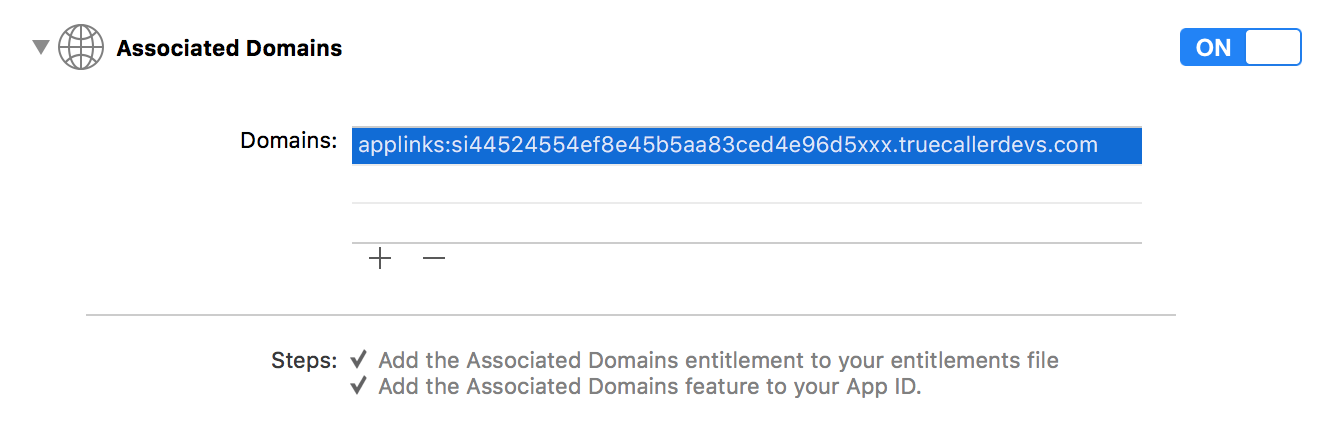
Add the associated domain provided by Truecaller (for example applinks:si44524554ef8e45b5aa83ced4e96d5xxx.truecallerdevs.com) in Your project -> Capabilities > Associated Domains. The prefix 'applinks:' is needed for universal links to function properly.
**Important:** Replace the '**https://**' part from the provided app link with "**applinks:**". ie _`https://si44524554ef8e45b5aa83ced4e96d5xxx.truecallerdevs.com`_ should become _`applinks:si44524554ef8e45b5aa83ced4e96d5xxx.truecallerdevs.com`_ while adding to entitlements.
(Note that there is **no** _http://_ or _https://_ prefix when setting up the applinks:)
1. Import the TruecallerSDK framework in the class where you want to initialize it (for example AppDelegate.m) and in the class that you want to receive the profile response.
```objectivec
#import "TrueSDK/TrueSDK.h"
```
2. In AppDelegate implement the method `application:continueUserActivity:restorationHandler:` and call the corresponding method of the `[TCTrueSDK sharedManager]`.
If the method returns false that means the activity need not be addressed by Truecaller SDK and you can handle it as desired.
```objectivec
- (BOOL)application:(UIApplication *)application continueUserActivity:(NSUserActivity *)userActivity restorationHandler:(void (^)(NSArray *restorableObjects))restorationHandler {
return [[TCTrueSDK sharedManager] application:application continueUserActivity:userActivity restorationHandler:restorationHandler];
}
```
3. Applinks and Appkey will be initialized in react-native code (`TRUECALLER.initializeClientIOS(APPKEY,APPLINKS)`)
## Example Snippet to initiate TrueClient with your react app
``` java
import TRUECALLER,{TRUECALLEREvent} from "react-native-truecaller"
type Props = {};
export default class App extends Component
{
constructor(props)
{
super(props);
this.state = { name :"", phone:"", address:"", email:"", job:"", company:"", countryCode:"", gender:"", url:avatar,
};
this.onButtonPress=this.onButtonPress.bind(this)
}
componentDidMount()
{
if(Platform.OS=="ios"){
TRUECALLER.initializeClientIOS(`APPKEY`,`APPLINKS`)
}
else{
TRUECALLER.initializeClient();
}
}
onButtonPress()
{
TRUECALLER.on(TRUECALLEREvent.TrueProfileResponse, (profile) =>
{
this.setState({
name:profile.firstName+" "+profile.lastName,
phone:profile.phoneNumber,
address:profile.city,
email:profile.email,
job:profile.jobTitle,
company:profile.companyName,
countryCode:profile.countryCode,
gender:profile.gender?"Male":"Female",
url:{uri:profile.avatarUrl}
})
});
TRUECALLER.on(TRUECALLEREvent.TrueProfileResponseError, (error) =>
{
Toast.show(error.profile,Toast.SHORT);
});
TRUECALLER.requestTrueProfile();
}
```
Implement the following callbacks methods -
```java
TRUECALLER.initializeClient()
// set callback to reach react library in android
TRUECALLER.initializeClientIOS(`APPKEY`,`APPLINKS`)
// set APPKEY and APPLINKS for TrueSDK And set delegate to reach react library in ios
TRUECALLER.requestTrueProfile()
// method to request profile form Truecaller app
TRUECALLER.on(TRUECALLEREvent.TrueProfileResponse, (profile) =>
{
// after fetching profile, this callback would be returned in both android and ios
}
TRUECALLER.on(TRUECALLEREvent.TrueProfileResponseError, (error) =>
{
// this callback will be called in case of any error
});
```
- To access the user profile details from the profile object in your react app, use the following paramters -
```
profile.firstName
profile.lastName
profile.phoneNumber
profile.gender
profile.street
profile.city
profile.zipcode
profile.countryCode
profile.facebookId
profile.twitterId
profile.email
profile.url
profile.avatarUrl
profile.isTrueName
profile.companyName
profile.jobTitle
profile.payload
profile.signature
profile.signatureAlgorithm
profile.requestNonce
profile.isSimChanged
profile.verificationMode
```