# react-native-text-contextmenu

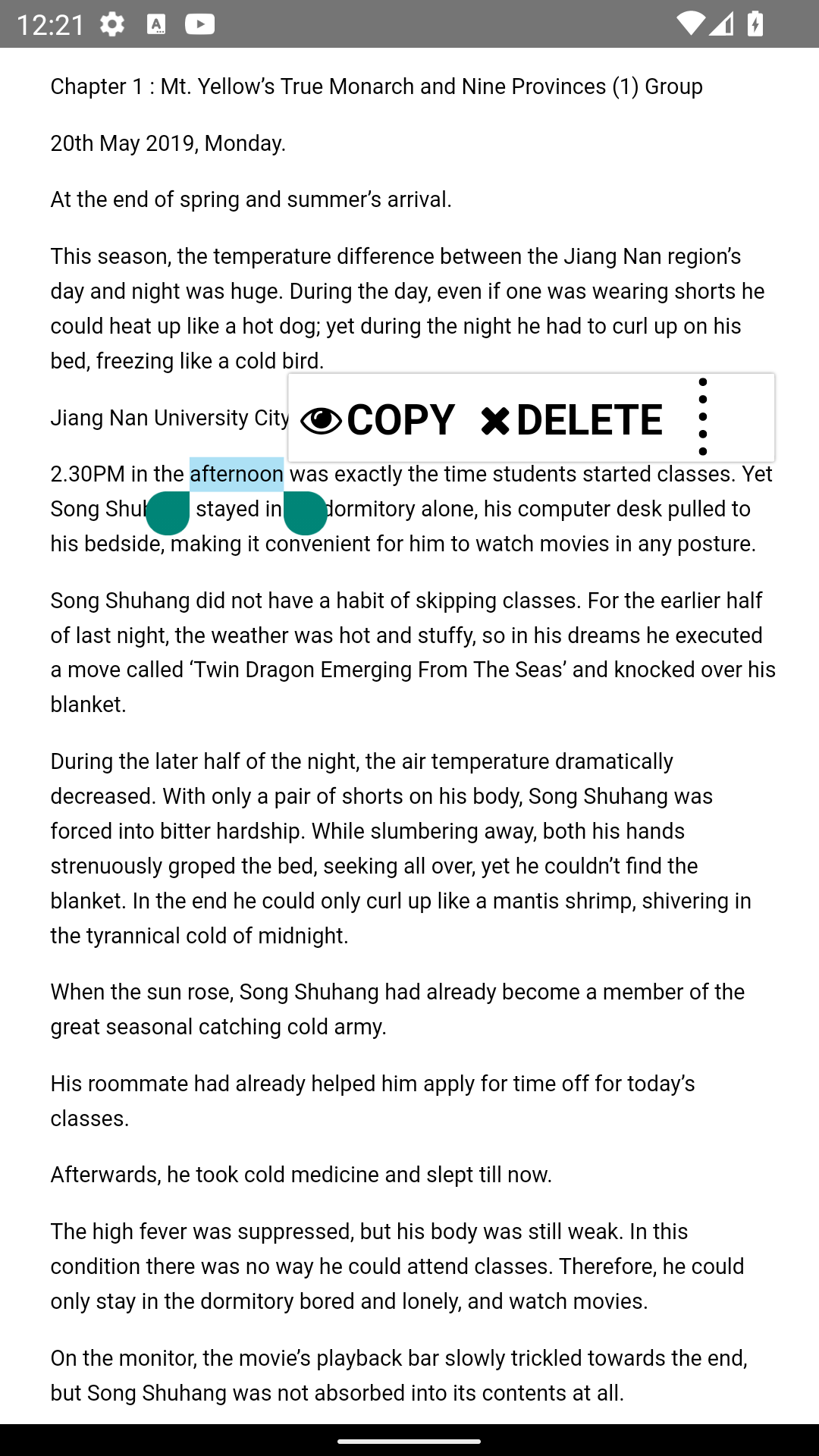
Custom text contextmenu for react-native using webview
in this you could customize everything about your contextmenu without using any native code

### Images

<img src="https://github.com/AlenToma/react-native-text-contextmenu/blob/master/screenshots/Screenshot_2.png?raw=true" width="500" />

## Installation

```sh

npm install react-native-webview react-native-text-contextmenu
```

## Usage

```js
import * as React from 'react';

import { StyleSheet, View, Dimensions } from 'react-native';
import TextContextmenu from 'react-native-text-contextmenu';

const html = `
<div class="main-content">
<p></p><p>Chapter 1 : Mt. Yellow’s True Monarch and Nine Provinces (1) Group</p><p></p><p>20th May 2019, Monday.</p><p></p><p>At the end of spring and summer’s arrival.</p><p></p><p>This season, the temperature difference between the Jiang Nan region’s day and night was huge. During the day, even if one was wearing shorts he could heat up like a hot dog; yet during the night he had to curl up on his bed, freezing like a cold bird.</p><p></p><p>Jiang Nan University City.</p>
</div>
`

export default function App() {
  const css = `
  .main-content p {
    font-size: 26px;
    line-height: 160%;
    margin-left: 52px;
    margin-right: 42px;
    font-family: Arial, sans-serif, serif;
    background-color: inherit;
    z-index: -9999999999999999999999999;
  }
  .selection-menu {
    font: 12px/100% Roboto, sans-serif;
  }

  .mobile {
    font-size: 20px !important;
    min-height: 30px !important;
    font-weight: bold;
    padding: 14px !important;
    padding-top: 21px !important;   
  }
  `

  return (
    <View style={styles.container}>
      <TextContextmenu minlength={3} value={html} menus={[{
        text: "Copy",
        icon: `<i class="fa fa-eye"></i>`,
        id: "copy"
      },
      {
        text: "Delete",
        icon: `<i class="fa fa-times"></i>`,
        id: "delete"
      },
      {
        text: "Translate",
        icon: `<i class="fa fa-times"></i>`,
        id: "translate"
      }]} maxItems={2} scrollTop={100} selections={[{ text: "the ", color: "red" }]} onSelect={(data, text) => {
        console.log(data, text);
      }} width={Dimensions.get("window").width} height={Dimensions.get("window").height} css={css} />
    </View>
  );
}
```
## Propeties 
### width*
the width of the webview

### height*
the height of the webview

### menus*
the contextmenu when the text gets selected

### value*
text or html

### onSelect*
when a contextmenu gets selected, it include the menu and the selected text

### maxItems(optional)
how many items get display in contextmenu and the rest will be included under a collabs button

### selections(optional)
select text with its properties eg `[{text: "the", color: red}]`

### onScroll(optional)
when the window gets scrolled, it return scrolltop

### css(optional)
style of the page. here you can customize even the `selection-menu` [see the css file for more info](https://github.com/AlenToma/react-native-text-contextmenu/blob/master/android/src/main/assets/style.css) 

### injectedJavaScriptBefore(optional)
inject javascript before the contextmenu gets bind

### injectedJavaScriptAfter(optional)
inject javascript after the contextmenu gets bind

### minlength(optional)
how much text has to get selected before contextmenu gets displayed default is 1

### contextMenuJS(optional)
override the contextmenujs and load your own js file. This is a link eg `file:///android_asset/contextMenu.js`

### click(optional)
When the container gets clicked

### scrollTop(optional)
ScrollY Offset

## Contributing

See the [contributing guide](CONTRIBUTING.md) to learn how to contribute to the repository and the development workflow.

## License

MIT

---

Made with [create-react-native-library](https://github.com/callstack/react-native-builder-bob)
