# react-native-ssh-sftp
SSH and SFTP client library for React Native.
## Installation
```
npm install react-native-ssh-sftp --save
react-native link react-native-ssh-sftp
```
### iOS (only)
NMSSH is required for iOS.
1. Initialize Pod:
```
cd ios
pod init
```
2. Open Podfile and add:
```
target '[your project's name]' do
pod 'NMSSH'
end
```
3. Install Pod:
```
pod install
```
### Manual Link
#### iOS
1. In XCode, in the project navigator, right click `Libraries` ➜ `Add Files to [your project's name]`
2. Go to `node_modules` ➜ `react-native-ssh-sftp` and add `RNSSHClient.xcodeproj`
3. In XCode, in the project navigator, select your project. Add `libRNSSHClient.a` to your project's `Build Phases` ➜ `Link Binary With Libraries`
#### Android
1. Open up `android/app/src/main/java/[...]/MainActivity.java`
- Add `import com.reactlibrary.RNSshClientPackage;` to the imports at the top of the file
- Add `new RNSshClientPackage()` to the list returned by the `getPackages()` method
2. Append the following lines to `android/settings.gradle`:
```
include ':react-native-ssh-sftp'
project(':react-native-ssh-sftp').projectDir = new File(rootProject.projectDir, '../node_modules/react-native-ssh-sftp/android')
```
3. Insert the following lines inside the dependencies block in `android/app/build.gradle`:
```
compile project(':react-native-ssh-sftp')
```
## Demo
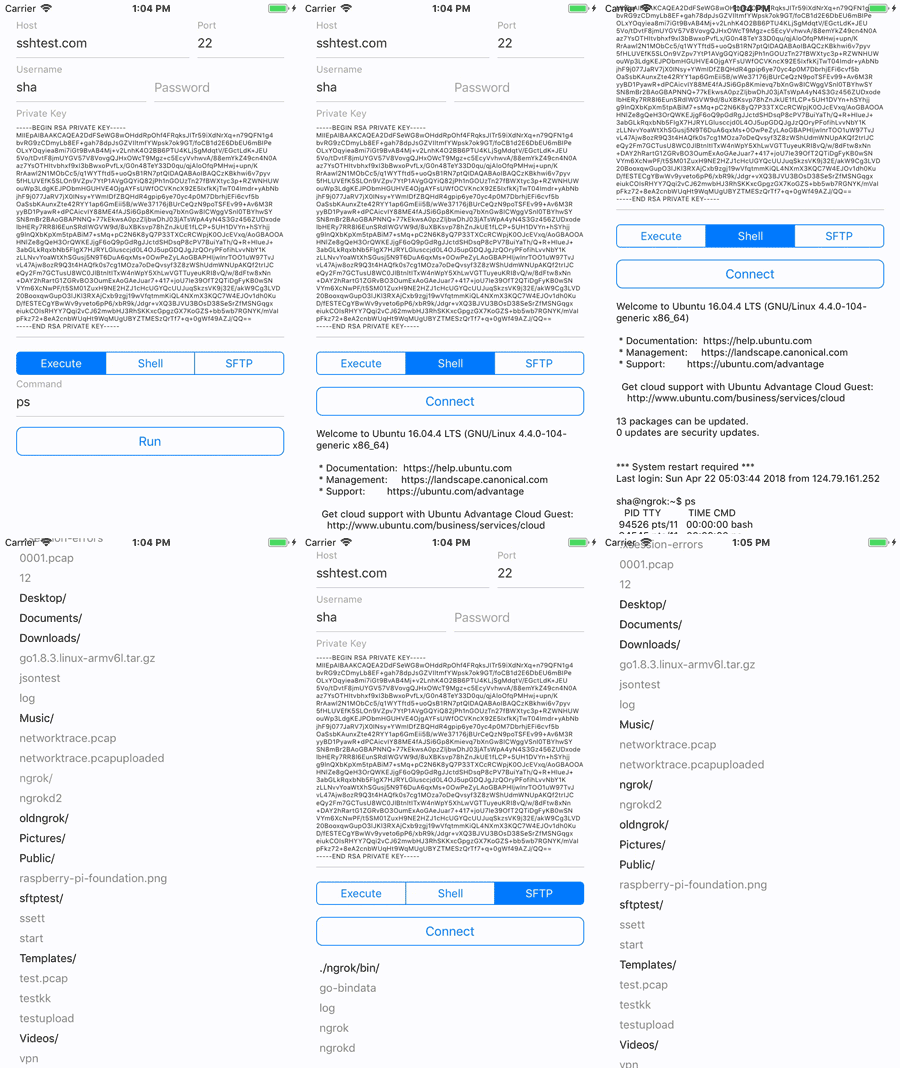
- This library is also used in iOS app PiHelper.

## Run demo
### iOS
```
cd example
cd ios
pod install
cd ..
npm install
react-native run-ios
```
### Android
```
cd example
npm install
react-native run-android
```
## Usage
### Create a client using password authentication
```javascript
import SSHClient from 'react-native-ssh-sftp';
let client = new SSHClient('10.0.0.10', 22, 'user', 'password', (error) => {
if (error)
console.warn(error);
});
```
### Create a client using public key authentication
```javascript
import SSHClient from 'react-native-ssh-sftp';
let client = new SSHClient('10.0.0.10', 22, 'user', {privateKey: '-----BEGIN RSA......'}, (error) => {
if (error)
console.warn(error);
});
```
- Public key authentication also supports:
```
{privateKey: '-----BEGIN RSA......'}
{privateKey: '-----BEGIN RSA......', publicKey: 'ssh-rsa AAAAB3NzaC1yc2EA......'}
{privateKey: '-----BEGIN RSA......', publicKey: 'ssh-rsa AAAAB3NzaC1yc2EA......', passphrase: 'Password'}
```
### Close client
```javascript
client.disconnect();
```
### Execute SSH command
```javascript
var command = 'ls -l';
client.execute(command, (error, output) => {
if (error)
console.warn(error);
if (output)
console.warn(output);
});
```
### Shell
#### Start shell:
- Supported ptyType: vanilla, vt100, vt102, vt220, ansi, xterm
```javascript
var ptyType = 'vanilla';
client.startShell(ptyType, (error) => {
if (error)
console.warn(error);
});
```
#### Read from shell:
```javascript
client.on('Shell', (event) => {
if (event)
console.warn(event);
});
```
#### Write to shell:
```javascript
var str = 'ls -l\n';
client.writeToShell(str, (error) => {
if (error)
console.warn(error);
});
```
#### Close shell:
```javascript
client.closeShell();
```
### SFTP
#### Connect SFTP
```javascript
client.connectSFTP((error) => {
if (error)
console.warn(error);
});
```
#### List directory:
```javascript
var path = '.';
client.sftpLs(path, (error, response) => {
if (error)
console.warn(error);
if (response)
console.warn(response);
});
```
#### Create directory:
```javascript
client.sftpMkdir('dirName', (error) => {
if (error)
console.warn(error);
});
```
#### Rename file or directory:
```javascript
client.sftpRename('oldName', 'newName', (error) => {
if (error)
console.warn(error);
});
```
#### Remove directory:
```javascript
client.sftpRmdir('dirName', (error) => {
if (error)
console.warn(error);
});
```
#### Remove file:
```javascript
client.sftpRm('fileName', (error) => {
if (error)
console.warn(error);
});
```
#### Download file:
```javascript
client.sftpDownload('[path-to-remote-file]', '[path-to-local-direcotry]', (error, downloadedFilePath) => {
if (error)
console.warn(error);
if (downloadedFilePath)
console.warn(downloadedFilePath);
});
// Downlowd progress
client.on('DownloadProgress', (event) => {
console.warn(event);
});
// Cancel download:
client.sftpCancelDownload();
```
#### Upload file:
```javascript
client.sftpUpload('[path-to-local-file]', '[path-to-remote-directory]', (error) => {
if (error)
console.warn(error);
});
// Upload progress
client.on('UploadProgress', (event) => {
console.warn(event);
});
// Cancel upload:
client.sftpCancelUpload();
```
#### Close SFTP:
```javascript
client.disconnectSFTP();
```
## Credits
* iOS SSH library: [NMSSH](https://github.com/NMSSH/NMSSH)
* Android SSH library: [JSch](http://www.jcraft.com/jsch/)