## react-native-smooth-slider
[](https://npmjs.org/package/react-native-smooth-slider "View this project on npm")
[](https://npmjs.org/package/react-native-smooth-slider "View this project on npm")
[](https://npmjs.org/package/react-native-smooth-slider "View this project on npm")
[](https://npmjs.org/package/react-native-smooth-slider "View this project on npm")
A react-native-gesture-handler smoothed `` , also support trackImage and vertical.
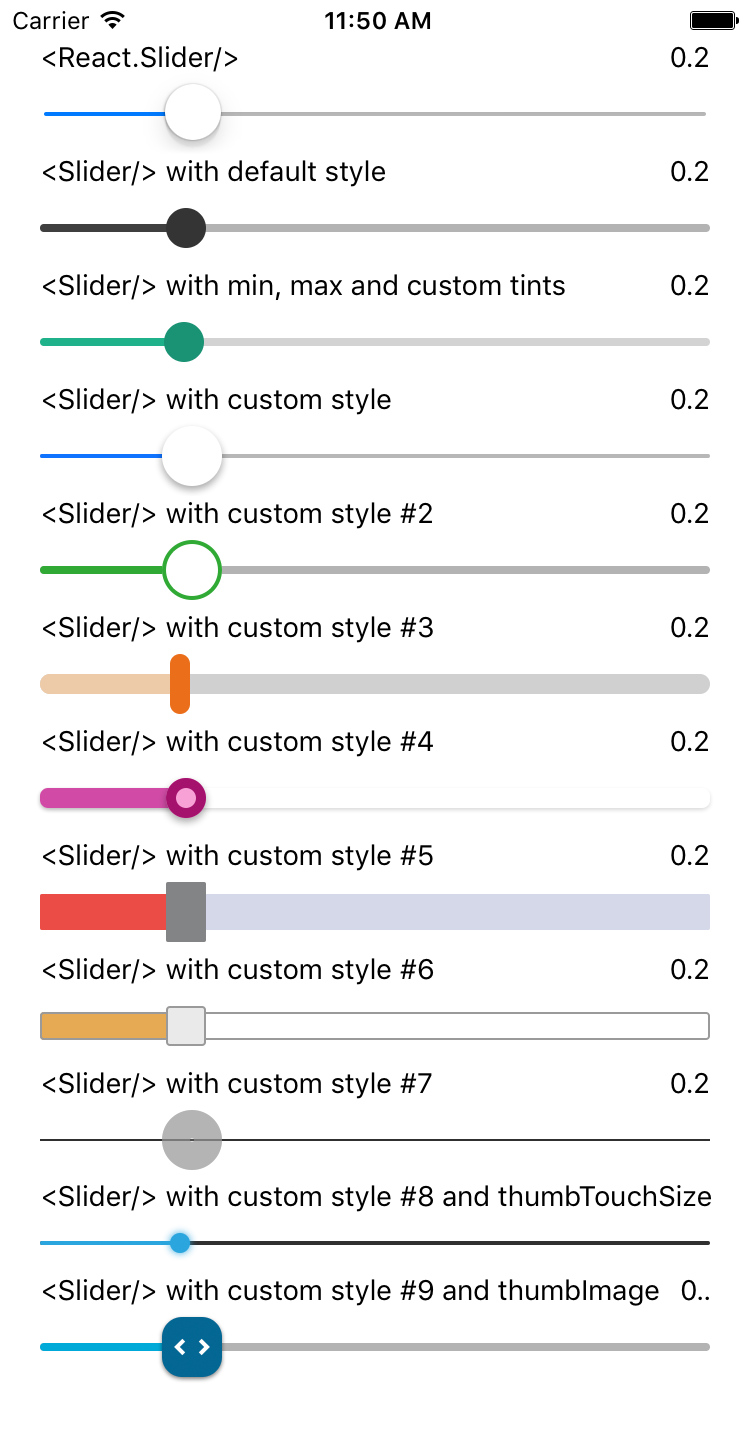
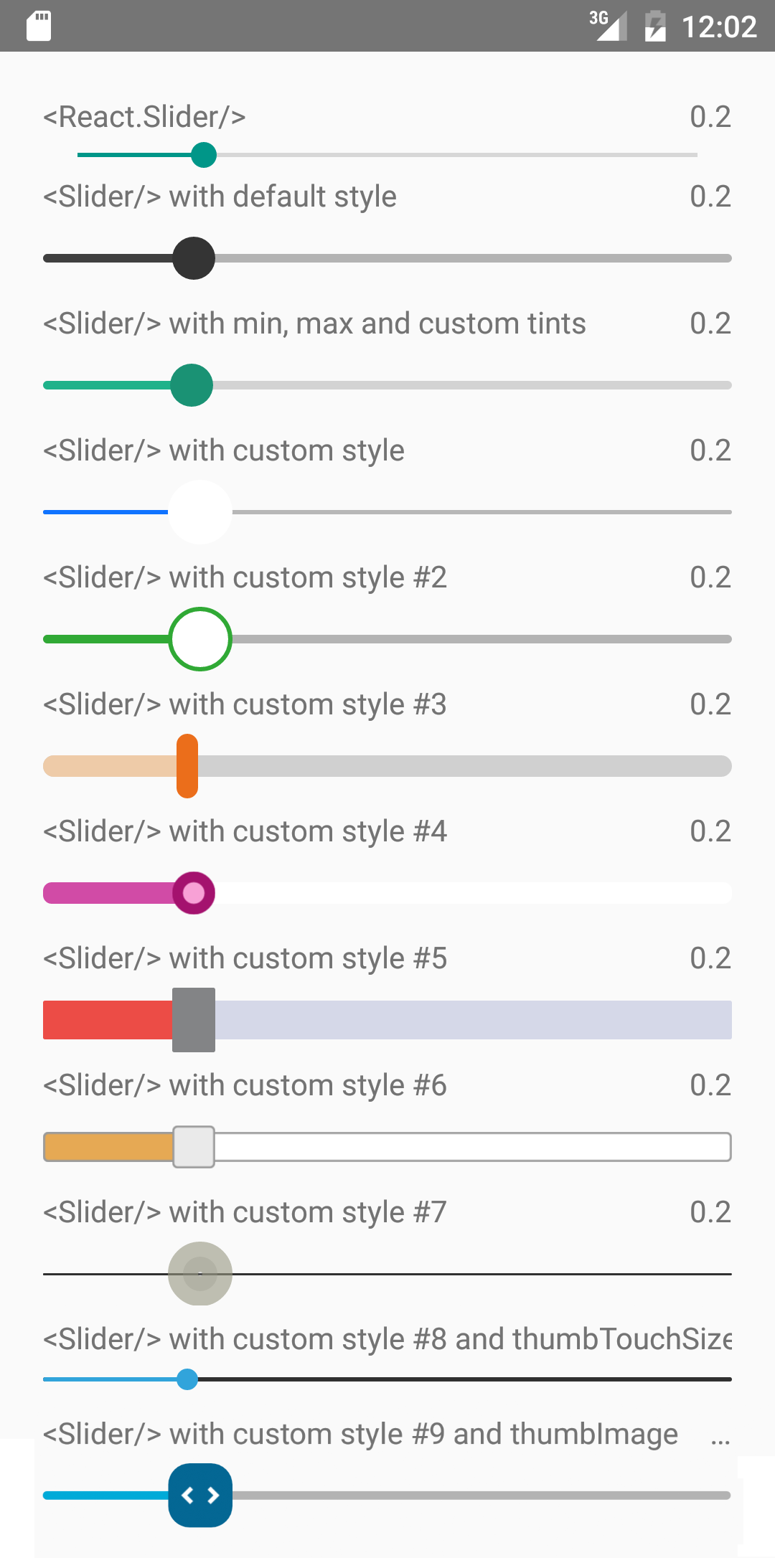 It is a drop-in replacement for [Slider](http://facebook.github.io/react-native/docs/slider.html).
## Install
For RN >= 0.60
```shell
npm i --save react-native-smooth-slider react-native-gesture-handler
```
For RN < 0.60
```shell
npm i --save react-native-smooth-slider@1.2.x react-native-gesture-handler@1.2.2
```
And be aware of https://github.com/software-mansion/react-native-gesture-handler/issues/1164 if you use react-native-web and want to slide on web.
## Usage
```jsx
import React from "react";
import Slider from "react-native-smooth-slider";
import {AppRegistry, StyleSheet, Text} from "react-native";
// if react-native-gesture-handler@1.x, no need
// but just , ref to
// https://docs.swmansion.com/react-native-gesture-handler/docs/guides/migrating-off-rnghenabledroot/
// You should put in your root component,
// example below is just playing the role of a root component
import {GestureHandlerRootView} from 'react-native-gesture-handler';
class SliderExample extends React.Component {
state = {
value: 0.2
};
render() {
return (
this.setState({ value })}
/>
Value: {this.state.value}
);
}
}
const styles = StyleSheet.create({
container: {
flex: 1,
marginLeft: 10,
marginRight: 10,
alignItems: "stretch",
justifyContent: "center"
}
});
AppRegistry.registerComponent("SliderExample", () => SliderExample);
```
## Props
Prop | Type | Optional | Default | Description
--------------------- | -------- | -------- | ------------------------- | -----------
value | number | Yes | 0 | Initial value of the slider
disabled | bool | Yes | false | If true the user won't be able to move the slider
minimumValue | number | Yes | 0 | Initial minimum value of the slider
maximumValue | number | Yes | 1 | Initial maximum value of the slider
step | number | Yes | 0 | Step value of the slider. The value should be between 0 and maximumValue - minimumValue)
minimumTrackTintColor | string | Yes | '#3f3f3f' | The color used for the track to the left of the button
maximumTrackTintColor | string | Yes | '#b3b3b3' | The color used for the track to the right of the button
thumbTintColor | string | Yes | '#343434' | The color used for the thumb
thumbTouchSize | object | Yes | `{width: 40, height: 40}` | The size of the touch area that allows moving the thumb. The touch area has the same center as the visible thumb. This allows to have a visually small thumb while still allowing the user to move it easily.
moveVelocityThreshold | number | Yes | 2000 | Prevent onValueChange if velocityX or velocityY (vertical is true) of nativeEvent is over the moveVelocityThreshold
onValueChange | function | Yes | | Callback continuously called while the user is dragging the slider and the dragging movement speed is below the moveVelocityThreshold
onSlidingStart | function | Yes | | Callback called when the user starts changing the value (e.g. when the slider is pressed)
onSlidingComplete | function | Yes | | Callback called when the user finishes changing the value (e.g. when the slider is released)
style | [style](http://facebook.github.io/react-native/docs/view.html#style) | Yes | | The style applied to the slider container
trackStyle | [style](http://facebook.github.io/react-native/docs/view.html#style) | Yes | | The style applied to the track
trackImage | [source](http://facebook.github.io/react-native/docs/image.html#source) | Yes | | Sets an image for the track.
thumbStyle | [style](http://facebook.github.io/react-native/docs/view.html#style) | Yes | | The style applied to the thumb
thumbImage | [source](http://facebook.github.io/react-native/docs/image.html#source) | Yes | | Sets an image for the thumb.
vertical | bool | Yes | false | Set this to true to be a vertical slider.
useNativeDriver | bool | Yes | false | The useNativeDriver parameter in Animated used by react-native-gesture-handler when the user change the value. Default value is false, because some Android phone [PanGestureHandler causes Animated Value to jump when using native driver](https://github.com/software-mansion/react-native-gesture-handler/issues/984)
animateTransitions | bool | Yes | false | Set to true to animate values with default 'timing' animation type when value in next props is different.
animationType | string | Yes | 'timing' | Custom Animation type when value in next props is different. 'spring' or 'timing'.
animationConfig | object | Yes | undefined | Used to configure the animation parameters when value in next props is different. These are the same parameters in the [Animated library](https://facebook.github.io/react-native/docs/animations.html).
## Methods
setValue(value)
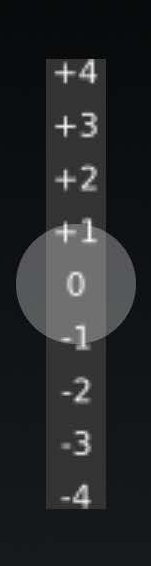
In some use case e.g. "tension rod", it's more convenient to use method instead of prop to restore original positon of the tension rod. Below is a vertical tension rod example screenshot.
It is a drop-in replacement for [Slider](http://facebook.github.io/react-native/docs/slider.html).
## Install
For RN >= 0.60
```shell
npm i --save react-native-smooth-slider react-native-gesture-handler
```
For RN < 0.60
```shell
npm i --save react-native-smooth-slider@1.2.x react-native-gesture-handler@1.2.2
```
And be aware of https://github.com/software-mansion/react-native-gesture-handler/issues/1164 if you use react-native-web and want to slide on web.
## Usage
```jsx
import React from "react";
import Slider from "react-native-smooth-slider";
import {AppRegistry, StyleSheet, Text} from "react-native";
// if react-native-gesture-handler@1.x, no need
// but just , ref to
// https://docs.swmansion.com/react-native-gesture-handler/docs/guides/migrating-off-rnghenabledroot/
// You should put in your root component,
// example below is just playing the role of a root component
import {GestureHandlerRootView} from 'react-native-gesture-handler';
class SliderExample extends React.Component {
state = {
value: 0.2
};
render() {
return (
this.setState({ value })}
/>
Value: {this.state.value}
);
}
}
const styles = StyleSheet.create({
container: {
flex: 1,
marginLeft: 10,
marginRight: 10,
alignItems: "stretch",
justifyContent: "center"
}
});
AppRegistry.registerComponent("SliderExample", () => SliderExample);
```
## Props
Prop | Type | Optional | Default | Description
--------------------- | -------- | -------- | ------------------------- | -----------
value | number | Yes | 0 | Initial value of the slider
disabled | bool | Yes | false | If true the user won't be able to move the slider
minimumValue | number | Yes | 0 | Initial minimum value of the slider
maximumValue | number | Yes | 1 | Initial maximum value of the slider
step | number | Yes | 0 | Step value of the slider. The value should be between 0 and maximumValue - minimumValue)
minimumTrackTintColor | string | Yes | '#3f3f3f' | The color used for the track to the left of the button
maximumTrackTintColor | string | Yes | '#b3b3b3' | The color used for the track to the right of the button
thumbTintColor | string | Yes | '#343434' | The color used for the thumb
thumbTouchSize | object | Yes | `{width: 40, height: 40}` | The size of the touch area that allows moving the thumb. The touch area has the same center as the visible thumb. This allows to have a visually small thumb while still allowing the user to move it easily.
moveVelocityThreshold | number | Yes | 2000 | Prevent onValueChange if velocityX or velocityY (vertical is true) of nativeEvent is over the moveVelocityThreshold
onValueChange | function | Yes | | Callback continuously called while the user is dragging the slider and the dragging movement speed is below the moveVelocityThreshold
onSlidingStart | function | Yes | | Callback called when the user starts changing the value (e.g. when the slider is pressed)
onSlidingComplete | function | Yes | | Callback called when the user finishes changing the value (e.g. when the slider is released)
style | [style](http://facebook.github.io/react-native/docs/view.html#style) | Yes | | The style applied to the slider container
trackStyle | [style](http://facebook.github.io/react-native/docs/view.html#style) | Yes | | The style applied to the track
trackImage | [source](http://facebook.github.io/react-native/docs/image.html#source) | Yes | | Sets an image for the track.
thumbStyle | [style](http://facebook.github.io/react-native/docs/view.html#style) | Yes | | The style applied to the thumb
thumbImage | [source](http://facebook.github.io/react-native/docs/image.html#source) | Yes | | Sets an image for the thumb.
vertical | bool | Yes | false | Set this to true to be a vertical slider.
useNativeDriver | bool | Yes | false | The useNativeDriver parameter in Animated used by react-native-gesture-handler when the user change the value. Default value is false, because some Android phone [PanGestureHandler causes Animated Value to jump when using native driver](https://github.com/software-mansion/react-native-gesture-handler/issues/984)
animateTransitions | bool | Yes | false | Set to true to animate values with default 'timing' animation type when value in next props is different.
animationType | string | Yes | 'timing' | Custom Animation type when value in next props is different. 'spring' or 'timing'.
animationConfig | object | Yes | undefined | Used to configure the animation parameters when value in next props is different. These are the same parameters in the [Animated library](https://facebook.github.io/react-native/docs/animations.html).
## Methods
setValue(value)
In some use case e.g. "tension rod", it's more convenient to use method instead of prop to restore original positon of the tension rod. Below is a vertical tension rod example screenshot.
 ## Donate
To support my work, please consider donate.
- ETH: 0xd02fa2738dcbba988904b5a9ef123f7a957dbb3e
-
## Donate
To support my work, please consider donate.
- ETH: 0xd02fa2738dcbba988904b5a9ef123f7a957dbb3e
-  ---
**MIT Licensed**
---
**MIT Licensed**