<h1>📲 react-native-slider-intro</h1>

[![npm version](https://img.shields.io/npm/v/react-native-slider-intro.svg)](https://www.npmjs.com/package/react-native-slider-intro)
[![build](https://github.com/RichardRNStudio/react-native-slider-intro/actions/workflows/build-app.yml/badge.svg?branch=main)](https://github.com/RichardRNStudio/react-native-slider-intro/actions/workflows/build-app.yml)

[![platform](https://img.shields.io/badge/platform-Android_%7C_iOS-yellow)](https://github.com/RichardRNStudio/react-native-slider-intro)

[![react-native-slider-intro](https://snyk.io/advisor/npm-package/react-native-slider-intro/badge.svg)](https://snyk.io/advisor/npm-package/react-native-slider-intro)

[![NPM total downloads](https://img.shields.io/npm/d18m/react-native-slider-intro.svg?style=flat)](https://npmcharts.com/compare/react-native-slider-intro?minimal=true)

[![license](https://img.shields.io/badge/license-MIT-green)](https://github.com/RichardRNStudio/react-native-slider-intro/blob/main/LICENSE)

[![runs with Expo Go](https://img.shields.io/badge/Runs%20with%20Expo%20Go-000.svg?style=flat-square&logo=EXPO&labelColor=f3f3f3&logoColor=000)](https://expo.dev/client)

<p align="center">
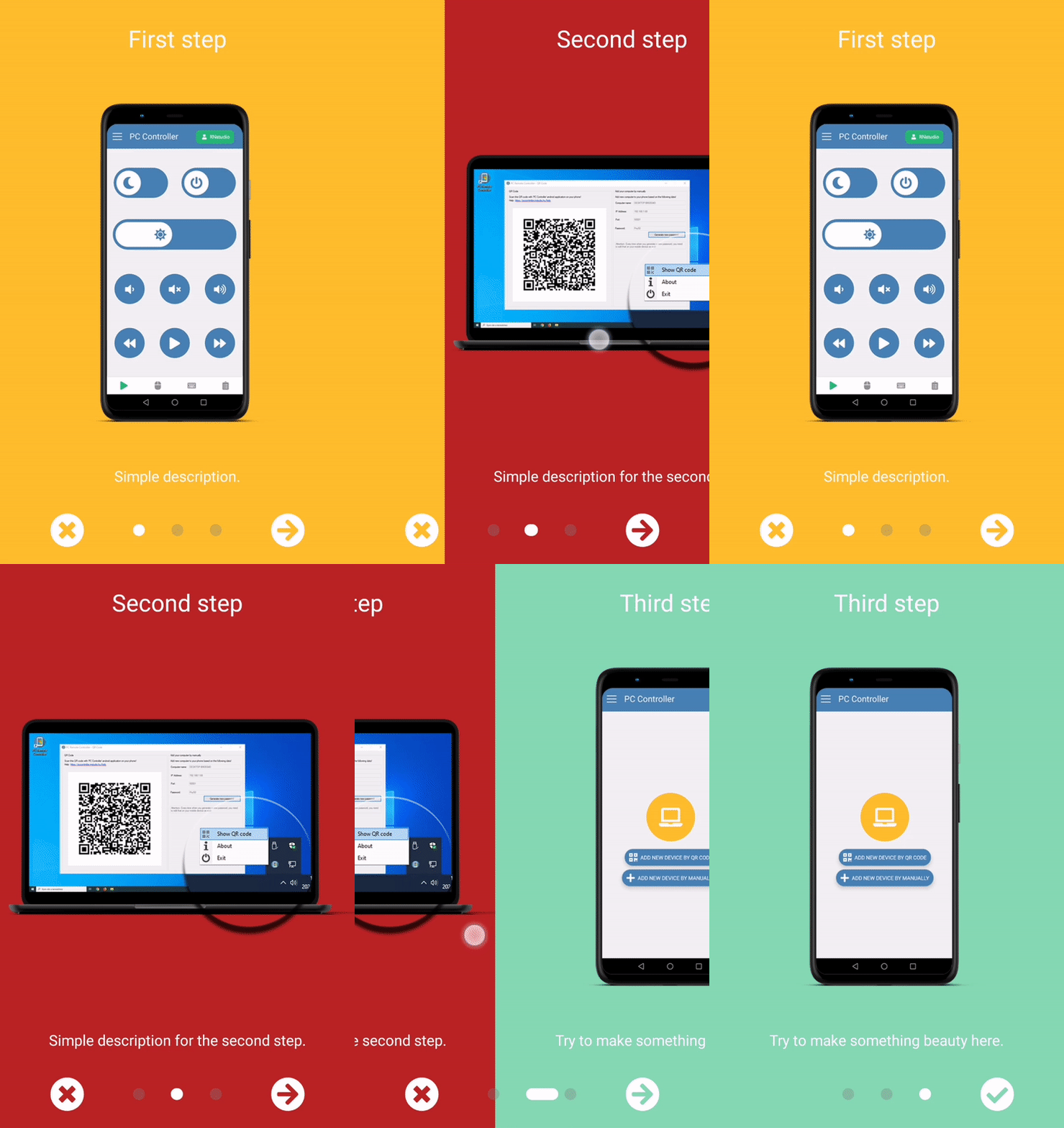
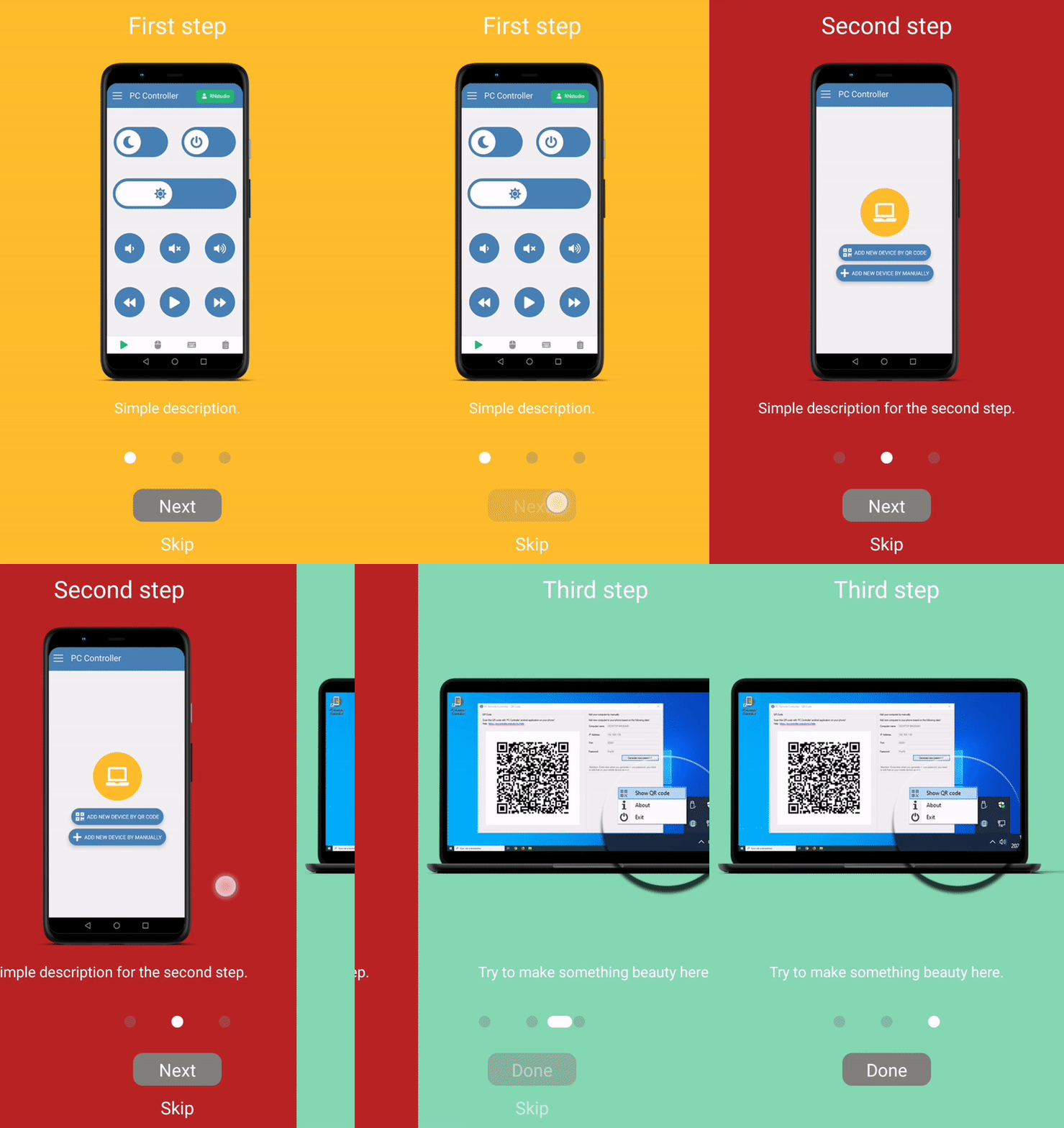
  A simple and full customizable React Native package which implements a unique slider.

</p>
<p align="center">
  <a href="https://github.com/RichardRNStudio/react-native-slider-intro/">
    <img src="https://github.com/RichardRNStudio/react-native-slider-intro/blob/main/docs/basic-example.gif?raw=true" height="350"/>
  </a>
  <a href="https://github.com/RichardRNStudio/react-native-slider-intro/">
    <img src="https://github.com/RichardRNStudio/react-native-slider-intro/blob/main/docs/custom-buttons-example.gif?raw=true" height="350"/>
  </a>
  <a href="https://github.com/RichardRNStudio/react-native-slider-intro/">
    <img src="https://github.com/RichardRNStudio/react-native-slider-intro/blob/main/docs/column-buttons-example.gif?raw=true" height="350"/>
  </a>
</p>

<h2>Installation</h2>

```sh
yarn add react-native-slider-intro
```

or

```sh
npm install react-native-slider-intro --save
```

<h2>Running the example project</h2>

iOS
```sh
yarn example ios
```
Android
```sh
yarn example android
```

<h2>Usage</h2>

<h3>Basic example</h3>

```ts
import React from 'react';
import SliderIntro from 'react-native-slider-intro';

const slides = [
  {
    index: 1,
    title: 'First step',
    text: 'Simple description.',
    link: 'https://rnstudio.hu',
    image: require('./images/step1.png'),
    backgroundColor: '#febe29',
  },
  {
    index: 2,
    title: 'Second step',
    text: 'Simple description for the second step.',
    image: require('./images/step2.png'),
    backgroundColor: '#febe29',
  },
];

const BasicExample = ({ closeExample }: { closeExample: () => void }) => (
  <SliderIntro data={slides} onDone={closeExample} onSkip={closeExample} />
);

export default BasicExample;
```

The package includes two rendering options. In addition to the `default render`, where you can pass `data` as an array of <a href="https://github.com/RichardRNStudio/react-native-slider-intro/blob/main/src/types/SliderIntroItem.types.ts">SliderIntroItemProps</a>, you can use a `custom render` with `children` and `numberOfSlides` properties.

<h2>Properties</h2>

| Name                         | Type     | Default value                         | Description                                                                                  |
| ---------------------------- | -------- | ------------------------------------- | -------------------------------------------------------------------------------------------- |
| `data`                       | array    | []                                    | `Default render` - An array of items. If data is provided, children will be ignored.                          |
| `numberOfSlides`             | array    | number                                | `Custom render` - if children is provided, data will be ignored. numberOfSlides is required in this case.     |
| `children`                   | ReactNode| null                                  | `Custom render` - JSX elements to render.                                                                     |
| `navigationBarBottom`        | number   | 0                                     | Custom bottom position of the dot navigation container.                                                       |
| `navigationBarHeight`        | number   | 70                                    | Height of the dot navigation container.                                                                       |
| `animateSlideSpeed`          | number   | 15                                    | Speed of the slider animation.                                                                                |
| `navContainerMaxSizePercent` | number   | 0.5                                   | The maximum width of the navigation container as a percentage of the total width.                             |
| `dotWidth`                   | number   | 12                                    | The radius of the navigation dots.                                                                            |
| `fixDotOpacity`              | number   | 0.35                                  | Opacity of inactive (non-animated) dots.                                                                      |
| `fixDotBackgroundColor`      | <a href="https://reactnative.dev/docs/colors">color</a>| grey  | Background color of inactive dots.                                                              |
| `animatedDotBackgroundColor` | <a href="https://reactnative.dev/docs/colors">color</a>| white | Background color of the animated dot.                                                           |
| `animateDotSpeed`            | number   | 8                                     | Speed of the dot animation.                                                                                   |
| `animateDotBouncing`         | number   | 2                                     | Bounciness value of all animations. https://reactnative.dev/docs/animated#spring                              |
| `skipLabel`                  | string   | Skip                                  | Custom label for skip button.                                                                                 |
| `nextLabel`                  | string   | Next                                  | Custom label for next button.                                                                                 |
| `doneLabel`                  | string   | Done                                  | Custom label for done button.                                                                                 |
| `renderSkipButton`           | function | Default skip/previous button renderer | Custom renderer for the skip/previous button.                                                                 |
| `renderNextButton`           | function | Default next button renderer          | Custom renderer for the next button.                                                                          |
| `renderDoneButton`           | function | Default done button renderer          | Custom renderer for the done button.                                                                          |
| `onDone`                     | function | none                                  | Callback function executed when the done button is pressed.                                                   |
| `onSkip`                     | function | none                                  | Callback function executed when the skip button is pressed.                                                   |
| `showLeftButton`             | boolean  | true                                  | Whether to show the skip/previous button on the left side.                                                    |
| `leftButtonType`             | string   | skip                                  | The button type on the left side, either `skip` or `previous`.                                                |
| `columnButtonStyle`          | boolean  | false                                 | If true, buttons will be displayed in a column.                                                               |
| `limitToSlide`               | number | (Device max width) * 0.35               | Defines the slide animation limit, based on <a href="https://reactnative.dev/docs/panresponder">PanResponder's `gestureState.dx`</a> property.

<h2>Examples</h2>
<ul>
  <li>1. <a href="https://github.com/RichardRNStudio/react-native-slider-intro/blob/main/example/src/BasicExample.tsx">Basic example</a></li>
  <li>2. <a href="https://github.com/RichardRNStudio/react-native-slider-intro/blob/main/example/src/CustomButtonsExample.tsx">Custom buttons example</a></li>
  <li>3. <a href="https://github.com/RichardRNStudio/react-native-slider-intro/blob/main/example/src/ColumnButtonsExample.tsx">Column buttons example</a></li>
  <li>4. <a href="https://github.com/RichardRNStudio/react-native-slider-intro/blob/main/example/src/PreviousButtonExample.tsx">Previous button example</a></li>
  <li>5. <a href="https://github.com/RichardRNStudio/react-native-slider-intro/blob/main/example/src/CustomRenderFunctionExample.tsx">Custom slider render function example</a></li>
  <li>6. <a href="https://github.com/RichardRNStudio/react-native-slider-intro/blob/main/example/src/StatusBarExample.tsx">Statusbar example</a></li>
  <li>7. <a href="https://github.com/RichardRNStudio/react-native-slider-intro/blob/main/example/src/ReactNavigationExample/ReactNavigationExample.tsx">React navigation example</a></li>
  <li>8. <a href="https://github.com/RichardRNStudio/react-native-slider-intro/blob/main/example/src/GifExample.tsx">Gif example</a></li>
  <li>9. <a href="https://github.com/RichardRNStudio/react-native-slider-intro/blob/main/example/src/UsingThirdPartyLibrariesExample.tsx">Third party library example</a></li>
</ul>

<h2>Contributing</h2>

See the [contributing guide](CONTRIBUTING.md) to learn how to contribute to the repository and the development workflow.

<h2>License</h2>

MIT