# react-native-native-dialog
> A React Native module that exposes some of the common native dialogs to React Native.
[](https://www.npmjs.com/package/react-native-native-dialog)
[](https://www.npmjs.com/package/react-native-native-dialog)
[](https://github.com/mohakapt/react-native-native-dialog/issues)
[](https://github.com/mohakapt/react-native-native-dialog/issues)
✨ Features
* ✅ Native support for the most commonly used Dialogs on `iOS` and `Android`.
* ✅ Dark mode 🌓 and Accent Color 🌈.
* ✅ Easy to use Api with support for both `Callback` and `Promise`.
🚧 Table of Contents
- [🚀 Motivation](#section_motivation)
- [⬇️ Installation](#section_installation)
- [⚒️ Additional Setup](#section_additional_setup)
- [☘️ Example](#section_example)
- [🔌 Component API](#section_component_api)
- [🤝 Contributing](#section_contributing)
- [💡 FAQ](#section_faq)
- [👍 Support](#section_support)
- [📝 License](#section_license)
🚀 Motivation
The issue with trying to mock native components using ``s is that no matter how much time and effort you spend to make it look like the real-deal, You end up with janky looking results (I spent hours taking screenshots of the real Android dialog and trying to imitate it, And didn't get a satisfying result). But to be fair, using `react-native` ``s offers a lot of customization which is something you cannot simply just get with native libraries. So there is a decision that needs to be made.
Anyways I decided to make a library for some of the commonly used dialogs using native APIs.
⬇️ Installation
```bash
npm install react-native-native-dialog --save
cd ios && pod install # Only if you're building for iOS
```
**Or if you're using yarn:**
```bash
yarn add react-native-native-dialog
cd ios && pod install # Only if you're building for iOS
```
> ⚠️ The library only works with react-native@0.60 and up.
⚒️ Additional Setup
Since this library only works with react-native@0.60.0 and up there is no need to manually link the library, But there still some additional setup you need to do.
**iOS**
This library is written in `Swift` so we need to create a bridging header in your `XCode` project (If you've already done it you can skip this section).
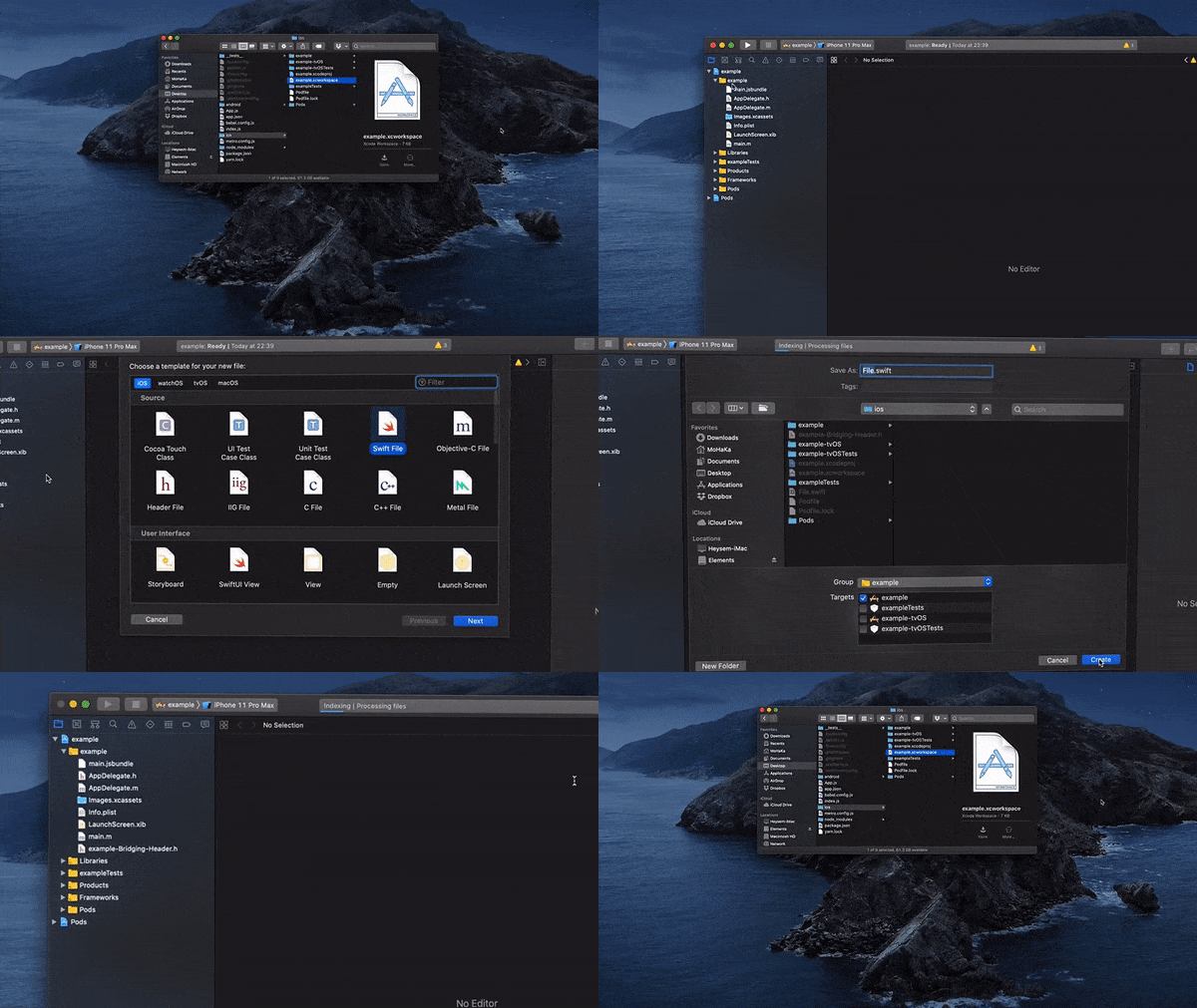
0. First of all make sure you run ```pod install``` in `Terminal` inside `ios` folder.
0. In XCode, in the project navigator, right click `[your project's name]` ➜ `New File...`
0. Select `Swift File`, click `Next` and then click `Create`.
0. `XCode` will ask you whether you want to create bridging header, Click `Create Bridging Header`.
0. Build your project (`Cmd+B`), And you're ready to go.
**Android**
Unfortunately `Android` doesn't support changing the `accentColor` dynamically, the only way to use a custom `accentColor` is to define your style statically in `res/values/styles.xml` (If you're ok with using the default `accentColor`  in `Android` you can skip this section).
0. Open `android/app/src/main/res/values/styles.xml`
- If you don't have one create a new file in the exact same path.
- Add those tow styles to the bottom of your `styles.xml` file and replace `colorPrimary`, `colorPrimaryDark` and `colorAccent` with your own colors:
```diff
...
+
+
```
0. Next open up `android/app/src/main/java/[...]/MainAppliction.java`
- Add `import com.github.mohaka.nativedialog.RNNativeDialogPackage;` to the imports at the top of the file
- Add `RNNativeDialogPackage.setDialogTheme(R.style.AlertDialog, R.style.LightAlertDialog);` to the bottom of `onCreate()` method.
```diff
...
import android.app.Application;
import android.content.Context;
+ import com.github.mohaka.nativedialog.RNNativeDialogPackage;
...
@Override
public void onCreate() {
super.onCreate();
SoLoader.init(this, /* native exopackage */ false);
+ RNNativeDialogPackage.setDialogTheme(R.style.AlertDialog, R.style.LightAlertDialog);
initializeFlipper(this, getReactNativeHost().getReactInstanceManager());
}
...
```
0. Build your project and start using `react-native-native-dialog`.
☘️ Example
```javascript
import NativeDialog from 'react-native-native-dialog';
NativeDialog.showDialog({
title: 'Do you want to update your iCloud Backup before erasing?',
message: 'If you erase without updating your backup, you may lose photos and other data that are not yet uploaded to iCloud.',
positiveButton: 'Back Up Then Erase',
negativeButton: 'Erase Now',
neutralButton: 'Cancel',
negativeButtonStyle: 'default',
neutralButtonStyle: 'cancel',
theme: 'dark',
accentColor: '#ff4a9e',
onPositivePress: () => console.warn('positive'),
onNegativePress: () => console.warn('negative'),
onNeutralPress: () => console.warn('neutral'),
onDismiss: () => console.warn('dismiss'),
});
```
🔌 Component API
[`NativeDialog.showDialog()` API](docs/dialog.md)
[`NativeDialog.showInputDialog()` API](docs/inputdialog.md)
[`NativeDialog.showItemsDialog()` API](docs/itemsdialog.md)
[`NativeDialog.showNumberPickerDialog()` API](docs/numberpickerdialog.md)
[`NativeDialog.showRatingDialog()` API](docs/ratingdialog.md)
🤝 Contributing
We would love to have community contributions and support! A few areas where could use help right now:
* Bug reports and/or fixes
* Writing tests
* Creating examples for the docs
If you want to contribute, please submit a pull request, or contact mohakapt@gmail.com for more information.
When you commit your messages, follow this convention:
```
App changes subject
- Optional message
- Another optional message
```
If you do a breaking change, add an explanation preceded by `BREAKING CHANGE:` keyword. For example:
```
BREAKING CHANGE: App changes subject
- Optional message
- Another optional message
```
💡 FAQ
👍 Support
* **Heysem Katibi** - *Initial work*
* **Yaman Katby**
See also the list of [contributors](https://github.com/mohakapt/react-native-native-dialog/contributors) who participated in this project.
📝 License
This library is licensed under the MIT License - see the [LICENSE.md](LICENSE) file for details.