# :rainbow: react-native-month-switch

[![Npm Version](https://img.shields.io/npm/v/npm.svg)](https://www.npmjs.com/package/react-native-month-switch)
[![MIT License](https://img.shields.io/npm/l/react-native-tab-view.svg?style=flat-square)](https://www.npmjs.com/package/react-native-month-switch)
[![Preview](https://github.com/Simoon-F/react-native-month-switch/actions/workflows/preview.yml/badge.svg)](https://github.com/Simoon-F/react-native-month-switch/actions/workflows/preview.yml)

A React Native Month Switch Components

## Installation

```sh
yarn add react-native-month-switch

or

npm install react-native-month-switch
```

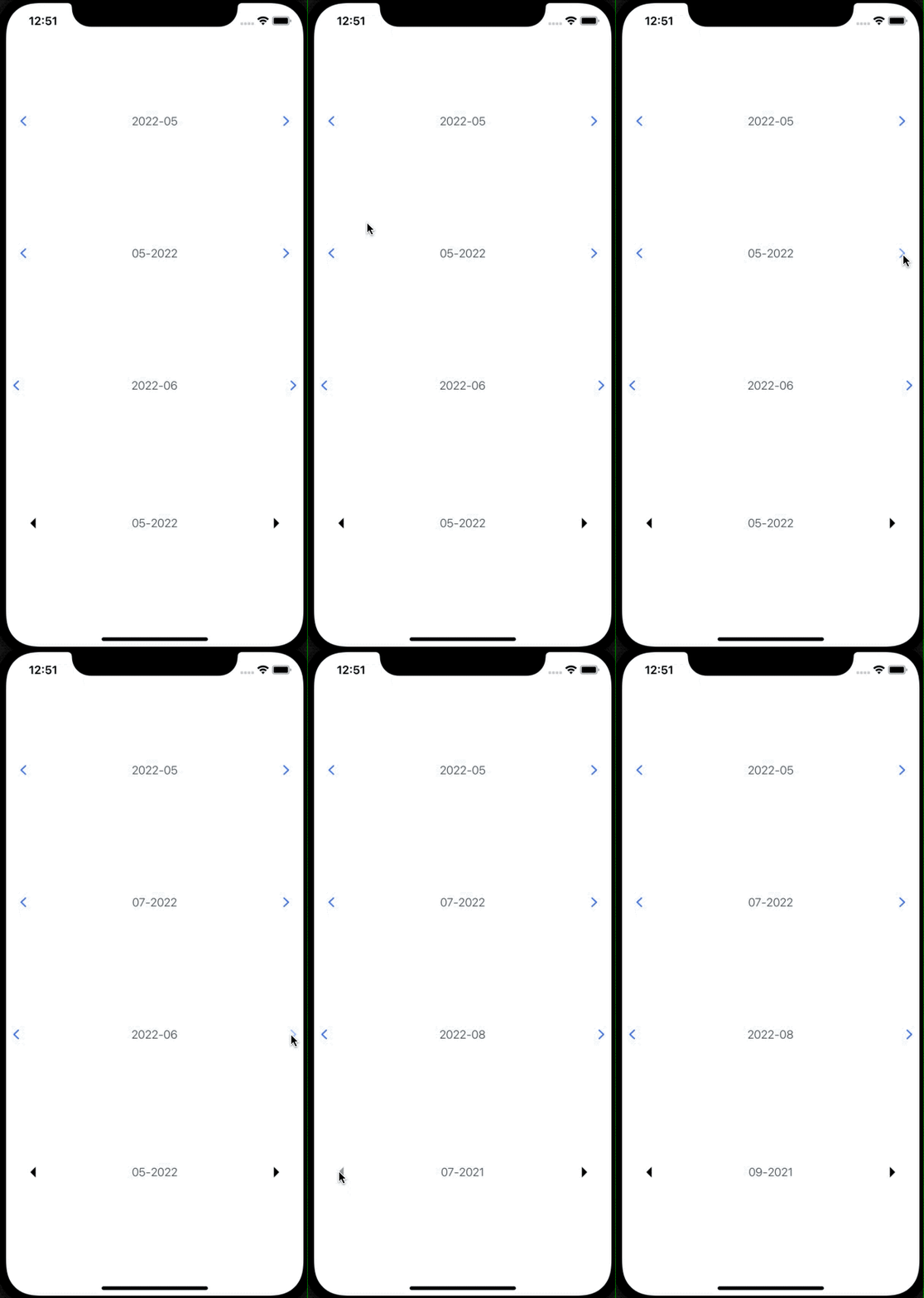
## Demo

<a href="https://raw.githubusercontent.com/Simoon-F/react-native-month-switch/master/demo/demo.gif"><img src="https://raw.githubusercontent.com/Simoon-F/react-native-month-switch/master/demo/demo.gif" width="360"></a>

## Usage

```ts
import React, { useRef } from 'react';

import { Button, Image, View } from 'react-native';
import { MonthSwitch, DateData } from 'react-native-month-switch';
import type { IMonthSwitchRef } from 'src/types';

export default function App() {
  const monthSwitchRef = useRef<IMonthSwitchRef>(null);

  return (
    <View
      style={{
        flex: 1,
        justifyContent: 'space-evenly',
      }}
    >
      <MonthSwitch />

      {/* Set max date */}
      <MonthSwitch
        format={'MM-yyyy'}
        maxDate={'2022-08'}
        maxDateTrigger={(b: boolean) => {
          console.log(b, 'trigger');
        }}
      />

      <MonthSwitch
        arrowStyle={{
          padding: 0,
        }}
        format={'yyyy-MM'}
        onChange={(dataString: DateData) => {
          /** {"dateString": "2022-05-18", "day": 18, "month": "05", "year": 2022} */
          console.log(dataString);
        }}
      />

      <Button
        title="On ref reset ⬇️"
        onPress={() => {
          monthSwitchRef.current?.reset();
        }}
      />

      <MonthSwitch
        ref={monthSwitchRef}
        format={'MM-yyyy'}
        renderCustomArrow={(direction: string) => {
          const arrowImage =
            direction === 'left'
              ? require('./images/left.png')
              : require('./images/right.png');

          return (
            <Image
              style={{
                width: 35,
                height: 35,
              }}
              source={arrowImage}
            />
          );
        }}
        onLeftArrow={(date: string) => {
          console.log('click', date);
        }}
        onRightArrow={(date: string) => {
          console.log('click', date);
        }}
      />
    </View>
  );
}
```

## MonthSwitch Props

| Property          | Type                                              | Optional | Default       | Description                                                                                   |
| ----------------- | ------------------------------------------------- | -------- | ------------- | --------------------------------------------------------------------------------------------- |
| ref               | React.Ref<any>                                    | no       | -             | Ref                                                                                           |
| format            | string                                            | no       | yyyy-MM       | To set the date format，can refer to：[Formatting](http://arshaw.com/xdate/#Formatting)       |
| initValue         | string                                            | no       | current month | To set init value, default current month                                                      |
| maxDate           | string                                            | no       | -             | Max date that can be limit                                                                    |
| arrowStyle        | StyleProp<ViewStyle>                              | no       | -             | Style passed to the arrow, can refer to：[Viewstyle](https://reactnative.dev/docs/view#style) |
| maxDateTrigger    | function(b:boolean)                               | no       | -             | Triggered when maxdate condition is met                                                       |
| onChange          | function(dataString: DateData)                    | no       | -             | Callback function, can be executed when the month is changing                                 |
| onLeftArrow       | function(date:string)                             | no       | -             | Callback function, can be executed when the left arrow is click                               |
| onRightArrow      | function(date:string)                             | no       | -             | Callback function, can be executed when the right arrow is click                              |
| renderCustomArrow | function(direction: Direction) => React.ReactNode | no       | -             | Custom arrow icon render method                                                               |

## MonthSwitch Ref

| function | Description                        |
| -------- | ---------------------------------- |
| reset    | Reset to init date or today's date |

## Contributing

While developing, you can run the [example app](https://github.com/Simoon-F/react-native-month-switch/blob/master/example/README.md) to test your changes.

Make sure your code passes TypeScript and ESLint. Run the following to verify:

```
yarn typescript
yarn lint
```

To fix formatting errors, run the following:

```
yarn lint --fix
```

Remember to add tests for your change if possible.

## License

MIT