# `react-native-maps-directions-via-server`
[](https://www.npmjs.com/package/react-native-maps-directions-via-server)
[](https://www.npmtrends.com/react-native-maps-directions-via-server)
This component is built based on [react-native-maps-directions](https://github.com/bramus/react-native-maps-directions), with changes below:
1. By removing apikey as a required parameter, we mitigate the risk of the `apikey` being compromised on the app side.
2. `directionsServiceBaseUrl` has been marked as a required parameter, as direction requests will be sent to the URL specified by it.
3. `headers` has been added as an optional parameter, works together with `directionsServiceBaseUrl`, for authenticating if necessary.
BTW, these changes addressed the issue mentioned at [https://github.com/bramus/react-native-maps-directions/issues/84](https://github.com/bramus/react-native-maps-directions/issues/84).
## Installation
Install `react-native-maps-directions` as a dependency using either
- [Node's `npm`](https://nodejs.org/en/download/)
```
npm install react-native-maps-directions-via-server
```
- [Yarn](https://yarnpkg.com/en/docs/install)
```
yarn add react-native-maps-directions-via-server
```
## Basic Usage
Since the map directions feature in this library requires server-side implementation, before wiring it up in React Native, you'll must have server side ready. And the implementation at server-side is as simple as forwarding the request to google's server by appending the apiKey param to the request.
Server side:
Have a RESTful endpoint for forwarding the request to Google.
Here is a basic setup of endpoint at local `http://10.2.97.131:3000/maps/api/directions/json`:
```js
const GOOGLE_API_KEY = "YOUR_GOOGLE_API_KEY";
const http = require("http");
const https = require("https");
const url = require("url");
const querystring = require("querystring"); // for handling query params
const hostname = "0.0.0.0";
const port = 3000;
const server = http.createServer((req, res) => {
const parsedUrl = url.parse(req.url, true);
const pathname = parsedUrl.pathname;
if (req.method === "GET" && pathname === "/maps/api/directions/json") {
const originalQuery = parsedUrl.query;
// ✅ Inject API key (override if client included it)
const queryWithKey = {
...originalQuery,
key: GOOGLE_API_KEY,
};
const queryString = querystring.stringify(queryWithKey);
const googleUrl = `https://maps.googleapis.com/maps/api/directions/json?${queryString}`;
let responded = false;
const proxyReq = https.get(googleUrl, (googleRes) => {
let data = "";
googleRes.on("data", (chunk) => {
data += chunk;
});
googleRes.on("end", () => {
if (!responded) {
responded = true;
res.statusCode = googleRes.statusCode;
res.setHeader("Content-Type", "application/json");
res.end(data);
}
});
});
proxyReq.on("error", (err) => {
if (!responded) {
responded = true;
res.statusCode = 500;
res.setHeader("Content-Type", "application/json");
res.end(
JSON.stringify({
error: "Failed to fetch from Google Maps API",
details: err.message,
})
);
} else {
console.error("Unhandled proxy error after response:", err.message);
}
});
} else {
res.statusCode = 404;
res.setHeader("Content-Type", "application/json");
res.end(JSON.stringify({ error: "Not Found" }));
}
});
server.listen(port, hostname, () => {
console.log(`Proxy server running at http://${hostname}:${port}/`);
});
```
Run the command to start it up:
```shell
node server.js
```
In React Native:
```js
import MapViewDirections from 'react-native-maps-directions-via-server';
const origin = {latitude: 37.3318456, longitude: -122.0296002};
const destination = {latitude: 37.771707, longitude: -122.4053769};
const directionsServiceBaseUrl = 'http://10.2.97.131:3000/maps/api/directions/json';
```
Then you're good to go.
### Original documentation from react-native-maps-directions as follows:
[](https://www.npmjs.com/package/react-native-maps-directions)
[](https://www.npmtrends.com/react-native-maps-directions)
[](https://github.com/bramus/react-native-maps-directions/graphs/contributors)
[](https://github.com/bramus/react-native-maps-directions)
[](LICENSE.md)
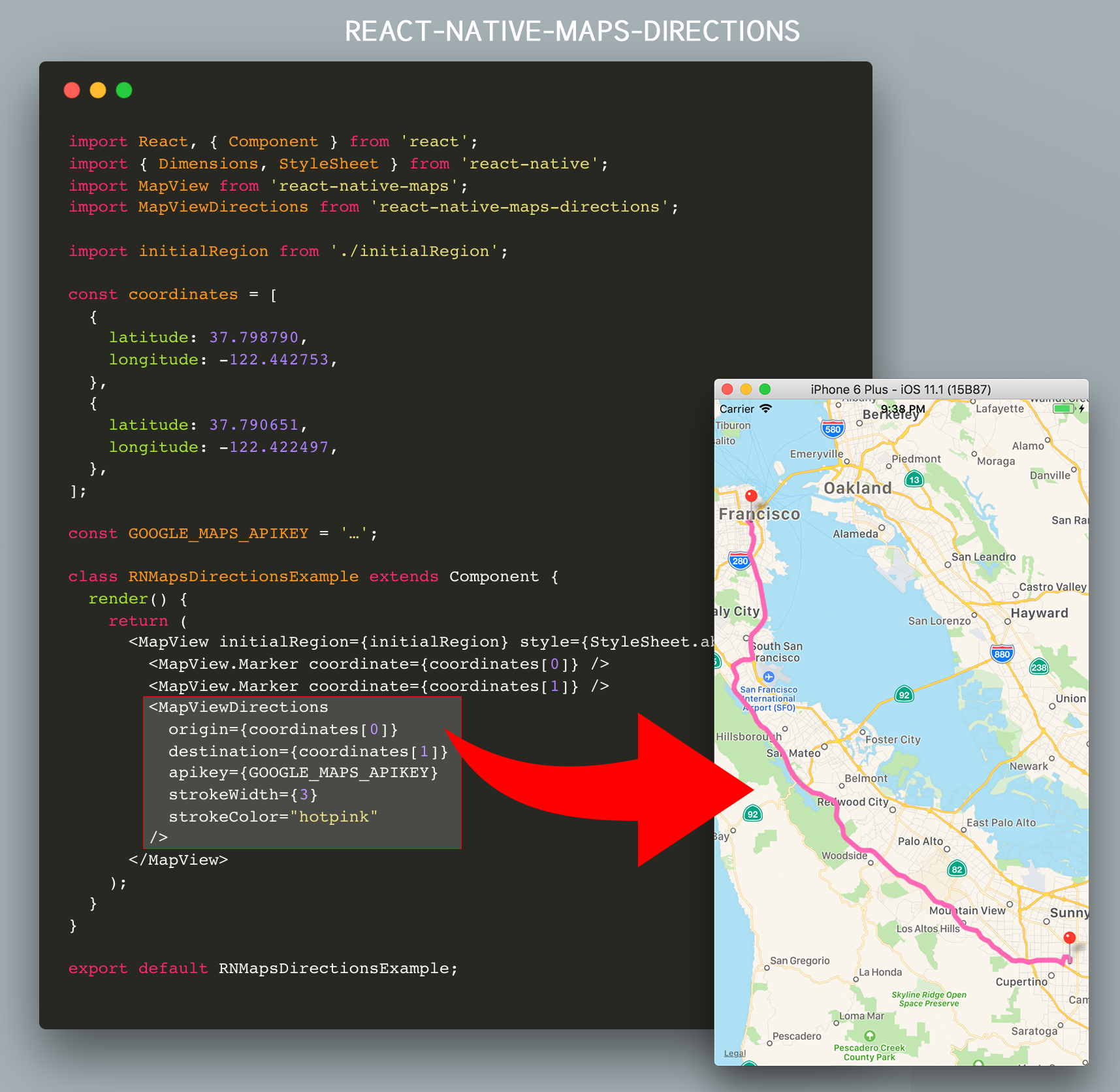
Directions component for [`react-native-maps`](https://github.com/airbnb/react-native-maps/) – Draw a route between two coordinates, powered by the Google Maps Directions API
## Installation
Install `react-native-maps-directions` as a dependency using either
- [Node's `npm`](https://nodejs.org/en/download/)
```
npm install react-native-maps-directions
```
- [Yarn](https://yarnpkg.com/en/docs/install)
```
yarn add react-native-maps-directions
```
## Basic Usage
Import `MapViewDirections` and render it as a child of a `MapView` component. The mandatory `MapViewDirections` props are:
- `origin`: The origin location to start routing from
- `destination`: The destination location to start routing to
- `apikey`: Your Google Maps Directions API Key _(request one [here](https://developers.google.com/maps/documentation/directions/get-api-key); if you're using an existing Google Maps API Key make sure you've enabled the Google Maps Directions API for that key using the [Google API Console](https://console.developers.google.com/apis/))_.
```js
import MapViewDirections from 'react-native-maps-directions';
const origin = {latitude: 37.3318456, longitude: -122.0296002};
const destination = {latitude: 37.771707, longitude: -122.4053769};
const GOOGLE_MAPS_APIKEY = '…';
```
Once the directions in between `destination` and `origin` has been fetched, a `MapView.Polyline` between the two will be drawn. Whenever one of both changes, new directions will be fetched and rendered.
## Component API
### Props
| Prop | Type | Default | Note |
| -------------------------- | ---------------------- | ------------ | --------------------------------------------------------------------------------------------------------------------------------------------------------------------------------------------------------------------------------------------------------------------------------------------------------------------------------------------------------------------------------------------------------- |
| `origin` | `LatLng` or `String` | | The origin location to start routing from. |
| `destination` | `LatLng` or `String` | | The destination location to start routing to. |
| `apikey` | `String` | | Your Google Maps API Key _(request one [here](https://developers.google.com/maps/documentation/directions/get-api-key); if you're using an existing Google Maps API Key make sure you've enabled the Google Maps Directions API for that key using the [Google API Console](https://console.developers.google.com/apis/) by hitting the “Enable APIs and Services“ button)_. |
| `waypoints` | [`LatLng` or `String`] | `[]` | Array of waypoints to use between origin and destination. |
| `language` | `String` | `"en"` | The language to use when calculating directions. See [here](https://developers.google.com/maps/documentation/javascript/localization) for more info. |
| `mode` | `String` | `"DRIVING"` | Which transportation mode to use when calculating directions. Allowed values are `"DRIVING"`, `"BICYCLING"`, `"WALKING"`, and `"TRANSIT"`. _(See [here](https://developers.google.com/maps/documentation/javascript/examples/directions-travel-modes) for more info)_. |
| `resetOnChange` | `boolean` | `true` | Tweak if the rendered `MapView.Polyline` should reset or not when calculating the route between `origin` and `destionation`. Set to `false` if you see the directions line glitching. |
| `optimizeWaypoints` | `boolean` | `false` | Set it to true if you would like Google Maps to re-order all the waypoints to optimize the route for the fastest route. Please be aware that if this option is enabled, you will be billed at a higher rate by Google as stated [here](https://developers.google.com/maps/documentation/javascript/directions#Waypoints). |
| `splitWaypoints` | `boolean` | `false` | Directions API has a [limit](https://developers.google.com/maps/documentation/directions/usage-and-billing#directions-advanced) of 10 or 25 (depends on the billing plan) waypoints per route. When exceeding this limit you will be billed at a higher reate by Google. Set this to `true` if you would like to automatically split waypoints into multiple routes, thus bypassing this waypoints limit. |
| `directionsServiceBaseUrl` | `string` | _(Google's)_ | Base URL of the Directions Service (API) you are using. By default the Google Directions API is used (`"https://maps.googleapis.com/maps/api/directions/json"`). Usually you won't need to change this. |
| `region` | `String` | | If you are using strings for **origin** or **destination**, sometimes you will get an incorrect route because Google Maps API needs the region where this places belong to. See [here](https://developers.google.com/maps/documentation/javascript/localization#Region) for more info. |
| `precision` | `String` | `"low"` | The precision level of detail of the drawn polyline. Allowed values are "high", and "low". Setting to "low" will yield a polyline that is an approximate (smoothed) path of the resulting directions. Setting to "high" may cause a hit in performance in case a complex route is returned. |
| `timePrecision` | `String` | `"none"` | The timePrecision to get Realtime traffic info. Allowed values are "none", and "now". Defaults to "none". |
| `channel` | `String` | `null` | If you include the channel parameter in your requests, you can generate a Successful Requests report that shows a breakdown of your application's API requests across different applications that use the same client ID (such as externally facing access vs. internally facing access). |
#### More props
Since the result rendered on screen is a `MapView.Polyline` component, all [`MapView.Polyline` props](https://github.com/airbnb/react-native-maps/blob/master/docs/polyline.md#props) – except for `coordinates` – are also accepted.
```js
```
#### An extra note on `origin` and `destination`
The values for the `origin` and `destination` props can take several forms. They can either be:
- Coordinates in the form of an object with `latitude` and `longitude` keys
- Coordinates in the form of a string with `latitude` and `longitude` values separated by a comma
- Strings representing an address
- Strings representing a location
- Strings containing a Place Id from the Google Maps Place API prefixed with `place_id:`
All examples below have the same `origin` location, represented in the formats mentioned above:
```js
```
Note: The `origin` and `destination` props don't need to use the same representation, you may mix them.
Tip: Don't forget to tweak the `language` prop when using localized location names.
### Events/Callbacks
| Event Name | Returns | Notes |
| ---------- | -------------------------------------------------------------------------------------------- | --------------------------------------------------------------------------------------------------------------------------------- |
| `onStart` | `{ origin, destination, waypoints: [] }` | Callback that is called when the routing has started. |
| `onReady` | `{ distance: Number, duration: Number, coordinates: [], fare: Object, waypointOrder: [[]] }` | Callback that is called when the routing has succesfully finished. Note: distance returned in kilometers and duration in minutes. |
| `onError` | `errorMessage` | Callback that is called in case the routing has failed. |
## Extended Example
This example will draw a route between AirBnB's Office and Apple's HQ
```js
import React, { Component } from "react";
import { Dimensions, StyleSheet } from "react-native";
import MapView from "react-native-maps";
import MapViewDirections from "react-native-maps-directions";
const { width, height } = Dimensions.get("window");
const ASPECT_RATIO = width / height;
const LATITUDE = 37.771707;
const LONGITUDE = -122.4053769;
const LATITUDE_DELTA = 0.0922;
const LONGITUDE_DELTA = LATITUDE_DELTA * ASPECT_RATIO;
const GOOGLE_MAPS_APIKEY = "…";
class Example extends Component {
constructor(props) {
super(props);
// AirBnB's Office, and Apple Park
this.state = {
coordinates: [
{
latitude: 37.3317876,
longitude: -122.0054812,
},
{
latitude: 37.771707,
longitude: -122.4053769,
},
],
};
this.mapView = null;
}
onMapPress = (e) => {
this.setState({
coordinates: [...this.state.coordinates, e.nativeEvent.coordinate],
});
};
render() {
return (
(this.mapView = c)}
onPress={this.onMapPress}
>
{this.state.coordinates.map((coordinate, index) => (
))}
{this.state.coordinates.length >= 2 && (
2
? this.state.coordinates.slice(1, -1)
: undefined
}
destination={
this.state.coordinates[this.state.coordinates.length - 1]
}
apikey={GOOGLE_MAPS_APIKEY}
strokeWidth={3}
strokeColor="hotpink"
optimizeWaypoints={true}
onStart={(params) => {
console.log(
`Started routing between "${params.origin}" and "${params.destination}"`
);
}}
onReady={(result) => {
console.log(`Distance: ${result.distance} km`);
console.log(`Duration: ${result.duration} min.`);
this.mapView.fitToCoordinates(result.coordinates, {
edgePadding: {
right: width / 20,
bottom: height / 20,
left: width / 20,
top: height / 20,
},
});
}}
onError={(errorMessage) => {
// console.log('GOT AN ERROR');
}}
/>
)}
);
}
}
export default Example;
```
## Example App
An example app can be found in a separate repo, located at [https://github.com/bramus/react-native-maps-directions-example](https://github.com/bramus/react-native-maps-directions-example).
## Changelog
Please see [CHANGELOG](CHANGELOG.md) for more information on what has changed recently.
## Credits
- Bram(us) Van Damme ([https://www.bram.us/](https://www.bram.us/))
- [All Contributors](../../contributors)
This code is inspired upon the article [React Native Maps with Google Directions Api](https://medium.com/@ali_oguzhan/react-native-maps-with-google-directions-api-bc716ed7a366) by [Ali Oğuzhan Yıldız](https://github.com/alioguzhan).
## License
The MIT License (MIT). Please see [License File](LICENSE.md) for more information.