# `react-native-maps-directions` [](https://www.npmjs.com/package/react-native-maps-directions)
Directions component for [`react-native-maps`](https://github.com/airbnb/react-native-maps/) – Draw a route between two coordinates, powered by the Google Maps Directions API
## Installation
```
yarn add react-native-maps-directions
```
## Basic Usage
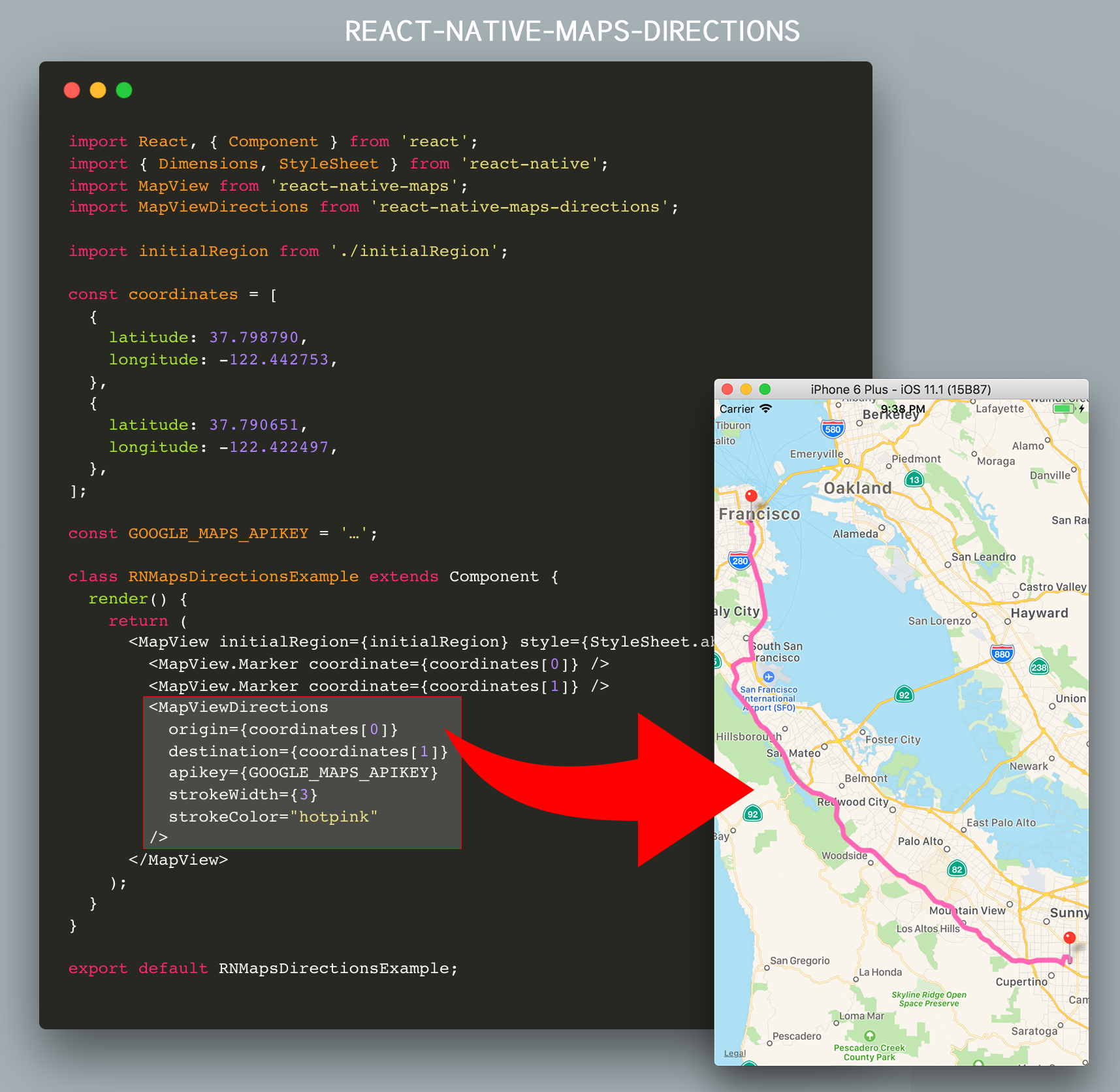
Import `MapViewDirections` and render it as a child of a `MapView` component. The mandatory `MapViewDirections` props are:
- `origin`: The coordinate of the origin location
- `destination`: The coordinate of the destination location
- `apikey`: Your Google Maps API Key _(request one [here](https://developers.google.com/maps/documentation/directions/get-api-key))_.
```js
import MapViewDirections from 'react-native-maps-directions';
const origin = {latitude: 37.3318456, longitude: -122.0296002};
const destination = {latitude: 37.771707, longitude: -122.4053769};
const GOOGLE_MAPS_APIKEY = '…';
```
Once the directions in between `destination` and `origin` has been fetched, a `MapView.Polyline` between the two will be drawn.
## Component API
### Props
| Prop | Type | Default | Note
|---|---|---|---|
| `origin` | `LatLng` or `String` | | The origin location.
| `destination` | `LatLng` or `String` | | The destination location.
| `apikey` | `String` | | Your Google Maps API Key _(request one [here](https://developers.google.com/maps/documentation/directions/get-api-key))_.
| `waypoints` | [`LatLng` or `String`] | | Array of waypoints to use between origin and destination.
| `language` | `String` | `"en"` | The language to use when calculating directions. See [here](https://developers.google.com/maps/documentation/javascript/localization) for more info.
| `mode` | `String` | `"driving"` | Which transportation mode to use when calculating directions. Allowed values are `"driving"`, `"bicycling"`, `"walking"`, and `"transit"`. _(See [here](https://developers.google.com/maps/documentation/javascript/examples/directions-travel-modes) for more info)_.
#### More props
Since the result rendered on screen is a `MapView.Polyline` component, all [`MapView.Polyline` props](https://github.com/airbnb/react-native-maps/blob/master/docs/polyline.md#props) – except for `coordinates` – are also accepted.
```js
```
#### An extra note on `origin` and `destination`
`origin` and `destination` can be coordinates in the form of objects with `latitude` and `longitude` keys, or coordinates in the form of a string in the format `'latitude,longitude'`.
```js
```
Additionally `origin` and `destination` can also be location names. The Google Directions API will translate those to coordinates for you.
```js
```
Don't forget to tweak the `language` prop when using localized location names.
### Events/Callbacks
| Event Name | Returns | Notes
|---|---|---|
| `onReady` | `{ distance: Number, duration: Number, coordinates: [] }` | Callback that is called when the routing has been calculated.
| `onError` | `errorMessage` | Callback that is called in case the routing has failed.
## Extended Example
This example will draw a route between AirBnB's Office and Apple's HQ
```js
import React, { Component } from 'react';
import { Dimensions, StyleSheet } from 'react-native';
import MapView from 'react-native-maps';
import MapViewDirections from 'react-native-maps-directions';
const { width, height } = Dimensions.get('window');
const ASPECT_RATIO = width / height;
const LATITUDE = 37.771707;
const LONGITUDE = -122.4053769;
const LATITUDE_DELTA = 0.0922;
const LONGITUDE_DELTA = LATITUDE_DELTA * ASPECT_RATIO;
const GOOGLE_MAPS_APIKEY = '…';
class Example extends Component {
constructor(props) {
super(props);
// AirBnB's Office, and Apple Park
this.state = {
coordinates: [
{
latitude: 37.3317876,
longitude: -122.0054812,
},
{
latitude: 37.771707,
longitude: -122.4053769,
},
],
};
this.mapView = null;
}
onMapPress = (e) => {
this.setState({
coordinates: [
...this.state.coordinates,
e.nativeEvent.coordinate,
],
});
}
render() {
return (
this.mapView = c}
onPress={this.onMapPress}
>
{this.state.coordinates.map((coordinate, index) =>
)}
{(this.state.coordinates.length >= 2) && (
2) ? this.state.coordinates.slice(1, -1): null}
destination={this.state.coordinates[this.state.coordinates.length-1]}
apikey={GOOGLE_MAPS_APIKEY}
strokeWidth={3}
strokeColor="hotpink"
onReady={(result) => {
this.mapView.fitToCoordinates(result.coordinates, {
edgePadding: {
right: (width / 20),
bottom: (height / 20),
left: (width / 20),
top: (height / 20),
}
});
}}
onError={(errorMessage) => {
// console.log('GOT AN ERROR');
}}
/>
)}
);
}
}
export default Example;
```
## Changelog
Please see [CHANGELOG](CHANGELOG.md) for more information on what has changed recently.
## Credits
- Bram(us) Van Damme ([https://www.bram.us/](https://www.bram.us/))
- [All Contributors](../../contributors)
This code is inspired upon the article [React Native Maps with Google Directions Api](https://medium.com/@ali_oguzhan/react-native-maps-with-google-directions-api-bc716ed7a366) by [Ali Oğuzhan Yıldız](https://github.com/alioguzhan).
## License
The MIT License (MIT). Please see [License File](LICENSE.md) for more information.