# react-native-image-marker  [](https://github.com/JimmyDaddy/react-native-image-marker/pulls)
Add text or icon watermark to your images
## sample
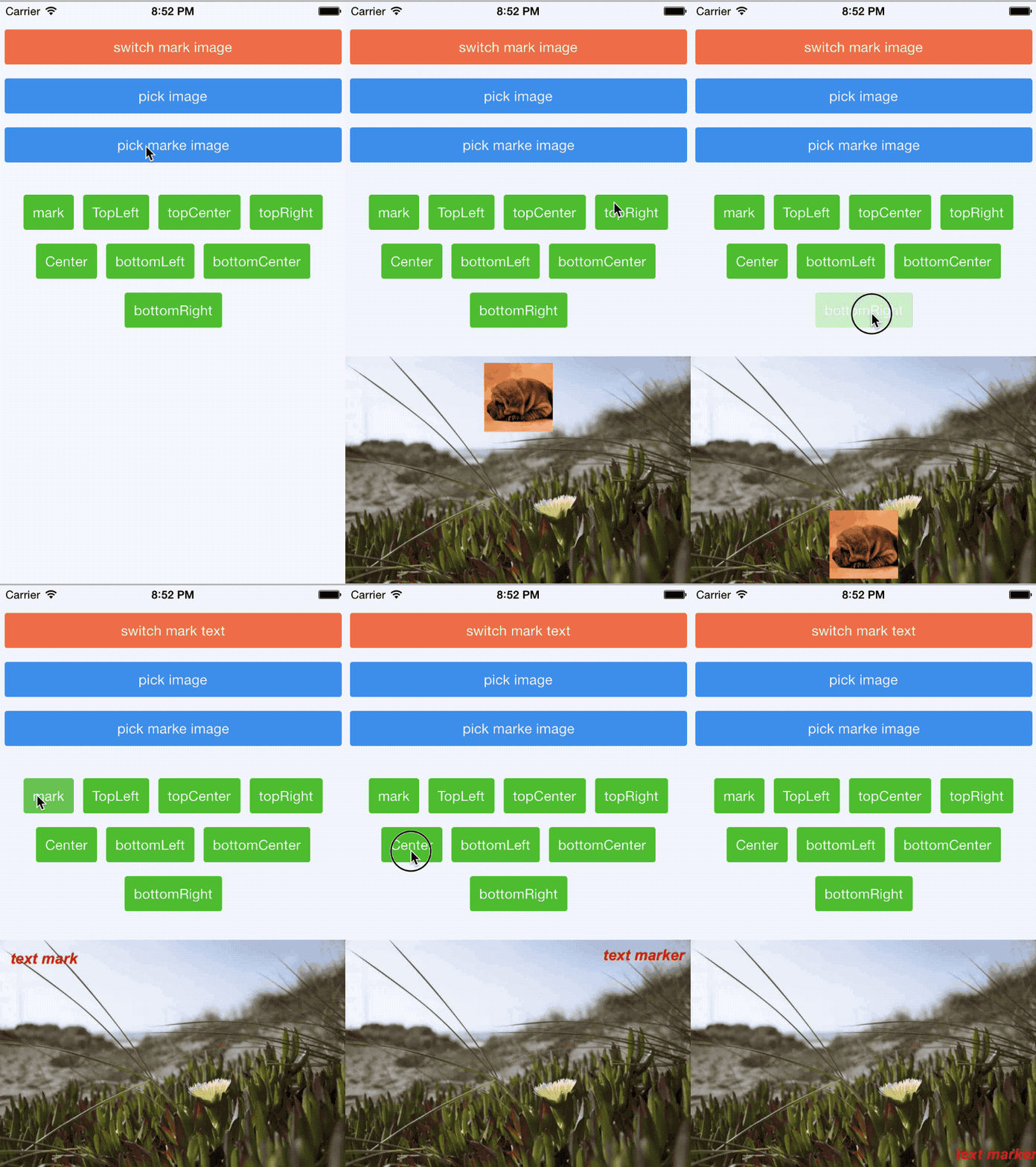
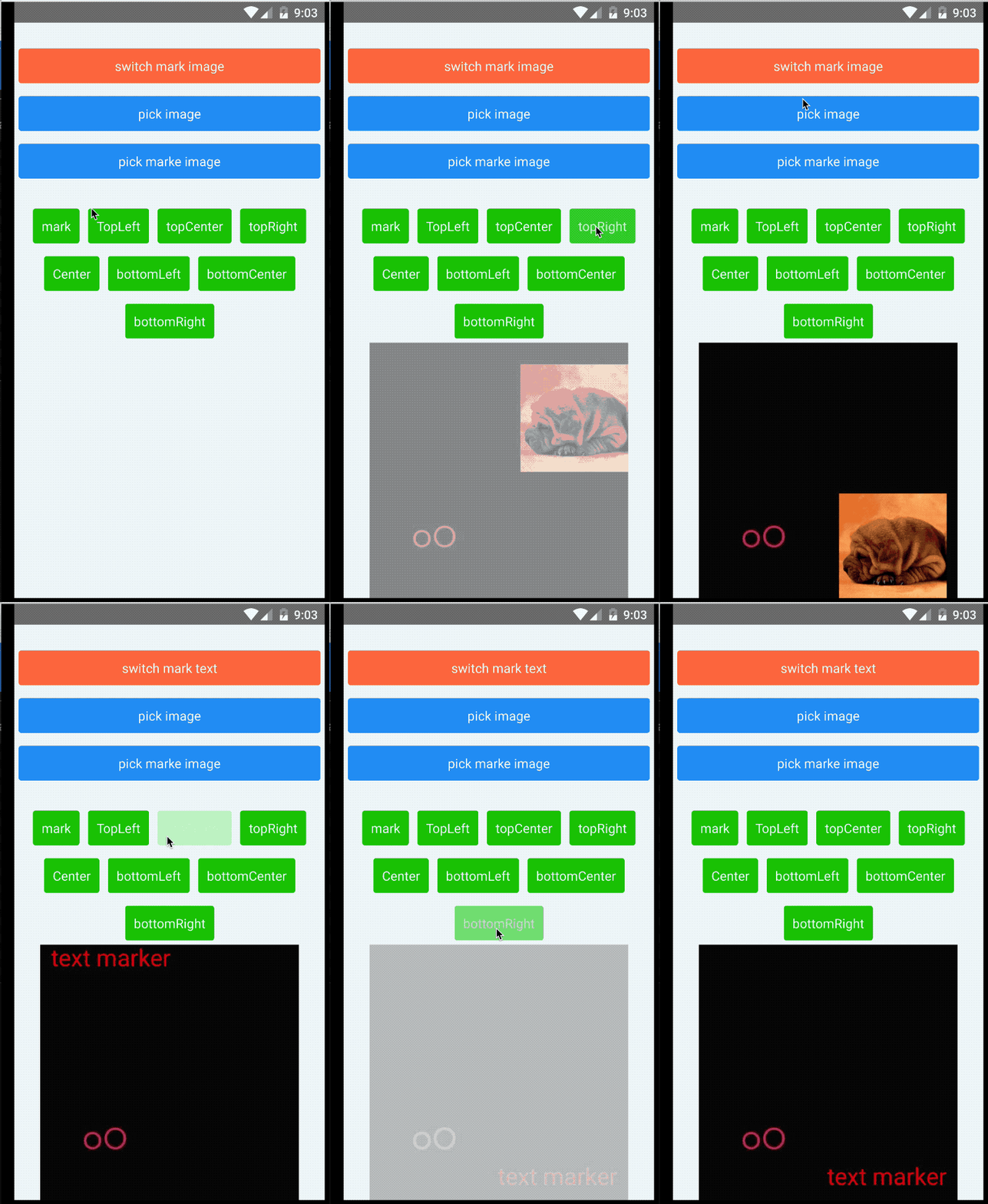


## Installation
**RN version < 0.60.0 please use v0.5.2 or older**
* npm install react-native-image-marker --save
* link
* react-native link (RN version < 0.60.0)
* [auto link](https://github.com/react-native-community/cli/blob/main/docs/autolinking.md)(RN version > 0.60.0)
### iOS Pod Install (RN version < 0.60.0)
You can use `pod` instead of `link`. Add following lines in your `Podfile`:
```shell
pod 'RNImageMarker', :path => '../node_modules/react-native-image-marker'
```
## API
|name|parameter|return|decription|
|--|--|--|--|
|`markText`|`TextMarkOption`|`Promise`|mark image with text|
|`markImage`|`ImageMarkOption`|`Promise`| mark image with icon|
* `TextMarkOption`
|name|description|
|--|--|
|`src`|image url |
|`text`|the text you want to mark with|
|`position`| text position(`topLeft`,`topRight`,`topCenter`, `center`, `bottomLeft`, `bottomCenter`, `bottomRight`)|
|`X`|distance from the left, **if you have set `position` yet you don't need to set this property again**|
|`Y`|distance from the top, **if you have set `position` you don't need to set this property again**|
|`color`| text color HEX: #rgba |
|`fontName`| fontName |
|`fontSize`| fontSize |
|`shadowStyle`| text's shadow style: iOS's `NSShadowAttributeName`, Android's `textPaint.shadowLayerStyle` |
|`scale`| scale image |
|`quality`| image qulaity |
|`filename` | set filename for the result |
|`saveFormat`| `png` `jpg` `base64` |
|`textBackgroundStyle` | text background style |
|`maxSize`| default value is 2048, **need RN version >= 0.60.0**, fresco `MaxBitmapSize` [`ImagePipelineConfig.Builder.experiment().setMaxBitmapSize()`](https://github.com/facebook/fresco/blob/08ca5f40cc0b60b4db16d15e45552cafeae39ccb/imagepipeline/src/main/java/com/facebook/imagepipeline/core/ImagePipelineExperiments.java#L282), see [#49](https://github.com/JimmyDaddy/react-native-image-marker/issues/49#issuecomment-535303838)|
```typescript
export enum ImageFormat {
png = 'png',
jpg = 'jpg',
base64 = 'base64', // base64 string
}
export type TextMarkOption = {
// image src, local image
src: ImageSourcePropType,
text: string,
// if you set position you don't need to set X and Y
X?: number,
Y?: number,
// eg. '#aacc22' '#aacc22af' '#acda' '#acd'
color: string,
fontName: string,
fontSize: number,
// scale image
scale: number,
// image quality
quality: number,
position?: Position,
filename?: string,
shadowStyle: ShadowLayerStyle,
textBackgroundStyle: TextBackgroundStyle,
saveFormat?: ImageFormat,
maxSize?: number, // android only see #49 #42
}
```
* `ImageMarkOption`
|name|description|
|--|--|
|`src`|image url |
|`markerSrc`|the icon you want to mark with |
|`position`| text position(`topLeft`,`topRight`,`topCenter`, `center`, `bottomLeft`, `bottomCenter`, `bottomRight`)|
|`X`|distance from the left, **if you have set `position` yet you don't need to set this property again**|
|`Y`|distance from the top, **if you have set `position` you don't need to set this property again**|
|`markerScale`| scale icon |
|`scale`| scale image |
|`quality`| image qulaity |
|`filename` | set filename for the result |
|`saveFormat`| `png` `jpg` `base64`, default is `jpg` |
|`maxSize`| default value is 2048, **need RN version >= 0.60.0**, fresco `MaxBitmapSize` [`ImagePipelineConfig.Builder.experiment().setMaxBitmapSize()`](https://github.com/facebook/fresco/blob/08ca5f40cc0b60b4db16d15e45552cafeae39ccb/imagepipeline/src/main/java/com/facebook/imagepipeline/core/ImagePipelineExperiments.java#L282), see [#49](https://github.com/JimmyDaddy/react-native-image-marker/issues/49#issuecomment-535303838)|
```typescript
export type ImageMarkOption = {
// image src, local image
src: ImageSourcePropType,
markerSrc: ImageSourcePropType,
X?: number,
Y?: number,
// marker scale
markerScale: number,
// image scale
scale: number,
quality: number,
position?: Position,
filename?: string,
saveFormat?: ImageFormat,
maxSize?: number, // android only see #49 #42
}
```
* `ShadowStyle`
|name|description|
|--|--|
|`radius`| blur radius |
|`dx`| x offset|
|`dy`| y offset|
|`color`| shadow color #rgba |
```typescript
export type ShadowLayerStyle = {
'dx': number,
'dy': number,
'radius': number,
'color': string
}
```
* `textBackgroundStyle`
> thanks [@onka13](https://github.com/onka13) for [#38](https://github.com/JimmyDaddy/react-native-image-marker/pull/38)
|name|description|
|--|--|
|`paddingX`| padding X |
|`paddingY`| padding y|
|`type`| default is fit the text, `stretchX` stretch to fill width, `stretchY` stretch to fill height |
|`color`| bg color #rgba |
```typescript
export enum TextBackgroundType {
stretchX = 'stretchX',
stretchY = 'stretchY'
}
```
## Usage
```javascript
import ImageMarker from "react-native-image-marker"
···
// add text watermark to a photo
this.setState({
loading: true
})
Marker.markText({
src: img.uri,
text: 'text marker',
X: 30,
Y: 30,
color: '#FF0000', // '#ff0000aa' '#f0aa'
fontName: 'Arial-BoldItalicMT',
fontSize: 44,
shadowStyle: {
dx: 10.5,
dy: 20.8,
radius: 20.9,
color: '#ff00ff' // '#ff00ffad'
},
textBackgroundStyle: {
type: 'stretchX',
paddingX: 10,
paddingY: 10,
color: '#0f0' // '#0f0a'
},
scale: 1,
quality: 100
}).then((res) => {
this.setState({
loading: false,
markResult: res
})
console.log("the path is"+res)
}).catch((err) => {
console.log(err)
this.setState({
loading: false,
err
})
})
···
this.setState({
loading: true
})
Marker.markText({
src: img.uri,
text: 'text marker',
position: 'topLeft',
color: '#FF0000',
fontName: 'Arial-BoldItalicMT',
fontSize: 44,
scale: 1,
quality: 100
}).then((res) => {
console.log("the path is"+res)
this.setState({
loading: false,
markResult: res
})
}).catch((err) => {
console.log(err)
this.setState({
loading: false,
err
})
})
// add icon watermark to a photo
const iconUri = icon.uri
const backGroundUri = img.uri
this.setState({
loading: true
})
Marker.markImage({
src: backGroundUri,
markerSrc: iconUri, // icon uri
X: 100, // left
Y: 150, // top
scale: 1, // scale of bg
markerScale: 0.5, // scale of icon
quality: 100, // quality of image
saveFormat: 'png',
}).then((path) => {
this.setState({
uri: Platform.OS === 'android' ? 'file://' + path : path,
loading: false
})
}).catch((err) => {
console.log(err, 'err')
this.setState({
loading: false,
err
})
})
Marker.markImage({
src: backGroundUri,
markerSrc: iconUri,
position: 'topLeft', // topLeft, topCenter,topRight, bottomLeft, bottomCenter , bottomRight, center
scale: 1,
markerScale: 0.5,
quality: 100
}).then((path) => {
this.setState({
uri: Platform.OS === 'android' ? 'file://' + path : path,
loading: false
})
}).catch((err) => {
console.log(err, 'err')
this.setState({
loading: false,
err
})
})
// you can also add watermark to a photo with static images
Marker.markImage({
src: backGroundUri,
markerSrc: require('./icon.png'),
position: 'topLeft', // topLeft, topCenter,topRight, bottomLeft, bottomCenter , bottomRight, center
scale: 1,
markerScale: 0.5,
quality: 100
}).then((path) => {
this.setState({
uri: Platform.OS === 'android' ? 'file://' + path : path,
loading: false
})
}).catch((err) => {
console.log(err, 'err')
this.setState({
loading: false,
err
})
})
// or base64
Marker.markImage({
src: { uri: `data:img/jpg;base64,/9j/4qqqAQSkZJRgABAQEBLAEsAAD/2wBDAAIBAQEBAQIBAQECAgICAgQDAgICAgUEBAMEBgUGBgYFBgYGBwkIBgcJBwYGCAsICQoKCgoKBggLDAsKDAkKCgr/2wBDAQICAgICAgUDAwUKBwYHCgoKCgoKCgoKCgoKCgoKCgoKCgoKCgoKCgoKCgoKCgoKCgoKCgoKCgoKCgoKCgoKCgr/wAARCAHnAooDASIA
AhEBAxEB/8QAHwAAAQUBAQEBAQEAAAAAAAAAAAECAwQFBgddddcI` },
markerSrc: { uri: `data:img/jpg;base64,/9j/4AAQSkZJRgABAQEBLAEsAAD/2wBDAAIBAQEBAQIBAQECAgICAgQDAgICAgUEBAMEBgUGBgYFBgYGBwkIBgcJBwYGCAsICQoKCgoKBggLDAsKDAkKCgr/2wBDAQICAgICAgUDAwUKBwYHCgoKCgoKCgoKCgoKCgoKCgoKCgoKCgoKCgoKCgoKCgoKCgoKCgoKCgoKCgoKCgoKCgr/wAARCAHnAooDASIA
AhEBAxEB/8QAHwAAAQUBAQEBAQEAAAAAAAAAAAECAwQFBgcI` },
position: 'topLeft', // topLeft, topCenter,topRight, bottomLeft, bottomCenter , bottomRight, center
scale: 1,
markerScale: 0.5,
quality: 100
}).then((path) => {
this.setState({
uri: Platform.OS === 'android' ? 'file://' + path : path,
loading: false
})
}).catch((err) => {
console.log(err, 'err')
this.setState({
loading: false,
err
})
})
```
## Extra about Android decoding image
This library use [Fresco](https://github.com/facebook/fresco) to decode image on Android. You can set your configuration through [Configure Fresco in React Native](https://medium.com/in-the-hudl/configure-fresco-in-react-native-28c2bc7dcc4d)
* RN version < 0.60.0 use fresco v1.10.0
* RN version >= 0.60.0 use fresco v2.0.0 +
[see](https://github.com/facebook/react-native/blob/8cf9505bd27c5dade33b17cc177fa5ef1613dbcd/ReactAndroid/gradle.properties#L15)
## Save image to file
* If you want to save the new image result to the phone camera roll, just use the [CameraRoll-module from react-native](https://facebook.github.io/react-native/docs/cameraroll.html#savetocameraroll).
* If you want to save it to an arbitrary file path, use something like [react-native-fs](https://github.com/itinance/react-native-fs).
* For any more advanced needs, you can write your own (or find another) native module that would solve your use-case.
## Contributors
[@filipef101](https://github.com/filipef101)
[@mikaello](https://github.com/mikaello)
[@Peretz30](https://github.com/Peretz30)
[@gaoxiaosong](https://github.com/gaoxiaosong)
[@onka13](https://github.com/onka13)
[@OrangeFlavoredColdCoffee](https://github.com/OrangeFlavoredColdCoffee)
## Example
[example](https://github.com/JimmyDaddy/react-native-image-marker/tree/master/example)
## Contributing
See the [contributing guide](CONTRIBUTING.md) to learn how to contribute to the repository and the development workflow.
## License
MIT
---
Made with [create-react-native-library](https://github.com/callstack/react-native-builder-bob)