<a href="https://luehangs.site/lue_hang/projects/react-native-image-layout"><img src="https://luehangs.site/images/react-native-image-layout-main.jpg" alt="react-native-image-layout"/></a>

<a href="https://luehangs.site/marketplace/product/RN%20Posting%20Demo%20App%20Kit"><img src="https://luehangs.site/images/lh-mobile-strip.jpg" alt="LueHsoft LueH LABS Lue Hang luehang"/></a>
<br/>
<br/>

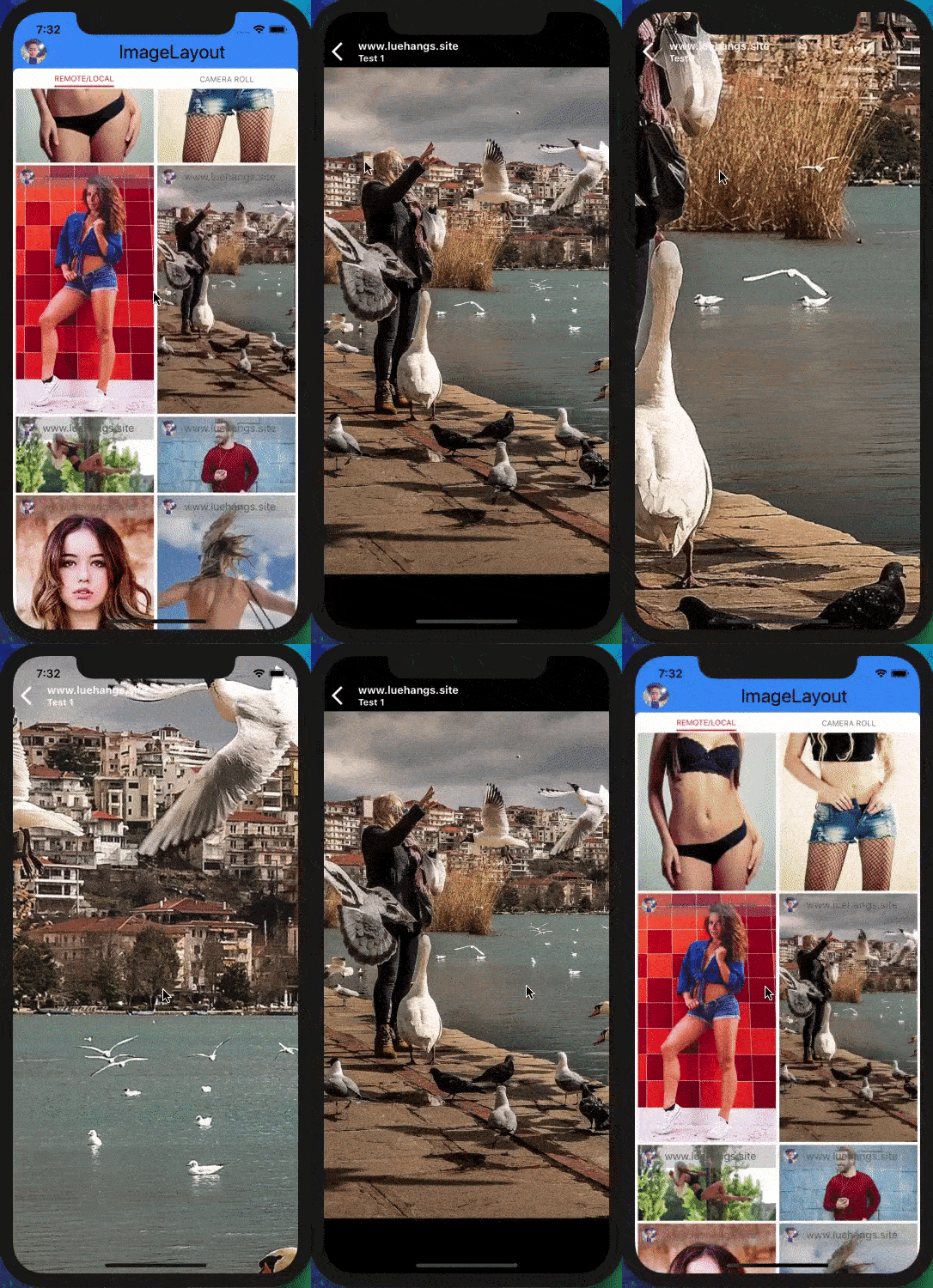
An easy and simple to use React Native component to render a custom masonry layout for remote/local images and displayed on a custom interactive image viewer. Includes animations and support for both iOS and Android. Free and made possible along with costly maintenance and updates by [Lue Hang](https://www.facebook.com/lue.hang) (the author).

Check out the [docs](https://luehangs.site/lue_hang/projects/react-native-image-layout) for a complete documentation.

- Supports **large lists** rendering.
- Efficiently add more images without re-rendering.
- Smart algorithm for eveningly laying out images.
- Swipe up and down to close images.
- Can be use with many fieldnames. `source`, `source.uri`, `uri`, `URI`, `url` or `URL`.
- Support for rendering all local and remote images with no missing images.
- Support for dynamic device rotation.
- Includes guestures and important event listeners for pan, pinch, single tap and double tap.
- Includes zoom mode.
- Pull to Refresh.
- Scroll loading.
- Easily customizable.
- Intelligent scroll detection to cushion rough swipe guestures.
- Supports iOS and Android.

<br/>
<br/>
<br/>

---
<br/>
<br/>
<br/>

![react-native-image-layout](https://www.luehangs.site/videos/react-native-image-layout-demo.gif)

#### :information_source: Learn more about React Native with project examples along with Cyber Security and Ethical Hacking at [LueHsoft](https://www.luehangs.site).

Built with [`react-native-gallery-swiper`](https://npmjs.com/package/react-native-gallery-swiper) & [`react-native-smart-gallery`](https://npmjs.com/package/react-native-smart-gallery).

<br/>
<br/>
<br/>

---
<br/>
<br/>
<br/>

# :open_file_folder: Index

### 1.  [Install](#gem-install)
### 2.  [Usage Example](#tada-usage-example)
### 3.  [API](#nut_and_bolt-api)
### 4.  :books: [Props](#books-props)
### 5.  [Example Project](#clapper-example-project)
### 6.  [Author](#santa-author)
### 7.  [Contribute](#clap-contribute)
### 8.  [License](#page_facing_up-license)

<br/>
<br/>
<br/>

---
<br/>
<br/>
<br/>

## :gem: Install

Type in the following to the command line to install the dependency.

```bash
$ npm install --save react-native-image-layout
```

or

```bash
$ yarn add react-native-image-layout
```

<br/>
<br/>
<br/>

---
<br/>
<br/>
<br/>

## :tada: Usage Example

Add an ``import`` to the top of the file.  At minimal, declare the ``ImageLayout`` component in the ``render()`` method providing an array of data for the ``images`` prop.

> If you like [`react-native-image-layout`](https://github.com/Luehang/react-native-image-layout), please be sure to give it a star at [GitHub](https://github.com/Luehang/react-native-image-layout). Thanks.

```javascript
import ImageLayout from "react-native-image-layout";

//...
render() {
    return (
        <ImageLayout
            images={[
                // Version *3.0.0 update (or greater versions): 
                // Can be used with different image object fieldnames.
                // Ex. source, source.uri, uri, URI, url, URL
                { uri: "https://luehangs.site/pic-chat-app-images/beautiful-blond-blonde-hair-478544.jpg" },
                // IMPORTANT: It is REQUIRED for LOCAL IMAGES
                // to include a dimensions field with the
                // actual width and height of the image or
                // it will throw an error.
                // { source: require("yourApp/image.png"),
                //     dimensions: { width: 1080, height: 1920 }
                // },
                // "width" & "height" is an alternative to the dimensions
                // field that will also be acceptable.
                // { source: require("yourApp/image.png"),
                //     width: 1080,
                //     height: 1920 },
                { source: { uri: "https://luehangs.site/pic-chat-app-images/beautiful-beautiful-women-beauty-40901.jpg" } },
                { uri: "https://luehangs.site/pic-chat-app-images/animals-avian-beach-760984.jpg",
                    // Optional: Adding a dimensions field with
                    // the actual width and height for REMOTE IMAGES
                    // will help improve performance.
                    dimensions: { width: 1080, height: 1920 } },
                { URI: "https://luehangs.site/pic-chat-app-images/beautiful-blond-fishnet-stockings-48134.jpg",
                    // Version *2.0.0 update (or greater versions):
                    // Optional: Does not require an id for each
                    // image object, but is for best practices and
                    // can be better for performance with the API.
                    id: "blpccx4cn" },
                { url: "https://luehangs.site/pic-chat-app-images/beautiful-beautiful-woman-beauty-9763.jpg" },
                { URL: "https://luehangs.site/pic-chat-app-images/attractive-balance-beautiful-186263.jpg" },
            ]}
            // Version *5.7.0 update
            // onEndReached={() => {
            //     // add more images when scroll reaches end
            // }}
        />
    );
}
//...
```

Android Note: Remote debugger should be turned off on Android.

<br/>

***
<br/>

## :tada: Efficiently Add More Images

**Version \*5.2.0 update:** Without rerendering the images.

```javascript
import ImageLayout from "react-native-image-layout";

//...
/**
 * Example method to add more images.
 *
 * @method addMoreImages
 */
addMoreImages(newImages) {
    this.setState({
        images: this.state.images.concat(newImages)
    });
}

render() {
    return (
        <ImageLayout
            images={this.state.images}
            {/* Version *5.7.0 update */}
            onEndReached={() => {
                this.addMoreImages(moreImages);
            }}
        />
    );
}
//...
```

<br/>

***
<br/>

## :tada: Add New Images

**Version \*5.2.0 update:** Rerendering the images.

```javascript
import ImageLayout from "react-native-image-layout";

//...
/**
 * Example method to add new images.
 *
 * @method addNewImages
 * @config Set react-native-image-layout's "rerender" prop to true.
 */
addNewImages(newImages) {
    this.setState({
        images: newImages
    });
}

render() {
    return (
        <ImageLayout
            rerender={true}
            images={this.state.images}
        />
    );
}
//...
```

<br/>
<br/>
<a href="https://luehangs.site/marketplace/product/RN%20Posting%20Demo%20App%20Kit"><img src="https://luehangs.site/images/lh-mobile-strip.jpg" alt="LueHsoft LueH LABS Lue Hang luehang"/></a>
<br/>
<br/>

## :nut_and_bolt: API

``<ImageLayout />`` component accepts the following props...

<br/>

# :books: Props

:information_source: **Version *2.0.0 update (or greater versions):**  Props changes that may not be compatible with lower versions.

## :small_blue_diamond: Image Layout Props of ``<ImageLayout />``

> If you like [`react-native-image-layout`](https://github.com/Luehang/react-native-image-layout), please be sure to give it a star at [GitHub](https://github.com/Luehang/react-native-image-layout). Thanks.

| Props | Description | Type | Default |
| ----- | ----------- | ---- | ------- |
| `images`                      | An array of objects.  `uri` is a required field. EX. `[{uri: "https://luehangs.site/pic-chat-app-images/beautiful-blond-fishnet-stockings-48134.jpg"}, {uri: "https://luehangs.site/pic-chat-app-images/beautiful-blond-blonde-hair-478544.jpg"}]` | `Array` | Required |
| `columns`                       | Desired number of columns. | `number` | 2 |
| `initialColToRender`            | How many columns to render in the initial batch. | `number` | `columns` |
| `initialNumInColsToRender`      | How many items to render in each column in the initial batch. | `number` | 1 |
| `spacing`                       | Gutter size of the column. The spacing is a multiplier of 1% of the available view. | `number` | 1 |
| `sorted`                        | Whether to sort the masonry data according to their index position or allow to fill in as soon as the `uri` is ready. | `Boolean` | false |
| `rerender`                      | Rerender the images when it changes. **Version \*5.2.0 update** | `boolean` | false |
| `onLongPressImage`              | Executed after a long press on an item on the masonry. `({item: object, index: number}) => void` **Version \*3.0.0 update**. | `Function` | |
| `imageContainerStyle`           | The styles object which is added to the Image component. | `object` | {} |
| `renderIndividualMasonryHeader` | Custom function that is executed **ABOVE** each individual masonry image. `(item: object, index: number) => ?React.Element` | `Function` | |
| `renderIndividualMasonryFooter` | Custom function that is executed **BELOW** each individual masonry image. `(item: object, index: number) => ?React.Element` | `Function` | |
| `renderMainHeader`              | Custom function to render a header above the MasonryList. `() => void` | `Function` | |
| `renderMainFooter`              | Custom function to render a footer below the MasonryList. `() => void` | `Function` | |
| `masonryFlatListColProps`       | Props to be passed to the underlying `FlatList` masonry.  See [`FlatList` props...](https://facebook.github.io/react-native/docs/flatlist#props) | `object` | {} |
| `onEndReached`                  | Called once when the scroll position gets within `onEndReachedThreshold` of the rendered content. `() => void` **Version \*5.7.0 update** | `function` | |
| `onEndReachedThreshold`         | How far from the end (in units of visible length of the list) the bottom edge of the list must be from the end of the content to trigger the `onEndReached` callback. Thus a value of 0.5 will trigger `onEndReached` when the end of the content is within half the visible length of the list. **Version \*5.7.0 update** | `number` | 0.8 |

<br/>
<br/>
<a href="https://luehangs.site/marketplace/product/RN%20Posting%20Demo%20App%20Kit"><img src="https://luehangs.site/images/lh-mobile-strip.jpg" alt="LueHsoft LueH LABS Lue Hang luehang"/></a>
<br/>
<br/>

## :small_blue_diamond: Gallery Props of ``<ImageLayout />``

> If you like [`react-native-image-layout`](https://github.com/Luehang/react-native-image-layout), please be sure to give it a star at [GitHub](https://github.com/Luehang/react-native-image-layout). Thanks.

| Props | Description | Type | Default |
| ----- | ----------- | ---- | ------- |
| `imagePageComponent`          | Custom function to render the images for gallery.  `(imageProps: { imageLoaded: Boolean, source: object, image: object, style: Array<object>, resizeMode: string, capInsets: object, onLoadStart: Function, onLoad: Function, ...extras }, imageDimensions: {width: number, height: number}, index: number) => React.Element` **index params included in Version \*3.0.0 update** | `Function` | `<Image/>` component |
| `errorPageComponent`          | Custom function to render the page of an image in gallery that couldn't be displayed. | `Function` | `<View/>` with stylized error |
| `renderPageHeader`            | Custom function to render gallery page header.  `(item: object, index: number, onClose: Function) => ?React.Element` The `onClose` function is use to close gallery pages and return to the masonry layout. | `Function` | |
| `renderPageFooter`            | Custom function to render gallery page footer.  `(item: object, index: number, onClose: Function) => ?React.Element` The `onClose` function is use to close gallery pages and return to the masonry layout. | `Function` | |
| `pagesFlatListProps`          | Props to be passed to the underlying `FlatList` gallery.  See [`FlatList` props...](https://facebook.github.io/react-native/docs/flatlist) | `object` | {windowSize: 3} |
| `pageMargin`                  | Blank space to show between images in gallery. | `number` | 0 |
| `sensitivePageScroll`         | Whether to enable an intelligent detection to detect rough and fast swiping gestures in order to "cushion" or slow down a swipe at the end. **Version \*3.0.0 update**. | `Boolean` | `false` |
| `onPageSelected`              | Fired with the index of page that has been selected in gallery. `(index: number) => void` | `Function` | |
| `onPageScrollStateChanged`    | Called when page scrolling state has changed in gallery.  See [scroll state and events...](#scroll-state-and-events) `(state: string) => void` | `Function` | |
| `onPageScroll`                | Scroll event for page gallery.  See [scroll state and events...](#scroll-state-and-events) `(event: { position: number, offset: number, fraction: number }) => void` | `Function` | |
| `pageScrollViewStyle`         | Custom style for the `FlatList` component for gallery. | `object` | {} |
| `onPageSingleTapConfirmed`    | Fired after a single tap on page in gallery. `(index: number) => void` | `Function` | |
| `onPageLongPress`             | Fired after a long press on page in gallery. `(gestureState: object, index: number) => void` | `Function` | |
| `onDoubleTapConfirmed`        | Executed after a double tap. `(index: number) => void` **Version \*5.1.0 update**. | `Function` |
| `onDoubleTapStartReached`     | Executed after scaling out or zooming out using double tap. `(transform: { scale: number, translateX: number, translateY: number }, index: number) => void` **Version \*5.1.0 update**. | `Function` |
| `onDoubleTapEndReached`       | Executed after scaling in or zooming in using double tap. `(transform: { scale: number, translateX: number, translateY: number }, index: number) => void` **Version \*5.1.0 update**. | `Function` |
| `onPinchTransforming`         | Executed while pinching to transform view or zoom (view transformer). `(transform: { scale: number, translateX: number, translateY: number }, index: number) => void` **Version \*5.1.0 update**. | `Function` |
| `onPinchStartReached`         | Executed after scaling out or zooming out to initial size using the pinch gesture. `(transform: { scale: number, translateX: number, translateY: number }, index: number) => void` **Version \*5.1.0 update**. | `Function` |
| `enableScale`                 | Enable or disable zoom and double tap zoom (view transformer). **Version \*5.1.0 update**. | `boolean` | `true` |
| `maxScale`                    | Max zoom (view transformer). **Version \*5.1.0 update**. | `number` | `Math.max(imageWidth / viewWidth, imageHeight / viewHeight)` |
| `enableTranslate`             | Enable or disable moving while in zoom (view transformer). **Version \*5.1.0 update**. | `boolean` | `true` |
| `resizeMode`                  | The mechanism that should be used to resize the image when the image's dimensions differ from the image view's dimensions. Expecting one of `"contain"`, `"cover"`, `"stretch"`, `"repeat"`, `"center"`. **Version \*5.1.0 update**. | `string` | `"contain"` |
| `enableResistance`            | Enable or disable resistance over panning (view transformer). **Version \*5.1.0 update**. | `boolean` | `true` |
| `resistantStrHorizontal`      | Resistant value for left and right panning (view transformer). `(dx: number) => number` **Version \*5.1.0 update**. | `Function`, `number` or `string` | `(dx) => (dx /= 3)` |
| `resistantStrVertical`        | Resistant value for top and bottom panning (view transformer). `(dy: number) => number` **Version \*5.1.0 update**. | `Function`, `number` or `string` | `(dy) => (dy /= 3)` |
| `onViewTransformed`           | Executed while being transformed in anyway (view transformer). `(transform: { scale: number, translateX: number, translateY: number }, index: number) => void` **Version \*5.1.0 update**. | `Function` |
| `onTransformGestureReleased`  | Executed after a transform guesture released (view transformer). `(transform: { scale: number, translateX: number, translateY: number }, index: number) => void` **Version \*5.1.0 update**. | `Function` |
| `onSwipeUpReleased`           | Executed after releasing an upward swipe at a specific y translate while not in zoom mode. `(transform: { scale: number, translateX: number, translateY: number }, index: number) => void` For custom precision swiping gestures, refer to the `onTransformGestureReleased`. **Version \*5.8.0 update**. | `Function` |
| `onSwipeDownReleased`         | Executed after releasing a downward swipe at a specific y translate while not in zoom mode. `(transform: { scale: number, translateX: number, translateY: number }, index: number) => void` For custom precision swiping gestures, refer to the `onTransformGestureReleased`. **Version \*5.8.0 update**. | `Function` |
| `maxOverScrollDistance`       | A number used to determine final scroll position triggered by fling (view transformer). **Version \*5.1.0 update**. | `number` | `20` |
| `enableVerticalExit`          | Enable or disable exiting from swiping up or down in gallery. **Version \*5.3.0 update**. | `Boolean` | `true` |
| `enableModal`                 | Enable or disable modal for gallery. This also helps with Androids back button. **Version \*5.9.0 update**. | `boolean` | `false` |

<br/>
<br/>
<a href="https://luehangs.site/marketplace/product/RN%20Posting%20Demo%20App%20Kit"><img src="https://luehangs.site/images/lh-mobile-strip.jpg" alt="LueHsoft LueH LABS Lue Hang luehang"/></a>
<br/>
<br/>

## :clapper: Example Project

Perform steps 1-2 to run locally:

<details>
<summary>1. Clone the Repo</summary>
</br>

**Clone** `react-native-image-layout` locally. In a terminal, run:

```bash
$ git clone https://github.com/Luehang/react-native-image-layout.git react-native-image-layout
```

</details>

<details>
<summary>2. Install and Run</summary>
</br>

```bash
$ cd react-native-image-layout/example/
```

#### iOS - Mac - Install & Run

	1. check out the code
	2. npm install
	3. npm run ios

#### Android - Mac - Install & Run

	1. check out the code
	2. npm install
	3. emulator running in separate terminal
	4. npm run android

</details>

<br/>
<br/>
<a href="https://luehangs.site"><img src="https://luehangs.site/images/lh-blog-strip.jpg" alt="LueHsoft LueH LABS Lue Hang luehang"/></a>
<br/>
<br/>

## :santa: Author

<a href="https://www.facebook.com/lue.hang">
<img src="https://www.luehangs.site/images/lue-hang2018-circle-150px.png"/>
</a>

Free and made possible along with costly maintenance and updates by [Lue Hang](https://www.facebook.com/lue.hang) (the author).

<br/>
<br/>
<br/>

---
<br/>
<br/>
<br/>

## :clap: Contribute

[Pull requests](https://github.com/Luehang/react-native-image-layout/pulls) are welcomed.

<br/>

### :tophat: Contributors

Contributors will be posted here.

<br/>

### :baby: Beginners

Not sure where to start, or a beginner? Take a look at the [issues page](https://github.com/Luehang/react-native-image-layout/issues).

<br/>
<br/>
<br/>

---
<br/>
<br/>
<br/>

## :page_facing_up: License

MIT © [Lue Hang](https://luehangs.site), as found in the LICENSE file.