# react-native-hijiri-calendar
[](https://www.npmjs.com/package/react-native-hijiri-calendar)
[](https://www.npmjs.com/package/react-native-hijiri-calendar)
[](https://www.npmjs.com/package/react-native-hijiri-calendar)
React Native calendar for **Hijri (Umm al-Qura)** and **Gregorian** dates. Supports month navigation, day selection, and date-range highlighting. Optional Google Calendar sign-in and event sync. Written in TypeScript.
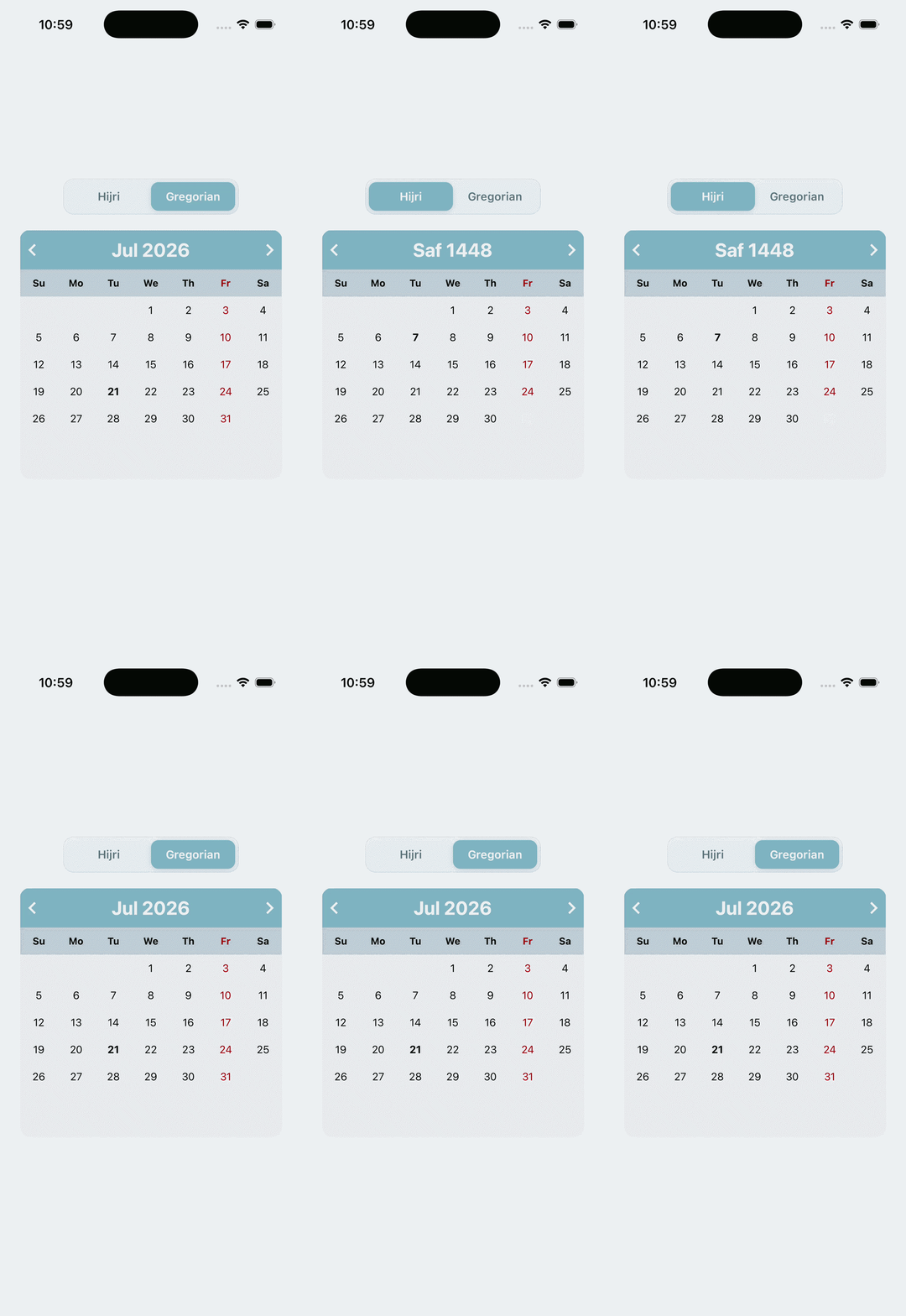
## Installation
Requires React 18+, React Native 0.76+, and `@expo/vector-icons` (included with Expo).
```bash
pnpm add react-native-hijiri-calendar
npx expo install @expo/vector-icons
```
[Expo Snack example](https://snack.expo.io/@dev-ahmed/hcalender-example)
## Usage
```tsx
import React from 'react';
import {StyleSheet, View} from 'react-native';
import {HCalendar} from 'react-native-hijiri-calendar';
export default function App() {
return (
{
console.log(day, marked);
}}
selectedDates={[
{
from: '1441/9/1',
to: '1441/9/5',
style: {borderColor: 'blue'},
},
{
from: '1441/9/4',
to: '1441/9/12',
style: {borderColor: 'green'},
},
]}
/>
);
}
const styles = StyleSheet.create({
container: {
flex: 1,
alignSelf: 'center',
justifyContent: 'center',
alignItems: 'center',
},
});
```
Google Calendar is off unless you pass `googleCalendar`. See [Google Calendar](#google-calendar-optional).
### Calendar types
| Value | Description |
| ----------- | ---------------------------------- |
| `hijiri` | Hijri / Islamic calendar (default) |
| `gregorian` | Gregorian calendar |
### Date formats
Input and output formats differ for Hijri — note the field order.
| Type | `selectedDates` input | `onDaySelect` output |
| --------- | ----------------------------- | ----------------------------- |
| Hijri | `YYYY/M/D` (e.g. `1441/9/1`) | `D/M/YYYY` (e.g. `1/9/1441`) |
| Gregorian | `YYYY/M/D` (e.g. `2020/4/15`) | `YYYY/M/D` (e.g. `2020/4/15`) |
`onDaySelect` receives `(date, marked)`, where `marked` is `true` if the day falls inside a `selectedDates` range.
> **Hijri round-trips need reordering.** A date string from `onDaySelect` is day-first, so feeding it straight back into `selectedDates` (which expects year-first) will resolve to the wrong day. Flip the parts first:
>
> ```js
> const [day, month, year] = hijriDate.split('/');
> const forSelectedDates = `${year}/${month}/${day}`;
> ```
## Props
### Dates and selection
| Prop | Type | Default | Description |
| --------------- | ---------- | ----------- | -------------------------------------------- |
| `calendarType` | `string` | `'hijiri'` | `'hijiri'` or `'gregorian'` |
| `selectedDates` | `array` | `undefined` | Ranges to highlight: `{ from, to, style }` |
| `onDaySelect` | `function` | — | `(date, marked) => void` |
| `onPrev` | `function` | — | Called when navigating to the previous month |
| `onNext` | `function` | — | Called when navigating to the next month |
### Labels and icons
| Prop | Type | Default | Description |
| ---------------- | --------- | ----------- | -------------------------------------------- |
| `iconPrev` | `element` | — | Custom previous-month icon |
| `iconNext` | `element` | — | Custom next-month icon |
| `customHMonths` | `array` | short names | Override Hijri month labels (12 strings) |
| `customGMonths` | `array` | short names | Override Gregorian month labels (12 strings) |
| `customWeekDays` | `array` | locale min | Override weekday labels (7 strings) |
### Styling
| Prop | Type | Default | Description |
| ---------------------- | ------- | ------- | ----------------------------------------- |
| `containerStyle` | `style` | `{}` | Outer calendar container |
| `headerStyle` | `style` | `{}` | Header bar |
| `headerFontStyle` | `style` | `{}` | Header month/year text |
| `fontStyle` | `style` | `{}` | Day number text |
| `weekDaysStyle` | `style` | `{}` | Weekday row |
| `dayNameFontStyle` | `style` | `{}` | Weekday label text |
| `currentDayStyle` | `style` | `{}` | Today’s day text |
| `markedDatesTextStyle` | `style` | `{}` | Text style for days inside a marked range |
| `dayContainerStyle` | `style` | `{}` | Individual day cell |
| `colContainerStyle` | `style` | `{}` | Row / column container |
### Agenda and Google Calendar
| Prop | Type | Default | Description |
| ---------------- | --------------------- | ----------- | ---------------------------------------------- |
| `agenda` | `boolean` or `object` | `undefined` | Optional day agenda with time slots |
| `agendaItems` | `array` | `undefined` | Controlled reserved slots |
| `onReserve` | `function` | — | Called when a time slot is reserved |
| `onAgendaDelete` | `function` | — | Called when a reservation is removed |
| `googleCalendar` | `object` | `undefined` | Optional Google Calendar sync (off by default) |
### `selectedDates` item shape
```js
{
from: '1441/9/1', // start date (inclusive)
to: '1441/9/5', // end date (inclusive)
style: { // applied to the highlight bar
borderColor: 'blue',
},
}
```
## Agenda (optional)
Pass `agenda` to open a day agenda when a date is tapped. Users pick a time slot and reserve it.
```tsx
```
Default slots are **08:00–20:00** in 1-hour blocks.
```tsx
{
console.log(item);
}}
/>
```
- Free slots show **Reserve**
- Reserved slots can be edited or removed
- Days with reservations show a dot
- If Google Calendar is connected, reservations are saved as timed events there
## Google Calendar (optional)
Off by default. The host app passes **its own** Google OAuth client IDs. That app’s users sign in with Google, then the calendar shows and manages their events.
```bash
npx expo install expo-auth-session expo-web-browser expo-crypto
```
In the host app’s Google Cloud project:
1. Enable the **Google Calendar API**
2. Create OAuth 2.0 client IDs for web, iOS, and Android as needed
3. Add the app’s authorized JavaScript origins and redirect URIs
```tsx
```
When `googleCalendar` is passed with client IDs:
- Users see **Sign in with Google**
- After login, days with events show a dot
- Tap a day to open the agenda, then reserve, edit, or remove a time slot
- Reservations are created as timed Google events
- Hijri dates are converted to Gregorian before talking to Google Calendar
Omit `googleCalendar` to keep the calendar local.
### `googleCalendar` shape
```ts
{
webClientId?: string;
iosClientId?: string;
androidClientId?: string;
clientId?: string;
accessToken?: string; // optional, if the host already signed the user in
calendarId?: string; // optional, defaults to 'primary'
eventColor?: string;
onError?: (error: Error) => void;
}
```
`useGoogleCalendar` and `useGoogleCalendarAuth` are also exported if you want to build your own event UI.
## Exports
```ts
import {
HCalendar,
useGoogleCalendar,
useGoogleCalendarAuth,
} from 'react-native-hijiri-calendar';
import type {
HCalendarProps,
CalendarType,
SelectedDateRange,
CalendarEvent,
GoogleCalendarConfig,
AgendaConfig,
AgendaItem,
} from 'react-native-hijiri-calendar';
```
## Contributing
Pull requests are welcome.