 [](http://makeapullrequest.com)
A simple React Native component that takes an array of data and renders a SectionList with alphabetically sorted data.
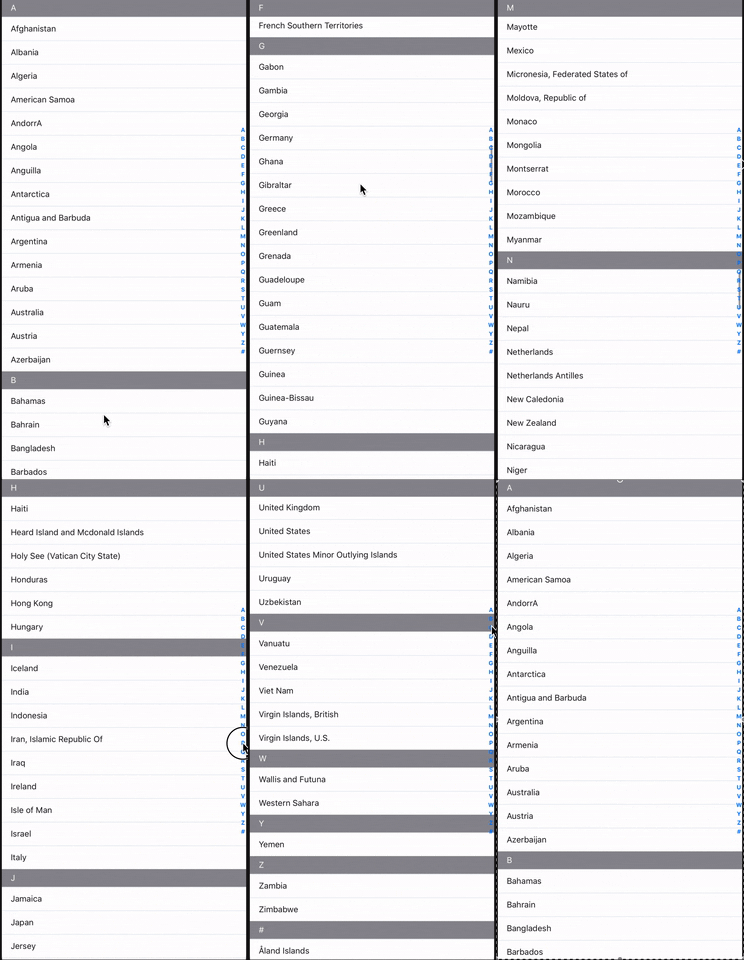
This package_uses the array of objects data-structure.
```javascript
const data = [{...}, {...}, {...}, ...]
```
For _react-native-flatlist-alphabet_, the data does not need to be pre-formatted and sorted before use. The component handles all this logic internally.
## Installation
Using npm:
```bash
npm install react-native-flatlist-alphabet
```
or with yarn:
```bash
yard add react-native-flatlist-alphabet
```
## Usage
### Import the module
```javascript
import AlphabetList from "react-native-flatlist-alphabet";
```
### Use the component
```javascript
```
`YourData` should be provided as an Array of objects, with each object item having both a `value`and a `key`.
```javascript
const YourData = [
{
value: string, // determines which alphabet section to place the object in
key: string // used as the key in the keyExtractor for SectionList
... // your other properties
},
...
]
```
## Props
| Option | Description | Default |
|--------|--------------------------|--------------------------|
| `sectionData` | The array of objects data with value and key. | -
| `renderItem` | Render the alphabet letter header. | JSX
| `renderSectionHeader` | Render the alphabet letter header. | JSX
| `indexLetterColor` | The alphabet letter font-size. | #0B3277
| `indexLetterSize` | The alphabet letter font-size. | 16
| `letterIndexWidth` | The alphabet letter index width size. | #0B3277
| `sectionHeaderHeight` | The section header defines each alphabet title header size. | 40
| `getItemHeight` | Returns the each item height position size. | 30
| `letterItemStyle` | The container letter item style. | -
| `containerStyle` | The alphabet wrapper container style. | -
| `alphabetContainer` | The flatlist alphabet container style. | -
| `style` | The sectionlist container style. | -
## Contributing
Pull requests are welcome. For major changes, please open an issue first to discuss what you would like to change.
Please make sure to update the tests as appropriate.
## License
[MIT](https://choosealicense.com/licenses/mit/)
[](http://makeapullrequest.com)
A simple React Native component that takes an array of data and renders a SectionList with alphabetically sorted data.

This package_uses the array of objects data-structure.
```javascript
const data = [{...}, {...}, {...}, ...]
```
For _react-native-flatlist-alphabet_, the data does not need to be pre-formatted and sorted before use. The component handles all this logic internally.
## Installation
Using npm:
```bash
npm install react-native-flatlist-alphabet
```
or with yarn:
```bash
yard add react-native-flatlist-alphabet
```
## Usage
### Import the module
```javascript
import AlphabetList from "react-native-flatlist-alphabet";
```
### Use the component
```javascript
```
`YourData` should be provided as an Array of objects, with each object item having both a `value`and a `key`.
```javascript
const YourData = [
{
value: string, // determines which alphabet section to place the object in
key: string // used as the key in the keyExtractor for SectionList
... // your other properties
},
...
]
```
## Props
| Option | Description | Default |
|--------|--------------------------|--------------------------|
| `sectionData` | The array of objects data with value and key. | -
| `renderItem` | Render the alphabet letter header. | JSX
| `renderSectionHeader` | Render the alphabet letter header. | JSX
| `indexLetterColor` | The alphabet letter font-size. | #0B3277
| `indexLetterSize` | The alphabet letter font-size. | 16
| `letterIndexWidth` | The alphabet letter index width size. | #0B3277
| `sectionHeaderHeight` | The section header defines each alphabet title header size. | 40
| `getItemHeight` | Returns the each item height position size. | 30
| `letterItemStyle` | The container letter item style. | -
| `containerStyle` | The alphabet wrapper container style. | -
| `alphabetContainer` | The flatlist alphabet container style. | -
| `style` | The sectionlist container style. | -
## Contributing
Pull requests are welcome. For major changes, please open an issue first to discuss what you would like to change.
Please make sure to update the tests as appropriate.
## License
[MIT](https://choosealicense.com/licenses/mit/)