## Getting started
An example project can be found at [react-native-cloud-fs-example](https://github.com/npomfret/react-native-cloud-fs-example).
This package is not released to npm (yet)...
npm install react-native-cloud-fs@https://github.com/npomfret/react-native-cloud-fs.git --save
react-native link react-native-cloud-fs
### iOS
On the device, make sure iCloud Drive is enabled. And it's helpful to have the iClound Drive app available.
In xCode...
* Add the following to `ios/app-name/Info.plist` (replacing _app-name_ and _package-name_ as appropriate):
```xml
NSUbiquitousContainers
iCloud.package-name
NSUbiquitousContainerIsDocumentScopePublic
NSUbiquitousContainerSupportedFolderLevels
One
NSUbiquitousContainerName
app-name
```
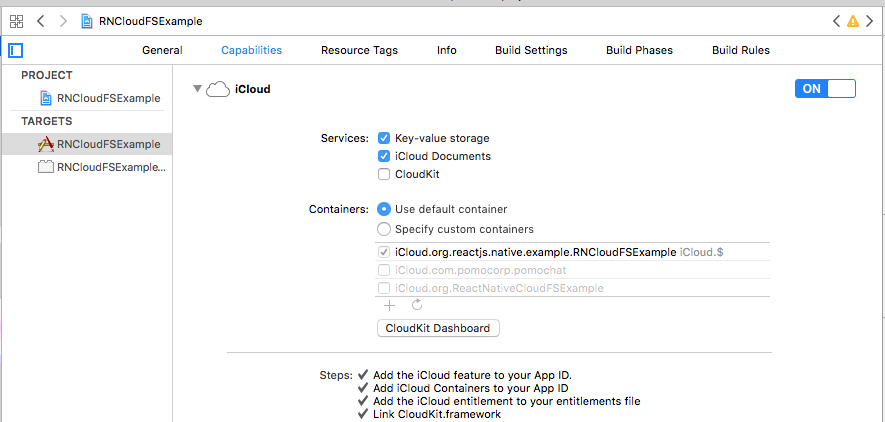
* Enable iCloud:
### Android
Enable Google Drive API:
It's complicated! Here's a [video](https://www.youtube.com/watch?v=RezC1XP6jcs&feature=youtu.be&t=3m55s) of someone doing a similar thing for the Google Drive API demo.
- Create a [new project](https://console.developers.google.com/apis/dashboard) for your app (if you don't already have one)
- Under `Credentials`, choose `Create Credentials` > `OAth client ID`
- Choose `Android` and enter a name
- enter your SHA1 fingerprint (use the keytool to find it, eg: `keytool -exportcert -keystore path-to-debug-or-production-keystore -list -v`)
- enter your package name (found in your manifest file)
- copy the _OAuth client ID_
- Click Library, choose `Drive API` and enable it
- Click `Drive UI Integration`
- add the mandatory application icons
- under `Drive integration` > `Authentication`
- check `Automatically show OAuth 2.0 consent screen when users open my application from Google Drive` and enter your _OAuth client ID_
- enter an _Open URL_
Add the following to your `app/build.gradle` in the `dependecies` section (you can change the version to suit your application):
compile ('com.google.android.gms:play-services-drive:10.2.0') {
force = true;
}