# react-native-clean-webiew
> React Native component for rendering a clean WebView (using Readability algorithm)
[](https://badge.fury.io/js/react-native-clean-webview)
React Native component that will render a clean version of a web page using the readability algorithm. The component can override the default CSS styling.
The Readability algorithm is from [https://github.com/mozilla/readability](https://github.com/mozilla/readability)
## Installation
```sh
npm install react-native-clean-webview --save
```
## Usage example
```js
import CleanWebView from 'react-native-clean-webview';
render() {
let css = `
img, figure {
display: none;
}
h1 {
font-size: 1.5em;
font-weight: bold;
margin-bottom: 5px;
letter-spacing: .05em
}
p {
letter-spacing: .03em;
}
`;
return (
{
console.log(readabilityArticle); // access to the readability article object
console.log(cleanedHtml); // access to the cleaned HTML
}}
onError={(error) => {
console.log(error);
}}
/>
)
```
### ``
Component for rendering clean web view.
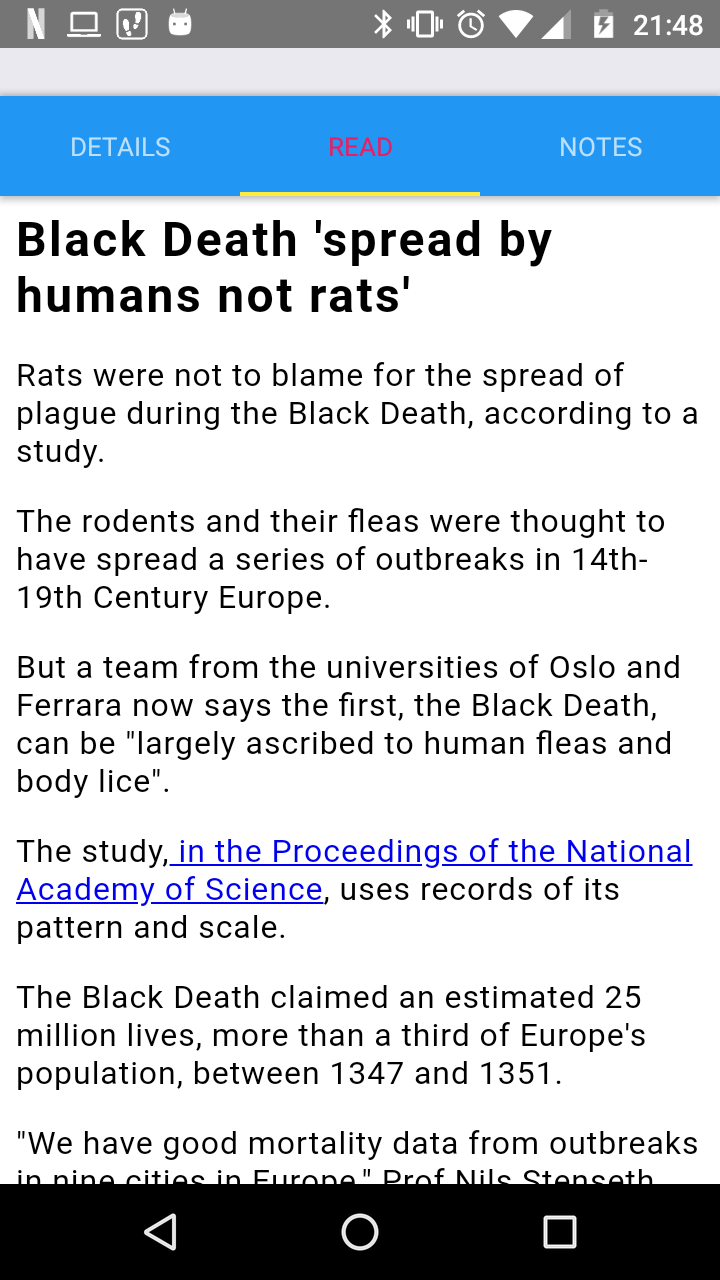 #### Props
- `url` - the url to clean
- `htmlCss` - custom css that is used with the clean html (view the returned `cleanHtml` property from the `onCleaned` callback to see what styles you can customize. These styles are consistent for all URLs)
- `onCleaned` - a callback function that returns a `readabilityArticle` and the `cleanHtml`
- `onError` - a callback function that returns an `error` object when a problem occurs while cleaning the web page
#### Objects
This `readabilityArticle` object will contain the following properties:
* `uri`: original `uri` object that was passed to constructor
* `title`: article title
* `content`: HTML string of processed article content
* `length`: length of article, in characters
* `excerpt`: article description, or short excerpt from content
* `byline`: author metadata
* `dir`: content direction
The `cleanHTML` is a string containing the clean HTML.
## Development setup
Clone this project from [GitHub](https://github.com/jameslawler/react-native-clean-webview)
```sh
npm install
npm test
```
## Bugs / feature requests
If you find any bugs or have a feature request, please create an issue in [GitHub](https://github.com/jameslawler/react-native-clean-webview).
## Contributing
1. Fork it ()
2. Create your feature branch (`git checkout -b feature/fooBar`)
3. Commit your changes (`git commit -am 'Add some fooBar'`)
4. Push to the branch (`git push origin feature/fooBar`)
5. Create a new Pull Request
## License
Distributed under the MIT license. See ``LICENSE`` for more information.
#### Props
- `url` - the url to clean
- `htmlCss` - custom css that is used with the clean html (view the returned `cleanHtml` property from the `onCleaned` callback to see what styles you can customize. These styles are consistent for all URLs)
- `onCleaned` - a callback function that returns a `readabilityArticle` and the `cleanHtml`
- `onError` - a callback function that returns an `error` object when a problem occurs while cleaning the web page
#### Objects
This `readabilityArticle` object will contain the following properties:
* `uri`: original `uri` object that was passed to constructor
* `title`: article title
* `content`: HTML string of processed article content
* `length`: length of article, in characters
* `excerpt`: article description, or short excerpt from content
* `byline`: author metadata
* `dir`: content direction
The `cleanHTML` is a string containing the clean HTML.
## Development setup
Clone this project from [GitHub](https://github.com/jameslawler/react-native-clean-webview)
```sh
npm install
npm test
```
## Bugs / feature requests
If you find any bugs or have a feature request, please create an issue in [GitHub](https://github.com/jameslawler/react-native-clean-webview).
## Contributing
1. Fork it ()
2. Create your feature branch (`git checkout -b feature/fooBar`)
3. Commit your changes (`git commit -am 'Add some fooBar'`)
4. Push to the branch (`git push origin feature/fooBar`)
5. Create a new Pull Request
## License
Distributed under the MIT license. See ``LICENSE`` for more information.