React Native Barcoder



```
npm install react-native-barcoder
```
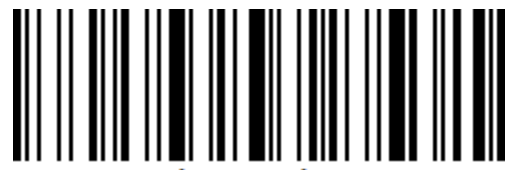
A minimal package for displaying a barcode on react-native.
```typescript
import Barcode from 'react-native-barcoder';
const options = { /* add your options here*/ }
```
## features
- **Support** for all types of barcodes including EAN/UPC
- **No external dependencies** required for running the code
- **Easy customization** taking jsbarcode as an example
## options
set up the options parameter
```typescript
interface Options = {
// barcode display
format: Format;
width: number;
height: number;
background: string;
color: string;
displayValue: boolean;
// EAN settings
flat: boolean;
lastChar: boolean;
// text display
font: string;
fontSize: number;
fontStyle: 'normal' | 'italic';
fontWeight: 'normal' | 'bold' | '100' ~ '900';
textAlign: 'left' | 'center' | 'right';
textMargin: number;
textColor?: string;
};
```
regarding each value inside options:
| Value | Type | Default | Comment |
| ------------- | --------- | ----------- | -------------- |
| format | Format | 'CODE128' | the format you want to use to display the barcode |
| width | int | 2 | the base width of a barcode's bar |
| height | int | 100 | the height of the barcode |
| background | string | white | the background color of the object |
| color | string | black | the color of the bars of the barcode |
| displayValue | boolean | true | display/hide the string value of the barcode |
| flat | boolean | false | for EAN/UPC only, show/hide barcode guards |
| lastChar | char | null | display a last character for EAN13 barcodes |
| font | string | 'monospace' | the font of the text |
| fontSize | number | 20 | the font size of the text |
| fontStyle | string | 'normal' | normal or italic font settings |
| fontWeight | string | 'normal' | the font weight of the text |
| textAlign | string | center | the alignment of the text |
| textMargin | number | 2 | the top and bottom margins of the text |
| textColor | string | undefined | used to override the "color" option for the text |
### formats
Here is a list of supported formats
> CODE39 | CODE128 | CODE128A | CODE128B | CODE128C
> EAN13 | EAN8 | EAN5 | EAN2
> UPC | UPCE
> ITF14 | ITF
> MSI | MSI10 | MSI11 | MSI1010 | MSI1110
> pharmacode | codabar | GenericBarcode
### margins
you can set the margins directly on the element:
```typescript
```
## development
You can try out the code locally using expo after cloning!
Change the main directory in the package.json to 'index.js'
```js
{
"name": "react-native-barcoder",
"main": "dist/index.js", <-- change this to "index.js"
...
}
```
Then customize the ```App.tsx``` file as you like and run
```
npm run build
npm run dev
```
## aknowledgements
This code relies on [jsbarcode](https://github.com/lindell/JsBarcode/blob/master/README.md#options)'s math files to transform the value into a binary.
## contributions
Any contributions are welcome!