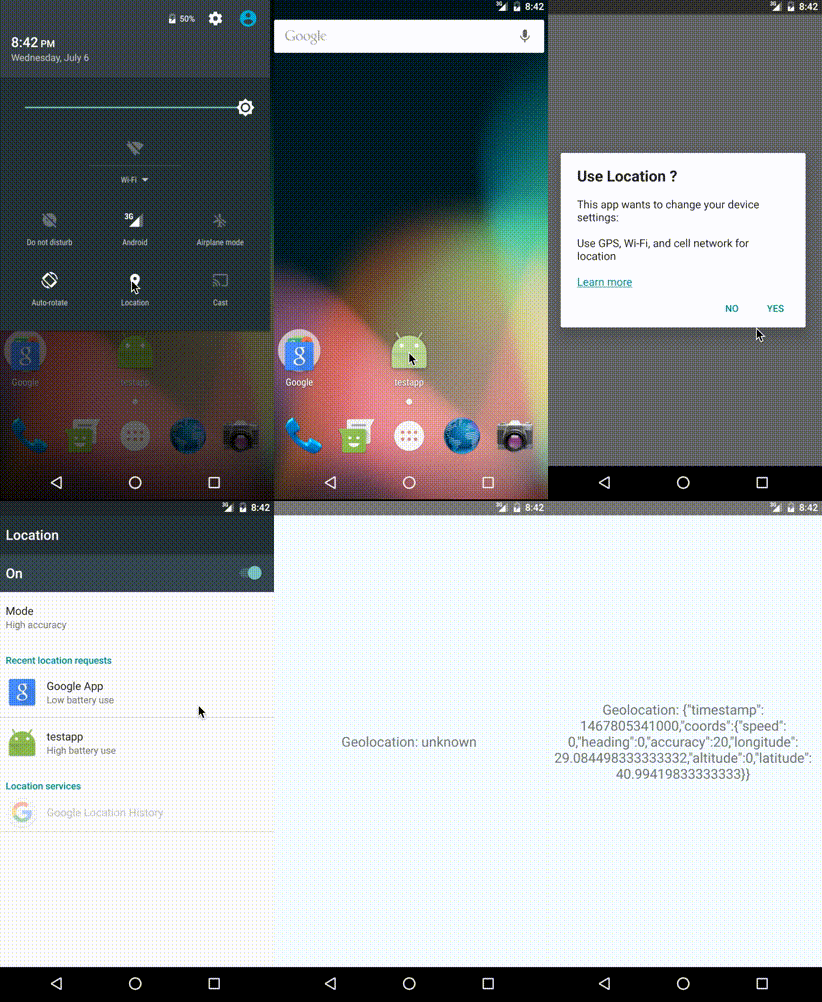
 A react-native component for turn on the dialog box from android location services
[](https://github.com/webyonet/react-native-android-location-services-dialog-box)
[](https://badge.fury.io/js/react-native-android-location-services-dialog-box)



### Installation
#### Mostly automatic installation (recommended)
1. `yarn add react-native-android-location-services-dialog-box`
A react-native component for turn on the dialog box from android location services
[](https://github.com/webyonet/react-native-android-location-services-dialog-box)
[](https://badge.fury.io/js/react-native-android-location-services-dialog-box)



### Installation
#### Mostly automatic installation (recommended)
1. `yarn add react-native-android-location-services-dialog-box`
Use Location ?
This app wants to change your device settings:Use GPS, Wi-Fi, and cell network for location
Learn more", ok: "YES", cancel: "NO", enableHighAccuracy: true, // true => GPS AND NETWORK PROVIDER, false => GPS OR NETWORK PROVIDER showDialog: true, // false => Opens the Location access page directly openLocationServices: true, // false => Directly catch method is called if location services are turned off preventOutSideTouch: false, // true => To prevent the location services window from closing when it is clicked outside preventBackClick: false, // true => To prevent the location services popup from closing when it is clicked back button providerListener: false // true ==> Trigger locationProviderStatusChange listener when the location state changes }).then(function(success) { console.log(success); // success => {alreadyEnabled: false, enabled: true, status: "enabled"} }).catch((error) => { console.log(error.message); // error.message => "disabled" }); BackHandler.addEventListener('hardwareBackPress', () => { //(optional) you can use it if you need it //do not use this method if you are using navigation."preventBackClick: false" is already doing the same thing. LocationServicesDialogBox.forceCloseDialog(); }); DeviceEventEmitter.addListener('locationProviderStatusChange', function(status) { // only trigger when "providerListener" is enabled console.log(status); // status => {enabled: false, status: "disabled"} or {enabled: true, status: "enabled"} }); componentWillUnmount() { // used only when "providerListener" is enabled LocationServicesDialogBox.stopListener(); // Stop the "locationProviderStatusChange" listener } ``` ### Configure Colors ```javascript import LocationServicesDialogBox from "react-native-android-location-services-dialog-box"; LocationServicesDialogBox.checkLocationServicesIsEnabled({ message: "Use Location ?", ok: "YES", cancel: "NO", style: { // (optional) backgroundColor: '#87a9ea',// (optional) positiveButtonTextColor: '#ffffff',// (optional) positiveButtonBackgroundColor: '#5fba7d',// (optional) negativeButtonTextColor: '#ffffff',// (optional) negativeButtonBackgroundColor: '#ba5f5f'// (optional) } }).then(function(success) { console.log(success); }).catch((error) => { console.log(error.message); }); ```
 ### Usage And Example For Async Method `ES6`
```javascript
import { BackHandler, DeviceEventEmitter } from 'react-native';
import LocationServicesDialogBox from "react-native-android-location-services-dialog-box";
export default class LocationServiceTestPage extends Component {
constructor(props){
super(props);
this.checkIsLocation().catch(error => error);
DeviceEventEmitter.addListener('locationProviderStatusChange', function(status) { // only trigger when "providerListener" is enabled
console.log(status); // status => {enabled: false, status: "disabled"} or {enabled: true, status: "enabled"}
});
}
async checkIsLocation():Promise {
let check = await LocationServicesDialogBox.checkLocationServicesIsEnabled({
message: "Use Location ?",
ok: "YES",
cancel: "NO",
enableHighAccuracy: true, // true => GPS AND NETWORK PROVIDER, false => GPS OR NETWORK PROVIDER
showDialog: true, // false => Opens the Location access page directly
openLocationServices: true, // false => Directly catch method is called if location services are turned off
preventOutSideTouch: false, //true => To prevent the location services window from closing when it is clicked outside
preventBackClick: false, //true => To prevent the location services popup from closing when it is clicked back button
providerListener: true // true ==> Trigger "locationProviderStatusChange" listener when the location state changes
}).catch(error => error);
return Object.is(check.status, "enabled");
}
componentWillUnmount() {
// used only when "providerListener" is enabled
LocationServicesDialogBox.stopListener(); // Stop the "locationProviderStatusChange" listener
}
}
```
### Examples `ES6`
```javascript
import React, { Component } from 'react';
import {
AppRegistry,
Text,
View,
BackHandler,
DeviceEventEmitter
} from 'react-native';
import LocationServicesDialogBox from "react-native-android-location-services-dialog-box";
class SampleApp extends Component {
state = {
initialPosition: 'unknown',
};
componentDidMount() {
LocationServicesDialogBox.checkLocationServicesIsEnabled({
message: "
### Usage And Example For Async Method `ES6`
```javascript
import { BackHandler, DeviceEventEmitter } from 'react-native';
import LocationServicesDialogBox from "react-native-android-location-services-dialog-box";
export default class LocationServiceTestPage extends Component {
constructor(props){
super(props);
this.checkIsLocation().catch(error => error);
DeviceEventEmitter.addListener('locationProviderStatusChange', function(status) { // only trigger when "providerListener" is enabled
console.log(status); // status => {enabled: false, status: "disabled"} or {enabled: true, status: "enabled"}
});
}
async checkIsLocation():Promise {
let check = await LocationServicesDialogBox.checkLocationServicesIsEnabled({
message: "Use Location ?",
ok: "YES",
cancel: "NO",
enableHighAccuracy: true, // true => GPS AND NETWORK PROVIDER, false => GPS OR NETWORK PROVIDER
showDialog: true, // false => Opens the Location access page directly
openLocationServices: true, // false => Directly catch method is called if location services are turned off
preventOutSideTouch: false, //true => To prevent the location services window from closing when it is clicked outside
preventBackClick: false, //true => To prevent the location services popup from closing when it is clicked back button
providerListener: true // true ==> Trigger "locationProviderStatusChange" listener when the location state changes
}).catch(error => error);
return Object.is(check.status, "enabled");
}
componentWillUnmount() {
// used only when "providerListener" is enabled
LocationServicesDialogBox.stopListener(); // Stop the "locationProviderStatusChange" listener
}
}
```
### Examples `ES6`
```javascript
import React, { Component } from 'react';
import {
AppRegistry,
Text,
View,
BackHandler,
DeviceEventEmitter
} from 'react-native';
import LocationServicesDialogBox from "react-native-android-location-services-dialog-box";
class SampleApp extends Component {
state = {
initialPosition: 'unknown',
};
componentDidMount() {
LocationServicesDialogBox.checkLocationServicesIsEnabled({
message: "Use Location ?
This app wants to change your device settings:Use GPS, Wi-Fi, and cell network for location
Learn more", ok: "YES", cancel: "NO", enableHighAccuracy: true, // true => GPS AND NETWORK PROVIDER, false => GPS OR NETWORK PROVIDER showDialog: true, // false => Opens the Location access page directly openLocationServices: true, // false => Directly catch method is called if location services are turned off preventOutSideTouch: false, //true => To prevent the location services popup from closing when it is clicked outside preventBackClick: false, //true => To prevent the location services popup from closing when it is clicked back button providerListener: true // true ==> Trigger "locationProviderStatusChange" listener when the location state changes }).then(function(success) { // success => {alreadyEnabled: true, enabled: true, status: "enabled"} navigator.geolocation.getCurrentPosition((position) => { let initialPosition = JSON.stringify(position); this.setState({ initialPosition }); }, error => console.log(error), { enableHighAccuracy: false, timeout: 20000, maximumAge: 1000 }); }.bind(this) ).catch((error) => { console.log(error.message); }); DeviceEventEmitter.addListener('locationProviderStatusChange', function(status) { // only trigger when "providerListener" is enabled console.log(status); // status => {enabled: false, status: "disabled"} or {enabled: true, status: "enabled"} }); } componentWillUnmount() { // used only when "providerListener" is enabled LocationServicesDialogBox.stopListener(); // Stop the "locationProviderStatusChange" listener. } render() { return (