# react-mobile-datepicker
[![Travis][build-badge]][build] [![npm package][npm-badge]][npm] [![Coveralls][coveralls-badge]][coveralls]
**a lightweight react date picker for mobile, Not more than 4k**
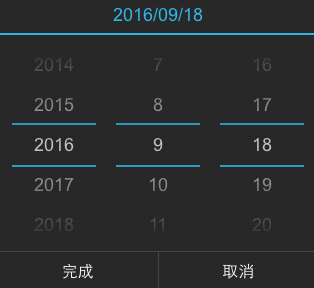
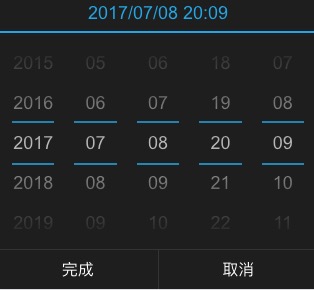
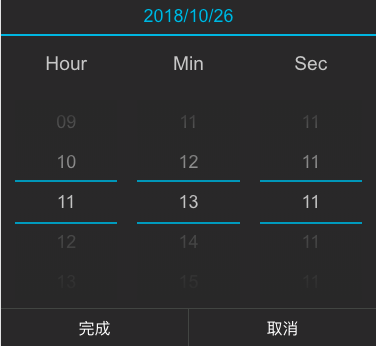
react-mobile-datepicker provides a component that can set year, month, day, hour, minute and second by sliding up or down.
## Features
- is only 4k.
- It does not depend on moment.js
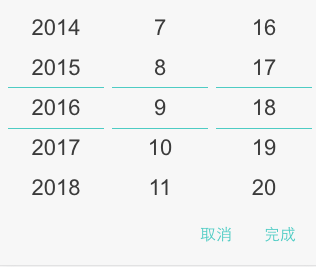
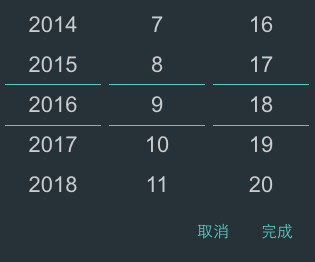
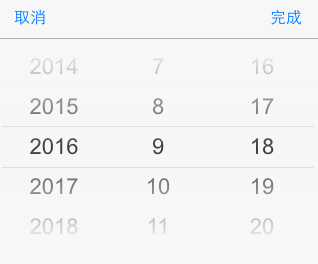
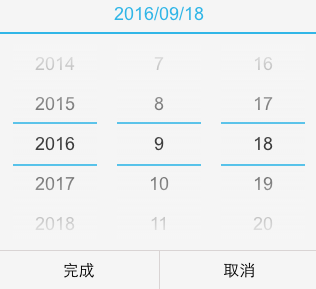
## Theme
### default
### dark
### ios
### android
### android-dark
## Custom date unit
set `dateConfig` to configure year, month, day, hour, minute.
```javascript
{
'year': {
format: 'YYYY',
caption: 'Year',
step: 1,
},
'month': {
format: 'MM',
caption: 'Mon',
step: 1,
},
'date': {
format: 'DD',
caption: 'Day',
step: 1,
},
'hour': {
format: 'hh',
caption: 'Hour',
step: 1,
},
'minute': {
format: 'mm',
caption: 'Min',
step: 1,
},
'second': {
format: 'hh',
caption: 'Sec',
step: 1,
},
}
```
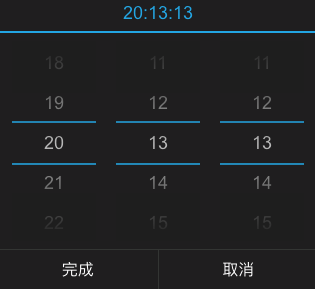
set `dateConfig` to configure hour, minute and second.
```javascript
{
'hour': {
format: 'hh',
caption: 'Hour',
step: 1,
},
'minute': {
format: 'mm',
caption: 'Min',
step: 1,
},
'second': {
format: 'hh',
caption: 'Sec',
step: 1,
},
}
```
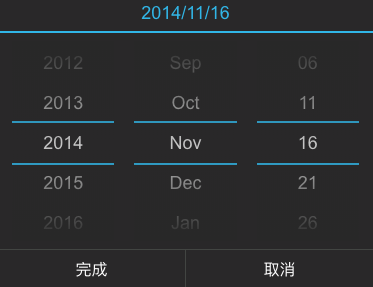
customize the content mapping shown in the month.
```javascript
const monthMap = {
'1': 'Jan',
'2': 'Feb',
'3': 'Mar',
'4': 'Apr',
'5': 'May',
'6': 'Jun',
'7': 'Jul',
'8': 'Aug',
'9': 'Sep',
'10': 'Oct',
'11': 'Nov',
'12': 'Dec',
};
const dateConfig = {
'year': {
format: 'YYYY',
caption: 'Year',
step: 1,
},
'month': {
format: value => monthMap[value.getMonth() + 1],
caption: 'Mon',
step: 1,
},
'date': {
format: 'DD',
caption: 'Day',
step: 1,
},
};
```
set `showCaption` to display date captions, matches the dateConfig property's caption.
```javascript
const dateConfig = {
'hour': {
format: 'hh',
caption: 'Hour',
step: 1,
},
'minute': {
format: 'mm',
caption: 'Min',
step: 1,
},
'second': {
format: 'hh',
caption: 'Sec',
step: 1,
},
}
```
## Getting Started
### Install
Using [npm](https://www.npmjs.com/):
$ npm install react-mobile-datepicker --save
### Import what you need
The following guide assumes you have some sort of ES2015 build set up using babel and/or webpack/browserify/gulp/grunt/etc.
```javascript
// Using an ES6 transpiler like Babel
import React from 'react';
import ReactDOM from 'react-dom';
import DatePicker from 'react-mobile-datepicker';
```
### Usage Example
```javascript
class App extends React.Component {
state = {
time: new Date(),
isOpen: false,
}
handleClick = () => {
this.setState({ isOpen: true });
}
handleCancel = () => {
this.setState({ isOpen: false });
}
handleSelect = (time) => {
this.setState({ time, isOpen: false });
}
render() {
return (
);
}
}
ReactDOM.render(, document.getElementById('react-box'));
```
## PropTypes
| Property | Type | Default | Description |
|:------------- |:------------- |:-------------- |:---------- |
| isPopup | Boolean | true | whether as popup add a overlay |
| isOpen | Boolean | false | whether to open datepicker |
| theme | String | default | theme of datepicker, include 'default', 'dark', 'ios', 'android', 'android-dark' |
| ~~dateFormat~~(deprecated, use `dateConfig` instead) | Array | ['YYYY', 'M', 'D'] | according to year, month, day, hour, minute, second format specified display text. E.g ['YYYY年', 'MM月', 'DD日']|
| ~~dateSteps~~(deprecated), use `dateConfig` instead | Array | [1, 1, 1] | set step for each time unit |
| dateConfig | Object | [See `DateConfig` format for details](#dateconfig) | configure date unit information |
|~~showFormat~~(deprecated, use `headerFormat` instead) | String | 'YYYY/MM/DD' | customize the format of the display title |
|headerFormat | String | 'YYYY/MM/DD' | customize the format of the display title |
| value | Date | new Date() | date value |
| min | Date | new Date(1970, 0, 1) | minimum date |
| max | Date | new Date(2050, 0, 1) | maximum date |
| showHeader | Boolean | true | whether to show the header |
| showFooter | Boolean | true | whether to show the fotter |
| customHeader | ReactElement | undefined | customize the header, if you set this property, it will replace `showFormat`|
| confirmText | String | 完成 | customize the selection time button text |
| cancelText | String | 取消 | customize the cancel button text |
| onSelect | Function | () => {} | the callback function after click button of done, Date object as a parameter |
| onCancel | Function | () => {} | the callback function after click button of cancel |
| onChange | Function | () => {} | the callback function after date be changed |
## DateConfig
all default date configuration information, as follows
- format: date unit display format
- caption: date unit caption
- step: date unit change interval
```javascript
{
'year': {
format: 'YYYY',
caption: 'Year',
step: 1,
},
'month': {
format: 'M',
caption: 'Mon',
step: 1,
},
'date': {
format: 'D',
caption: 'Day',
step: 1,
},
'hour': {
format: 'hh',
caption: 'Hour',
step: 1,
},
'minute': {
format: 'mm',
caption: 'Min',
step: 1,
},
'second': {
format: 'hh',
caption: 'Sec',
step: 1,
},
}
```
## Changelog
* [Changelog](CHANGELOG.md)
## How to Contribute
Anyone and everyone is welcome to contribute to this project. The best way to
start is by checking our [open issues](https://github.com/lanjingling0510/react-mobile-datepicker/issues),
[submit a new issues](https://github.com/lanjingling0510/react-mobile-datepicker/issues/new?labels=bug) or
[feature request](https://github.com/lanjingling0510/react-mobile-datepicker/issues/new?labels=enhancement),
participate in discussions, upvote or downvote the issues you like or dislike.
[npm-badge]: https://img.shields.io/npm/v/react-mobile-datepicker.svg?style=flat-square
[npm]: https://www.npmjs.com/package/react-mobile-datepicker
[build-badge]: https://img.shields.io/travis/lanjingling0510/react-mobile-datepicker/master.svg?style=flat-square
[build]: https://travis-ci.org/lanjingling0510/react-mobile-datepicker
[coveralls-badge]: https://img.shields.io/coveralls/lanjingling0510/react-mobile-datepicker.svg?style=flat-square
[coveralls]: https://coveralls.io/github/lanjingling0510/react-mobile-datepicker