# React Jupyter Notebook Viewer
 [](https://www.npmjs.com/package/react-jupyter-notebook-viewer)
[](https://www.npmjs.com/package/react-jupyter-notebook-viewer)
[](https://www.npmjs.com/package/react-jupyter-notebook-viewer)
[](https://github.com/mtetik98/react-jupyter-notebook-viewer/blob/main/LICENSE)


[](https://www.npmjs.com/package/react-markdown)
[](https://www.npmjs.com/package/react-syntax-highlighter)
[](https://www.buymeacoffee.com/mtetik98)
---
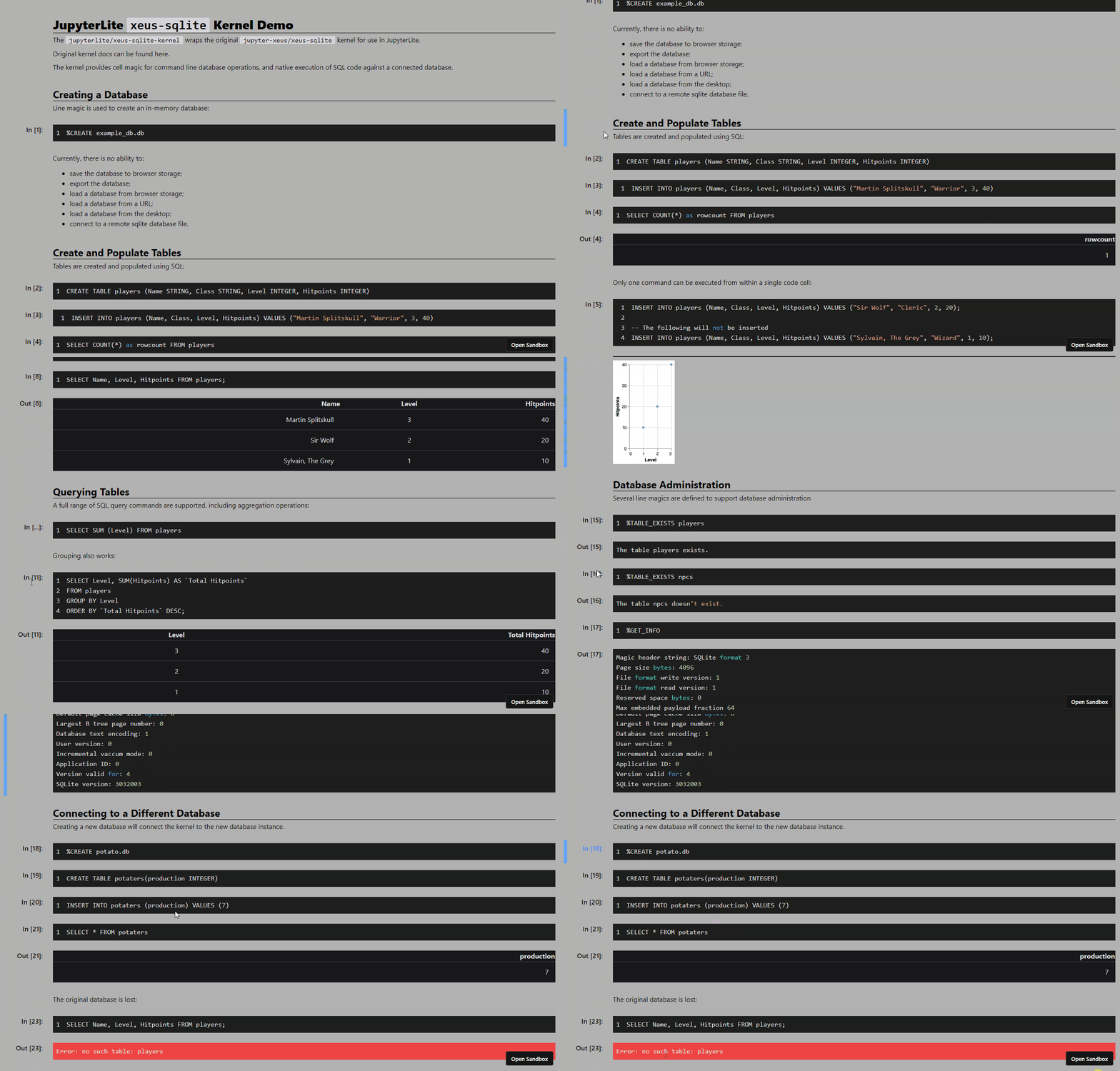
Render Jupyter notebook files easily in your React/NextJS project to showcase your notebooks.
React Jupyter Notebook Viewer is a **highly customizable static** viewer for React. Therefore this package will **never ever** be transformed into an interactive Jupyter Notebook viewer.
#### Try it yourself!
- [React Sandbox Demo](https://codesandbox.io/s/react-example-react-jupyter-notebook-viewer-ti7qcf)
- [NextJS Sandbox Demo](https://codesandbox.io/s/nextjs-example-react-jupyter-notebook-viewer-lzjcb5)
## Install
```bash
npm install react-jupyter-notebook-viewer
```
## Usage
### React Applications
```js
// App.js
import { JupyterNotebookViewer } from "react-jupyter-notebook-viewer";
export default function App() {
return (
);
}
```
### NextJS Applications
> **⚠️ DISCLAIMER**
>
> Using this package in a NextJS application requires a different approach.
1. Create a component using the package inside the ``/components/Notebook.js`` file:
```js
// components/Notebook.js
import { JupyterNotebookViewer } from "react-jupyter-notebook-viewer";
function Notebook(props) {
const notebook = new JupyterNotebookViewer(props);
return <>{notebook};
}
export default Notebook;
```
2. Use the created component in the desired file:
```js
// pages/index.js
import dynamic from "next/dynamic";
const Notebook = dynamic(() => import("../components/Notebook"), {
ssr: false
});
export default function IndexPage() {
return (
);
}
```
## Types
| Property | Description | Required | Type | Default Value |
| --------------------------- | ---------------------------------------------------------------------------------------------------------------------------- | -------- | ------- | ---------------------- |
| filePath | The path to the Jupyter notebook file (.ipynb) | ✔️ | string | - |
| className | The class name of the static viewer | ❌ | string | - |
| notebookInputLanguage | The Jupyter notebook input code language | ❌ | string | - |
| notebookOutputLanguage | The Jupyter notebook output code language | ❌ | string | ``notebookOutputLanguage \|\| notebookInputLanguage`` |
| outputTextClassName | The Jupyter notebook output block execution number class name | ❌ | string | - |
| inputTextClassName | The Jupyter notebook input block execution number class name | ❌ | string | - |
| outputBlockClassName | The Jupyter notebook output block class name | ❌ | string | - |
| outputImageClassName | The Jupyter notebook output image class name | ❌ | string | - |
| outputOuterClassName | The Jupyter notebook output outer class name | ❌ | string | - |
| inputOuterClassName | The Jupyter notebook input outer class name | ❌ | string | - |
| outputBorderClassName | The Jupyter notebook output block left-border class name | ❌ | string | - |
| inputBorderClassName | The Jupyter notebook input block left-border class name | ❌ | string | - |
| outputTableClassName | The Jupyter notebook output table class name | ❌ | string | - |
| inputMarkdownBlockClassName | The Jupyter notebook input markdown class name | ❌ | string | - |
| inputCodeBlockClassName | The Jupyter notebook input code class name | ❌ | string | - |
| inputCodeDarkTheme | The Jupyter notebook input code theme option | ❌ | boolean | `false` |
| outputDarkTheme | The Jupyter notebook output code theme option | ❌ | boolean | `false` |
| inputMarkdownDarkTheme | The Jupyter notebook input markdown theme option | ❌ | boolean | `false` |
| showInputLineNumbers | The Jupyter notebook input code line numbers visibility | ❌ | boolean | `false` |
| showOutputLineNumbers | The Jupyter notebook output code line numbers visibility | ❌ | boolean | `false` |
| withOnClick | The Jupyter notebook on block click functionality | ❌ | boolean | `false` |
| hideCodeBlocks | The Jupyter notebook input code blocks visibility | ❌ | boolean | `false` |
| hideMarkdownBlocks | The Jupyter notebook input markdown blocks visibility | ❌ | boolean | `false` |
| hideAllOutputs | The Jupyter notebook output (images/tables/code/etc.) blocks visibility | ❌ | boolean | `false` |
| hideAllInputs | The Jupyter notebook input (code/markdown) blocks visibility | ❌ | boolean | `false` |
| remarkPlugins | The Jupyter notebook remark plugins, see [here](https://github.com/remarkjs/remark/blob/main/doc/plugins.md#list-of-plugins) | ❌ | array | - |
| rehypePlugins | The Jupyter notebook rehype plugins, see [here](https://github.com/rehypejs/rehype/blob/main/doc/plugins.md#list-of-plugins) | ❌ | array | - |
## License
The **React Jupyter Notebook Viewer** package is licensed under MIT.
## Motivation
I required a Jupyter notebook renderer for React since I was busy on a React/NextJS project. There are a decent amount of packages that could have been used such as [react-jupyter-notebook](https://www.npmjs.com/package/react-jupyter-notebook), but in my opinion these packages are not very customizable and some of them are deprecated. Therefore I started working on this idea.
I've mainly focused on the code block part and not the **markdown** part and this might be an issue in some situations since I've styled the markdown HTML elements myself. That's also one of the reasons I've added the properties ``remarkPlugins`` and ``rehypePlugins`` in case you'd like to customize it.
## Links
- [React Demo](https://codesandbox.io/s/react-example-react-jupyter-notebook-viewer-ti7qcf)
- [NextJS Demo](https://codesandbox.io/s/nextjs-example-react-jupyter-notebook-viewer-lzjcb5)
- [NPM Package](https://www.npmjs.com/package/react-jupyter-notebook-viewer)
- [Source code](https://github.com/mtetik98/react-jupyter-notebook-viewer)
- [React Syntax Highlighter](https://www.npmjs.com/package/react-syntax-highlighter)
- [React Markdown](https://www.npmjs.com/package/react-markdown)
- [Remark Plugins](https://github.com/remarkjs/remark/blob/main/doc/plugins.md#list-of-plugins)
- [Rehype Plugins](https://github.com/rehypejs/rehype/blob/main/doc/plugins.md#list-of-plugins)
[](https://www.npmjs.com/package/react-jupyter-notebook-viewer)
[](https://www.npmjs.com/package/react-jupyter-notebook-viewer)
[](https://www.npmjs.com/package/react-jupyter-notebook-viewer)
[](https://github.com/mtetik98/react-jupyter-notebook-viewer/blob/main/LICENSE)


[](https://www.npmjs.com/package/react-markdown)
[](https://www.npmjs.com/package/react-syntax-highlighter)
[](https://www.buymeacoffee.com/mtetik98)
---
Render Jupyter notebook files easily in your React/NextJS project to showcase your notebooks.
React Jupyter Notebook Viewer is a **highly customizable static** viewer for React. Therefore this package will **never ever** be transformed into an interactive Jupyter Notebook viewer.
#### Try it yourself!
- [React Sandbox Demo](https://codesandbox.io/s/react-example-react-jupyter-notebook-viewer-ti7qcf)
- [NextJS Sandbox Demo](https://codesandbox.io/s/nextjs-example-react-jupyter-notebook-viewer-lzjcb5)

## Install
```bash
npm install react-jupyter-notebook-viewer
```
## Usage
### React Applications
```js
// App.js
import { JupyterNotebookViewer } from "react-jupyter-notebook-viewer";
export default function App() {
return (
);
}
```
### NextJS Applications
> **⚠️ DISCLAIMER**
>
> Using this package in a NextJS application requires a different approach.
1. Create a component using the package inside the ``/components/Notebook.js`` file:
```js
// components/Notebook.js
import { JupyterNotebookViewer } from "react-jupyter-notebook-viewer";
function Notebook(props) {
const notebook = new JupyterNotebookViewer(props);
return <>{notebook};
}
export default Notebook;
```
2. Use the created component in the desired file:
```js
// pages/index.js
import dynamic from "next/dynamic";
const Notebook = dynamic(() => import("../components/Notebook"), {
ssr: false
});
export default function IndexPage() {
return (
);
}
```
## Types
| Property | Description | Required | Type | Default Value |
| --------------------------- | ---------------------------------------------------------------------------------------------------------------------------- | -------- | ------- | ---------------------- |
| filePath | The path to the Jupyter notebook file (.ipynb) | ✔️ | string | - |
| className | The class name of the static viewer | ❌ | string | - |
| notebookInputLanguage | The Jupyter notebook input code language | ❌ | string | - |
| notebookOutputLanguage | The Jupyter notebook output code language | ❌ | string | ``notebookOutputLanguage \|\| notebookInputLanguage`` |
| outputTextClassName | The Jupyter notebook output block execution number class name | ❌ | string | - |
| inputTextClassName | The Jupyter notebook input block execution number class name | ❌ | string | - |
| outputBlockClassName | The Jupyter notebook output block class name | ❌ | string | - |
| outputImageClassName | The Jupyter notebook output image class name | ❌ | string | - |
| outputOuterClassName | The Jupyter notebook output outer class name | ❌ | string | - |
| inputOuterClassName | The Jupyter notebook input outer class name | ❌ | string | - |
| outputBorderClassName | The Jupyter notebook output block left-border class name | ❌ | string | - |
| inputBorderClassName | The Jupyter notebook input block left-border class name | ❌ | string | - |
| outputTableClassName | The Jupyter notebook output table class name | ❌ | string | - |
| inputMarkdownBlockClassName | The Jupyter notebook input markdown class name | ❌ | string | - |
| inputCodeBlockClassName | The Jupyter notebook input code class name | ❌ | string | - |
| inputCodeDarkTheme | The Jupyter notebook input code theme option | ❌ | boolean | `false` |
| outputDarkTheme | The Jupyter notebook output code theme option | ❌ | boolean | `false` |
| inputMarkdownDarkTheme | The Jupyter notebook input markdown theme option | ❌ | boolean | `false` |
| showInputLineNumbers | The Jupyter notebook input code line numbers visibility | ❌ | boolean | `false` |
| showOutputLineNumbers | The Jupyter notebook output code line numbers visibility | ❌ | boolean | `false` |
| withOnClick | The Jupyter notebook on block click functionality | ❌ | boolean | `false` |
| hideCodeBlocks | The Jupyter notebook input code blocks visibility | ❌ | boolean | `false` |
| hideMarkdownBlocks | The Jupyter notebook input markdown blocks visibility | ❌ | boolean | `false` |
| hideAllOutputs | The Jupyter notebook output (images/tables/code/etc.) blocks visibility | ❌ | boolean | `false` |
| hideAllInputs | The Jupyter notebook input (code/markdown) blocks visibility | ❌ | boolean | `false` |
| remarkPlugins | The Jupyter notebook remark plugins, see [here](https://github.com/remarkjs/remark/blob/main/doc/plugins.md#list-of-plugins) | ❌ | array | - |
| rehypePlugins | The Jupyter notebook rehype plugins, see [here](https://github.com/rehypejs/rehype/blob/main/doc/plugins.md#list-of-plugins) | ❌ | array | - |
## License
The **React Jupyter Notebook Viewer** package is licensed under MIT.
## Motivation
I required a Jupyter notebook renderer for React since I was busy on a React/NextJS project. There are a decent amount of packages that could have been used such as [react-jupyter-notebook](https://www.npmjs.com/package/react-jupyter-notebook), but in my opinion these packages are not very customizable and some of them are deprecated. Therefore I started working on this idea.
I've mainly focused on the code block part and not the **markdown** part and this might be an issue in some situations since I've styled the markdown HTML elements myself. That's also one of the reasons I've added the properties ``remarkPlugins`` and ``rehypePlugins`` in case you'd like to customize it.
## Links
- [React Demo](https://codesandbox.io/s/react-example-react-jupyter-notebook-viewer-ti7qcf)
- [NextJS Demo](https://codesandbox.io/s/nextjs-example-react-jupyter-notebook-viewer-lzjcb5)
- [NPM Package](https://www.npmjs.com/package/react-jupyter-notebook-viewer)
- [Source code](https://github.com/mtetik98/react-jupyter-notebook-viewer)
- [React Syntax Highlighter](https://www.npmjs.com/package/react-syntax-highlighter)
- [React Markdown](https://www.npmjs.com/package/react-markdown)
- [Remark Plugins](https://github.com/remarkjs/remark/blob/main/doc/plugins.md#list-of-plugins)
- [Rehype Plugins](https://github.com/rehypejs/rehype/blob/main/doc/plugins.md#list-of-plugins)