# react-hook-form-autosave
[](https://www.npmjs.com/package/react-hook-form-autosave)
[](https://bundlephobia.com/package/react-hook-form-autosave)
[](./LICENSE)
**Effortless autosave for React Hook Form with smart field tracking, undo/redo, and perfect synchronization.**
 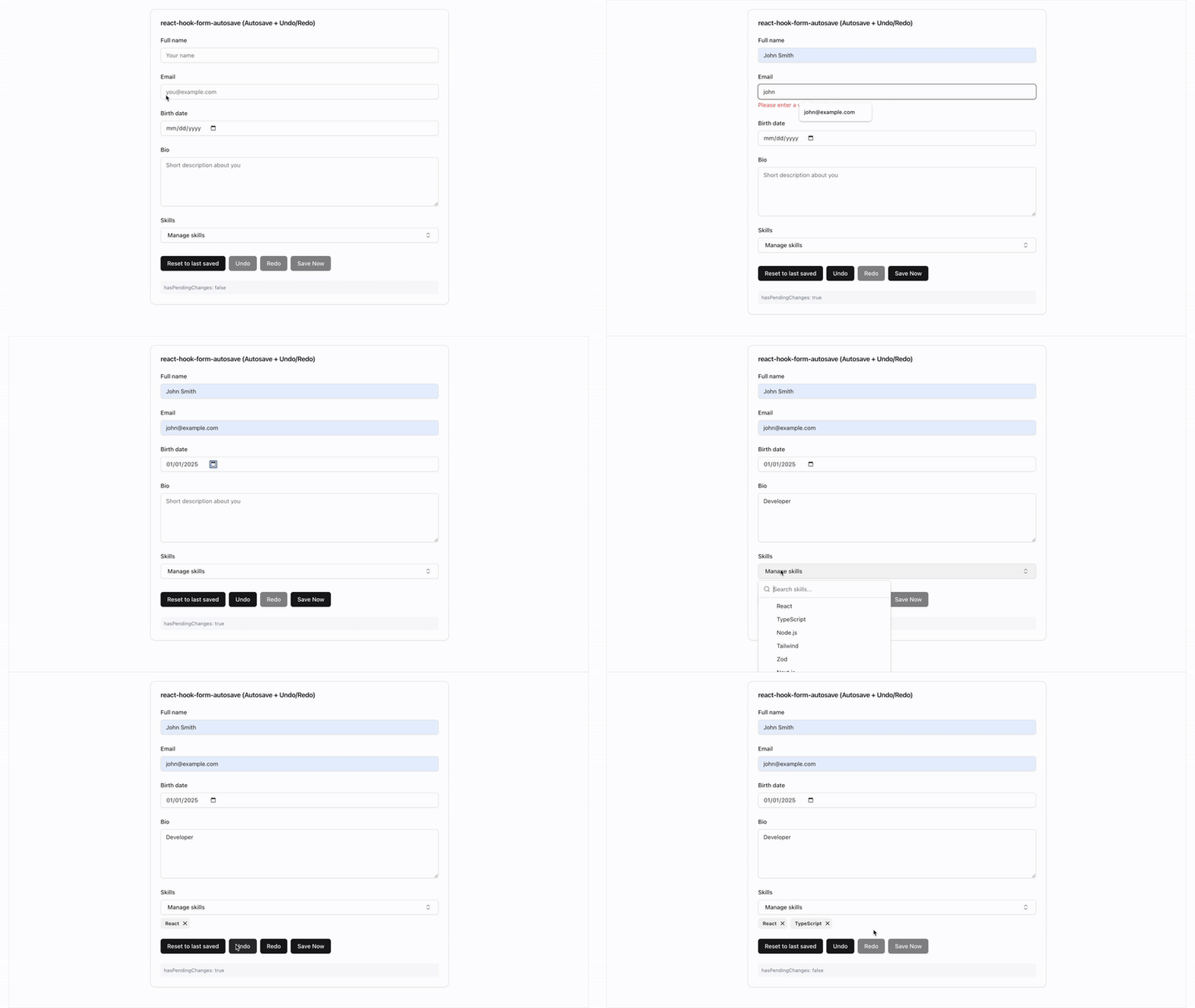
```tsx
import { useRhfAutosave, fetchTransport, useBeforeUnload } from "react-hook-form-autosave";
const { isSaving, hasPendingChanges, undo, redo } = useRhfAutosave({
form,
transport: fetchTransport('/api/save'),
});
useBeforeUnload(hasPendingChanges);
```
✅ **Zero-config transports** - `fetchTransport`, `serverActionTransport` — no boilerplate
✅ **Accurate pending state** - Always know if there are unsaved changes
✅ **Undo/Redo support** - Let users undo mistakes with Cmd/Ctrl+Z
✅ **Array field handling** - Smart diffing for add/remove operations
✅ **Auto-hydration** - Seamlessly sync when data loads from API
✅ **Nested field utilities** - Full support for deeply nested objects and arrays
✅ **Production ready** - Battle-tested with proper error handling
---
## Table of Contents
- [Installation](#-installation)
- [Quick Start](#-quick-start)
- [Why Choose This?](#-why-choose-this)
- [Core Features](#-core-features)
- [Transport Presets](#-transport-presets)
- [Basic Examples](#-basic-examples)
- [Common Patterns](#-common-patterns)
- [Nested Fields](#-nested-fields)
- [Advanced Features](#-advanced-features)
- [API Reference](#-api-reference)
- [Framework Integration](#-framework-integration)
- [Migration Guide](#-migration-guide)
- [Best Practices](#-best-practices)
---
## 📦 Installation
```bash
npm install react-hook-form-autosave
# or
pnpm add react-hook-form-autosave
# or
yarn add react-hook-form-autosave
```
**Peer Requirements**
| Peer | Version |
|------|---------|
| `react` | `>=18` |
| `react-hook-form` | `>=7` |
```bash
# Ensure you have React 18+
npm install react@^18 react-dom@^18
```
---
## 🚀 Quick Start
**Step 1:** Add the hook to your form
```tsx
import { useForm } from "react-hook-form";
import { useRhfAutosave, fetchTransport, useBeforeUnload } from "react-hook-form-autosave";
function MyForm() {
const form = useForm({
defaultValues: { name: "", email: "" }
});
const { isSaving, hasPendingChanges } = useRhfAutosave({
form,
transport: fetchTransport("/api/save"),
});
// Warn before closing tab with unsaved changes
useBeforeUnload(hasPendingChanges);
return (
);
}
```
**That's it!** Your form now autosaves with accurate pending state tracking and navigation protection.
---
## 💡 Why Choose This?
### The Problem
- Users lose work when browsers crash or they navigate away
- Form state gets out of sync with server data
- Building reliable autosave from scratch is complex
- Tracking "unsaved changes" accurately is surprisingly hard
### The Solution
```tsx
// Without this library (complex and buggy)
const [saving, setSaving] = useState(false);
const [hasPending, setHasPending] = useState(false);
const lastSavedRef = useRef();
const debouncedSave = useMemo(() => debounce(async (data) => {
setSaving(true);
try {
if (form.formState.isValid) {
await saveData(data);
lastSavedRef.current = data;
setHasPending(false);
}
} catch (error) {
// handle error...
} finally {
setSaving(false);
}
}, 600), []);
useEffect(() => {
const isDifferent = !deepEqual(form.getValues(), lastSavedRef.current);
setHasPending(isDifferent);
if (form.formState.isDirty && isDifferent) {
debouncedSave(form.getValues());
}
}, [form.watch()]);
// With this library (simple and reliable)
const { isSaving, hasPendingChanges } = useRhfAutosave({ form, transport: saveData });
```
---
## 🎯 Core Features
### 1. Accurate Pending State Tracking
The `hasPendingChanges` boolean accurately tracks whether there are unsaved changes, even after:
- Data loads from the API
- Successful saves
- Undo/redo operations
- Array field modifications
```tsx
const { hasPendingChanges } = useRhfAutosave({ form, transport });
// Use it to show save status
{hasPendingChanges ? "You have unsaved changes" : "All changes saved"}
// Or to warn before navigation
useEffect(() => {
const handleBeforeUnload = (e: BeforeUnloadEvent) => {
if (hasPendingChanges) {
e.preventDefault();
e.returnValue = '';
}
};
window.addEventListener('beforeunload', handleBeforeUnload);
return () => window.removeEventListener('beforeunload', handleBeforeUnload);
}, [hasPendingChanges]);
```
### 2. Undo/Redo Support
Built-in undo/redo with keyboard shortcuts:
```tsx
const { undo, redo, canUndo, canRedo } = useRhfAutosave({
form,
transport,
undo: { enabled: true }
});
// Keyboard shortcuts work automatically (Cmd/Ctrl+Z, Shift+Cmd/Ctrl+Z)
// Or add buttons:
```
### 3. Auto-Hydration
Automatically syncs when data loads from your API:
```tsx
function MyForm() {
const form = useForm();
const { data } = useQuery(['form-data'], fetchFormData);
const { hasPendingChanges } = useRhfAutosave({
form,
transport,
autoHydrate: true // Enabled by default
});
// When data loads, the form automatically syncs
useEffect(() => {
if (data) {
form.reset(data); // This triggers auto-hydration
}
}, [data]);
// hasPendingChanges will be false after data loads
// and true only when user makes changes
}
```
### 4. Array Field Diffing
Handle array fields intelligently with add/remove operations:
```tsx
const { isSaving } = useRhfAutosave({
form,
transport,
diffMap: {
tags: {
idOf: (tag) => tag.id,
onAdd: async (tag) => {
await api.addTag(postId, tag.id);
},
onRemove: async (tag) => {
await api.removeTag(postId, tag.id);
},
},
},
});
// Now when users add/remove tags, only the changes are sent
// The form properly tracks these as saved after success
```
---
## 🚌 Transport Presets
Zero-config transport factories so you never write fetch boilerplate again.
### fetchTransport — REST APIs
```tsx
import { useRhfAutosave, fetchTransport, withRetry } from "react-hook-form-autosave";
const { isSaving } = useRhfAutosave({
form,
transport: fetchTransport("/api/save"),
});
// With options:
const transport = fetchTransport("/api/save", {
method: "PATCH",
headers: { Authorization: `Bearer ${token}` },
credentials: "include",
mapBody: (payload) => ({ data: payload, updatedAt: Date.now() }),
});
// Compose with retry:
const reliableTransport = withRetry(
fetchTransport("/api/save"),
{ maxRetries: 3 }
);
```
Handles JSON serialization, `Content-Type` headers, `AbortSignal` passthrough, and non-2xx error wrapping automatically.
### serverActionTransport — Next.js Server Actions
```tsx
// app/actions.ts
'use server';
export async function saveForm(data: unknown) {
await db.form.update({ data });
}
// app/components/MyForm.tsx
import { useRhfAutosave, serverActionTransport } from "react-hook-form-autosave";
import { saveForm } from "./actions";
const { isSaving } = useRhfAutosave({
form,
transport: serverActionTransport(saveForm),
});
// With custom result interpretation:
const transport = serverActionTransport(saveForm, {
mapResult: (result: any) =>
result.success ? { ok: true } : { ok: false, error: new Error(result.message) },
});
```
Calls the server action directly. Wraps thrown errors as `TransportError`.
### useBeforeUnload — Navigation Guard
```tsx
import { useRhfAutosave, useBeforeUnload } from "react-hook-form-autosave";
const { hasPendingChanges } = useRhfAutosave({ form, transport });
// Warn before closing tab with unsaved changes
useBeforeUnload(hasPendingChanges);
```
### onStatusChange — Lifecycle Callback
```tsx
const { isSaving } = useRhfAutosave({
form,
transport,
onStatusChange: (status) => {
// status.state: 'idle' | 'saving' | 'saved' | 'error'
if (status.state === "saved") toast.success("Saved!");
if (status.state === "error") Sentry.captureException(status.error);
},
});
```
Fires on state transitions only, not on every render.
---
## 📖 Basic Examples
### Simple Status Display
```tsx
function MyForm() {
const form = useForm({ defaultValues: { title: "" } });
const { isSaving, lastError, hasPendingChanges } = useRhfAutosave({
form,
transport: async (data) => {
await api.save(data);
return { ok: true };
},
});
return (
);
}
```
### Configuration Options
```tsx
const { isSaving } = useRhfAutosave({
form,
transport,
config: {
debounceMs: 1000, // Wait 1 second after user stops typing
debug: true, // Enable debug logging (default: false)
enableMetrics: true, // Track performance metrics
maxRetries: 3, // Retry failed saves
enableCache: true, // Cache validation results
}
});
```
### Validation Control
```tsx
const { isSaving } = useRhfAutosave({
form,
transport,
shouldSave: ({ isDirty, isValid }) => isDirty && isValid,
validateBeforeSave: "payload", // Only validate changed fields
});
```
---
## 🔧 Common Patterns
### Manual Save Button
Sometimes you want both autosave AND a manual save button:
```tsx
function MyForm() {
const form = useForm();
const { isSaving, flush, hasPendingChanges } = useRhfAutosave({
form,
transport,
config: { debounceMs: 2000 } // Auto-save after 2 seconds
});
const handleManualSave = async () => {
const result = await flush(); // Save immediately
if (result.ok) {
toast.success("Saved!");
}
};
return (
);
}
```
### Form Submission Integration
Ensure all changes are saved before final submission:
```tsx
function MyForm() {
const form = useForm();
const { flush, hasPendingChanges } = useRhfAutosave({
form,
transport
});
const onSubmit = async (data) => {
// Save any pending autosave changes first
if (hasPendingChanges) {
await flush();
}
};
return (
);
}
```
### Server Data Synchronization
Handle server data updates properly:
```tsx
function MyForm() {
const form = useForm();
const { data, isLoading } = useQuery(['form-data'], fetchData);
const { hasPendingChanges, hydrateFromServer } = useRhfAutosave({
form,
transport,
autoHydrate: true // Auto-detect and sync server data
});
// Option 1: Auto-hydration (recommended)
useEffect(() => {
if (data) {
form.reset(data); // Auto-hydration handles the rest
}
}, [data]);
// Option 2: Manual hydration
const handleRefresh = async () => {
const freshData = await fetchData();
hydrateFromServer(freshData); // Manually sync
};
return (

```tsx
import { useRhfAutosave, fetchTransport, useBeforeUnload } from "react-hook-form-autosave";
const { isSaving, hasPendingChanges, undo, redo } = useRhfAutosave({
form,
transport: fetchTransport('/api/save'),
});
useBeforeUnload(hasPendingChanges);
```
✅ **Zero-config transports** - `fetchTransport`, `serverActionTransport` — no boilerplate
✅ **Accurate pending state** - Always know if there are unsaved changes
✅ **Undo/Redo support** - Let users undo mistakes with Cmd/Ctrl+Z
✅ **Array field handling** - Smart diffing for add/remove operations
✅ **Auto-hydration** - Seamlessly sync when data loads from API
✅ **Nested field utilities** - Full support for deeply nested objects and arrays
✅ **Production ready** - Battle-tested with proper error handling
---
## Table of Contents
- [Installation](#-installation)
- [Quick Start](#-quick-start)
- [Why Choose This?](#-why-choose-this)
- [Core Features](#-core-features)
- [Transport Presets](#-transport-presets)
- [Basic Examples](#-basic-examples)
- [Common Patterns](#-common-patterns)
- [Nested Fields](#-nested-fields)
- [Advanced Features](#-advanced-features)
- [API Reference](#-api-reference)
- [Framework Integration](#-framework-integration)
- [Migration Guide](#-migration-guide)
- [Best Practices](#-best-practices)
---
## 📦 Installation
```bash
npm install react-hook-form-autosave
# or
pnpm add react-hook-form-autosave
# or
yarn add react-hook-form-autosave
```
**Peer Requirements**
| Peer | Version |
|------|---------|
| `react` | `>=18` |
| `react-hook-form` | `>=7` |
```bash
# Ensure you have React 18+
npm install react@^18 react-dom@^18
```
---
## 🚀 Quick Start
**Step 1:** Add the hook to your form
```tsx
import { useForm } from "react-hook-form";
import { useRhfAutosave, fetchTransport, useBeforeUnload } from "react-hook-form-autosave";
function MyForm() {
const form = useForm({
defaultValues: { name: "", email: "" }
});
const { isSaving, hasPendingChanges } = useRhfAutosave({
form,
transport: fetchTransport("/api/save"),
});
// Warn before closing tab with unsaved changes
useBeforeUnload(hasPendingChanges);
return (
);
}
```
**That's it!** Your form now autosaves with accurate pending state tracking and navigation protection.
---
## 💡 Why Choose This?
### The Problem
- Users lose work when browsers crash or they navigate away
- Form state gets out of sync with server data
- Building reliable autosave from scratch is complex
- Tracking "unsaved changes" accurately is surprisingly hard
### The Solution
```tsx
// Without this library (complex and buggy)
const [saving, setSaving] = useState(false);
const [hasPending, setHasPending] = useState(false);
const lastSavedRef = useRef();
const debouncedSave = useMemo(() => debounce(async (data) => {
setSaving(true);
try {
if (form.formState.isValid) {
await saveData(data);
lastSavedRef.current = data;
setHasPending(false);
}
} catch (error) {
// handle error...
} finally {
setSaving(false);
}
}, 600), []);
useEffect(() => {
const isDifferent = !deepEqual(form.getValues(), lastSavedRef.current);
setHasPending(isDifferent);
if (form.formState.isDirty && isDifferent) {
debouncedSave(form.getValues());
}
}, [form.watch()]);
// With this library (simple and reliable)
const { isSaving, hasPendingChanges } = useRhfAutosave({ form, transport: saveData });
```
---
## 🎯 Core Features
### 1. Accurate Pending State Tracking
The `hasPendingChanges` boolean accurately tracks whether there are unsaved changes, even after:
- Data loads from the API
- Successful saves
- Undo/redo operations
- Array field modifications
```tsx
const { hasPendingChanges } = useRhfAutosave({ form, transport });
// Use it to show save status
{hasPendingChanges ? "You have unsaved changes" : "All changes saved"}
// Or to warn before navigation
useEffect(() => {
const handleBeforeUnload = (e: BeforeUnloadEvent) => {
if (hasPendingChanges) {
e.preventDefault();
e.returnValue = '';
}
};
window.addEventListener('beforeunload', handleBeforeUnload);
return () => window.removeEventListener('beforeunload', handleBeforeUnload);
}, [hasPendingChanges]);
```
### 2. Undo/Redo Support
Built-in undo/redo with keyboard shortcuts:
```tsx
const { undo, redo, canUndo, canRedo } = useRhfAutosave({
form,
transport,
undo: { enabled: true }
});
// Keyboard shortcuts work automatically (Cmd/Ctrl+Z, Shift+Cmd/Ctrl+Z)
// Or add buttons:
```
### 3. Auto-Hydration
Automatically syncs when data loads from your API:
```tsx
function MyForm() {
const form = useForm();
const { data } = useQuery(['form-data'], fetchFormData);
const { hasPendingChanges } = useRhfAutosave({
form,
transport,
autoHydrate: true // Enabled by default
});
// When data loads, the form automatically syncs
useEffect(() => {
if (data) {
form.reset(data); // This triggers auto-hydration
}
}, [data]);
// hasPendingChanges will be false after data loads
// and true only when user makes changes
}
```
### 4. Array Field Diffing
Handle array fields intelligently with add/remove operations:
```tsx
const { isSaving } = useRhfAutosave({
form,
transport,
diffMap: {
tags: {
idOf: (tag) => tag.id,
onAdd: async (tag) => {
await api.addTag(postId, tag.id);
},
onRemove: async (tag) => {
await api.removeTag(postId, tag.id);
},
},
},
});
// Now when users add/remove tags, only the changes are sent
// The form properly tracks these as saved after success
```
---
## 🚌 Transport Presets
Zero-config transport factories so you never write fetch boilerplate again.
### fetchTransport — REST APIs
```tsx
import { useRhfAutosave, fetchTransport, withRetry } from "react-hook-form-autosave";
const { isSaving } = useRhfAutosave({
form,
transport: fetchTransport("/api/save"),
});
// With options:
const transport = fetchTransport("/api/save", {
method: "PATCH",
headers: { Authorization: `Bearer ${token}` },
credentials: "include",
mapBody: (payload) => ({ data: payload, updatedAt: Date.now() }),
});
// Compose with retry:
const reliableTransport = withRetry(
fetchTransport("/api/save"),
{ maxRetries: 3 }
);
```
Handles JSON serialization, `Content-Type` headers, `AbortSignal` passthrough, and non-2xx error wrapping automatically.
### serverActionTransport — Next.js Server Actions
```tsx
// app/actions.ts
'use server';
export async function saveForm(data: unknown) {
await db.form.update({ data });
}
// app/components/MyForm.tsx
import { useRhfAutosave, serverActionTransport } from "react-hook-form-autosave";
import { saveForm } from "./actions";
const { isSaving } = useRhfAutosave({
form,
transport: serverActionTransport(saveForm),
});
// With custom result interpretation:
const transport = serverActionTransport(saveForm, {
mapResult: (result: any) =>
result.success ? { ok: true } : { ok: false, error: new Error(result.message) },
});
```
Calls the server action directly. Wraps thrown errors as `TransportError`.
### useBeforeUnload — Navigation Guard
```tsx
import { useRhfAutosave, useBeforeUnload } from "react-hook-form-autosave";
const { hasPendingChanges } = useRhfAutosave({ form, transport });
// Warn before closing tab with unsaved changes
useBeforeUnload(hasPendingChanges);
```
### onStatusChange — Lifecycle Callback
```tsx
const { isSaving } = useRhfAutosave({
form,
transport,
onStatusChange: (status) => {
// status.state: 'idle' | 'saving' | 'saved' | 'error'
if (status.state === "saved") toast.success("Saved!");
if (status.state === "error") Sentry.captureException(status.error);
},
});
```
Fires on state transitions only, not on every render.
---
## 📖 Basic Examples
### Simple Status Display
```tsx
function MyForm() {
const form = useForm({ defaultValues: { title: "" } });
const { isSaving, lastError, hasPendingChanges } = useRhfAutosave({
form,
transport: async (data) => {
await api.save(data);
return { ok: true };
},
});
return (
);
}
```
### Configuration Options
```tsx
const { isSaving } = useRhfAutosave({
form,
transport,
config: {
debounceMs: 1000, // Wait 1 second after user stops typing
debug: true, // Enable debug logging (default: false)
enableMetrics: true, // Track performance metrics
maxRetries: 3, // Retry failed saves
enableCache: true, // Cache validation results
}
});
```
### Validation Control
```tsx
const { isSaving } = useRhfAutosave({
form,
transport,
shouldSave: ({ isDirty, isValid }) => isDirty && isValid,
validateBeforeSave: "payload", // Only validate changed fields
});
```
---
## 🔧 Common Patterns
### Manual Save Button
Sometimes you want both autosave AND a manual save button:
```tsx
function MyForm() {
const form = useForm();
const { isSaving, flush, hasPendingChanges } = useRhfAutosave({
form,
transport,
config: { debounceMs: 2000 } // Auto-save after 2 seconds
});
const handleManualSave = async () => {
const result = await flush(); // Save immediately
if (result.ok) {
toast.success("Saved!");
}
};
return (
);
}
```
### Form Submission Integration
Ensure all changes are saved before final submission:
```tsx
function MyForm() {
const form = useForm();
const { flush, hasPendingChanges } = useRhfAutosave({
form,
transport
});
const onSubmit = async (data) => {
// Save any pending autosave changes first
if (hasPendingChanges) {
await flush();
}
};
return (
);
}
```
### Server Data Synchronization
Handle server data updates properly:
```tsx
function MyForm() {
const form = useForm();
const { data, isLoading } = useQuery(['form-data'], fetchData);
const { hasPendingChanges, hydrateFromServer } = useRhfAutosave({
form,
transport,
autoHydrate: true // Auto-detect and sync server data
});
// Option 1: Auto-hydration (recommended)
useEffect(() => {
if (data) {
form.reset(data); // Auto-hydration handles the rest
}
}, [data]);
// Option 2: Manual hydration
const handleRefresh = async () => {
const freshData = await fetchData();
hydrateFromServer(freshData); // Manually sync
};
return (
{!isLoading && (
{hasPendingChanges
? "You have unsaved changes"
: "Synced with server"}
)}
{hasPendingChanges ? "Unsaved changes" : "All saved"}
);
}
```
### Next.js + Server Actions
```tsx
import { serverActionTransport } from "react-hook-form-autosave";
import { saveFormData } from "./actions"; // Your server action
const { isSaving } = useRhfAutosave({
form,
transport: serverActionTransport(saveFormData),
});
```
### Next.js + REST API
```tsx
import { fetchTransport } from "react-hook-form-autosave";
const { isSaving } = useRhfAutosave({
form,
transport: fetchTransport("/api/save"),
});
```
### Remix
```tsx
import { useFetcher } from "@remix-run/react";
function MyForm() {
const form = useForm();
const fetcher = useFetcher();
const { isSaving, hasPendingChanges } = useRhfAutosave({
form,
transport: async (data) => {
fetcher.submit(data, {
method: "POST",
encType: "application/json"
});
return { ok: true };
},
});
return <>{/* form fields */};
}
```
---
## 📦 Migration Guide
### From v2.x to v3.x
#### 1. Debug flag moved to config:
```tsx
// Before (v2.x)
useRhfAutosave({
form,
transport,
debug: true
});
// After (v3.x)
useRhfAutosave({
form,
transport,
config: { debug: true }
});
```
#### 2. `hasPendingChanges` is now accurate:
- Properly tracks array field changes
- Correctly syncs after server data loads
- Works with undo/redo operations
#### 3. Auto-hydration enabled by default:
```tsx
// Opt-out if needed
useRhfAutosave({
form,
transport,
autoHydrate: false
});
```
---
## 🎯 Best Practices
### ⚡ Performance
```tsx
// ✅ Good: Reasonable debounce
config: { debounceMs: 600 }
// ✅ Good: Disable debug in production
config: { debug: false }
// ✅ Good: Only save valid data
shouldSave: ({ isDirty, isValid }) => isDirty && isValid
```
### 🔒 Error Handling
```tsx
const transport = async (data) => {
try {
const response = await fetch('/api/save', {
method: 'POST',
body: JSON.stringify(data)
});
if (!response.ok) {
throw new Error(`Save failed: ${response.status}`);
}
return { ok: true };
} catch (error) {
console.error('Autosave error:', error);
return { ok: false, error };
}
};
```
### 🧹 Cleanup
```tsx
// The hook automatically cleans up on unmount
// For special cases:
const { abort } = useRhfAutosave({ form, transport });
useEffect(() => {
return () => {
abort(); // Cancel any pending saves
};
}, [abort]);
```
---
## 🙋♀️ FAQ
How do I prevent saving invalid data?
```tsx
const { isSaving } = useRhfAutosave({
form,
transport,
shouldSave: ({ isDirty, isValid }) => isDirty && isValid,
validateBeforeSave: "payload" // Only validate changed fields
});
```
Can I save only specific fields?
```tsx
const { isSaving } = useRhfAutosave({
form,
transport,
selectPayload: (values, dirtyFields) => {
// Only save name and email fields
return { name: values.name, email: values.email };
}
});
```
How do I handle slow networks?
```tsx
const { isSaving } = useRhfAutosave({
form,
transport,
config: {
debounceMs: 1000, // Wait longer before saving
maxRetries: 5, // More retry attempts
}
});
```
Can I use this with server components?
This is a client-side hook that requires React Hook Form, so it needs to be used in client components. Use `serverActionTransport` to call server actions:
```tsx
'use client';
import { useRhfAutosave, serverActionTransport } from 'react-hook-form-autosave';
import { saveFormData } from './actions'; // Server action
const { isSaving } = useRhfAutosave({
form,
transport: serverActionTransport(saveFormData),
});
```
---
## 🤖 AI-Assisted Development
This library ships with a Claude Code skill at `skills/rhf-autosave/SKILL.md`. Point your AI coding assistant at it for full API reference, usage examples, and common patterns — no docs tab-switching needed.
## 📄 License
MIT © [Ziad Ziadeh](https://github.com/ziadeh)
---
**⭐ Star this repo if it helped you build better forms!**