# react-grid-heatmap
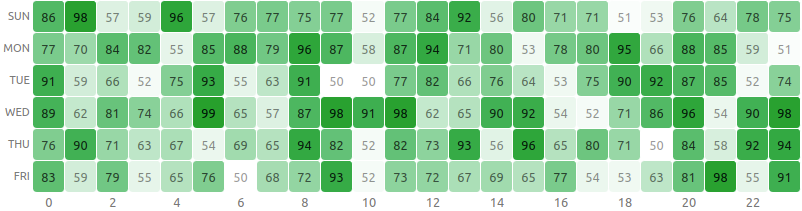
A React component to visualize heatmap in a grid layout without using any 3rd party libraries.
[Demo - Try in Sandbox](https://codesandbox.io/s/react-grid-heatmap-hhmqw?file=/src/App.js)
[](https://www.npmjs.com/package/react-grid-heatmap) [](https://standardjs.com) [](https://travis-ci.org/arunghosh/react-grid-heatmap)
## Install
```bash
npm install --save react-grid-heatmap
```
## Usage
**Mandatory fields**
| Name | Type | Sample |
| ---- | ------------ | ----------------------------- |
| data | `number[][]` | `[[1,2,3], [4,5,6], [7,8,9]]` |
```tsx
import React from 'react'
import { HeatMapGrid } from 'react-grid-heatmap'
const xLabels = new Array(24).fill(0).map((_, i) => `${i}`)
const yLabels = ['Sun', 'Mon', 'Tue', 'Wed', 'Thu', 'Fri']
const data = new Array(yLabels.length)
.fill(0)
.map(() =>
new Array(xLabels.length).fill(0).map(() => Math.floor(Math.random() * 50 + 50))
)
const App = () => {
return (
)
}
export default App
```
**Optional Parameters**
| Name | Type | Description/Example | Default Value |
| :----------- | :------- | :------------------------------------------------------ | :------------ |
| xLabels | string[] | `['1am', '2am', '3am']` | `null` |
| yLabels | string[] | `['Sun', 'Mon']` | `null` |
| cellHeight | string | Height of each cell of the heatmap | `"2rem"` |
| onClick | function | Adds an handler to cell click
`(x, y) => void` | `null` |
| square | boolean | If set to `true` will render cells as square | `false` |
| xLabelsPos | string | Location of y labels. It can be `top` or `bottom` | `"top"` |
| yLabelsPos | string | Location of y labels. It can be `left` or `right` | `"left"` |
| cellRender | function | Render custom content in cell.
`(x, y, value) => ()` | `null` |
| cellStyle | function | To set custom cell style
`(x, y, ratio) => {}` | `null` |
| xLabelsStyle | function | To set custom cell style
`(index) => {}` | `null` |
| yLabelsStyle | function | To set custom cell style
`(index) => {}` | `null` |
A sample code with all parameters
```js
import React from 'react'
import { HeatMapGrid } from 'react-grid-heatmap'
const xLabels = new Array(24).fill(0).map((_, i) => `${i}`)
const yLabels = ['Sun', 'Mon', 'Tue', 'Wed', 'Thu', 'Fri']
const data = new Array(yLabels.length)
.fill(0)
.map(() =>
new Array(xLabels.length)
.fill(0)
.map(() => Math.floor(Math.random() * 50 + 50))
)
const App = () => {
return (
(
{value}
)}
xLabelsStyle={(index) => ({
color: index % 2 ? 'transparent' : '#777',
fontSize: '.8rem'
})}
yLabelsStyle={() => ({
fontSize: '.7rem',
textTransform: 'uppercase',
color: '#777'
})}
cellStyle={(_x, _y, ratio) => ({
background: `rgb(12, 160, 44, ${ratio})`,
fontSize: '.8rem',
color: `rgb(0, 0, 0, ${ratio / 2 + 0.4})`
})}
cellHeight='2rem'
xLabelsPos='bottom'
onClick={(x, y) => alert(`Clicked (${x}, ${y})`)}
yLabelsPos='right'
square
/>
)
}
export default App
```
## Local development
Local development is broken into two parts (ideally using two tabs).
First, run rollup to watch your `src/` module and automatically recompile it into `dist/` whenever you make changes.
```
npm start # runs rollup with watch flag
```
The second part will be running the `example/` create-react-app that's linked to the local version of your module.
```
# (in another tab)
cd example
npm start # runs create-react-app dev server
```
Now, anytime you make a change to your library in `src/` or to the example app's `example/src`, `create-react-app` will live-reload your local dev server so you can iterate on your component in real-time.
## License
MIT © [arunghosh](https://github.com/arunghosh)