# react-gdpr
This package provide tools and components for react to make your website gdpr compliant.
## Installation
With npm
```
npm install react-gdpr --save
```
With yarn
```
yarn add react-gdpr
```
## Settings pannel
You need to wrap the GDPRSettings component to wrap it with your store.
Exemple :
```
import React, { Component } from 'react'
import PropTypes from 'prop-types'
import {GDPRSettings,GDPRConfigBuilder,cookiesTool} from 'react-gdpr'
import {connect} from 'react-redux'
import * as actions from '../../../redux/actions'
import * as selectors from '../../../redux/selectors'
const mapActions = dispatch => ({
closeCookies: ()=>dispatch(actions.App.closeCookies())
})
const mapSelectors = state => ({
cookiesSettings: selectors.App.cookiesSettings(state),
})
@connect(mapSelectors, mapActions)
export default class GDPRSettingsPanel extends Component {
constructor(props)
{
super(props)
this.state = {
render:0,
}
}
incRender()
{
this.setState({render:this.state.render+1})
}
componentDidMount()
{
this.allowRender = true
this.incRender()
}
handleToggle = (id,value) =>{
cookiesTool.setActive(id,value)
this.incRender()
}
handleValidate = () =>{
this.props.closeCookies()
}
render() {
if (!this.allowRender) return null
if(!this.props.cookiesSettings) return null
let configBuilder = new GDPRConfigBuilder()
configBuilder.setLocale('Paramètres de conf','ceci correspond aux réglages','valider','actif','inactif','toujours actif')
.addSetting('navigation','Cookies obligatoire','permet la navigation dans le site',true,false)
.addSetting('analytics','Param de performance','autoriser google analytics',cookiesTool.isActive("analytics"),true)
let config = configBuilder.getConfig()
return (
{true && }
)
}
}
```
This sample use GDPRConfigBuilder tool to create components props (locale and cookies status)
```
let configBuilder = new GDPRConfigBuilder()
configBuilder.setLocale('title',
description',
'validate',
'active',
'inactive',
'always active')
.addSetting(setting_id,
setting_title,
setting_description,
setting_status,
allow_changes)
let config = configBuilder.getConfig()
```
GDPRSettings dispach callback to your component :
```
handleToggle = (id,value) =>{
cookiesTool.setActive(id,value)
this.incRender()
}
handleValidate = () =>{
this.props.closeCookies()
}
```
You can use cookieTool to save and load user settings
```
cookiesTool.isActive(cookie_id)
cookiesTool.setActive(cookie_id,value)
```
If you use cookiesTool, you need to use it in your cookie banner too.
## Skin your panel settings
The best way is to use SASS and import the file
```
.gdpr-settings-panel{
$gdpr-mobile-size:800px;
$gdpr-active-color1:#00C0D5;
$gdpr-active-color2:#0092a2;
$gdpr-inactive-color1:#CCCCCC;
$gdpr-inactive-color2:#FFFFFF;
@import '../../../node_modules/react-gdpr/sass/GDPRSettings.scss';
.gdpr-title{
font-family: "futura-medium",Arial,sans-serif;
}
.gdpr-description{
font-family: "raleway-regular",Arial,sans-serif;
}
.gdpr-status{
font-family: "futura-medium",Arial,sans-serif;
}
.gdpr-button{
font-family: "futura-medium",Arial,sans-serif;
border-radius: 0!important;
}
}
```
If you don't use SASS, you can simply import the CSS file and override default styles.
```
import 'react-gdpr/css/main.scss'
```
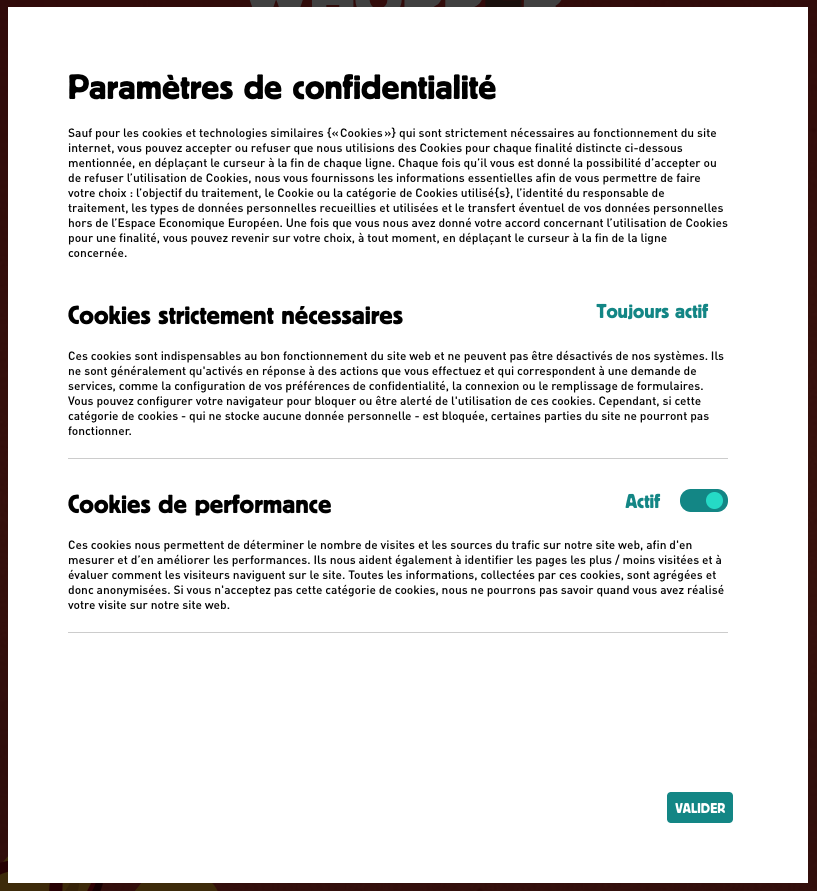
## Screenshot of GDPRSettings component
The GDPRSettings component is responsive and add automatically a scrollbar if necessary.