[](https://GitHub.com/JohannesKlauss/react-fps/graphs/contributors/)
[](https://GitHub.com/JohannesKlauss/react-fps/issues/)
[](https://github.com/JohannesKlauss/react-fps/blob/master/LICENSE)
react-fps
A fresh and modern FPS component for react.
View Demo
·
Report Bug
·
Request Feature
## Table of Contents
* [About the Project](#about-the-project)
* [Getting Started](#getting-started)
* [Installation](#installation)
* [TypeScript](#typescript)
* [Usage](#usage)
* [Component](#component)
* [Props](#props)
* [Hook](#hook)
* [Roadmap](#roadmap)
* [Contributing](#contributing)
* [License](#license)
* [Contact](#contact)
* [Prior Art](#prior-art)
## About the Project
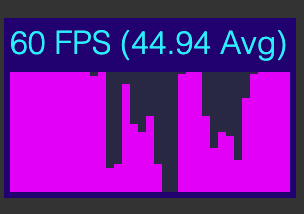
`react-fps` is a tool to analyze your apps performance. Simply add the component
or use the exported hook to create your own visualization.
### Features
* Includes the above UI component for logging FPS without any hassle.
* Exports a `useFps` hook to create your own customized UI.
* Also tracks main thread blocks and idle times.
## Getting Started
### Installation
```shell script
yarn add react-fps
```
```shell script
npm i react-fps
```
### TypeScript
This package is built with TypeScript and supports it out of the box.
## Usage
### Component
To use the built in UI component seen above, just use the `FpsView` component:
```jsx harmony
import React from "react";
import {FpsView} from "react-fps";
export function YourComponent() {
// ....
return (
// ...
// ...
);
}
```
### Props
By default the component will appear in the upper left corner with a dimension
of 140x60 pixels. You can of course modify that via props:
```jsx harmony
import React from "react";
import {FpsView} from "react-fps";
export function YourComponent() {
// ....
return (
// ...
// ...
);
}
```
You can also use `bottom` and `right` to position it relative to those borders.
```jsx harmony
import React from "react";
import {FpsView} from "react-fps";
export function YourComponent() {
// ....
return (
// ...
// ...
);
}
```
### Hook
```typescript
useFps(windowWidth: number): {fps: number[], avgFps: number, maxFps: number, currentFps: number};
```
#### Params
* `windowWidth` defines the number of kept values. So `3` saves the last
three fps values, `20` will save the last twenty. This also is the base
the average and maximum calculation.
**Note!** `windowWidth` roughly equals to seconds passed. So a window of
`20` is approximately a window of 20 seconds. But there is absolutely no
guarantee that this will be the case.
#### Return Values
* `fps` is an array of fps numbers. Most recent value is the last one.
* `avgFps` is the average frame rate over the defined window.
* `maxFps` is the maximum frame rate recorded over the defined window.
#### Usage
To use the hook, just import it into your component.
```typescript
import {useFps} from 'react-fps';
function YourComponent() {
const {fps, avgFps, maxFps, currentFps} = useFps(20);
// ....
}
```
And then you can build the UI visualization of your dreams.
## Roadmap
- [ ] Implement a hook version that updates itself every frame.
- [ ] Add milliseconds to render a frame stat
- [ ] Add memory consumption
- [ ] Add a customization hook and component.
## Contributing
Contributions are what make the open source community such an amazing place to be learn, inspire, and create. Any contributions you make are **greatly appreciated**.
1. Fork the Project
2. Create your Feature Branch (`git checkout -b feature/AmazingFeature`)
3. Commit your Changes (`git commit -m 'Add some AmazingFeature'`)
4. Push to the Branch (`git push origin feature/AmazingFeature`)
5. Open a Pull Request
## License
Distributed under the MIT License. See `LICENSE` for more information.
## Contact
Johannes Klauss - [@JohannesKlauss](https://github.com/JohannesKlauss) - klauss.johannes@gmail.com
Project Link: [https://github.com/JohannesKlauss/react-fps](https://github.com/JohannesKlauss/react-fps)
## Prior Art
Basis of this package is the [react-fps-stats](https://github.com/tibotiber/react-fps-stats)
Both are react ports of [stats.js](https://github.com/mrdoob/stats.js).
I ported it to use hooks, added a nicer color layout and made it more customizable.