[](https://www.npmjs.com/package/react-forms-builder)
[](https://travis-ci.org/blackjk3/react-form-builder)
# React Form Builder
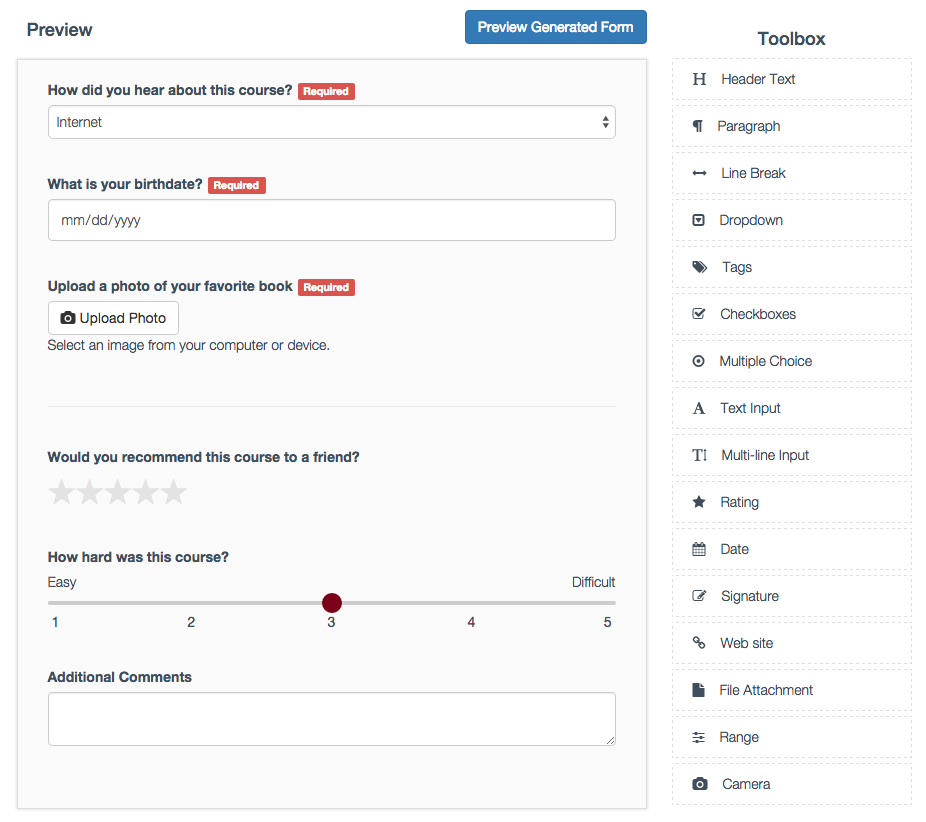
A complete react form builder that interfaces with a json endpoint to load and save generated forms. The toolbox contains 16 items for gathering data. Everything from star ratings to signature boxes!
# Basic Usage
```javascript
var React = require('react');
var FormBuilder = require('react-forms-builder');
React.render(
,
document.body
)
```
# Props
```javascript
var items = [{
key: 'Header',
name: 'Header Text',
icon: 'fa fa-header',
static: true,
content: 'Placeholder Text...'
},
{
key: 'Paragraph',
name: 'Paragraph',
static: true,
icon: 'fa fa-paragraph',
content: 'Placeholder Text...'
}];
```
# React Form Generator
Now that a form is built and saved, let's generate it from the saved json.
```javascript
var React = require('react');
var FormBuilder = require('react-forms-builder');
React.render(
,
document.body
)
```
# Vendor Dependencies
In order to make the form builder look pretty, there are a few dependencies other than React. See the example code in index.html for more details.
- Bootstrap
- FontAwesome
- jQuery
# SASS
All relevant styles are located in css/application.css.scss.
# DEMO
```bash
$ npm install
$ npm start
```
Then navigate to http://localhost:8080/ in your browser and you should be able to see the form builder in action.
# Tests
```bash
$ npm test
```
In order to run tests you will need to install Cairo which is needed for node-canvas. Go to https://www.npmjs.com/package/canvas for more details.