# react-easy-sort
A React component to sort items in lists or grids
[![version][version-badge]][package] [![Monthly downloads][npmstats-badge]][npmstats] ![gzip size][brotli-badge] [![MIT License][license-badge]][license] [![PRs Welcome][prs-badge]][prs]
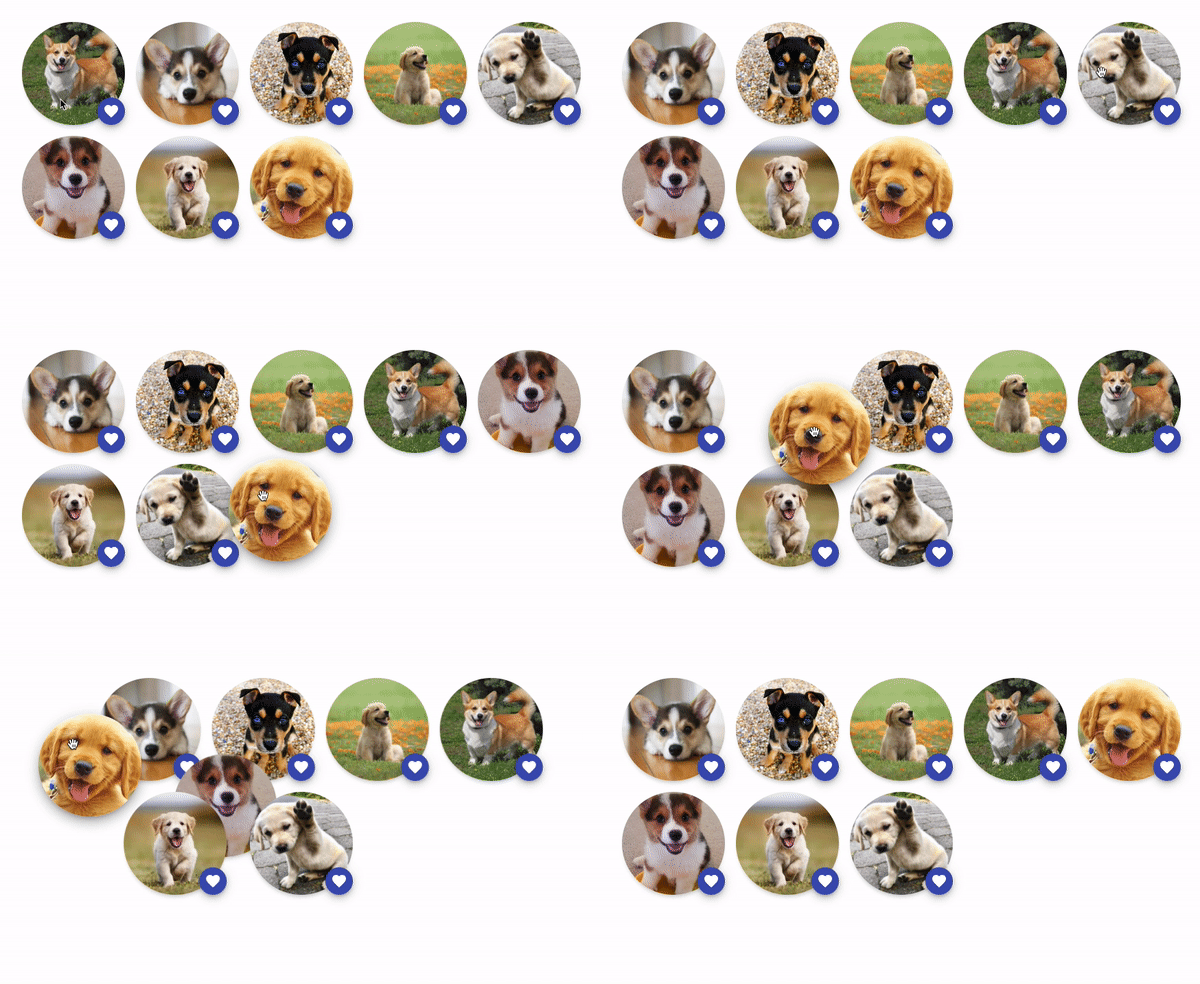
The goal of this component is to allow sorting elements with drag and drop.
It is mobile friendly by default. It doesn't block scrolling the page when swiping inside it:
the user needs to press an item during at least 200ms to start the drag gesture.
On non-touch devices, the drag gesture only starts after moving an element by at least one pixel.
This is done to avoid blocking clicks on clickable elements inside an item.
## Features
- Supports horizontal and vertical lists
- Supports grid layouts
- Mobile-friendly
- IE11 support 🙈
## Demo
Check out the examples:
- [Example with grid layout](https://codesandbox.io/s/react-easy-sort-grid-demo-87ev9)
- [Example with vertical list layout](https://codesandbox.io/s/react-easy-sort-vertical-list-demo-njg4i)
- [Example with horizontal list layout](https://codesandbox.io/s/react-easy-sort-horizontal-list-demo-69b3k)
- [Interactive avatars demo](https://codesandbox.io/s/react-easy-sort-images-demo-486qk)
- [Example with custom knobs](https://codesandbox.io/s/react-easy-sort-custom-knob-demo-ij37h)
## Installation
```shell
yarn add react-easy-sort
```
or
```shell
npm install react-easy-sort --save
```
## Basic usage
```js
import SortableList, { SortableItem } from 'react-easy-sort'
import { arrayMoveImmutable } from 'array-move'
const App = () => {
const [items, setItems] = React.useState(['A', 'B', 'C', 'D', 'E', 'F', 'G', 'H', 'I'])
const onSortEnd = (oldIndex: number, newIndex: number) => {
setItems((array) => arrayMoveImmutable(array, oldIndex, newIndex))
}
return (
{items.map((item) => (
{item}
))}
)
}
```
## Props
### SortableList
| Name | Description | Type | Default |
|--------------------------|:-------------------------------------------------------------------------------:|:----------------------------------------------:|----------------:|
| **as** | Determines html tag for the container element | `keyof JSX.IntrinsicElements` | `div` |
| **onSortStart** | Called when the user starts a sorting gesture | `() => void` | - |
| **onSortMove** | Called when the dragged item changes position during a sorting gesture | `(newIndex: number) => void` | - |
| **onSortEnd\*** | Called when the user finishes a sorting gesture. | `(oldIndex: number, newIndex: number) => void` | - |
| **draggedItemClassName** | Class applied to the item being dragged | `string` | - |
| **lockAxis** | Determines if an axis should be locked | `'x'` or `'y'` | |
| **allowDrag** | Determines whether items can be dragged | `boolean` | `true` |
| **customHolderRef** | Ref of an element to use as a container for the dragged item | `React.RefObject` | `document.body` |
| **dropTarget** | React element to use as a dropTarget | `ReactNode` | |
| **autoScroll** | Determines whether the containing element (or window) should scroll during sort | `boolean` | `false` |
### SortableItem
This component doesn't take any other props than its child. This child should be a single React element that can receives a ref. If you pass a component as a child, it needs to be wrapped with `React.forwardRef()`.
### SortableKnob
You can use this component if you don't want the whole item to be draggable but only a specific area of it.
```js
import SortableList, { SortableItem, SortableKnob } from 'react-easy-sort'
import arrayMove from 'array-move'
const App = () => {
const [items, setItems] = React.useState(['A', 'B', 'C', 'D', 'E', 'F', 'G', 'H', 'I'])
const onSortEnd = (oldIndex: number, newIndex: number) => {
setItems((array) => arrayMove(array, oldIndex, newIndex))
}
return (
{items.map((item) => (
))}
)
}
```
This component doesn't take any other props than its child. This child should be a single React element that can receive a ref. If you pass a component as a child, it needs to be wrapped with `React.forwardRef()`.
## Recommended CSS rules
To disable browser default behaviors that can interfer with the dragging experience, we recommend adding the following declarations on the "items":
- `user-select: none;`: disable the selection of content inside the item (the blue box)
- `pointer-events: none;`: required for some browsers if your items contain images (see the [Interactive avatars demo](https://codesandbox.io/s/react-easy-sort-images-demo-486qk))
## Development
```shell
yarn
yarn start
```
Now, open `http://localhost:3001/index.html` and start hacking!
## License
[MIT](https://github.com/ValentinH/react-easy-sort/blob/master/LICENSE)
## Maintainers
This project is maintained by Valentin Hervieu.
This project was originally part of [@ricardo-ch](https://github.com/ricardo-ch/) organisation because I (Valentin) was working at Ricardo.
After leaving this company, they gracefully accepted to transfer the project to me. ❤️
## Alternatives
- https://github.com/clauderic/react-sortable-hoc : before creating this library, I was using it and it was also supporting grid layouts. However, we had a lot of errors reported to our Sentry and this project was not maintained anymore.
- https://github.com/atlassian/react-beautiful-dnd: another great library for sorting items. However, it doesn't support grid layouts (as of 2021-02-05).
[npm]: https://www.npmjs.com/
[node]: https://nodejs.org
[version-badge]: https://img.shields.io/npm/v/react-easy-sort.svg?style=flat-square
[package]: https://www.npmjs.com/package/react-easy-sort
[downloads-badge]: https://img.shields.io/npm/dm/react-easy-sort.svg?style=flat-square
[npmstats]: https://npm-stat.com/charts.html?package=react-easy-sort&from=2021-02-01
[npmstats-badge]: https://img.shields.io/npm/dm/react-easy-sort.svg?style=flat-square
[brotli-badge]: http://img.badgesize.io/https://unpkg.com/react-easy-sort/umd/react-easy-sort.min.js?compression=brotli&style=flat-square&1
[license-badge]: https://img.shields.io/badge/license-MIT-blue.svg?style=flat-square
[license]: https://github.com/ValentinH/react-easy-sort/blob/main/LICENSE
[prs-badge]: https://img.shields.io/badge/PRs-welcome-brightgreen.svg?style=flat-square
[prs]: http://makeapullrequest.com