# react-datagrid2
### Fork for maintenance and development
> A carefully crafted DataGrid for React.
See demo at [stevelacy.github.io/react-datagrid2](http://stevelacy.github.io/react-datagrid2)
 ## Supports React 15 and 16
## Install
```sh
$ npm install react-datagrid2 --save
```
## Changelog
See [changelog](./CHANGELOG.md)
## Features
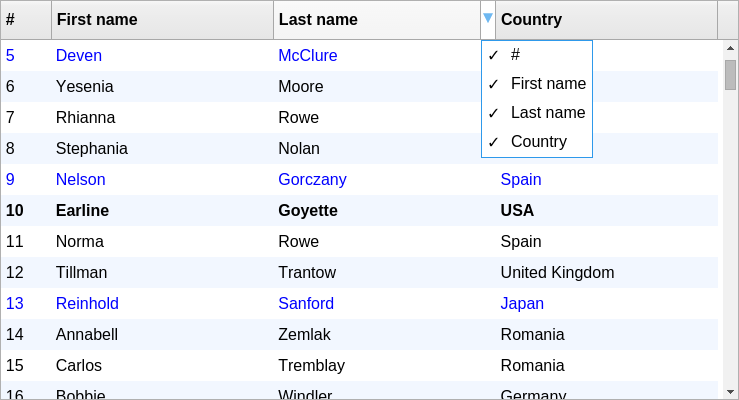
* renders huge amounts of data
* resizable columns
* reorderable columns
* remote data support
* custom row/cell/column rendering
* multiple/single selection
* sorting
* filtering
* pagination
* hideable columns
* works on mobile
## Usage
Please include the stylesheet `index.css` in your project. If you are using `webpack` with `css-loader`, you can require it: `require('react-datagrid2/index.css')`
#### NOTE:
For optimal performance, make sure you use `react-datagrid2` with the **production version of React**, not the `dev` version. The `dev` version contains a lot of checks, which slow down grid scrolling/rendering quite a bit.
Of course for development, you can use React `dev` version, but this is just a warning so you won't be put off if you see some jank in `dev` mode. It will dissapear when you switch to `production` (minified) version. We are working on this, to make the datagrid usage experience as optimal as possible even in development.
#### Example
```jsx
var React = require('react')
var DataGrid = require('react-datagrid2')
var data = [
{ id: '1', firstName: 'John', lastName: 'Bobson'},
{ id: '2', firstName: 'Bob', lastName: 'Mclaren'}
]
var columns = [
{ name: 'firstName'},
{ name: 'lastName'}
]
```
For more examples, see [examples site](http://stevelacy.github.io/react-datagrid2/#/examples/basic)
## Props
There are a lot of props that can be configured for the datagrid. We'll try to categorize them so they are easy to follow
#### Basic
* `dataSource`: Array/String/Function/Promise - for local data, an array of object to render in the grid. For remote data, a string url, or a function that returns a promise.
* `idProperty`: String - the name of the property where the id is found for each object in the data array
* `columns`: Array - an array of columns that are going to be rendered in the grid
Each column should have a `name` property, and optionally a `title` property. If no `title` property is specified, a humanized version of the column `name` will be used.
* `name`: String
* `title`: String/ReactElement - a title to show in the header. If not specified, a humanized version of `name` will be used. Can be a string or anything that React can render, so you can customize it as you please.
* `render`: Function - if you want custom rendering, specify this property
```jsx
var columns = [
{ name: 'index', render: function(v){return 'Index ' + v} }
]
```
* `style`: Object - if you want cells in this column to be have a custom style
* `textAlign`: String - one of 'left', 'right', 'center'
#### Sorting
Sorting the data array is not done by the grid. You can however pass in sort info so the grid renders with sorting icons as needed
* onSortChange: Function(sortInfo)
* sortInfo: Array - an array with sorting information
Example
```jsx
var sortInfo = [{name: 'firstName', dir: 'asc'}]
var sorty = require('sorty')
//sorty is a package which sorts an array on multiple properties
function sort(arr){
return sorty(sortInfo, arr)
}
function onSortChange(info){
sortInfo = info
data = sort(data)
//now refresh the grid
}
var data = [...]
data = sort(data)
```
#### Columns
##### Column styling
Column customization/styling can be done with different properties on the column object:
* `style`: Object - a style object to be applied to all cells in this column
* `textAlign`: String - one of 'left', 'right', 'center'
* `className`: String - a className to be applied to all cells in this column.
* `render`: Function(value, data, cellProps) - if you want custom rendering, specify this property
```jsx
var columns = [
{ name: 'index', render: function(v){return 'Index ' + v} }
]
```
The `column.render` function is called with 3 args:
* value - the default value to be rendered (equals to `data[column.name]`)
* data - the corresponding data object for the current row
* cellProps - an object with props for the current cell - has the following properties:
* rowIndex - the index of the row
* index - the index of the column
* style - a style for the cell
* className - a className for the cell
Example:
```jsx
var data = [...]
var columns = [
{
name: 'firstName',
className: 'first-column',
textAlign: 'center',
style: { fontWeight: 'bold' }
},
{
name: 'lastName',
render: function(value){
return
Last name: value
}
]
```
##### Column showing/hiding
When a column is shown/hidden, you can be notified using the `onColumnVisibilityChange` callback prop.
* `onColumnVisibilityChange`: Function(column, visibility)
You can specify a column is visible/hidden with the following props on column objects:
* defaultVisible: Boolean
* visible: Boolean - controlled (which means you have to manually set column visibility when it changes, by using `onColumnVisibilityChange`)
If you prefer to use the "hidden" alternatives, you can use `defaultHidden` and `hidden`.
##### Column reordering
If you want to enable column reordering, just specify the `onColumnOrderChange` prop on the grid:
* onColumnOrderChange: Function(index, dropIndex)
Example
```jsx
function handleColumnOrderChange(index, dropIndex){
var col = columns[index]
columns.splice(index, 1) //delete from index, 1 item
columns.splice(dropIndex, 0, col)
this.setState({})
}
```
### Rows
#### Styling
* `rowStyle`: Object/Function - you can specify either a style object to be applied to all rows, or a function. The function is called with `(data, props)` (so you have access to `props.index` for example) and is expected to return a style object.
* `rowProps`: Object - props to be passed to all rows
- `rowProps.overClassName` - a css class name to be applied when mouse is over the row
- `rowProps.selectedClassName`
- `rowProps.className`
* `rowFactory`: Function - a factory function for rows. It can return `undefined` if you only want to change the `props` object passed to the function and rely on the default rendering.
#### Remote data
* dataSource: String/Function/Promise if you specify a url to load remote data from, by default, pagination props are appended to the url as query params (pageSize, skip).
#### Pagination
When you have remote data, pagination is setup by default. If you want to disable pagination, specify the `pagination` prop with a `false` value.
* pagination: Boolean
* defaultPageSize: Number
* pageSize: Number - controlled alternative for `defaultPageSize`. When `pageSize` changes, `onPageSizeChange(pageSize)` is called
* defaultPage: Number
* page: Number - controlled alternative for `defaultPage`. When `page` changes, `onPageChange(page)` is called
## Contributing
Use [Github issues](https://github.com/stevelacy/react-datagrid2/issues) for feature requests and bug reports.
We actively welcome pull requests.
For setting up & starting the project locally, use:
```sh
$ git clone https://github.com/stevelacy/react-datagrid2
$ cd react-datagrid2
$ npm install
$ npm run dev # or npm run hot
```
Now navigate to [localhost:9090](http://localhost:9090/)
If you want to have `react-hot-loader` enabled, and see code changes pushed instantly, without losing page state, use `npm run hot` instead of `npm run dev`.
Before building a new version, make sure you run
```sh
$ npm run build
```
which compiles the `src` folder (which contains jsx files) into the `lib` folder (only valid EcmaScript 5 files).
## License
#### MIT