# react-d3-speedometer
**react-d3-speedometer** is a react component library for showing speedometer like gauge using d3.
[](https://travis-ci.org/palerdot/react-d3-speedometer)
[](https://github.com/prettier/prettier)

[](https://npmjs.org/package/react-d3-speedometer)
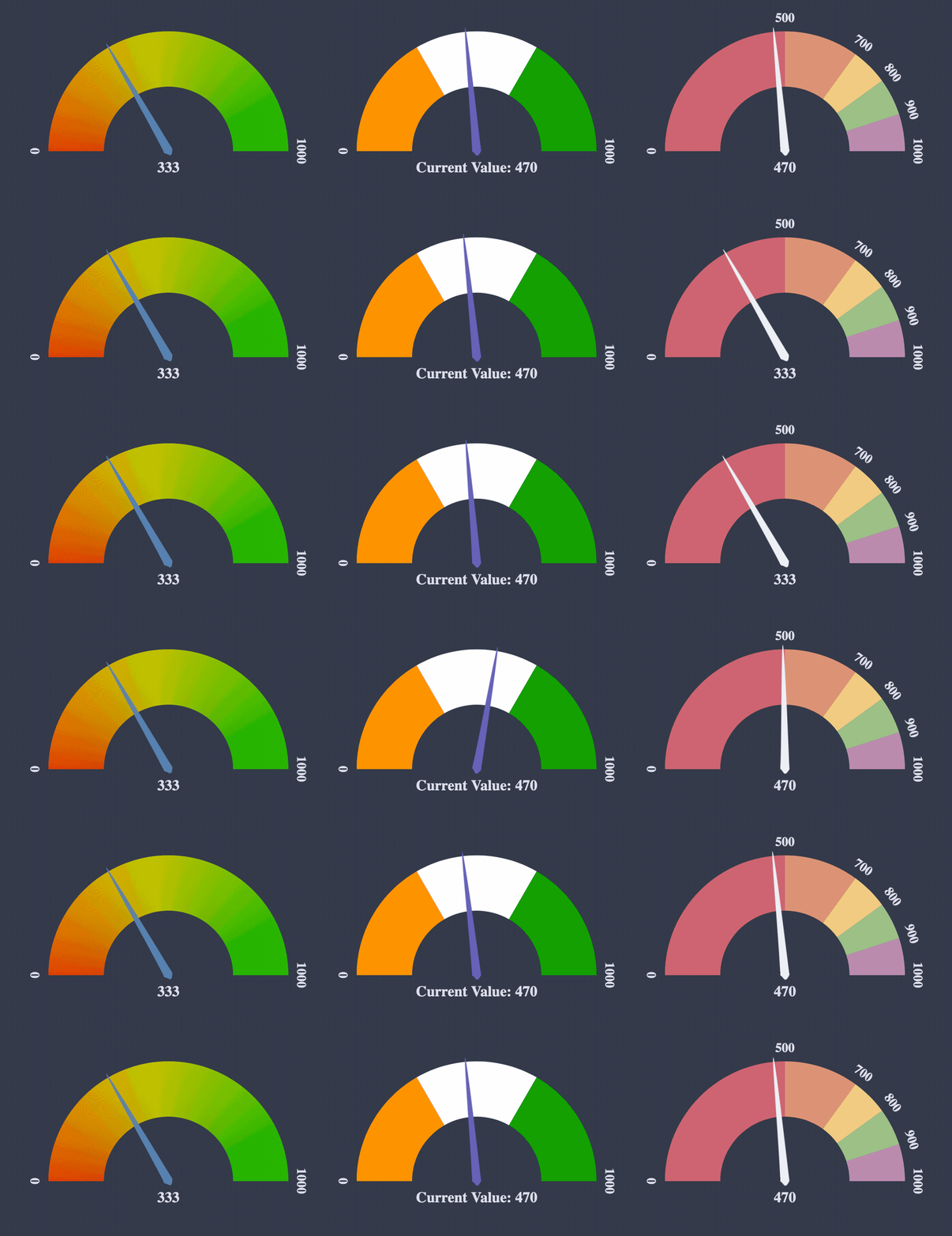
## Usage:
**NPM:**
`npm install --save react-d3-speedometer`
**Yarn:**
`yarn add react-d3-speedometer`
```javascript
// import the component
import ReactSpeedometer from "react-d3-speedometer"
// and just use it
```
## Configuration Options:
| prop | type | default | comments |
| ------------|:--------------:| --------:| ---------|
| value | number | 0 | Make sure your value is between your `minValue` and `maxValue` |
| minValue | number | 0 | |
| maxValue | number | 1000 | |
| segments | number | 5 | Number of segments in the speedometer. Please note, `segments` is calculated with [d3-ticks]() which is an approximate count that is uniformly spaced between min and max. Please refer to [d3-ticks](https://github.com/d3/d3-scale/blob/master/README.md#continuous_ticks) and [d3-array ticks](https://github.com/d3/d3-array#ticks) for more detailed info. |
| maxSegmentLabels | number | value from 'segments' prop | Limit the number of segment labels to displayed. This is useful for acheiving a gradient effect by giving arbitrary large number of `segments` and limiting the labels with this prop. [See Live Example](https://palerdot.in/react-d3-speedometer/?path=/story/react-d3-speedometer--gradient-effect-with-large-number-of-segments-and-maxsegmentlabels-config). Please note, `maxSegmentLabels` is calculated with [d3-ticks]() which is an approximate count that is uniformly spaced between min and max. Please refer to [d3-ticks](https://github.com/d3/d3-scale/blob/master/README.md#continuous_ticks) and [d3-array ticks](https://github.com/d3/d3-array#ticks) for more detailed info. |
| forceRender | boolean | false | After initial rendering/mounting, when props change, only the `value` is changed and animated to maintain smooth visualization. But, if you want to force rerender the whole component like change in segments, colors, dimensions etc, you can use this option to force rerender of the whole component on props change. |
| width | number | 300 | **diameter** of the speedometer and the **width** of the svg element |
| height | number | 300 | height of the svg element. Height of the speedometer is always half the width since it is a **semi-circle**. For fluid width, please refere to `fluidWidth` config |
| dimensionUnit | string | px | Default to `px` for `width/height`. Possible values - `"em" , "ex" , "px" , "in" , "cm" , "mm" , "pt" , ,"pc"` ... Please refer to [specification](https://developer.mozilla.org/en-US/docs/Web/SVG/Content_type#Length) for more details |
| fluidWidth | boolean | false | If `true` takes the width of the parent component. See [Live Example](https://palerdot.in/react-d3-speedometer/?selectedKind=React%20d3%20Speedometer&selectedStory=Fluid%20Width%20view&full=0&down=0&left=1&panelRight=0&downPanel=kadirahq%2Fstorybook-addon-actions%2Factions-panel) for more details |
| needleColor | string | steelblue | Should be a valid color code - colorname, hexadecimal name or rgb value. Should be a valid input for [d3.interpolateHsl](https://github.com/d3/d3-interpolate#interpolateHsl) |
| startColor | string | #FF471A | Should be a valid color code - colorname, hexadecimal name or rgb value. Should be a valid input for [d3.interpolateHsl](https://github.com/d3/d3-interpolate#interpolateHsl) |
| endColor | string | #33CC33 | Should be a valid color code - colorname, hexadecimal name or rgb value. Should be a valid input for [d3.interpolateHsl](https://github.com/d3/d3-interpolate#interpolateHsl) |
| segmentColors | array (of colors) | [] | Custom segment colors can be given with this option. Should be an array of valid color codes. If this option is given **startColor** and **endColor** options will be ignored. |
| needleTransition | string | easeQuadInOut | [d3-easing-identifiers](https://github.com/d3/d3-ease) - easeLinear, easeQuadIn, easeQuadOut, easeQuadInOut, easeCubicIn, easeCubicOut, easeCubicInOut, easePolyIn, easePolyOut, easePolyInOut, easeSinIn, easeSinOut, easeSinInOut, easeExpIn, easeExpOut, easeExpInOut, easeCircleIn, easeCircleOut, easeCircleInOut, easeBounceIn, easeBounceOut, easeBounceInOut, easeBackIn, easeBackOut, easeBackInOut, easeElasticIn, easeElasticOut, easeElasticInOut, easeElastic |
| needleTransitionDuration | number | 500 | Time in milliseconds. |
| needleHeightRatio | float (between 0 and 1) | 0.9 | Control the height of the needle by giving a number/float between `0` and `1`. Default height ratio is `0.9`. |
| ringWidth | number | 60 | Width of the speedometer ring. |
| textColor | string | #666 | Should be a valid color code - colorname, hexadecimal name or rgb value. Used for both showing the current value and the segment values |
| valueFormat | string | | should be a valid format for [d3-format](https://github.com/d3/d3-format#locale_format). By default, no formatter is used. You can use a valid d3 format identifier (for eg: `d` to convert float to integers), to format the values. **Note:** This formatter affects all the values (current value, segment values) displayed in the speedometer |
| currentValueText | string | ${value} | Should be provided a string which should have **${value}** placeholder which will be replaced with current value. By default, current value is shown (formatted with `valueFormat`). For example, if current Value is 333 if you would like to show `Current Value: 333`, you should provide a string **`Current Value: ${value}`**. See [Live Example](https://palerdot.in/react-d3-speedometer/?selectedKind=react-d3-speedometer&selectedStory=Custom%20Current%20Value%20Text&full=0&down=1&left=1&panelRight=0) |
| currentValuePlaceholderStyle | string | ${value} | Should be provided a placeholder string which will be replaced with current value in `currentValueTextProp`. For example: you can use ruby like interpolation by giving following props - ``. This is also helpful if you face `no-template-curly-in-string` eslint warnings and would like to use different placeholder for current value |
| customSegmentStops | array | [] | Array of values **starting** at `min` value, and **ending** at `max` value. This configuration is useful if you would like to split the segments at custom points or have unequal segments at preferred values. If the values does not begin and end with `min` and `max` value respectively, an error will be thrown. This configuration will override `segments` prop, since total number of segments will be `length - 1` of `customSegmentProps`. For example, `[0, 50, 75, 100]` value will have three segments - `0-50`, `50-75`, `75-100`. See [Live Example](https://palerdot.in/react-d3-speedometer/?path=/story/react-d3-speedometer--custom-segment-stops) |
| labelFontSize | string | 14px | Font size for segment labels/legends |
| valueTextFontSize | string | 16px | Font size for current value text |
## Examples
You can view [Live Examples here](https://palerdot.in/react-d3-speedometer/?path=/story/react-d3-speedometer--default-with-no-config)
#### Default with no config - [Live Example](https://palerdot.in/react-d3-speedometer/?path=/story/react-d3-speedometer--default-with-no-config)
```javascript
```
#### With configurations - [Live Example](https://palerdot.in/react-d3-speedometer/?path=/story/react-d3-speedometer--configuring-values)
```javascript
```
#### Custom Segment Colors - [Live Example](https://palerdot.in/react-d3-speedometer/?path=/story/react-d3-speedometer--custom-segment-colors)
```javascript
```
#### Custom Segment Stops - [Live Example](https://palerdot.in/react-d3-speedometer/?path=/story/react-d3-speedometer--custom-segment-stops)
```javascript
// `segments` prop will be ignored since it will be calculated from `customSegmentStops`
// In this case there will be `4` segments (0-500, 500-750, 750-900, 900-1000)
/>
```
#### Fluid Width Example - [Live Example](https://palerdot.in/react-d3-speedometer/?path=/story/react-d3-speedometer--fluid-width-view)
```javascript
// Speedometer will take the width of the parent div (500)
// any width passed will be ignored
```
#### Needle Transition Example - [Live Example](https://palerdot.in/react-d3-speedometer/?path=/story/react-d3-speedometer--needle-transition-duration)
```javascript
```
#### Force Render component on props change - [Live Example](https://palerdot.in/react-d3-speedometer/?path=/story/react-d3-speedometer--force-render-the-component)
```javascript
// By default, when props change, only the value prop is updated and animated.
// This is to maintain smooth visualization and to ignore breaking appearance changes like segments, colors etc.
// You can override this behaviour by giving forceRender: true
// render a component initially
// Now, if given forceRender: true, and change the appearance all together, the component will rerender completely on props change
```
#### Needle Height Configuration Example - [Live Example](https://palerdot.in/react-d3-speedometer/?path=/story/react-d3-speedometer--configure-needle-length)
```javascript
```
You can give a value between `0` and `1` to control the needle height.
#### Gradient Like Effect - [Live Example](https://palerdot.in/react-d3-speedometer/?path=/story/react-d3-speedometer--gradient-effect-with-large-number-of-segments-and-maxsegmentlabels-config)
```javascript
```
---
### Todos:
- [x] Test coverage (with enzyme)
- [x] Convert entire code base to ES6
- [x] Split core from lifecycles
- [ ] Typescript support?
---
### Tests:
`react-d3-speedometer` comes with a test suite using [enzyme](https://github.com/airbnb/enzyme).
```javascript
// navigate to root folder and run
npm test
// or 'yarn test' if you are using yarn
```
---
#### Feature Updates:
- Custom segment stops in `v0.7.0`. [Live Example](https://palerdot.in/react-d3-speedometer/?path=/story/react-d3-speedometer--custom-segment-stops)
- Custom segment colors in `v0.6.0`. [Live Example](https://codesandbox.io/s/relaxed-silence-c3qkb)
#### Changelog:
[View Changelog](CHANGELOG.md)
---
#### Credits:
`react-d3-speedometer` was started as a react port of the following d3 snippet - [http://bl.ocks.org/msqr/3202712](http://bl.ocks.org/msqr/3202712). Component template bootstrapped with [React CDK](https://github.com/storybooks/react-cdk). Also, many thanks to `d3` and `react` ecosystem contributors.
---
#### Contributing:
PRs are welcome. Please create a issue/bugfix/feature branch and create an issue with your branch details. Probably I will create a similar branch in the upstream repo so that PRs can be raised against that branch instead of `master`.
#### Notes
- `0.x` versions are compatible with React & React DOM Versions (16.x)
For every subsequent major react upgrade, `react-d3-speedometer` will be bumped to next major versions. For example `1.x` will be compatible with `React 17.x` so on and so forth ...
For similar library for VueJS, please check out [vue-speedometer](https://github.com/palerdot/vue-speedometer)
#### License:
[MIT](LICENSE)