# React Bounding Box Component
[](https://github.com/alx/react-bounding-box/actions)
[](https://github.com/alx/react-bounding-box/actions)
[](https://badge.fury.io/js/react-bounding-box)
[](https://codecov.io/gh/alx/react-bounding-box)
[](https://opensource.org/licenses/MIT)
React Bounding Box Component displays bounding boxes on an image inside an HTML Canvas.

Demo: [https://alx.github.io/react-bounding-box/](https://alx.github.io/react-bounding-box/)
## Features
- 🎯 Interactive bounding boxes with click selection
- 🖼️ Image and base64 support
- 🎨 Customizable colors and styling
- 📱 Responsive design
- 🧪 Comprehensive test coverage
- 📦 Modern build system with Webpack 5
- 🔒 TypeScript definitions included
## Installation
```bash
npm install react-bounding-box
# or
yarn add react-bounding-box
```
## Usage
```
```
## Params
Commented options are not yet implemented.
```
const params = {
image: 'http://i.imgur.com/gF7QYwa.jpg',
boxes: [
// coord(0,0) = top left corner of image
//[x, y, width, height]
[0, 0, 250, 250],
[300, 0, 250, 250],
[700, 0, 300, 25],
[1100, 0, 25, 300]
// {coord: [0, 0, 250, 250], label: "test"},
// {coord: [300, 0, 250, 250], label: "A"},
// {coord: [700, 0, 300, 25], label: "B"},
// {coord: [1100, 0, 25, 300], label: "C"}
],
options: {
colors: {
normal: 'rgba(255,225,255,1)',
selected: 'rgba(0,225,204,1)',
unselected: 'rgba(100,100,100,1)'
},
style: {
maxWidth: '100%',
maxHeight: '90vh'
}
//showLabels: false
}
};
```
## Segmentation
```
```
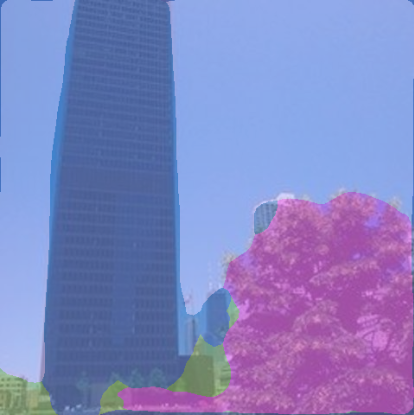
To load segmentation data from a json file generated by [deepdetect](http://deepdetect.com) :
```
```
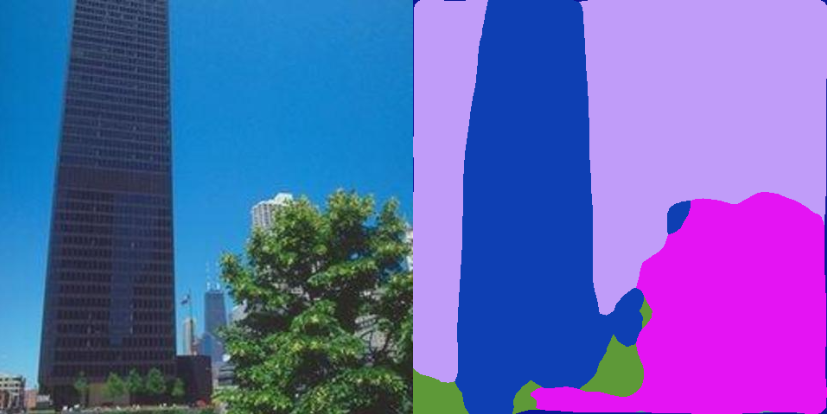
When you want to display the segmentation of an image not hosted in the same domain as your react app, you'll find the following error: **Unable to get image data from canvas because the canvas has been tainted by cross-origin data.**
To avoid this issue, the segmentation can be displayed side-by-side :
```
```
## Development
```bash
# Install dependencies
npm install
# Run tests
npm test
# Run tests with coverage
npm run test:coverage
# Run linting
npm run lint
# Build the project
npm run build
# Format code
npm run format
```
## Security
This project includes automated security scanning:
```bash
# Run security audit
npm run security:audit
# Check for vulnerabilities
npm run security:check
```
## CI/CD Pipeline
This project uses GitHub Actions for continuous integration and deployment:
### Automated Workflows
- **CI/CD Pipeline**: Runs on every push and PR
- Installs dependencies with caching
- Runs linting and type checking
- Executes all tests with coverage
- Performs security audits
- Builds the package
- Publishes to npm on tagged releases
- **Code Quality**: Additional quality checks
- Prettier formatting verification
- Bundle size analysis
- Console statement detection
- TODO/FIXME comment detection
- **Release Management**: Manual workflow for creating releases
- Version bumping (patch/minor/major)
- Changelog generation
- Git tagging
- GitHub release creation
### Publishing Process
1. **Automatic Publishing**: Push a git tag starting with `v` (e.g., `v1.0.0`)
```bash
git tag v1.0.0
git push origin v1.0.0
```
2. **Manual Release**: Use GitHub Actions workflow_dispatch
- Go to Actions tab → Release Management
- Select version type (patch/minor/major)
- Trigger the workflow
### Security
- Automated dependency updates every Monday
- Security vulnerability scanning on every build
- npm audit checks with configurable severity levels
## Contributing
1. Fork the repository
2. Create your feature branch (`git checkout -b feature/amazing-feature`)
3. Commit your changes (`git commit -m 'Add amazing feature'`)
4. Push to the branch (`git push origin feature/amazing-feature`)
5. Open a Pull Request
**Note**: All PRs must pass CI/CD checks including tests, linting, and security scans.
## License
This project is licensed under the MIT License - see the [LICENSE](LICENSE) file for details.
## Changelog
### v0.6.0 - 2025
- **BREAKING**: Modernized to React 18+ with new JSX transform
- **BREAKING**: Updated minimum Node.js requirement to 16+
- Migrated to Webpack 5 and Babel 7
- Added comprehensive Jest testing with React Testing Library
- Implemented modern CI/CD with GitHub Actions
- Added automated security scanning and code quality tools
- Enhanced package exports and build output
- Zero npm audit vulnerabilities
## Previous Changelog
### v0.5.19 - 09/06/2020
- fix: disable pointer-events on segmentation canvas
- fix: clean segCanvas when receiving new props
- fix: check null on this.props.boxes in renderBoxes
- fix: set boxes as empty array by default
- fix: remove unused backup file
### v0.5.14 - 14/02/2020
- FIX: Image is not redrawn on update
[#15](https://github.com/alx/react-bounding-box/issues/15) - Thanks [@testower](https://github.com/testower)
- FIX: display boxes when xmin/ymin on 0 value
- FIX: split storybook stories to use state outside component
- FIX: update `minimatch` and `serialize-javascript` dependencies - [@dependabot](https://github.com/dependabot)
### v0.5.10 - 26/01/2020
- FIX: segmentation is redrawn when nextProps.pixelSegmentation is updated
### v0.5.9 - 23/01/2020
- FIX: add missing redraw when resizing canvas after loading a new image
- FIX: only resize canvas when loaded image change dimensions
### v0.5.7 - 21/01/2020
- FIX: use props.forceRedraw property to redraw canvas
- FIX: replace array.some() method by classic for() loop
- FIX: check new image dimension and data before to redraw it in canvas
- FIX: update background width and height after loading a new image
### v0.5.2 - 16/12/2019
- Use absolute value to compute width and height from coordinates
### v0.1.0 - 22/05/2018
- Fix deprecated `React.PropTypes`
### v0.0.14 - 30/01/2018
- add image segmentation display available in [deepdetect](https://github.com/beniz/deepdetect/)
### v0.0.11 - 14/03/2017
- specific drawLabel prop function
### v0.0.10 - 14/03/2017
- new object model available inside boxes prop
- change drawBox function prop to support box label
### v0.0.9 - 16/02/2017
- add drawBox function prop to customize how the box will be displayed
### v0.0.8 - 16/02/2017
- add selectedIndex and onSelected props to allow external modification/observation of selected bounding box
### v0.0.7 - 15/02/2017
- use react-cdk yeoman generator to make simple component and use storybook
- eslint on bounding box component
### v0.0.5 - 09/02/2017
- add missing Boundingbox displayName
### v0.0.4 - 09/02/2017
- fix issue with canvas width/height on firefox
### v0.0.3 - 09/02/2017
- review options colors structure
- options is optional, and defaultProps for colors
### v0.0.2 - 09/02/2017
- get image size with javascript
### v0.0.1 - 08/02/2017
- First commit
- Simple example with mouse hover on boxes
## History
- 06/2016 - Inspiration: [DenseCap](http://cs.stanford.edu/people/karpathy/densecap/)
- 09/2016 - First prototype in production: [recognition.tate.org.uk](http://recognition.tate.org.uk/)