# `react-bootstrap-jalali-calendar`

This package created specifically for `react-bootstrap` which will help you to easily add Jalali calendar in your project without any changing in the code.

Enjoy coding ... 

- <a href="https://github.com/maherAshori/react-bootstrap-jalali-calendar#required">Required</a>
- How to make RTL with `react-bootstrap`
    - <a href="https://github.com/maherAshori/react-bootstrap-jalali-calendar#indexjs">index.js</a>
    - <a href="https://github.com/maherAshori/react-bootstrap-jalali-calendar#indexhtml">index.html</a>
- <a href="https://github.com/maherAshori/react-bootstrap-jalali-calendar#installation">Installation</a>
- <a href="https://github.com/maherAshori/react-bootstrap-jalali-calendar#output">What return from the datepicker</a>
- <a href="https://github.com/maherAshori/react-bootstrap-jalali-calendar#calendar">Standalone Calendar</a>
- <a href="https://github.com/maherAshori/react-bootstrap-jalali-calendar#simple-input">Simple datepicker input</a>
- <a href="https://github.com/maherAshori/react-bootstrap-jalali-calendar#multiple-inputs">Multiple inputs</a>
- <a href="https://github.com/maherAshori/react-bootstrap-jalali-calendar#array-inputs">Using datepicker in array</a>
- <a href="https://github.com/maherAshori/react-bootstrap-jalali-calendar#calendar-events">Calendar events</a>
- <a href="https://github.com/maherAshori/react-bootstrap-jalali-calendar#datepicker-properties-">Datepicker Properties</a>
- <a href="https://github.com/maherAshori/react-bootstrap-jalali-calendar#calendar-options-">Calendar Options</a>
---

# Version >= 0.2.1

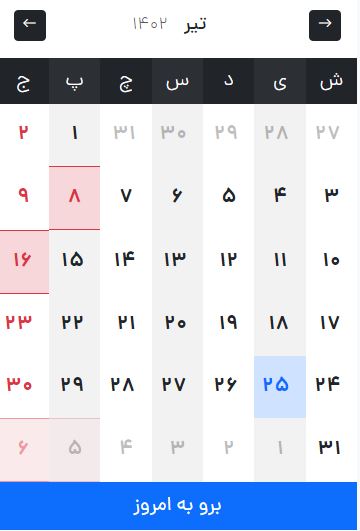
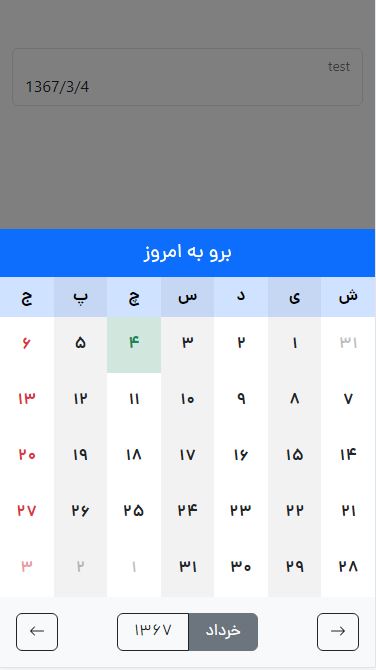
Responsive setting for tablet, mobile and desktop

---

`font-family: dana`

| Desktop          | Tablet & Mobile
| ---------------- | ----------
| `window.innerWidth > 768` | `window.innerWidth <= 768`
| <img src="https://raw.githubusercontent.com/maherAshori/react-bootstrap-jalali-calendar/main/datepicker.jpg"/>    | <img src="https://raw.githubusercontent.com/maherAshori/react-bootstrap-jalali-calendar/main/datepicker.responsive.jpg"/>    


## Required

This package created with

```text
npm install react-bootstrap bootstrap
npm install moment-jalaali
```

Please fill free If you encounter an issue using this product, be sure to notify us from issues part.

_We will do our best to improve and cooperate with you_

## index.js

Make your project RTL
```js
import React from 'react';
import ReactDOM from 'react-dom/client';
import App from './App';
import reportWebVitals from './reportWebVitals';
import 'bootstrap/dist/css/bootstrap.rtl.min.css';
import {ThemeProvider} from "react-bootstrap";

const root = ReactDOM.createRoot(document.getElementById('root'));
root.render(
    <ThemeProvider dir="rtl">
        <App/>
    </ThemeProvider>
);

reportWebVitals();
```

## index.html

Add `dir="rtl"` to your html
```html
<!DOCTYPE html>
<html lang="en" dir="rtl">
...
</html>
```

## Installation 🚀

In the project directory terminal, you can run:

```text
npm install react-bootstrap-jalali-calendar
```

## Output

When you click on the day, you will get this json.

_Event property default is `undefined`_

```json
{
  "date": "1400/2/14",
  "day": 14,
  "event": {
    "day": 8,
    "description": "۸ تیر عید سعید قربان",
    "isHoliday": true
  },
  "gregorian": "2021-5-4",
  "month": 2,
  "name": "Tue",
  "year": 1400
}
```

## Calendar

```js
import Calendar from 'react-bootstrap-jalali-calendar/dist/calendar';
import react, {useState} from "react";

function App() {
    const options = {
        hideTodayButton: false,
        stopChangingYears: false,
        calendarHeaderColor: "primary",
        hideToolsBar: false,
        calendarToolsColor: "light",
    }

    const events = [
        {
            year: 1402,
            data: [
                {
                    month: 4,
                    data: [
                        {
                            day: 8,
                            isHoliday: true,
                            description: '۸ تیر عید سعید قربان'
                        },
                        {
                            day: 16,
                            isHoliday: true,
                            description: '۱۶ تیر عید سعید غدیر خم [ ١٨ ذوالحجه ]'
                        }
                    ]
                },
                {
                    month: 5,
                    data: [
                        {
                            day: 5,
                            isHoliday: true,
                            description: '۵ اَمرداد تاسوعای حسینی [ ٩ محرم ]'
                        },
                        {
                            day: 6,
                            isHoliday: true,
                            description: '۶ اَمرداد عاشورای حسینی [ ١٠ محرم ]'
                        }
                    ]
                }
            ]
        }
    ];

    const [date, setDate] = useState("1367/3/4");

    const selectedDate = (day) => {
        console.log(day)
        setDate(day.date);
    }

    return (
        <>
            <div className={"container pt-5"}>
                <div className={"row"}>
                    <div className={"col-3 mx-auto"}>
                        <Calendar events={events} callback={selectedDate} value={date} options={options}/>
                    </div>
                </div>
                <div className={"row mt-5"}>
                    <div className={"col-4 mx-auto text-center"}>
                        <h3>{date}</h3>
                    </div>
                </div>
            </div>
        </>
    )
}

export default App;
```

## Simple input

Easy to use

```js
import React from 'react';
import {useState} from "react";
import Datepicker from 'react-bootstrap-jalali-calendar';

const App = () => {
    //optional: with default value
    const options = {
        template: 'floating',
        formControlSize: "",
        hideFormControlLabel: false,
        hideTodayButton: false,
        stopChangingYears: false,
        calendarHeaderColor: "primary",
        hideToolsBar: false,
        calendarToolsColor: "light",
    }
    //you can remove it 
    
    //with default value
    const [date, setDate] = useState("1367/3/4");

    return (
        <>
            <Datepicker name={'test'}
                        options={options}
                        value={date}
                        callback={(day) => setDate(day.date)}/>
        </>
    )
};

export default App;
```

## Multiple inputs

Multiple used

```js
import React from 'react';
import {useState} from "react";
import Datepicker from 'react-bootstrap-jalali-calendar';

const App = () => {
    const [date, setDate] = useState("");
    //with default value
    const [date2, setDate2] = useState("1367/3/10");

    return (
        <div className={"row"}>
            <div className={'col-12 col-lg-6 mb-3 mb-lg-0'}>
                <Datepicker name={'test'}
                            value={date}
                            callback={(day) => setDate(day.date)}/>
            </div>

            <div className={'col-12 col-lg-6 mb-3 mb-lg-0'}>
                <Datepicker name={'test2'}
                            value={date2}
                            callback={(day) => setDate2(day.date)}/>
            </div>
        </div>
    )
};

export default App;
```

## Array inputs

Handle your array inputs

```js
import React from 'react';
import {useState} from "react";
import Datepicker from 'react-bootstrap-jalali-calendar';

const App = () => {
    const data = [
        {
            name: 'test3',
            value: ""
        },
        {
            name: 'test4',
            value: "1400/2/14"
        }
    ];

    const [items, handleItems] = useState(data);

    const setItemsValue = (item, date) => {
        const cloneItems = [...items];
        const findItemByName = cloneItems.find(x => x.name === item.name);
        if (findItemByName) {
            findItemByName.value = date;
        }
        handleItems(cloneItems);
    }

    return (
        <div className={"row"}>
            {
                items.map((item, index) => {
                    return <React.Fragment key={index}>
                        <div className={'col-12 col-lg-6 mb-3 mb-lg-0'}>
                            <Datepicker name={item.name}
                                        value={item.value}
                                        callback={(day) => setItemsValue(item, day.date)}/>
                        </div>
                    </React.Fragment>
                })
            }
        </div>
    )
};

export default App;
```

## Calendar events

Set your events on calendar easily

```js
import React from 'react';
import {useState} from "react";
import Datepicker from 'react-bootstrap-jalali-calendar';

const App = () => {
    //with default value
    const [date, setDate] = useState("1367/3/4");

    const events = [
        {
            year: 1402,
            data: [
                {
                    month: 4,
                    data: [
                        {
                            day: 8,
                            isHoliday: true,
                            description: '۸ تیر عید سعید قربان'
                        },
                        {
                            day: 16,
                            isHoliday: true,
                            description: '۱۶ تیر عید سعید غدیر خم [ ١٨ ذوالحجه ]'
                        }
                    ]
                },
                {
                    month: 5,
                    data: [
                        {
                            day: 5,
                            isHoliday: true,
                            description: '۵ اَمرداد تاسوعای حسینی [ ٩ محرم ]'
                        },
                        {
                            day: 6,
                            isHoliday: true,
                            description: '۶ اَمرداد عاشورای حسینی [ ١٠ محرم ]'
                        }
                    ]
                }
            ]
        }
    ];

    return (
        <>
            <Datepicker name={'test'}
                        events={events}
                        value={date}
                        callback={(day) => setDate(day.date)}/>
        </>
    )
};

export default App;
```


## `Datepicker` Properties 📄

| Name          | Default    | Required | Description
| ------------- | ---------- | -------- | -----------
| `callback`    | `null`     | Yes      | calendar method to pass the value
| `value`       | `null`     | Yes      | input value
| `name`        | `null`     | Yes      | input name
| `id`          | `{name}`   | No       | input id - default is {name} if empty
| `label`       | `{name}`   | No       | input id - default is {name} if empty
| `placeholder` | `{name}`   | No       | input id - default is {name} if empty
| `disabled`    | `false`    | No       | disable input
| `required`    | `false`    | No       | required input
| `events`      | `[array]`  | No       | calendar events


## `Calendar` Options 📄

###BootstrapMainColors
```json
[
  "danger",
  "primary",
  "dark",
  "info",
  "light",
  "secondary",
  "success",
  "warning"
]
```

| Name                  | Default    | Options                  | Description
| --------------------- | ---------- | -----------------------  | -----------
| `template`            | `floating` | `floating` `formControl` | Bootstrap input type
| `formControlSize`     | `""`       | `lg` `sm` `""`           | Bootstrap input size if <div>`{template: "formControl"}`</div>
| `hideFormControlLabel`| `false`    |                          | Hide input label if <div>`{template: "formControl"}`</div>
| `hideTodayButton`     | `false`    |                          | Hide today button from the calendar                          
| `stopChangingMonths`  | `false`    |                          | Disable changing month, it will effect years                         
| `stopChangingYears`   | `false`    |                          | Disable changing years                         
| `hideToolsBar`        | `false`    |                          | Hide calendar toolbar include: `change years`, `change month`
| `calendarHeaderColor` | `primary`  | BootstrapMainColors      | Select from bootstrap main colors
| `calendarToolsColor`  | `light`    | BootstrapMainColors      | Select from bootstrap main colors

## License

[MIT](./LICENSE)