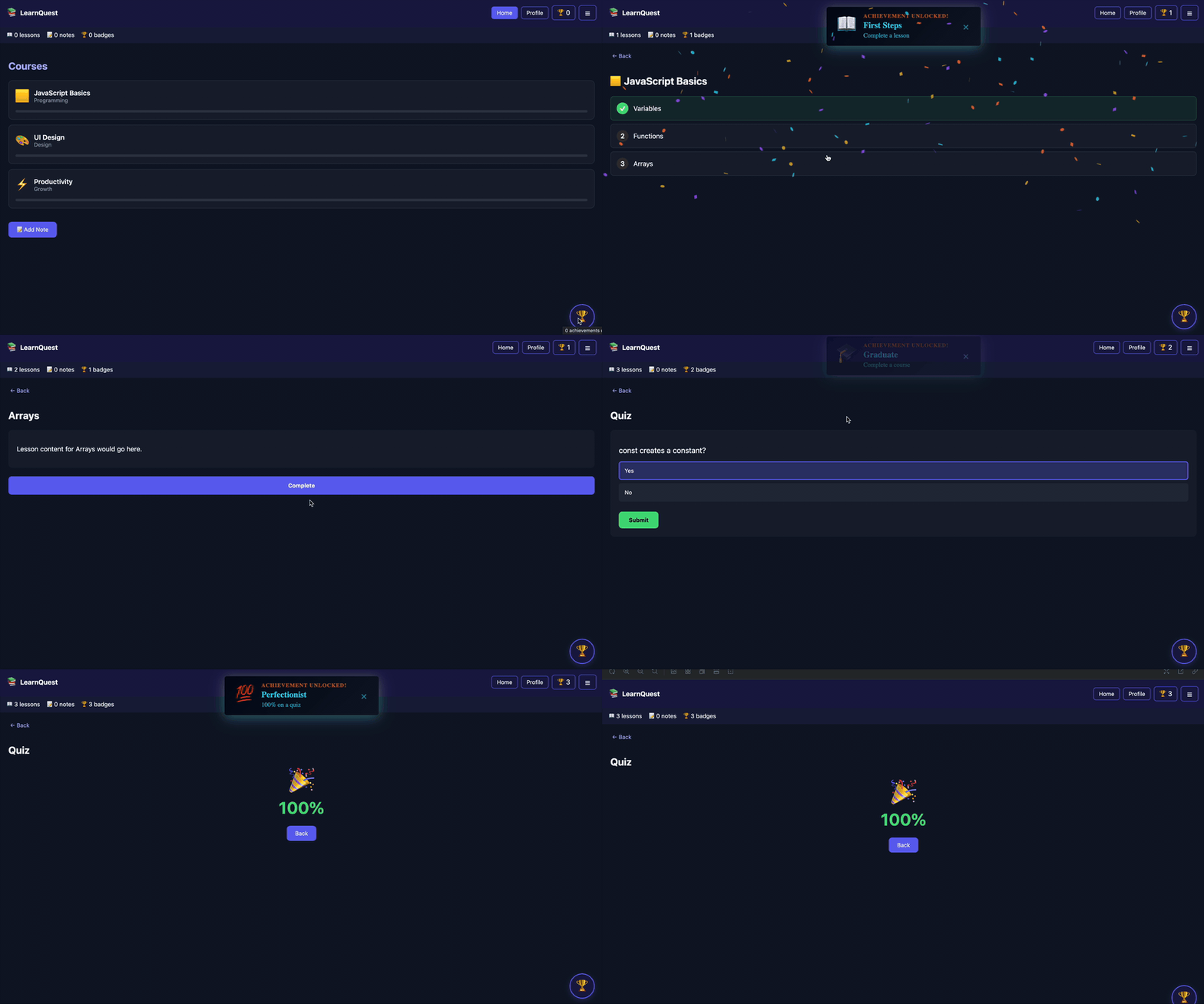
# React Achievements
**Add gamification to your React app in minutes** - Track progress, unlock achievements, show badges, and celebrate milestones.
[📚 Documentation](https://dave-b-b.github.io/react-achievements/) | [📦 npm Package](https://www.npmjs.com/package/react-achievements)
[](https://www.npmjs.com/package/react-achievements) [-blue.svg)](./LICENSE) [](https://www.typescriptlang.org/)
## Installation
```bash
npm install react-achievements
```
**Requirements:** React 16.8+, Node.js 16+
## Start Here
```tsx
import {
AchievementProvider,
AchievementsWidget,
useSimpleAchievements,
} from 'react-achievements';
const achievements = {
score: {
100: { title: 'Century!', description: 'Score 100 points', icon: '🏆' },
},
};
function Game() {
const { track } = useSimpleAchievements();
return (
);
}
export default function App() {
return (
);
}
```
`AchievementsWidget` reads from context, shows the unlocked count, and opens a modal with locked and unlocked achievements. Use `placement="inline"` to put it in a drawer, sidebar, or navigation area. For an exact visual match, pass `renderTrigger` and use your app's own drawer row, nav item, or profile menu button while the widget still controls the modal.
```tsx
(
)}
/>
```
## Common Placements
Use the same context-aware UI in whichever surface already fits your app:
```tsx
import { useState } from 'react';
import {
AchievementsList,
AchievementsModal,
AchievementsWidget,
} from 'react-achievements';
// Floating launcher in a corner
// Inline nav, drawer, sidebar, or profile menu item
// Compact square badge grid for dense achievement catalogs
// Optional: blur the page behind the modal
// Existing button or drawer row that opens the built-in modal
const [open, setOpen] = useState(false);
// Optional: hide scrollbar chrome while preserving scroll
setOpen(false)}
hideScrollbar
backdropBlur={2}
/>
// Inline achievements page, panel, drawer, or settings section
```
For modal blur props, pass a number for pixels or a CSS length string. Omit the prop or pass `0` when you do not want backdrop blur.
Storybook includes examples for floating buttons, nav buttons, drawer rows, existing controls that open a modal, dashboard cards, profile menus, and inline lists.
Provider-level icons and UI options are shared across notifications, widgets, modals, and lists:
```tsx
```
Set `ui.enableConfetti` to `false` to disable the built-in celebration. Omit `ConfettiComponent` when you only want to tune the default `canvas-confetti` animation through `ui.confetti`.
Rewards can optionally override the global confetti settings. Omit `confetti` to use the provider defaults, or set `confetti: false` for quieter rewards:
```tsx
const achievements = {
score: {
100: {
title: 'Century!',
description: 'Score 100 points',
icon: '🏆',
},
1000: {
title: 'Boss Finale!',
description: 'Score 1,000 points',
icon: '👑',
confetti: {
particleCount: 240,
spread: 100,
startVelocity: 60,
scalar: 1.4,
},
},
},
};
```
## Hooks
```tsx
const {
track,
increment,
trackMultiple,
unlockedIds,
unlockedAchievements,
allAchievements,
unlockedCount,
totalCount,
} = useSimpleAchievements();
```
Deprecated aliases from v3, including `unlocked` and `all`, remain available until 5.0.
## Event-Based Tracking
For larger apps, create an engine and emit semantic events:
```tsx
import {
AchievementEngine,
AchievementProvider,
AchievementsWidget,
useAchievementEngine,
} from 'react-achievements';
const engine = new AchievementEngine({
achievements,
eventMapping: {
userScored: (data) => ({ score: data.points }),
},
storage: 'local',
});
function Game() {
const engine = useAchievementEngine();
return ;
}
export default function App() {
return (
);
}
```
## Headless Usage
Use the DOM-free entry point when building custom UI or preparing a React Native integration:
```tsx
import {
AchievementProvider,
useAchievementState,
useSimpleAchievements,
} from 'react-achievements/headless';
function CustomAchievementsPanel() {
const { track } = useSimpleAchievements();
const { allAchievements, unlockedCount, totalCount } = useAchievementState();
return (
))}
);
}
export function App() {
return (
);
}
```
React Native UI components are not included in the web package; use `achievements-engine` or the `/headless` React APIs with your own native UI.
## Entry Points
- `react-achievements` - v4 web API with provider, hooks, built-in effects, widget, modal, and list components
- `react-achievements/web` - explicit web entry point
- `react-achievements/headless` - provider, hooks, engine, storage, and types without DOM UI
## Migrating From v3
- Built-in UI is now the default; `useBuiltInUI` is a deprecated no-op.
- `AchievementsWidget` replaces the legacy manual `BadgesButtonWithModal` setup.
- `useSimpleAchievements()` now returns `unlockedIds`, `unlockedAchievements`, and `allAchievements`.
- External UI peer dependencies are no longer required.
- Deprecated v3 component names remain as compatibility wrappers until 5.0.
## License
React Achievements is dual-licensed:
- **Free for Non-Commercial Use** (MIT License)
- **Commercial License Required** for businesses, SaaS, commercial apps, and enterprise use
[Get Commercial License](https://github.com/sponsors/dave-b-b) | [License Details](./LICENSE) | [Commercial Terms](./COMMERCIAL-LICENSE.md)
## AI Agents
If you're using AI coding agents, see `AGENTS.md` for the recommended v4 integration prompt.