# A/B Testing React Components
[](https://www.npmjs.com/package/react-ab-test)
[](https://circleci.com/gh/pushtell/react-ab-test)
[](https://coveralls.io/github/pushtell/react-ab-test?branch=master)
[](https://david-dm.org/pushtell/react-ab-test)
[](https://www.npmjs.com/package/react-ab-test)
Wrap components in [``](#variant-) and nest in [``](#experiment-). A variant is chosen randomly and saved to local storage.
```js
Version A
Version B
```
Report to your analytics provider using the [`emitter`](#emitter). Helpers are available for [Mixpanel](#mixpanelhelper) and [Segment.com](#segmenthelper).
```js
emitter.addPlayListener(function(experimentName, variantName){
mixpanel.track("Start Experiment", {name: experimentName, variant: variantName});
});
```
Please [★ on GitHub](https://github.com/pushtell/react-ab-test)!
;
}
});
// Called when the experiment is displayed to the user.
emitter.addPlayListener(function(experimentName, variantName){
console.log("Displaying experiment ‘" + experimentName + "’ variant ‘" + variantName + "’");
});
// Called when a 'win' is emitted, in this case by this.refs.experiment.win()
emitter.addWinListener(function(experimentName, variantName){
console.log("Variant ‘" + variantName + "’ of experiment ‘" + experimentName + "’ was clicked");
});
```
### Coordinate Multiple Components
Try it [on JSFiddle](http://jsfiddle.net/pushtell/pcutps9q/)
```js
var Experiment = require("react-ab-test/lib/Experiment");
var Variant = require("react-ab-test/lib/Variant");
var emitter = require("react-ab-test/lib/emitter");
// Define variants in advance.
emitter.defineVariants("My Example", ["A", "B", "C"]);
var Component1 = React.createClass({
render: function(){
return
Section A
Section B
;
}
});
var Component2 = React.createClass({
render: function(){
return
;
}
});
// Called when the experiment is displayed to the user.
emitter.addPlayListener(function(experimentName, variantName){
console.log("Displaying experiment ‘" + experimentName + "’ variant ‘" + variantName + "’");
});
// Called when a 'win' is emitted, in this case by emitter.emitWin()
emitter.addWinListener(function(experimentName, variantName){
console.log("Variant ‘" + variantName + "’ of experiment ‘" + experimentName + "’ was clicked");
});
```
### Weighting Variants
Try it [on JSFiddle](http://jsfiddle.net/pushtell/e2q7xe4f/)
Use [emitter.defineVariants()](#emitterdefinevariantsexperimentname-variantnames--variantweights) to optionally define the ratios by which variants are chosen.
```js
var Experiment = require("react-ab-test/lib/Experiment");
var Variant = require("react-ab-test/lib/Variant");
var emitter = require("react-ab-test/lib/emitter");
// Define variants and weights in advance.
emitter.defineVariants("My Example", ["A", "B", "C"], [10, 40, 40]);
var App = React.createClass({
render: function(){
return
Section A
Section B
Section C
;
}
});
```
### Debugging
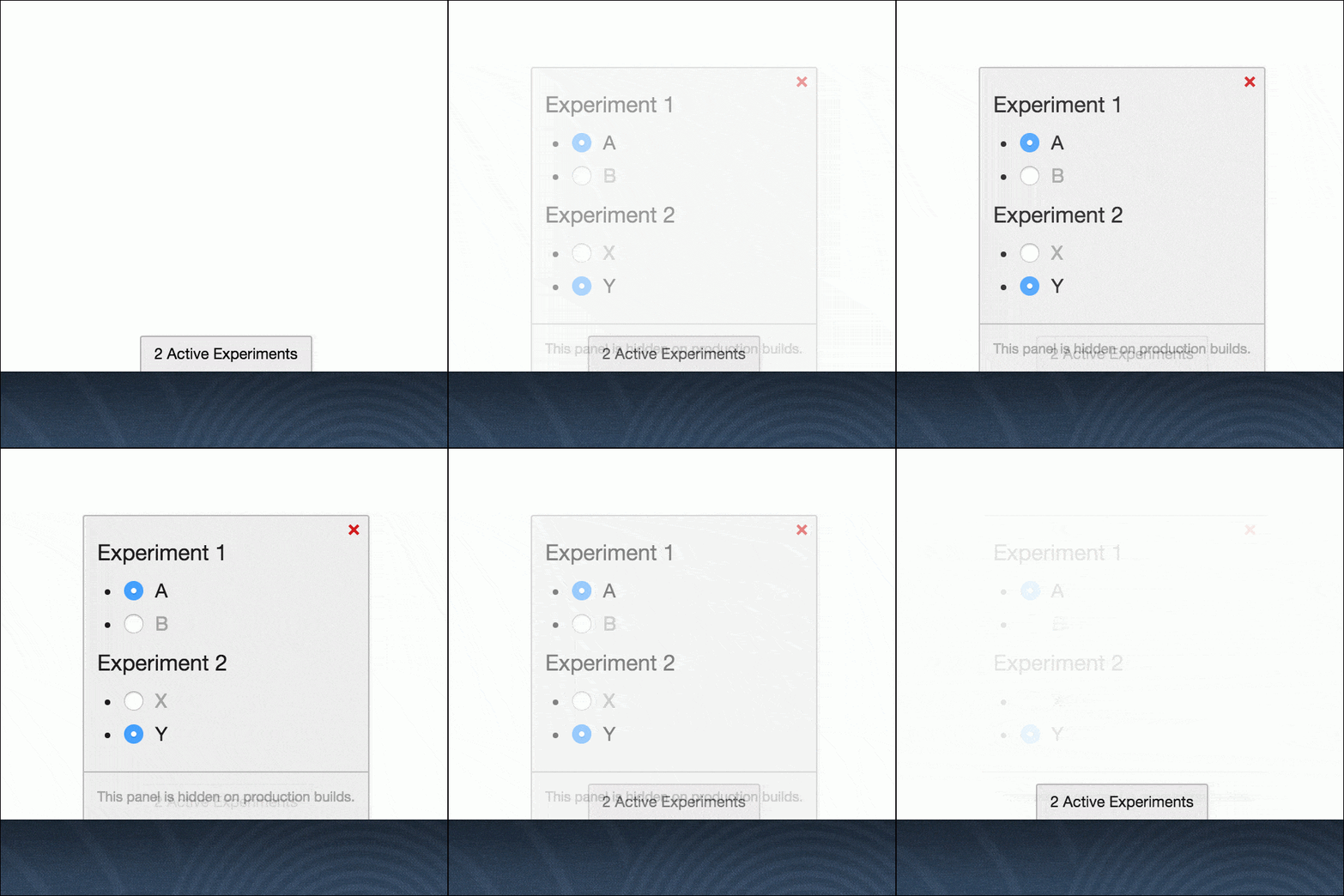
The [debugger](#experimentdebugger) attaches a fixed-position panel to the bottom of the `` element that displays mounted experiments and enables the user to change active variants in real-time.
The debugger is wrapped in a conditional `if(process.env.NODE_ENV === "production") {...}` and will not display on production builds using [envify](https://github.com/hughsk/envify).
Try it [on JSFiddle](http://jsfiddle.net/pushtell/vs9kkxLd/)
```js
var Experiment = require("react-ab-test/lib/Experiment");
var Variant = require("react-ab-test/lib/Variant");
var experimentDebugger = require("react-ab-test/lib/debugger");
experimentDebugger.enable();
var App = React.createClass({
render: function(){
return
Section A
Section B
;
}
});
```
### Server Rendering
A [``](#experiment-) with a `userIdentifier` property will choose a consistent [``](#variant-) suitable for server side rendering.
See [`./examples/isomorphic`](https://github.com/pushtell/react-ab-test/tree/develop/examples/isomorphic) for a working example.
#### Example
The component in [`Component.jsx`](https://github.com/pushtell/react-ab-test/blob/master/examples/isomorphic/Component.jsx):
```js
var React = require("react");
var Experiment = require("react-ab-test/lib/Experiment");
var Variant = require("react-ab-test/lib/Variant");
module.exports = React.createClass({
propTypes: {
userIdentifier: React.PropTypes.string.isRequired
},
render: function(){
return
Section A
Section B
;
}
});
```
We use a session ID for the `userIdentifier` property in this example, although a long-lived user ID would be preferable. See [`server.js`](https://github.com/pushtell/react-ab-test/blob/master/examples/isomorphic/server.js):
```js
require("babel/register")({only: /jsx/});
var express = require('express');
var session = require('express-session');
var React = require("react");
var ReactDOMServer = require("react-dom/server");
var Component = require("./Component.jsx");
var abEmitter = require("react-ab-test/lib/emitter")
var app = express();
app.set('view engine', 'ejs');
app.use(session({
secret: 'keyboard cat',
resave: false,
saveUninitialized: true
}));
app.get('/', function (req, res) {
var reactElement = React.createElement(Component, {userIdentifier: req.sessionID});
var reactString = ReactDOMServer.renderToString(reactElement);
abEmitter.rewind();
res.render('template', {
sessionID: req.sessionID,
reactOutput: reactString
});
});
app.use(express.static('www'));
app.listen(8080);
```
Remember to call `abEmitter.rewind()` to prevent memory leaks.
An [EJS](https://github.com/mde/ejs) template in [`template.ejs`](https://github.com/pushtell/react-ab-test/blob/master/examples/isomorphic/views/template.ejs):
```html
Isomorphic Rendering Example
<%- reactOutput %>
```
On the client in [`app.jsx`](https://github.com/pushtell/react-ab-test/blob/master/examples/isomorphic/www/app.jsx):
```js
var React = require('react');
var ReactDOM = require('react-dom');
var Component = require("../Component.jsx");
var container = document.getElementById("react-mount");
ReactDOM.render(, container);
```
### With Babel
Code from [`./src`](https://github.com/pushtell/react-ab-test/tree/master/src) is written in [JSX](https://facebook.github.io/jsx/) and transpiled into [`./lib`](https://github.com/pushtell/react-ab-test/tree/master/lib) using [Babel](https://babeljs.io/). If your project uses Babel you may want to include files from [`./src`](https://github.com/pushtell/react-ab-test/tree/master/src) directly.
## Alternative Libraries
* [**react-experiments**](https://github.com/HubSpot/react-experiments) - “A JavaScript library that assists in defining and managing UI experiments in React” by [Hubspot](https://github.com/HubSpot). Uses Facebook's [PlanOut framework](http://facebook.github.io/planout/) via [Hubspot's javascript port](https://github.com/HubSpot/PlanOut.js).
* [**react-ab**](https://github.com/olahol/react-ab) - “Simple declarative and universal A/B testing component for React” by [Ola Holmström](https://github.com/olahol)
* [**react-native-ab**](https://github.com/lwansbrough/react-native-ab/) - “A component for rendering A/B tests in React Native” by [Loch Wansbrough](https://github.com/lwansbrough)
Please [let us know](https://github.com/pushtell/react-ab-test/issues/new) about alternate libraries not included here.
## Resources for A/B Testing with React
* [Product Experimentation with React and PlanOut](http://product.hubspot.com/blog/product-experimentation-with-planout-and-react.js) on the [HubSpot Product Blog](http://product.hubspot.com/)
* [Roll Your Own A/B Tests With Optimizely and React](http://engineering.tilt.com/roll-your-own-ab-tests-with-optimizely-and-react/) on the [Tilt Engineering Blog](http://engineering.tilt.com/)
* [Simple Sequential A/B Testing](http://www.evanmiller.org/sequential-ab-testing.html)
* [A/B Testing Rigorously (without losing your job)](http://elem.com/~btilly/ab-testing-multiple-looks/part1-rigorous.html)
Please [let us know](https://github.com/pushtell/react-ab-test/issues/new) about React A/B testing resources not included here.
## API Reference
### ``
Experiment container component. Children must be of type [`Variant`](#variant-).
* **Properties:**
* `name` - Name of the experiment.
* **Required**
* **Type:** `string`
* **Example:** `"My Example"`
* `userIdentifier` - Distinct user identifier. When defined, this value is hashed to choose a variant if `defaultVariantName` or a stored value is not present. Useful for [server side rendering](#server-rendering).
* **Optional**
* **Type:** `string`
* **Example:** `"7cf61a4521f24507936a8977e1eee2d4"`
* `defaultVariantName` - Name of the default variant. When defined, this value is used to choose a variant if a stored value is not present. This property may be useful for [server side rendering](#server-rendering) but is otherwise not recommended.
* **Optional**
* **Type:** `string`
* **Example:** `"A"`
### ``
Variant container component.
* **Properties:**
* `name` - Name of the variant.
* **Required**
* **Type:** `string`
* **Example:** `"A"`
### `emitter`
Event emitter responsible for coordinating and reporting usage. Extended from [facebook/emitter](https://github.com/facebook/emitter).
#### `emitter.emitWin(experimentName)`
Emit a win event.
* **Return Type:** No return value
* **Parameters:**
* `experimentName` - Name of an experiment.
* **Required**
* **Type:** `string`
* **Example:** `"My Example"`
#### `emitter.addActiveVariantListener([experimentName, ] callback)`
Listen for the active variant specified by an experiment.
* **Return Type:** [`Subscription`](#subscription)
* **Parameters:**
* `experimentName` - Name of an experiment. If provided, the callback will only be called for the specified experiment.
* **Optional**
* **Type:** `string`
* **Example:** `"My Example"`
* `callback` - Function to be called when a variant is chosen.
* **Required**
* **Type:** `function`
* **Callback Arguments:**
* `experimentName` - Name of the experiment.
* **Type:** `string`
* `variantName` - Name of the variant.
* **Type:** `string`
#### `emitter.addPlayListener([experimentName, ] callback)`
Listen for an experiment being displayed to the user. Trigged by the [React componentWillMount lifecycle method](https://facebook.github.io/react/docs/component-specs.html#mounting-componentwillmount).
* **Return Type:** [`Subscription`](#subscription)
* **Parameters:**
* `experimentName` - Name of an experiment. If provided, the callback will only be called for the specified experiment.
* **Optional**
* **Type:** `string`
* **Example:** `"My Example"`
* `callback` - Function to be called when an experiment is displayed to the user.
* **Required**
* **Type:** `function`
* **Callback Arguments:**
* `experimentName` - Name of the experiment.
* **Type:** `string`
* `variantName` - Name of the variant.
* **Type:** `string`
#### `emitter.addWinListener([experimentName, ] callback)`
Listen for a successful outcome from the experiment. Trigged by the [emitter.emitWin(experimentName)](#emitteremitwinexperimentname) method.
* **Return Type:** [`Subscription`](#subscription)
* **Parameters:**
* `experimentName` - Name of an experiment. If provided, the callback will only be called for the specified experiment.
* **Optional**
* **Type:** `string`
* **Example:** `"My Example"`
* `callback` - Function to be called when a win is emitted.
* **Required**
* **Type:** `function`
* **Callback Arguments:**
* `experimentName` - Name of the experiment.
* **Type:** `string`
* `variantName` - Name of the variant.
* **Type:** `string`
#### `emitter.defineVariants(experimentName, variantNames [, variantWeights])`
Define experiment variant names and weighting. Required when an experiment [spans multiple components](#coordinate-multiple-components) containing different sets of variants.
If `variantWeights` are not specified variants will be chosen at equal rates.
The variants will be chosen according to the ratio of the numbers, for example variants `["A", "B", "C"]` with weights `[20, 40, 40]` will be chosen 20%, 40%, and 40% of the time, respectively.
* **Return Type:** No return value
* **Parameters:**
* `experimentName` - Name of the experiment.
* **Required**
* **Type:** `string`
* **Example:** `"My Example"`
* `variantNames` - Array of variant names.
* **Required**
* **Type:** `Array.`
* **Example:** `["A", "B", "C"]`
* `variantWeights` - Array of variant weights.
* **Optional**
* **Type:** `Array.`
* **Example:** `[20, 40, 40]`
#### `emitter.setActiveVariant(experimentName, variantName)`
Set the active variant of an experiment.
* **Return Type:** No return value
* **Parameters:**
* `experimentName` - Name of the experiment.
* **Required**
* **Type:** `string`
* **Example:** `"My Example"`
* `variantName` - Name of the variant.
* **Required**
* **Type:** `string`
* **Example:** `"A"`
#### `emitter.getActiveVariant(experimentName)`
Returns the variant name currently displayed by the experiment.
* **Return Type:** `string`
* **Parameters:**
* `experimentName` - Name of the experiment.
* **Required**
* **Type:** `string`
* **Example:** `"My Example"`
#### `emitter.getSortedVariants(experimentName)`
Returns a sorted array of variant names associated with the experiment.
* **Return Type:** `Array.`
* **Parameters:**
* `experimentName` - Name of the experiment.
* **Required**
* **Type:** `string`
* **Example:** `"My Example"`
### `Subscription`
Returned by the emitter's add listener methods. More information available in the [facebook/emitter documentation.](https://github.com/facebook/emitter#api-concepts)
#### `subscription.remove()`
Removes the listener subscription and prevents future callbacks.
* **Parameters:** No parameters
### `experimentDebugger`
Debugging tool. Attaches a fixed-position panel to the bottom of the `` element that displays mounted experiments and enables the user to change active variants in real-time.
The debugger is wrapped in a conditional `if(process.env.NODE_ENV === "production") {...}` and will not display on production builds using [envify](https://github.com/hughsk/envify).
#### `experimentDebugger.enable()`
Attaches the debugging panel to the `` element.
* **Return Type:** No return value
#### `experimentDebugger.disable()`
Removes the debugging panel from the `` element.
* **Return Type:** No return value
### `mixpanelHelper`
Sends events to [Mixpanel](https://mixpanel.com). Requires `window.mixpanel` to be set using [Mixpanel's embed snippet](https://mixpanel.com/help/reference/javascript).
#### Usage
When the [``](#experiment-) is mounted, the helper sends an `Experiment Play` event using [`mixpanel.track(...)`](https://mixpanel.com/help/reference/javascript-full-api-reference#mixpanel.track) with `Experiment` and `Variant` properties.
When a [win is emitted](#emitteremitwinexperimentname) the helper sends an `Experiment Win` event using [`mixpanel.track(...)`](https://mixpanel.com/help/reference/javascript-full-api-reference#mixpanel.track) with `Experiment` and `Variant` properties.
Try it [on JSFiddle](https://jsfiddle.net/pushtell/hwtnzm35/)
```js
var Experiment = require("react-ab-test/lib/Experiment");
var Variant = require("react-ab-test/lib/Variant");
var mixpanelHelper = require("react-ab-test/lib/helpers/mixpanel");
// window.mixpanel has been set by Mixpanel's embed snippet.
mixpanelHelper.enable();
var App = React.createClass({
onButtonClick: function(e){
emitter.emitWin("My Example");
// mixpanelHelper sends the 'Experiment Win' event, equivalent to:
// mixpanel.track('Experiment Win', {Experiment: "My Example", Variant: "A"})
},
componentWillMount: function(){
// mixpanelHelper sends the 'Experiment Play' event, equivalent to:
// mixpanel.track('Experiment Play', {Experiment: "My Example", Variant: "A"})
},
render: function(){
return
Section A
Section B
;
}
});
```
#### `mixpanelHelper.enable()`
Add listeners to `win` and `play` events and report results to Mixpanel.
* **Return Type:** No return value
#### `mixpanelHelper.disable()`
Remove `win` and `play` listeners and stop reporting results to Mixpanel.
* **Return Type:** No return value
### `segmentHelper`
Sends events to [Segment](https://segment.com). Requires `window.analytics` to be set using [Segment's embed snippet](https://segment.com/docs/libraries/analytics.js/quickstart/#step-1-copy-the-snippet).
#### Usage
When the [``](#experiment-) is mounted, the helper sends an `Experiment Viewed` event using [`segment.track(...)`](https://segment.com/docs/libraries/analytics.js/#track) with `experimentName` and `variationName` properties.
When a [win is emitted](#emitteremitwinexperimentname) the helper sends an `Experiment Won` event using [`segment.track(...)`](https://segment.com/docs/libraries/analytics.js/#track) with `experimentName` and `variationName` properties.
Try it [on JSFiddle](https://jsfiddle.net/pushtell/ae1jeo2k/)
```js
var Experiment = require("react-ab-test/lib/Experiment");
var Variant = require("react-ab-test/lib/Variant");
var segmentHelper = require("react-ab-test/lib/helpers/segment");
// window.analytics has been set by Segment's embed snippet.
segmentHelper.enable();
var App = React.createClass({
onButtonClick: function(e){
emitter.emitWin("My Example");
// segmentHelper sends the 'Experiment Won' event, equivalent to:
// segment.track('Experiment Won', {experimentName: "My Example", variationName: "A"})
},
componentWillMount: function(){
// segmentHelper sends the 'Experiment Viewed' event, equivalent to:
// segment.track('Experiment Viewed, {experimentName: "My Example", variationName: "A"})
},
render: function(){
return
Section A
Section B
;
}
});
```
#### `segmentHelper.enable()`
Add listeners to `win` and `play` events and report results to Segment.
* **Return Type:** No return value
#### `segmentHelper.disable()`
Remove `win` and `play` listeners and stop reporting results to Segment.
* **Return Type:** No return value
## How to contribute
### Requisites
Before contribuiting you need:
- [doctoc](https://github.com/thlorenz/doctoc) installed
Then you can:
- Apply your changes :sunglasses:
- Build your changes with `npm run build`
- Test your changes with `npm test`
- Lint your changes with `npm run lint`
- And finally open the PR! :tada:
### Browser Coverage
[Karma](http://karma-runner.github.io/0.13/index.html) tests are performed on [Browserstack](https://www.browserstack.com/) in the following browsers:
* IE 9, Windows 7
* IE 10, Windows 7
* IE 11, Windows 7
* Opera (latest version), Windows 7
* Firefox (latest version), Windows 7
* Chrome (latest version), Windows 7
* Safari (latest version), OSX Yosemite
* Android Browser (latest version), Google Nexus 7, Android 4.1
* Mobile Safari (latest version), iPhone 6, iOS 8.3
[Mocha](https://mochajs.org/) tests are performed on the latest version of [Node](https://nodejs.org/en/).
Please [let us know](https://github.com/pushtell/react-ab-test/issues/new) if a different configuration should be included here.
### Running Tests
Locally:
```bash
npm test
```
On [Browserstack](https://www.browserstack.com/):
```bash
BROWSERSTACK_USERNAME=YOUR_USERNAME BROWSERSTACK_ACCESS_KEY=YOUR_ACCESS_KEY npm test
```
 #### `experimentDebugger.enable()`
Attaches the debugging panel to the `` element.
* **Return Type:** No return value
#### `experimentDebugger.disable()`
Removes the debugging panel from the `` element.
* **Return Type:** No return value
### `mixpanelHelper`
Sends events to [Mixpanel](https://mixpanel.com). Requires `window.mixpanel` to be set using [Mixpanel's embed snippet](https://mixpanel.com/help/reference/javascript).
#### Usage
When the [`
#### `experimentDebugger.enable()`
Attaches the debugging panel to the `` element.
* **Return Type:** No return value
#### `experimentDebugger.disable()`
Removes the debugging panel from the `` element.
* **Return Type:** No return value
### `mixpanelHelper`
Sends events to [Mixpanel](https://mixpanel.com). Requires `window.mixpanel` to be set using [Mixpanel's embed snippet](https://mixpanel.com/help/reference/javascript).
#### Usage
When the [`